
More project photos (2)

The problem
Online Accounting Software with Invoicing, Expenses and GST Reports is a web-based accounting system that replaces the spreadsheets and single-purpose invoice tools many small Indian businesses rely on. A shop owner issues invoices, tracks expenses in a notebook, and works out GST at month end — a workflow where one mistyped rate or one missed purchase invoice corrupts the tax return. At filing time, GSTR-1 needs every outward invoice, GSTR-3B needs the month's output tax minus input credit, and the figures must reconcile with the party ledgers, yet the data lives in disconnected places. This project builds one system where invoicing, expenses, ledgers and GST reporting share the same database, so a sale recorded once flows into the invoice, the party balance and the GST report. Every tax figure is computed from line items against a configurable GST rate master, using GST 2.0 rates in force since 22 September 2025: 5% merit, 18% standard, 0% for notified essentials, 40% demerit.
| System | What it covers | What it remembers |
|---|---|---|
| Online accounting software (this project) | Invoices, expenses, ledgers, GST reports | Everything — one shared database |
| Desktop GST invoice generator | One invoice at a time | Nothing — one bill, then forgotten |
| AI expense tracker | Expenses | Expense records |
| Desktop expense tracker | Expenses | Expense records |
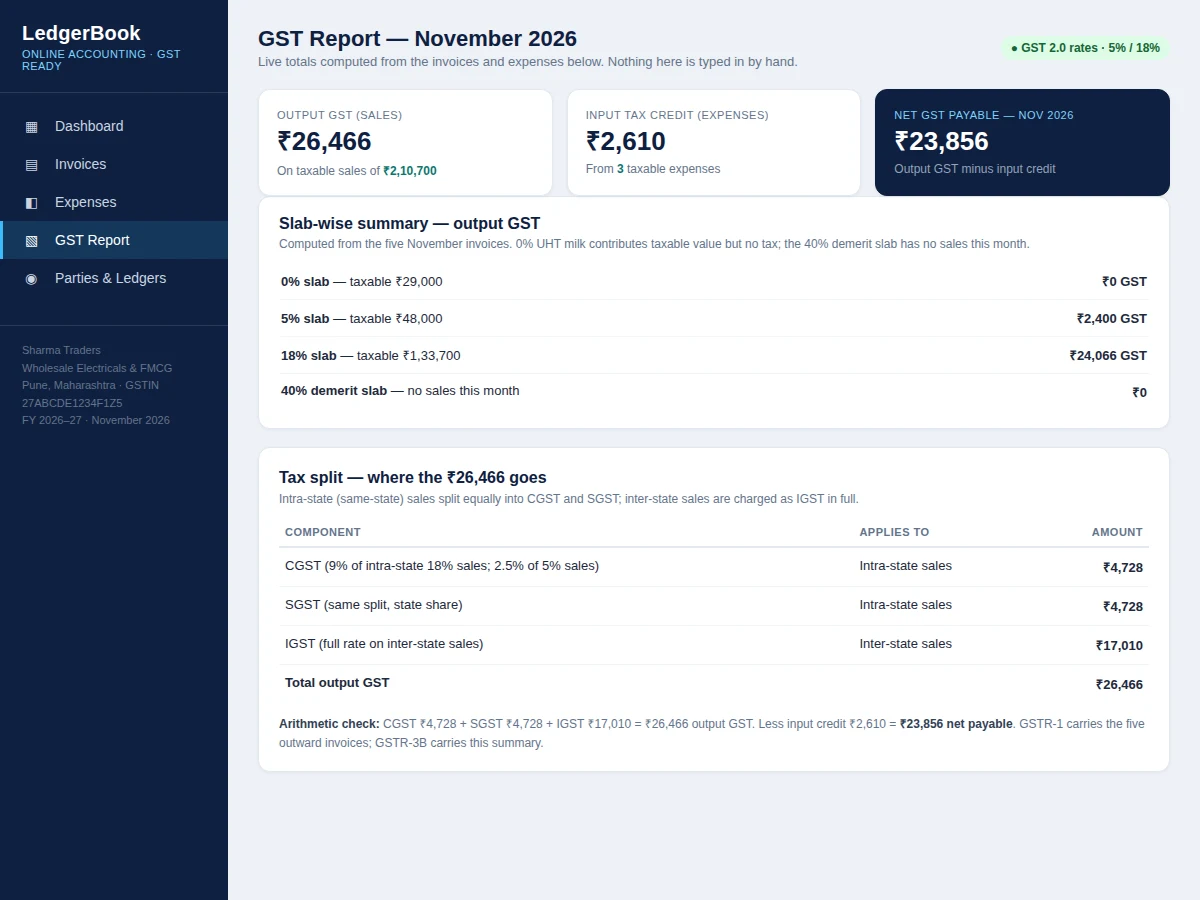
This is a full online accounting system, not an invoice-printing tool: it keeps party ledgers with running balances, records expenses with input tax credit, tracks receipts against invoices, and produces a slab-wise GST report for filing. A desktop invoice generator prints one bill at a time and remembers nothing; this system remembers every transaction and reconciles them. Measured from the working demo's own November 2026 dataset, five invoices totalling ₹2,10,700 of taxable value produce ₹26,466 of output GST — CGST ₹4,728 + SGST ₹4,728 + IGST ₹17,010 — and after ₹2,610 of input credit from three taxable expenses, net GST payable is ₹23,856. Every figure is computed live by the demo from its own line items, and the arithmetic is shown on the GST report screen.
Sale with GST slab
Follow the working sequence
How it works
The system is one connected accounting loop, not four separate tools. A user logs in with a role, and every transaction enters the same MySQL database: an invoice records a sale, an expense records a purchase, a receipt records a payment. The moment an invoice is saved, its line items are priced, taxed slab by slab, and split into CGST and SGST for a same-state customer or charged as IGST for an out-of-state customer; the party ledger gains the billed amount and the dashboard totals move. Expenses work in reverse: a taxable expense adds its GST to the input tax credit pool; an exempt expense adds none. At month end the GST report groups output tax by slab and component, subtracts the credit pool, and presents the net payable with the arithmetic visible — the figures needed for GSTR-1 and GSTR-3B. Because reports read live data, correcting one invoice corrects the ledger, the dashboard and the tax report.
- The admin creates the business profile, GSTIN, GST rate master (0%, 5%, 18% and 40% slabs) and user accounts with admin, accountant or viewer roles.
- Customers and suppliers are added as parties; each party gets a ledger that starts at zero and updates with every transaction.
- An invoice is created from line items — item, quantity, rate and GST slab — and the system computes taxable value, CGST/SGST or IGST, and the invoice total, then generates a PDF invoice.
- Receipts are recorded against invoices, including part payments; the invoice status moves from unpaid to partially paid to paid and the party balance falls.
- Expenses are recorded with their GST slab; taxable expenses add input tax credit to the pool, while exempt expenses such as rent add none.
- At month end the GST report groups output GST by slab and by CGST, SGST and IGST, subtracts input tax credit, and shows net GST payable with the full arithmetic for GSTR-1 and GSTR-3B preparation.
Tech stack:
- PHP 8.4
- MySQL 8.0
- HTML5 · CSS3 · JavaScript
- Apache 2.4 web server
- Dompdf invoice PDFs
- PHPMailer email invoices
- Chart.js dashboard charts
- Git version control
| Parameter | Value |
|---|---|
| User roles | 3 roles: admin · accountant · viewer (implemented design) |
| GST rate master | 4 active slabs: 0% · 5% · 18% · 40% (GST 2.0, in force since 22 September 2025) |
| Database tables | 12 tables: invoices · items · expenses · parties · ledgers · tax rates (implemented design) |
| Invoices per month | Approximately 500 invoices per month on shared hosting (expected) |
| Invoice PDF generation | Approximately 2 seconds per invoice (design target) |
| Concurrent users | Approximately 10 concurrent users on entry-level shared hosting (expected) |
| Monthly GST report | Approximately 3 seconds for 500 invoices (design target) |
| Data backup | Daily MySQL dump · approximately 5 MB per 1,000 invoices (expected) |
| Hosting requirement | PHP 8.4 · MySQL 8.0 · approximately 100 MB disk (expected) |
Project features
The system is built around four capabilities that work from the same database: GST invoicing with automatic CGST, SGST and IGST splitting, expense recording with input tax credit, party ledgers with running balances, and a slab-wise GST report that reconciles output tax against input credit. Around those four sit a live dashboard, receipt tracking against part payments, and PDF invoices a business can email to customers. Each capability is implemented in the delivered build and demonstrated in the working demo: the dashboard totals, the invoice tax split and the GST report are all computed from the same demo data, so any figure shown can be traced back to a line item. Optional additions such as a payment gateway, e-invoicing and multi-branch support are kept separate from the base build and listed under customisation.
- [GST invoicing with automatic tax split] Create an invoice from line items with quantities, rates and GST slabs; the system computes taxable value and splits tax into CGST and SGST for intra-state sales or charges IGST in full for inter-state sales, then generates a printable GST invoice PDF.
- [Expense tracking with input tax credit] Record business expenses with their GST slab; taxable expenses add their tax to the input credit pool shown on the GST report, while exempt expenses such as rent correctly contribute no credit.
- [Party ledgers with running balances] Every customer and supplier gets a ledger that updates automatically when an invoice is raised or a receipt is recorded, so the outstanding balance is always the running total of real transactions.
- [Slab-wise GST report] A monthly report breaks output GST down by slab (0%, 5%, 18%, 40%) and by CGST, SGST and IGST, then subtracts input credit to give the net GST payable, with the full arithmetic shown for GSTR-1 and GSTR-3B preparation.
- [Live business dashboard] Total sales, output GST, amount received, outstanding dues and net GST payable are computed from the database on every page load, with receipt and outstanding shares shown against billed value.
- [Receipt and payment tracking] Record full, partial and advance payments against invoices; the dashboard separates received from outstanding amounts and each party ledger reflects payments immediately.
- [Role-based access] Three roles — admin, accountant and viewer — control who can create invoices, record expenses and view reports, so a small business can give its accountant access without handing over full control.
What is included
- Complete PHP and MySQL source code with database schema and seed data
- Working demo with dashboard, invoices, expenses, GST report and party ledgers
- GST invoice PDF template and slab-wise GST report module
- Role-based login for admin, accountant and viewer
- Project report PDF (background, methodology, database design, GST computation, results)
- PPT presentation for final review
- Viva Q&A preparation document (GST structure, CGST/SGST/IGST, input tax credit, database design)
Limitations & prerequisites
- GST rates are configurable but the owner must keep them current; the system does not fetch rate notifications automatically.
- The GST report prepares figures for filing but is not a CA-certified filing tool; returns must be reviewed by the business owner or accountant before filing.
- No payment gateway in the base build; UPI and bank payments are recorded manually as receipts.
- Single-business build; multi-branch consolidation is available as optional customisation.
- Works on shared hosting; heavy concurrent load needs a VPS (expected limit approximately 10 concurrent users).
- E-invoicing with IRN generation through the government portal is not included in the base build.
Related built-to-order projects on this site: AI Expense Tracker with Gemini (https://projectech.in/projects/ai-expense-tracker-gemini-4-carbon/), Bank Management System (https://projectech.in/projects/bank-management-system-desktop-app-accounts-transactions/), Apartment Visitor Management with QR Passes (https://projectech.in/projects/apartment-visitor-management-qr-passes-php-mysql/), Desktop Expense Tracker (https://projectech.in/projects/desktop-expense-tracker-python-tkinter-sqlite/)
Frequently Asked Questions
Is this project suitable for a final-year project?
Yes — for Computer Science, IT and Web Development programs, because it demonstrates full-stack web development, relational database design, role-based access and real tax computation in one system. The GST logic gives the viva a concrete domain to discuss: slab selection, intra-state versus inter-state splits, input tax credit and reconciliation between ledgers and reports.
How is this different from a GST invoice generator?
An invoice generator prints one bill at a time and remembers nothing; this project is a complete online accounting system where invoices, expenses, receipts and ledgers share one database. A sale recorded once updates the invoice, the party balance, the dashboard and the GST report together, and the GST report reconciles output tax against input credit — none of which a single-invoice tool does.
Which GST rates does the system use?
The system uses the GST 2.0 rates in force since 22 September 2025: a 5% merit rate and an 18% standard rate, 0% for notified essentials, and a 40% demerit rate for a small list of luxury and sin goods. Rates live in a configurable rate master, so the older 12% and 28% slabs are not hard-coded and the owner can update rates when notifications change.
Does it handle input tax credit?
Yes — input tax credit is a core part of the system. Every taxable expense recorded adds its GST to the input credit pool, and the monthly GST report subtracts that pool from the month's output GST to show the net tax payable. In the working demo, three taxable expenses contribute ₹2,610 of credit against ₹26,466 of output GST, giving ₹23,856 net payable, with the arithmetic shown on screen.
Can it be hosted online and used by multiple people?
Yes. It is a PHP and MySQL web application that runs on ordinary shared hosting with PHP 8.4 and MySQL 8.0, and it supports three roles — admin, accountant and viewer — so the owner, the accountant and a viewer can use it at the same time. Approximately 10 concurrent users are expected on entry-level shared hosting.
What will I receive with the project?
The complete PHP and MySQL source code with database schema and seed data, the working demo, GST invoice PDF templates, the slab-wise GST report module, role-based login, the project report, a PPT for the final review, and a viva Q&A document. Everything is prepared fresh as a built-to-order project, and customisation such as a payment gateway or e-invoicing can be added on request.
Components & software requirements
- PHP 8.4
- MySQL 8.0
- HTML5 · CSS3 · JavaScript
- Apache 2.4 web server
- Dompdf invoice PDFs
- PHPMailer email invoices
- Chart.js dashboard charts
- Git version control
Delivery information
Built-to-order project. Delivery timeline is shared after order confirmation based on current queue.
Support terms
Complete documentation, setup guide, and viva preparation included. Support for setup and explanation provided.
Download free synopsis (PDF)
Enter your name and WhatsApp number — the synopsis PDF downloads immediately. We may send occasional project updates on WhatsApp; no spam.