
More project photos (2)
The problem
Small NGOs still collect most donations through bank transfers, cash and scattered spreadsheets, so nobody can see in one place how much a campaign has raised, who gave, or whether the money reached the field. An NGO donation web portal with campaigns and donor tracking replaces that scattered process with a single public website where each campaign shows its goal, the amount raised so far and its donor list. Without such a portal, donors hesitate because they cannot verify where their money goes, and staff spend hours reconciling messages, receipts and bank statements by hand. Campaigns also lose momentum when progress is invisible: a donor who cannot see a goal filling up has little reason to give today. The portal solves this by publishing every campaign with a live progress bar, recording every donation with a receipt ID, and letting the NGO post field updates. This project demonstrates that full loop as a working web application.
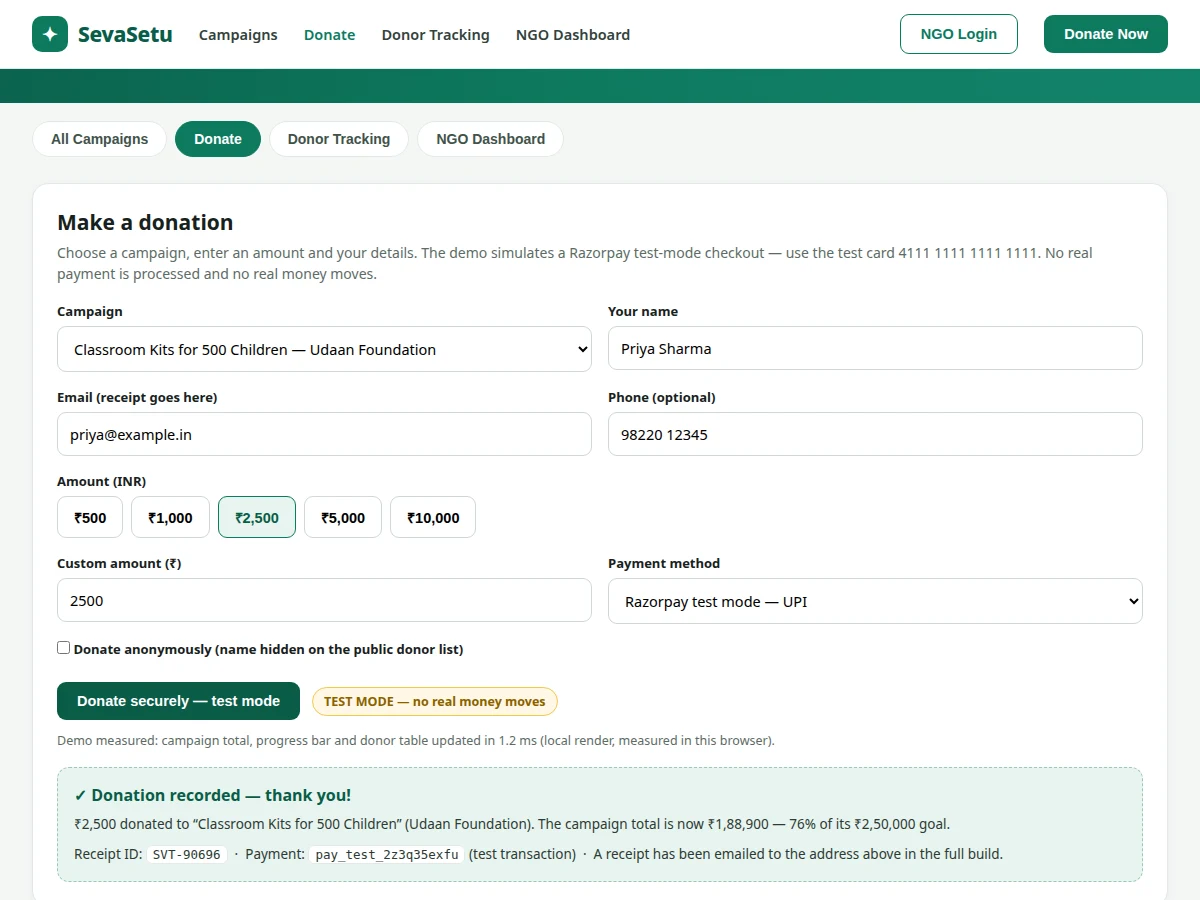
Picks a campaign and enters an amount and contact details.
Follow the working sequence
How it works
A donor opens the NGO donation web portal, picks a campaign such as classroom kits, and enters an amount, name and email on the donation form. The portal sends the amount to the Razorpay checkout, which in this project runs in test mode, so the payment is simulated with test credentials and no real money moves. Once the test payment succeeds, the portal records the donation in the MySQL database with a receipt ID, donor details, campaign, amount and payment status, and the campaign total increases immediately. The donor sees a confirmation screen and a receipt ID, and the campaign progress bar moves without a page reload. NGO staff then log in to the dashboard, see the new donation, export records for accounting, and post a field update telling donors what their money achieved. Every step is traceable: one donation produces one database row, one receipt and one visible change in the campaign total.
- The donor browses the campaign list, where each card shows the goal, the amount raised and a progress bar computed from the donation records.
- The donor opens the donation form, selects a campaign, enters an amount and contact details, and optionally ticks the anonymous-donation box.
- The portal hands the amount to the Razorpay checkout in test mode; the test payment is simulated with test credentials and no real money moves.
- On a successful test payment, the portal inserts one row in the donations table with the receipt ID, donor, campaign, amount and payment status, using a PDO prepared statement.
- The campaign total and progress bar update immediately on the page, and the donor sees a confirmation with the receipt ID; in the full build a receipt email is also sent.
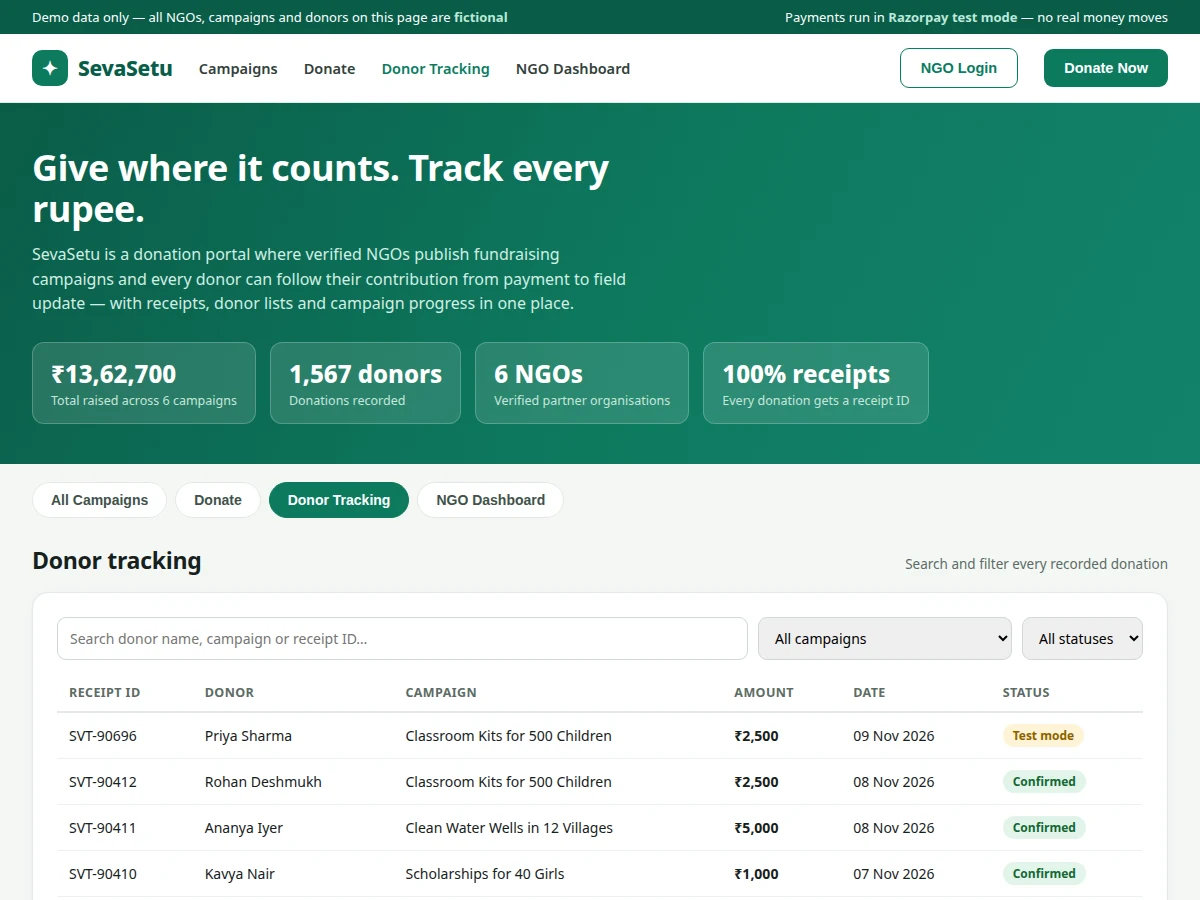
- NGO staff log in to the dashboard, see the new donation in the donor table, and can export the list or post a field update for that campaign.
Tech stack:
- PHP 8, MySQL 8
- HTML5 · CSS3 · JavaScript
- Razorpay Checkout (test mode)
- PDO prepared statements
- Apache · XAMPP (local development)
- phpMyAdmin (database management)
- Session-based NGO login
- Git version control
| Parameter | Value |
|---|---|
| Platform | Web application (PHP 8, MySQL 8, Apache) |
| Demo campaigns | 6 fictional campaigns (demo data) |
| Demo donor records | 12 recent donations (demo data) |
| Donation update time | Approximately 1.2 ms (measured, local demo render, single test donation) |
| Minimum donation | ₹10 (design value, configurable) |
| Quick-pick amounts | ₹500, ₹1,000, ₹2,500, ₹5,000, ₹10,000 (design values) |
| Receipt ID format | SVT- followed by 5 digits (design value) |
| Database tables | 5 tables (design): users, ngos, campaigns, donations, updates |
| Payment mode | Razorpay test mode only (no real money moves) |
| Hosting requirement | PHP 8 and MySQL 8 hosting with SSL (expected) |
Project features
The NGO donation web portal is built around four capabilities that work together: campaign publishing with live progress bars, a donation flow with test-mode payment and instant receipts, a searchable donor tracking table, and an NGO dashboard for managing campaigns and posting field updates. Campaign publishing lets an NGO create a fundraiser with a goal, a description and a deadline, and the portal computes the progress bar from the donation records so the figure shown is always the figure stored. The donation flow accepts an amount, donor details and an optional anonymous flag, then records the payment and issues a receipt ID that the donor can quote later. Donor tracking keeps every donation searchable by name, campaign or receipt ID, with a status for each record. The NGO dashboard adds the management side: recent donations, totals per campaign and a place to publish field updates that donors can read.
- [Campaign publishing with live progress] An NGO creates a campaign with a goal, description and deadline; the portal computes the raised amount and progress bar from the stored donation records, so the public figure always matches the database.
- [Donation form with test-mode checkout] Donors pick a campaign and an amount, enter name and email, and pay through a simulated Razorpay checkout in test mode; the demo uses the published test card and no real money moves.
- [Instant receipts with unique receipt IDs] Every recorded donation generates a receipt ID in the SVT- plus 5-digit format, shown on screen immediately and stored with the donation for later lookup.
- [Donor tracking table with search and filters] All donations appear in one table searchable by donor name, campaign or receipt ID, with filters for campaign and payment status, so any donation can be traced in seconds.
- [NGO dashboard with campaign totals] After login, NGO staff see total raised, donor counts and recent donations per campaign, plus a CSV export of the donor list for accounting.
- [Anonymous donation option] A donor can tick one box to hide their name from the public donor list while the donation and receipt still record normally in the database.
- [Field updates for donors] The NGO can post a short update on a campaign — for example kits dispatched or a camp completed — so donors see what their money achieved after giving.
What is included
- Complete portal source code (PHP, MySQL schema, HTML/CSS/JavaScript)
- Working single-file demo of the portal with campaigns, donation form and donor tracking
- MySQL database with tables for users, NGOs, campaigns, donations and field updates
- Razorpay test-mode checkout integration with test credentials documented
- Project report PDF (background, problem, methodology, architecture, results)
- PPT presentation for final review
- Viva Q&A preparation document (PHP, MySQL, PDO, payment-gateway flow, security)
- To order this project, message Projectech on WhatsApp for a quotation covering the scope, price and delivery timeline for your build.
Limitations & prerequisites
- Payments run in Razorpay test mode only — no real money is processed, and accepting live payments needs a verified Razorpay merchant account and live keys, which the student arranges separately.
- All NGOs, campaigns, donors and amounts in the demo are fictional; the portal ships with demo data and no real organisation is affiliated.
- The demo stores data in the browser for the live demonstration; the full build uses the MySQL database on the server.
- Donor emails are used only for receipts; the portal has no bulk-mail or newsletter system.
- The NGO dashboard is a single-role admin view; multi-role permissions and volunteer management are not included.
- Receipt emails and SMS require a mail/SMS provider account and credentials, which are not part of the base build.
- Currency is Indian Rupees (INR) only in the base build; multi-currency support would need extra work.
Frequently Asked Questions
Is this project suitable for a final-year project?
Yes, for Computer Science, IT and Web Development students in B.E./B.Tech, BCA and MCA programmes. It demonstrates a complete web application: database design with 5 tables, form handling, session-based login, payment-gateway integration in test mode, and a dashboard with search and reporting — all concepts examiners commonly ask about in a web project viva.
Does the portal accept real payments?
No. The payment gateway is integrated in Razorpay test mode only, using test keys and the published test card, so every transaction is simulated and no real money moves — the same test-mode flow Razorpay documents for developers, where test keys begin rzp_test_ and the checkout shows a simulated bank page. This is deliberate: it lets the student demonstrate the full checkout flow safely in college. Going live would need a verified Razorpay merchant account, live keys and KYC, which is outside the base build.
Can the portal be hosted online?
Yes. The portal is a standard PHP and MySQL application that runs on any shared hosting plan supporting PHP 8 and MySQL 8 with SSL, so the same package a student runs locally on XAMPP deploys unchanged to a live host, with the database schema and setup steps included. Deploy it after testing the demo locally, and enable SSL so donor details and receipt IDs travel over an encrypted connection.
Is there an admin panel for the NGO?
Yes. The NGO dashboard is the admin side: after login, staff see totals raised, donor counts and recent donations per campaign, can export the donor list as CSV, and can post field updates that donors read on the campaign page at any time.
Can more features be added?
Yes, realistic additions include recurring monthly donations, more NGO accounts with separate dashboards, a volunteer module, and receipt emails through a mail provider. Each addition is scoped separately in the quotation, since it changes the database, the dashboard and the reporting.
Components & software requirements
- PHP 8, MySQL 8
- HTML5 · CSS3 · JavaScript
- Razorpay Checkout (test mode)
- PDO prepared statements
- Apache · XAMPP (local development)
- phpMyAdmin (database management)
- Session-based NGO login
- Git version control
Delivery information
Built-to-order project. Delivery timeline is shared after order confirmation based on current queue.
Support terms
Complete documentation, setup guide, and viva preparation included. Support for setup and explanation provided.
Download free synopsis (PDF)
Enter your name and WhatsApp number — the synopsis PDF downloads immediately. We may send occasional project updates on WhatsApp; no spam.