
More project photos (2)
The problem
A placement cell that runs mock interviews usually coordinates them through a shared spreadsheet, a messaging group, or both. Interviewers post their free hours as messages, students reply in the thread, and the coordinator copies names into the sheet by hand. Messages get buried, two students claim the same hour, and nobody can tell at a glance which slots are still open. After the session the feedback, if it exists at all, sits in a private chat or a notebook, so the student never sees a structured record of what to practise, and the cell has no history of who was interviewed, by whom, and with what outcome. The work is coordination, not interviewing, and it grows messier with every additional panel and batch.
This is a built-to-order software project: the web app, database setup, report, abstract and presentation slides are built fresh for each order.
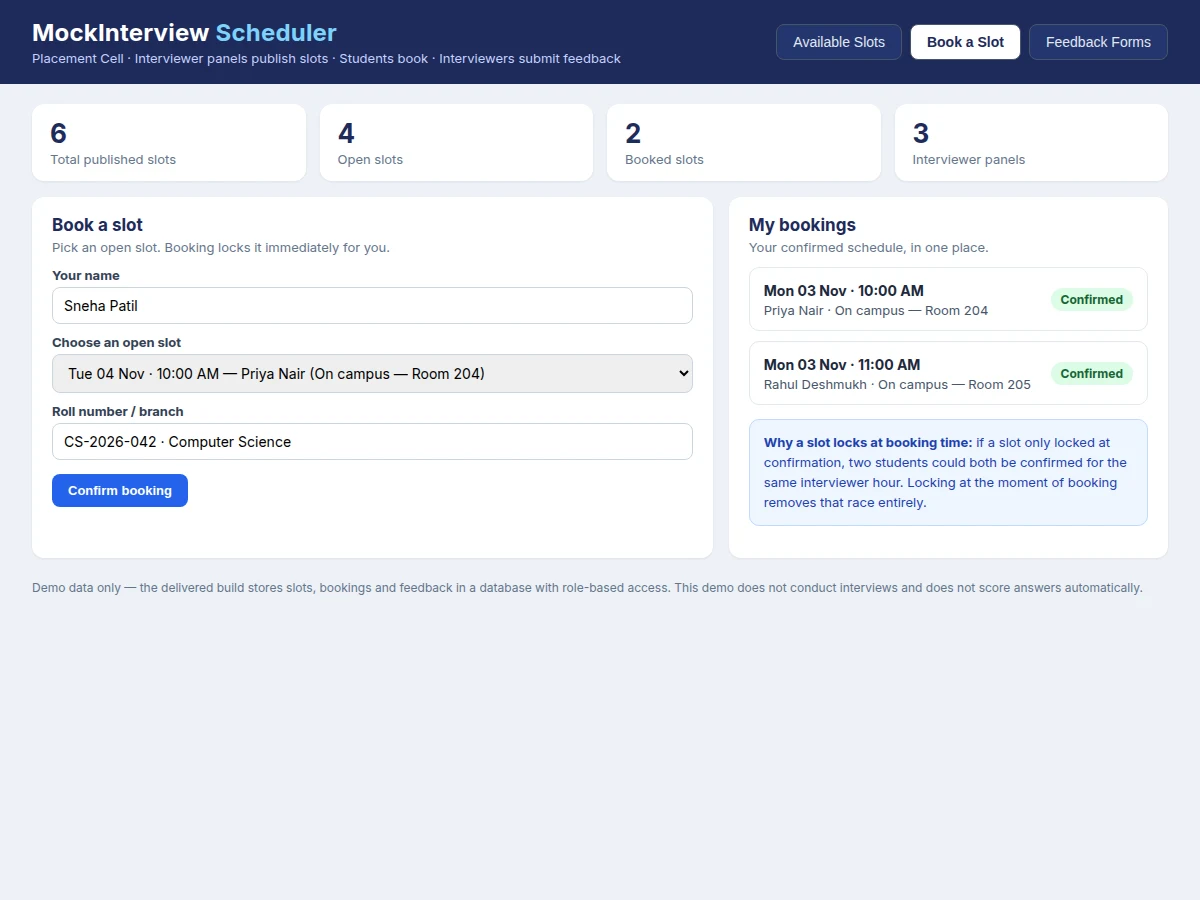
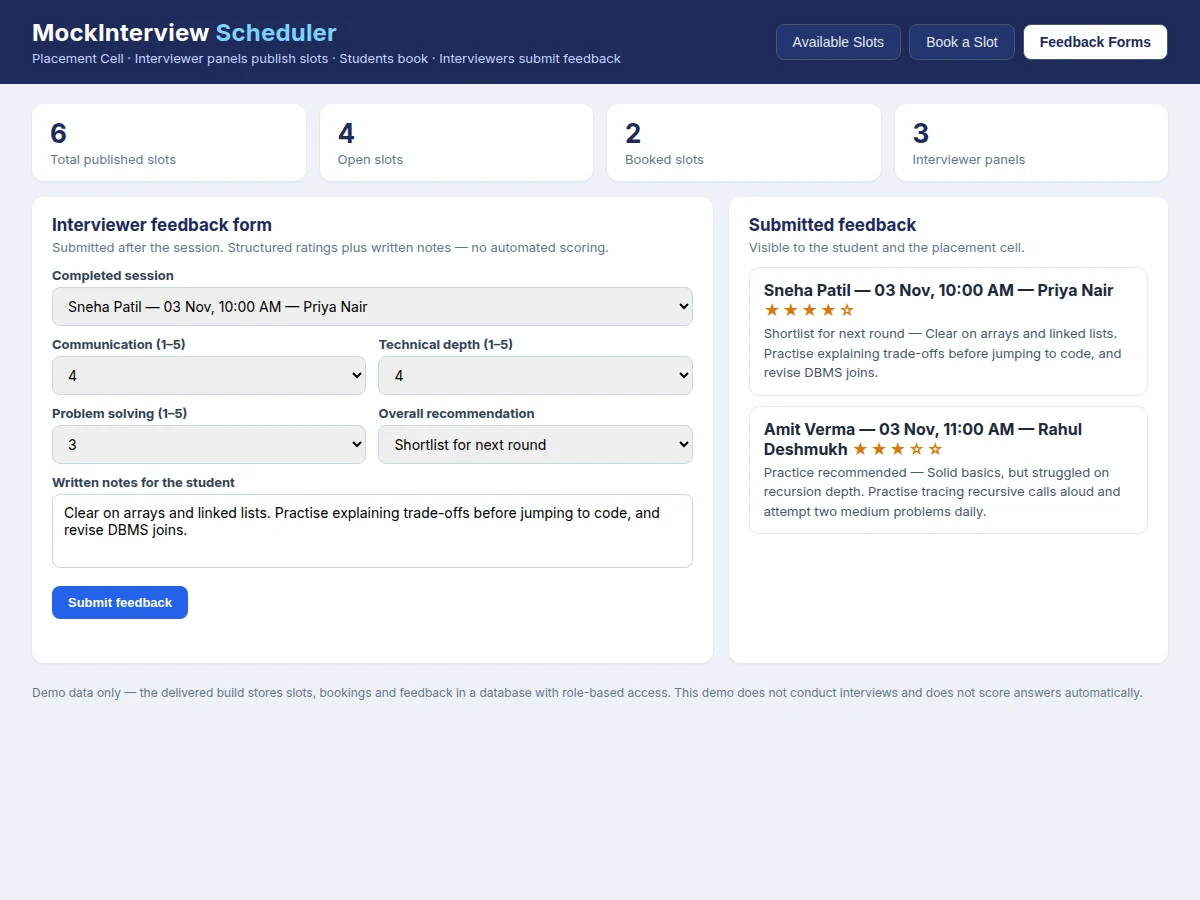
The Online Mock Interview Scheduler Web App with Feedback Forms and Slot Booking replaces that scattered coordination with one shared schedule. Interviewer panels publish their available slots with date, time and mode, students browse only the slots that are still open and book one in a single step, and the booking locks the slot immediately so no second student can take it. After the session, the interviewer opens the structured feedback form for that booking and records ratings for communication, technical depth and problem solving, a recommendation, and written notes for the student. Students see their own bookings and feedback, interviewers see their own panels and sessions, and the placement cell sees the whole schedule. The app organises human mock interviews; it does not interview anyone itself, generate questions, or score answers.
| Scheduling approach | How booking works | What feedback looks like | What it cannot do |
|---|---|---|---|
| Online mock interview scheduler (this build) | Interviewers publish slots; students book an open slot and it locks immediately | Structured form per session: ratings, recommendation and written notes, visible to student and cell | Conduct interviews, generate questions, or score answers automatically |
| Email and spreadsheet scheduling | Interviewers email free hours; coordinator copies names into a sheet by hand | Feedback, if any, sits in private messages or notebooks with no shared record | Prevent two students claiming the same hour, or show live availability |
| AI mock-interview platform | The platform itself interviews the student with automated questions and voice answers | Automated scores produced by the platform, not by a human interviewer | Reproduce a human panel interview, a placement-cell schedule, or interviewer judgement |
An interviewer panel publishes an available slot with date, time and mode.
How it works
The Online Mock Interview Scheduler Web App with Feedback Forms and Slot Booking runs as one loop from published slot to filed feedback. An interviewer panel publishes its available hours, and those slots appear on the shared schedule as open. A student browses the open slots, picks one, and books it; the booking action locks that slot immediately and records the student against it, so the slot disappears from the open list for everyone else. At the session time the interview takes place in person or on the panel's own meeting link, outside this app, exactly as a normal mock interview would. Afterwards the interviewer opens the feedback form for that booking, fills in the ratings, recommendation and notes, and submits it. The student then reads the feedback on their own schedule view, and the placement cell keeps the completed booking as part of the interview history.
- The placement cell creates interviewer panels with names and focus areas, such as HR and aptitude, data structures, or DBMS and projects.
- Interviewers publish slots with a date, time and mode (on campus with a room, or an online meeting link shared after booking).
- Students browse the schedule and see only slots that are still open; booked slots show as booked rather than bookable.
- A student books an open slot in one step; the booking locks the slot immediately and records the student against it.
- If a second student attempts the same slot, the booking fails with a message that the slot is taken, and the student picks another open slot.
- The interview happens outside the app, in person or on the panel's meeting link, at the booked time.
- After the session, the interviewer submits the structured feedback form for that booking: ratings, recommendation and written notes.
- The student reads the feedback on their own schedule view, and the placement cell retains the completed booking in the interview history.
Tech stack:
- HTML5 · CSS3 · JavaScript (ES6) frontend
- Node.js · Express REST API
- MySQL relational database
- REST endpoints for slots · bookings · feedback
- Role-based access for cell · interviewer · student
- Responsive layout · desktop and mobile browsers
- Browser local storage · demo state only
- Git version control
| Parameter | Value |
|---|---|
| Application type | Web app · placement-cell scheduling (design target) |
| User roles | 3 roles: placement cell · interviewer · student (design target) |
| Slots per panel | Configurable per panel · no fixed limit in the base build (design target) |
| Slot duration | 30 minutes per slot (design target) · configurable by the cell |
| Booking lock | At booking time · immediate (design target) |
| Feedback fields | 3 ratings (1–5 scale) · 1 recommendation · written notes (design target) |
| Database | MySQL · tables for users · panels · slots · bookings · feedback (design target) |
| Demo storage | Browser local storage · key-value string storage per origin (approximately 5 MB typical limit) · demo only |
| Backend framework | Express · minimal and flexible Node.js web framework with routing (framework documentation) |
| Hosting requirement | Node.js server with MySQL database · internet connection for shared access (design target) |
| Interview conduct | Not included · interviews happen outside the app (design target) |
Project features
The Online Mock Interview Scheduler Web App with Feedback Forms and Slot Booking is built around four capabilities that carry the whole build. Interviewer panels publish their own availability instead of sending free hours to a coordinator, so the schedule always reflects what panels actually offered. Students book from the live list of open slots, and the booking locks the slot at that moment, which is what makes double-booking impossible rather than merely unlikely. After each session the interviewer submits a structured feedback form tied to that exact booking, so the student receives ratings, a recommendation and written notes in one place. Finally, a shared schedule view shows every booking to the placement cell, while students and interviewers see only their own sessions, keeping the record complete without exposing everyone's data to everyone.
- [Slot publishing by interviewer panels] Interviewers or the placement cell create slots with date, time, mode and panel, and published slots appear immediately in the student view. Implemented in the base build.
- [Conflict-free slot booking] Booking a slot locks it at booking time, so a second student attempting the same slot is told it is taken and must choose another; the lock is the mechanism, not a warning. Implemented in the base build.
- [Structured feedback forms] After a session, the interviewer records ratings for communication, technical depth and problem solving, an overall recommendation, and written notes, all tied to that booking. Implemented in the base build.
- [Role-based schedule views] Students see their own bookings and feedback, interviewers see their panels and sessions, and the placement cell sees the full schedule with booking status. Implemented in the base build.
- [Booking and feedback history] Every booking keeps its slot, student, interviewer and feedback together, so the cell can review who was interviewed, by whom, and with what recommendation. Implemented in the base build.
- [Builder note: lock at booking time, not at confirmation] During the demo build, the first version only marked a slot as taken after a confirmation step, and two test bookings for the same hour both passed validation before either was saved. Moving the lock to the booking action itself closed that race: the second attempt now fails against the already-locked slot. Implemented in the base build.
- [Session notes for the next round] Written interviewer notes travel with the booking, so a student preparing for the next round can read exactly what to practise instead of relying on memory. Implemented in the base build.
Optional and future scope (not in the base build): AI question generation, video calling inside the app, calendar synchronisation with external calendars, email or SMS reminders, and automated scoring of any kind. These can be developed on request and are not claimed as included.
What is included
- Complete web app source code with slot publishing, booking and feedback forms
- MySQL database schema for users, panels, slots, bookings and feedback
- Setup instructions for running the app with Node.js and MySQL
- Project report covering background, system design, database design and limitations
- Project abstract PDF with 10 labelled sections matching this page
- Presentation slides for final review
- Viva Q&A preparation document covering scheduling conflicts, database design and role-based access
Limitations & prerequisites
- The app schedules and records feedback; it does not conduct interviews, generate questions, or score answers, and no automated scoring is claimed anywhere.
- Interviews themselves happen outside the app, so the app cannot verify attendance; a no-show must be marked by the interviewer or the cell.
- Email or SMS reminders are not in the base build, so students and interviewers must check the schedule themselves.
- The demo stores its state in browser local storage, which is per-browser and per-origin; the delivered build uses MySQL instead, and demo data does not transfer between devices.
- Slot times are only as accurate as the panels that publish them; a panel that forgets to withdraw a slot can still be booked for an hour it no longer has free.
- The base build assumes one student per slot; group or panel interviews with several students per slot need a modification.
- Hosting, domain and database server costs are not part of the software itself unless specified.
Frequently Asked Questions
Is this project suitable for a final-year project?
Yes, it fits Computer Science and Information Technology programmes, because it combines a real multi-role web application with a database design problem, a concurrency problem in slot locking, and role-based access control, all of which give a reviewer concrete design decisions to examine. The build also demonstrates cleanly: a published slot, a booking that locks it, and a feedback form filed against that booking.
Does this app conduct the mock interview itself?
No, it does not, because the app is a scheduler and a feedback record, not an interviewer: the interview itself happens in person or on the panel's own meeting link, exactly as a normal mock interview would, while the app only publishes the slot, locks the booking, and stores the human interviewer's feedback. Any AI interviewing, question generation or automated scoring would be a separate future addition, not part of this build.
How does the app prevent two students booking the same slot?
It locks the slot at the moment of booking, not at a later confirmation step, because a confirmation-step lock leaves a window in which two bookings can both pass validation before either is saved, which the demo build showed directly. Once a slot is locked it disappears from the open list, and a second attempt fails with a message that the slot is taken, so the student picks another open slot.
What does the feedback form contain?
It contains three ratings on a 1–5 scale for communication, technical depth and problem solving, plus an overall recommendation and written notes from the interviewer, all tied to one specific booking rather than to a student in general. That link matters, because a student with several mock interviews can compare feedback across sessions and see which weaknesses repeat and which improve.
Can the placement cell, interviewers and students all use the same app?
Yes, they use the same app with different views, because role-based access shows students only their own bookings and feedback, interviewers only their panels and sessions, and the placement cell the full schedule with booking status. This keeps the record complete for coordination while avoiding exposing one student's feedback to other students.
Does it need video calling or calendar sync to work?
No, it does not, because the base build deliberately excludes video calling and external calendar synchronisation: the interview happens on the panel's own meeting link or in person, and the schedule inside the app is the shared record. Both features are listed as future scope and can be developed on request, but neither is required for slot publishing, booking or feedback.
Components & software requirements
- HTML5 · CSS3 · JavaScript (ES6) frontend
- Node.js · Express REST API
- MySQL relational database
- REST endpoints for slots · bookings · feedback
- Role-based access for cell · interviewer · student
- Responsive layout · desktop and mobile browsers
- Browser local storage · demo state only
- Git version control
Delivery information
Built-to-order project. Delivery timeline is shared after order confirmation based on current queue.
Support terms
Complete documentation, setup guide, and viva preparation included. Support for setup and explanation provided.
Download free synopsis (PDF)
Enter your name and WhatsApp number — the synopsis PDF downloads immediately. We may send occasional project updates on WhatsApp; no spam.