
More project photos (2)
The problem
The Digital Yearbook Creator is a web application that moves the entire college yearbook workflow — roster management, photo page layout, quote collection, moderation and print-ready PDF export — into a single browser-based studio. It serves the yearbook committees and faculty advisors who assemble yearbooks in generic design tools, chase quotes across chat threads, and hand the print shop a file nobody has formally approved. The pipeline is structured: the class list imports from CSV in seconds, students are dragged onto themed photo pages, quotes arrive through one shareable link, and every quote and page clears a moderator approval queue before reaching the book. When content is final, the committee exports a press-ready A4 PDF with photos embedded at print resolution for the printer. The studio runs entirely in the browser — a real advantage in college labs where installing desktop software on every machine is its own project.
Most college yearbooks are still produced the hard way: one volunteer owns a design file on a personal laptop, photos arrive in a dozen chat groups at random resolutions, and quotes are collected by whoever shouts loudest in the class group. When that volunteer graduates or their laptop dies, the half-finished book dies with them. Committees that survive the process usually discover the errors after printing — a misspelled name, a missing student, a quote nobody approved — because there was never a review step built into the workflow. This project treats the yearbook as what it actually is: a small content-management problem with a print deadline. The roster is data, the pages are layouts over that data, the quotes are moderated submissions, and the PDF is a deterministic export of the approved state. Built that way, a new committee can pick up next year's book without inheriting anyone's laptop.
Imports the CSV class roster and lays out the photo pages.
Follow the working sequence
How it works
End to end, the workflow runs in five stages. First, the committee imports the official class roll as a CSV file — name, roll number and department per line — and the app builds a verified roster with photos attached. Second, designers open the page designer, drag students from the tray onto photo slots, and apply one of three theme templates to restyle the page. Third, the committee shares a single quote-collection link in the class group; friends submit quotes and dedications that land in a pending queue instead of going live. Fourth, faculty moderators approve or reject each quote and each finished page, so nothing unreviewed can reach the print file. Fifth, the committee opens the export view, checks the A4 preview, and generates the press-ready PDF with photos embedded — the file that goes to the print shop.
- The committee pastes or uploads the official class list as CSV (name, roll number, department); the importer validates each row and builds the student roster with photos attached.
- In the page designer, students are dragged from the roster tray onto slots in a live A4 preview; the layout can be switched between Classic 3 × 2 and Spotlight 2 × 2 without losing placements.
- One of three theme templates (Heritage Gold, Modern Teal, Blush Rose) is applied to restyle the cover, rules, frames and typography of the page.
- The committee shares the single quote-collection link; every submitted quote or dedication lands in the pending queue with the submitter's name attached.
- Faculty moderators work through the approval queue, approving or rejecting each quote and each finished page; rejected items return with their status visible.
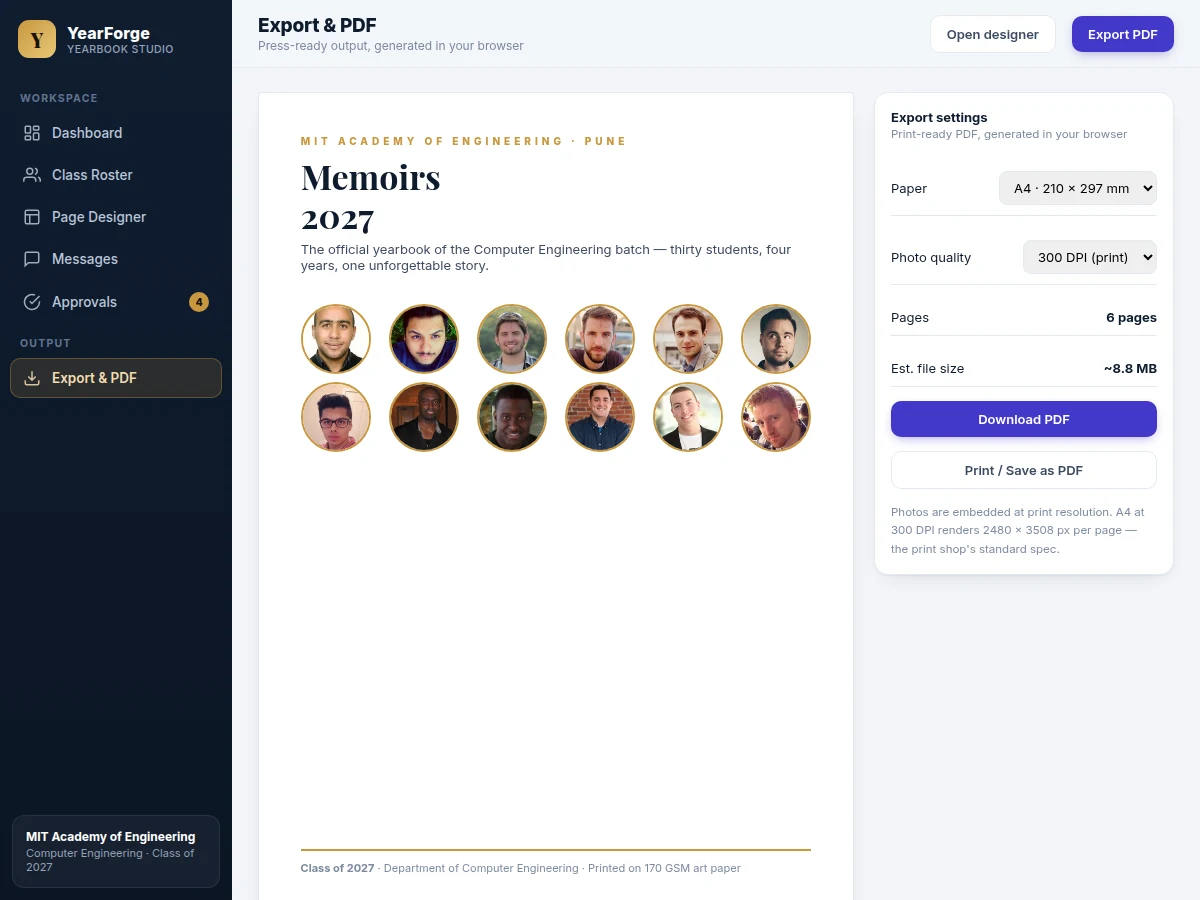
- In the export view the committee reviews the full A4 preview, picks 300 DPI for print or 150 DPI for email, and generates the final PDF with photographs embedded — ready for the print shop.
Builder note: yearbook PDFs balloon past 200 MB when full-resolution photos are placed — the demo downsamples every upload to a 1600 px longest edge before layout. A 60-photo batch at that size exports near 38 MB instead of roughly 240 MB at full 12 MP resolution (design estimate, not a measured claim).
Tech stack:
- HTML5, CSS3 and JavaScript (ES6) front end
- Node.js with Express (REST API)
- MySQL (roster, pages, quotes, approvals)
- jsPDF (client-side PDF generation)
- Multer (photo upload handling)
- JWT (role-based login: student, committee, moderator)
- Responsive CSS grid layouts
- Git
| Parameter | Value |
|---|---|
| Roster capacity | Up to 500 students (design target) |
| Photo slots per page | 6 (Classic 3 × 2) or 4 (Spotlight 2 × 2), configurable |
| Theme templates | 3 (Heritage Gold, Modern Teal, Blush Rose) |
| Upload downsampling | 1600 px longest edge, applied in-browser |
| PDF page size | A4, 210 × 297 mm |
| PDF photo quality | 300 DPI (print) or 150 DPI (email), selectable |
| Pixels per A4 page at 300 DPI | 2480 × 3508 px (print standard) |
| Quote-collection links | 1 shareable link per graduating class |
| Approval roles | 3 (student, committee member, moderator) |
| Supported browsers | Current Chrome, Edge and Firefox (expected) |
Project features
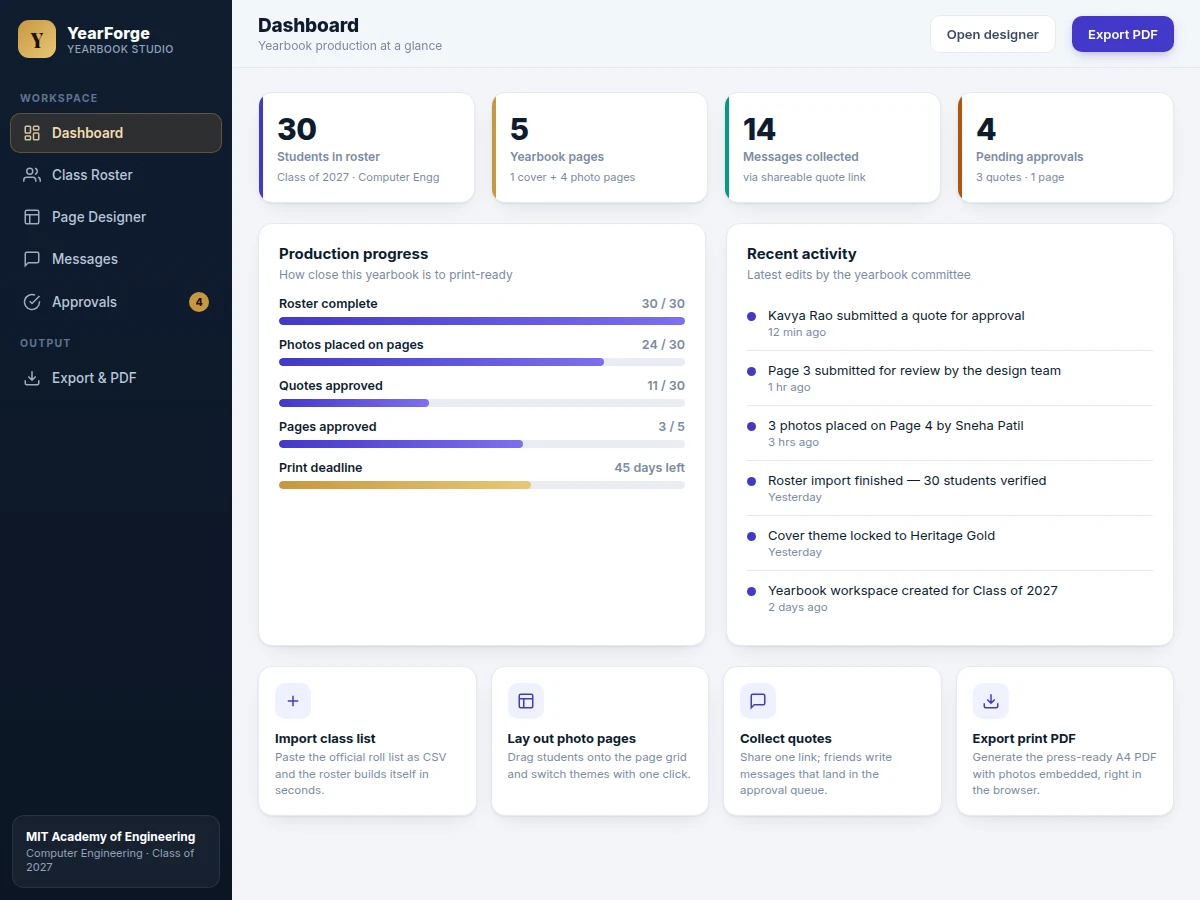
The studio ships with four capabilities that carry the whole project: a drag-and-drop page designer where student photos snap into a 3 × 2 or 2 × 2 grid; three one-click theme templates — Heritage Gold, Modern Teal and Blush Rose — that restyle every page instantly; a CSV roster importer that turns the official class list into a verified student database; and a quote-collection system built around a single shareable link, with every submission landing in a moderator approval queue. The fifth load-bearing piece is the export engine: a client-side PDF generator that assembles the cover, photo pages and quotes section into a press-ready A4 file with photographs embedded at 300 DPI. Around these sit the practical details that make the tool survivable in a real committee — automatic photo downsampling so uploads never bloat the file, role-based logins for students, committee members and moderators, and a production dashboard that shows exactly how close the book is to print-ready.
- [Drag-and-drop page designer] Students are dragged from the roster tray onto photo slots in a live A4 page preview; slots accept, highlight and reorder, and a page can be switched between the Classic 3 × 2 grid and the Spotlight 2 × 2 layout without losing placements.
- [Three one-click theme templates] Heritage Gold (serif, cream stock), Modern Teal (clean sans) and Blush Rose (warm farewell edition) restyle the cover, rules, photo frames and typography of every page instantly.
- [CSV class-roster import] The official roll list pastes in as name, roll number and department per line; the importer validates rows, reports bad lines, and assigns photos automatically.
- [Quote collection via shareable link] One link per graduating class is shared in the class group; friends submit quotes and dedications that land in a pending queue instead of publishing directly.
- [Two-stage moderator approval queue] Faculty moderators approve or reject each quote and each finished page independently, so nothing unreviewed can reach the print file; decided items stay visible in an audit list.
- [Client-side press-ready PDF export] The cover, photo pages and quotes section are assembled in the browser into an A4 PDF with photographs embedded at the selected 300 DPI (print) or 150 DPI (email) quality, plus a print/Save-as-PDF path.
- [Automatic photo downsampling] Every uploaded photo is downsampled in the browser to a 1600 px longest edge before it enters the layout, keeping the working file and the exported PDF lean for the print shop.
Configurable at order time: the number of photo slots per page, additional theme templates beyond the three included, and the approval roles. Listed as future scope in the report (not in the build): online payment collection for printed copies and a mobile app for quote submission.
What is included
- Complete yearbook studio web application (front end, REST API and database schema)
- CSV roster importer with row validation and error reporting
- Drag-and-drop page designer with 3 theme templates and 2 page layouts
- Quote-collection module with one shareable link per graduating class
- Two-stage approval workflow for quotes and finished pages, with a decision audit list
- Client-side PDF export module (cover, photo pages, quotes section) plus print stylesheet
- Deployment guide for shared or college hosting
- Project report PDF (background, requirements, system architecture, methodology, testing)
- PPT presentation for final review
- Viva Q&A preparation document
Limitations & prerequisites
- The shipped demo database holds a 30-student sample class; the 500-student capacity is a design target supported by pagination and lazy loading, not a load-tested claim.
- PDF export runs entirely in the browser, so a 500-photo book at 300 DPI can take several minutes on an average lab machine with at least 4 GB of free RAM (expected).
- Photo downsampling to a 1600 px longest edge is fixed in the demo build; print shops that demand full-resolution originals need the configurable option.
- The quote-collection link is protected by obscurity plus mandatory moderator approval; it is not a login-gated form in the base build.
- There is no payment or print-order integration — the handoff to the print shop is the PDF file plus a print spec sheet.
- Spelling and photo correctness stay the committee's job; the app ships no spell-checker and no face-verification.
Frequently Asked Questions
How does the drag-and-drop page designer work?
You drag students from the roster tray onto photo slots in a live A4 preview — each slot highlights on hover, the photo snaps in with name, roll number and approved quote, and students can be moved between slots or back to the tray at any time. Switching between the Classic 3 × 2 grid and the Spotlight 2 × 2 layout, or applying a theme template, never loses a placement. The page title edits inline, and a finished page is submitted to the moderator queue from the side panel.
How are quotes collected, and what stops misuse?
The committee shares one link per graduating class in the class group, and anyone with the link can submit a quote or dedication with their name attached. Nothing publishes directly — every submission waits in a pending queue until a faculty moderator approves it, so no unreviewed text can reach a page or the PDF. Rejected submissions stay visible in the decision list with their status, which keeps the whole moderation trail auditable if a dispute comes up later.
What does the PDF export actually produce?
The export produces a multi-page A4 PDF (210 × 297 mm) assembled entirely in the browser: a cover page, one page per photo layout, and a quotes section, with photographs embedded at 300 DPI for print or 150 DPI for email. At 300 DPI each page renders 2480 × 3508 px — the print shop's standard spec. A print stylesheet is included as a fallback, so the book can also go out through the browser's Print / Save as PDF dialog if the direct download path ever misbehaves.
Can a college change the theme or the number of photos per page?
Yes. The three included themes (Heritage Gold, Modern Teal, Blush Rose) and the two layouts (3 × 2 and 2 × 2) are switchable at any time, and a different slot count per page or extra theme templates can be configured at order time. The layout engine reads slot counts and theme variables from configuration rather than hard-coded values, so a college-specific look is a configuration change rather than a rebuild of the designer.
Is this project suitable for a final-year project?
Yes — for Computer Science, IT and related branches, it is a strong fit. It demonstrates full-stack web development across front end, REST API and relational database, plus file handling with in-browser image processing, role-based authentication, a real moderation workflow, and client-side PDF generation. The result is a complete, demonstrable system with a clear user story — a yearbook committee with a print deadline — which gives the viva discussion concrete ground to stand on.
Components & software requirements
- HTML5, CSS3 and JavaScript (ES6) front end
- Node.js with Express (REST API)
- MySQL (roster, pages, quotes, approvals)
- jsPDF (client-side PDF generation)
- Multer (photo upload handling)
- JWT (role-based login: student, committee, moderator)
- Responsive CSS grid layouts
- Git
Delivery information
Built-to-order project. Delivery timeline is shared after order confirmation based on current queue.
Support terms
Complete documentation, setup guide, and viva preparation included. Support for setup and explanation provided.
Download free synopsis (PDF)
Enter your name and WhatsApp number — the synopsis PDF downloads immediately. We may send occasional project updates on WhatsApp; no spam.