
More project photos (2)
The problem
This project builds a School Fee Payment Reminder Web App for Parents with Receipt Download, a web app that tracks fee dues child by child, reminds parents before each due date, and issues a downloadable receipt for every payment. Parents currently juggle fee circulars, diary notes and bank messages, and a missed due date surfaces as a late fee or a call from the school office. This app replaces that scattered tracking with one parent dashboard: each child gets their own fee heads (tuition, transport, activity and exam fees), each with an amount and due date, and the reminder engine follows a fixed schedule so nothing depends on a parent remembering to check. When a payment is recorded, the ledger updates and a sequentially numbered receipt is generated for download. The build is web-only and database-backed, so the whole flow — dues, reminders, payments and receipts — can be demonstrated end to end on a laptop with school data.
Fee heads per child with amounts and due dates for tuition, transport, activity and exam fees.
Follow the working sequence
How it works
The School Fee Payment Reminder Web App for Parents works as a simple closed loop: fee dues go in, reminders go out on schedule, payments come back into the ledger, and receipts come out for the parent to keep. A school-side entry creates fee heads for each child — tuition, transport, activity or exam fees — with an amount and a due date, and the parent dashboard immediately reflects what is due, what is due soon and what is overdue. Around each due date the reminder engine walks its fixed schedule, updating each fee head's status badge as reminders are sent, scheduled or become overdue. When a payment is recorded against a fee head, the ledger gains a row, the dashboard totals update, and a sequentially numbered receipt is generated for download. Nothing in the loop depends on a parent remembering a date: the schedule drives every nudge, and the receipt trail proves any payment later.
- Fee heads are entered per child — tuition, transport, activity or exam fees — each with an amount in rupees and a due date.
- The parent dashboard aggregates dues per child and overall, splitting them into due now, due in the next 7 days, overdue and already paid.
- The reminder engine evaluates each unpaid fee head daily against its fixed schedule: 7 days before, 3 days before, on the due date, and 1 day after if still unpaid.
- Each reminder updates the fee head's status badge (Scheduled, Sent or Overdue) with the date it was sent or is due to be sent.
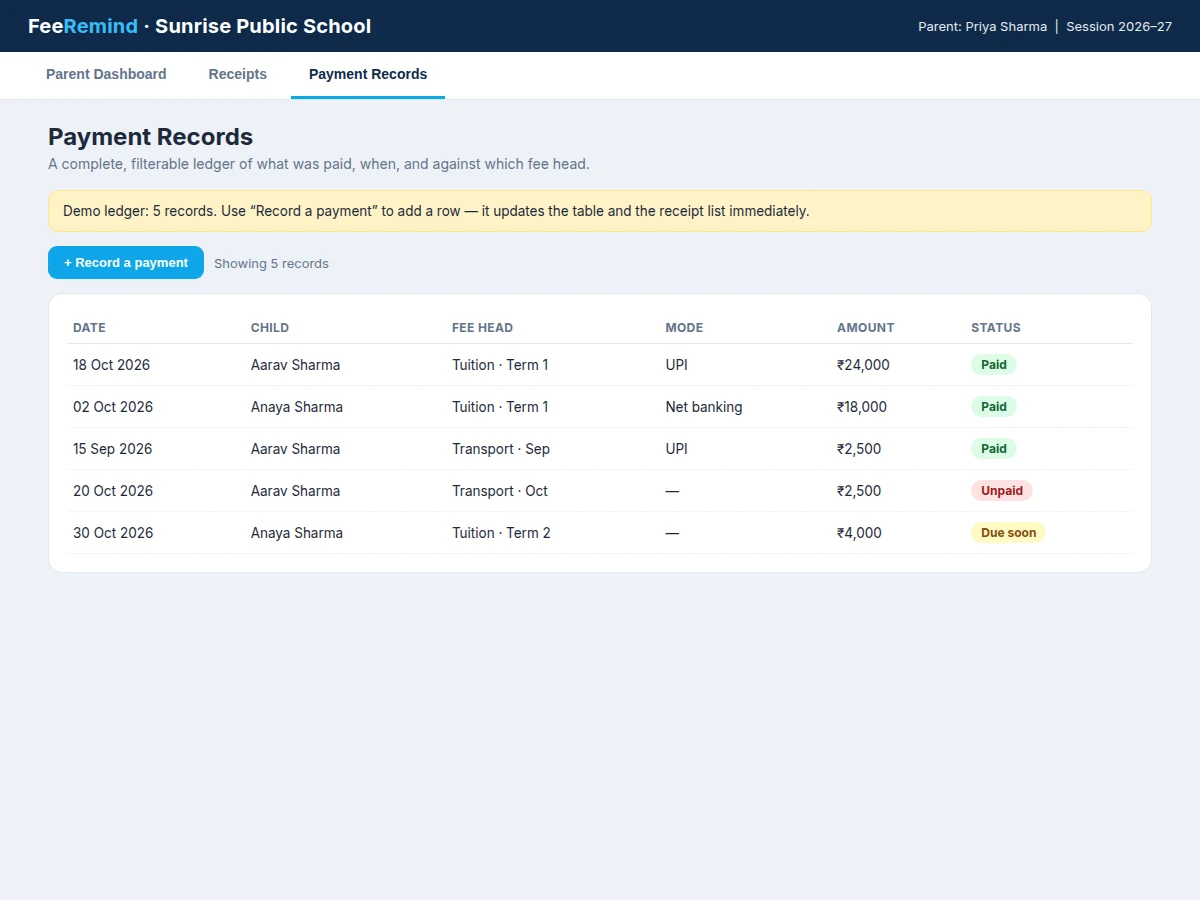
- The parent records a payment against a fee head, choosing the child, fee head, amount and payment mode (UPI, net banking or cash at the school office).
- The payment lands in the record table immediately, the fee head flips to paid, and the dashboard totals recalculate.
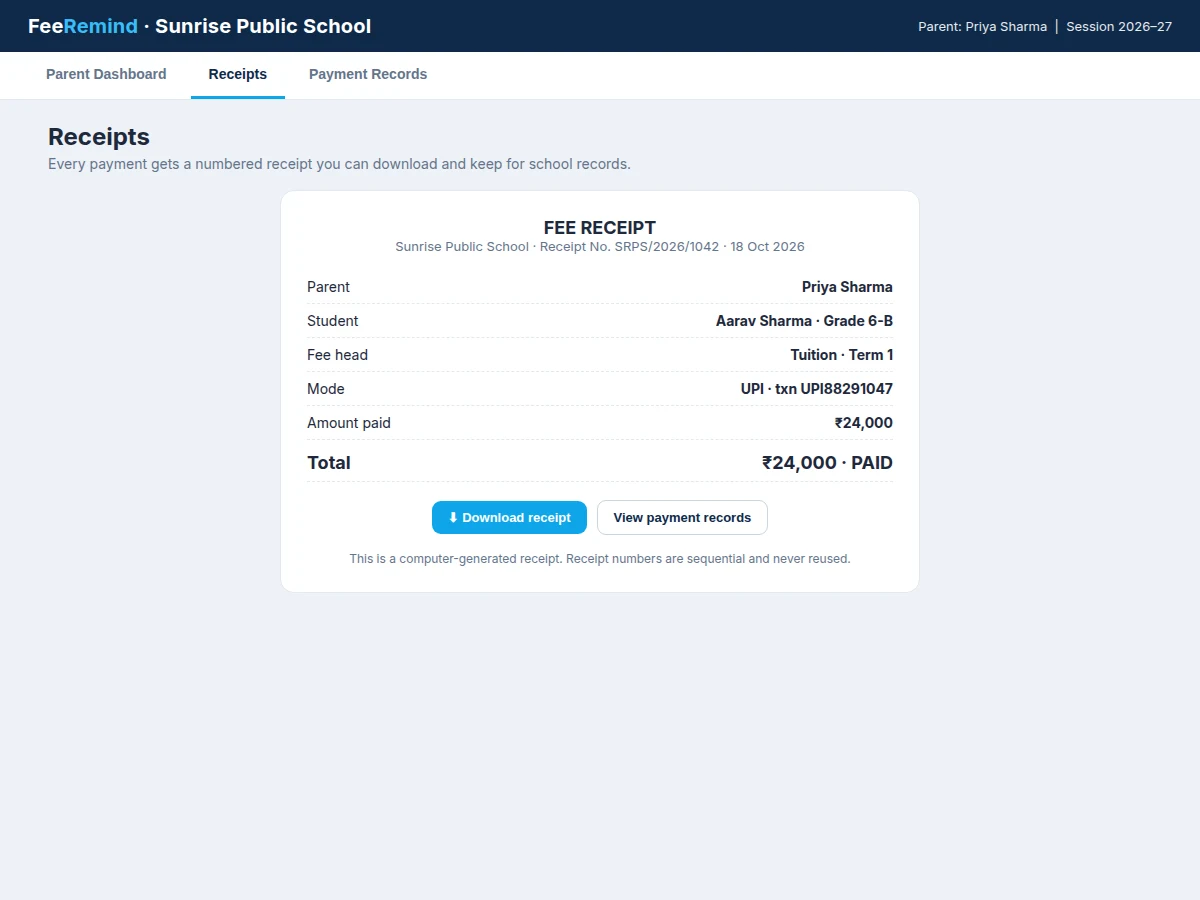
- A sequentially numbered receipt is generated for the payment and offered as a download the parent can keep for school records.
Tech stack:
- HTML5 · CSS3 · JavaScript (single-file demo)
- Node.js · Express (backend API, built-to-order build)
- SQLite (fee heads, reminders, payments, receipts)
- REST endpoints for dues, reminders and receipts
- Nodemailer (email reminder delivery, built-to-order build)
- LocalStorage demo state (browser demo only)
- Git
| Parameter | Value |
|---|---|
| Reminder points per fee head | 4 points (design target: 7 days before, 3 days before, due date, 1 day after if unpaid) |
| Reminder dispatch timing | Within 5 seconds of the due-date trigger per parent (design target) |
| Demo children | 2 children (design data) |
| Demo fee heads | 4 fee heads (design data) |
| Demo total due | ₹18,500 across 2 children (demo data) |
| Demo paid this term | ₹42,000 across 4 receipts (demo data) |
| Receipt numbering | Sequential, never reused (design rule) |
| Payment modes recorded | 3 modes: UPI, net banking, cash at school office |
| Demo reminder queue render | Full queue for both children on page load (observed in the demo build) |
| Platform | Web app, runs in a modern browser |
Project features
The School Fee Payment Reminder Web App for Parents gives a parent one dashboard for every child, with four capabilities doing the heavy lifting: a per-child fee-head ledger that shows what is due, what is overdue and what is already paid; a reminder schedule that messages the parent at fixed points around each due date rather than once and never again; a payment record table that keeps a complete, filterable history of every payment; and numbered receipt generation so each payment produces a downloadable receipt the parent can file. Around those four, the app adds child switching for multi-child families, reminder-status badges showing whether a reminder was sent, scheduled or overdue, and a demo data set modelled on a real school term. Every capability below is implemented in the demo build; items marked as future scope are not claimed as working features.
- [Per-child fee-head ledger] Each child has separate fee heads — tuition, transport, activity and exam fees — each with its own amount, due date and paid-or-due status, so one child's dues never blur into a sibling's.
- [Scheduled reminder engine] Reminders fire at 4 fixed points per fee head: 7 days before, 3 days before, on the due date, and 1 day after if still unpaid — then stop until the next fee head falls due, so parents are nudged without being spammed.
- [Reminder status badges] Every fee head shows Sent, Scheduled or Overdue status with the date, so a parent (and a viva examiner) can see exactly where each reminder stands.
- [Payment record table] A complete ledger of payments with date, child, fee head, mode and amount, filterable by child, with new payments added to the table immediately on recording.
- [Downloadable numbered receipts] Every recorded payment generates a sequentially numbered receipt (never reused) that the parent can download and keep for school records.
- [Multi-child parent view] One parent account covers all their children in the school, with a child switcher that filters dues and payments to the selected child.
- [Working parent-dashboard demo] A real single-file web demo with a dashboard, receipt view and payment ledger, using realistic term data for 2 children and 4 fee heads.
- [Future scope: live payment gateway] Online payment collection through a gateway is documented as future scope only; the shipped build records payments and issues receipts rather than moving money.
What is included
- Working parent-dashboard web demo (dashboard, receipt view, payment record table)
- Built-to-order backend build: fee-head management, reminder schedule, payment ledger and receipt generation
- Demo data set for 2 children and 4 fee heads across one school term
- Project report PDF (problem, design, reminder-schedule rationale, data model, testing)
- PPT presentation for final review
- Viva Q&A preparation document (reminder scheduling, receipt numbering, data model, web architecture)
Limitations & prerequisites
- The shipped build records payments and issues receipts; it does not collect money online — live gateway payment is future scope, not a working feature.
- Reminder delivery in the built-to-order build is email-based; SMS/WhatsApp delivery would need a paid messaging provider and is not included.
- The demo uses fixed sample data for 2 children and 4 fee heads; a real school would need its own fee-structure import before use.
- Reminder timing (within 5 seconds per parent) is a design target, not a measured production result — it is validated only against the demo's instant local rendering.
- Receipts are generated from recorded payments only; the app cannot verify a payment the school never records.
- The app is a student-built demonstration system, not a certified school accounting product, and its totals should not replace a school's official accounts.
Frequently Asked Questions
What does the app actually do for a parent?
It gives a parent one dashboard showing every child's fee dues, due dates and reminder status, sends reminders at fixed points around each due date, and issues a downloadable numbered receipt for every payment recorded. Dues, reminders, payments and receipts therefore stay in one consistent place instead of scattered across circulars, diary notes and bank messages. In the demo, a parent with two children sees ₹18,500 due, ₹4,500 overdue and four issued receipts on a single screen.
How does the reminder schedule work?
Each unpaid fee head gets reminders at exactly four points: 7 days before its due date, 3 days before, on the due date itself, and 1 day after if it is still unpaid. After that fourth reminder the engine stops for that fee head until the next fee head falls due, so parents are nudged firmly but never spammed. Every reminder updates the fee head's status badge with its sent or scheduled date, so the whole history is visible at a glance.
Does the app collect payments online?
No — the shipped build records payments and issues numbered receipts for them, but it does not move money through a payment gateway. Payments made by UPI, net banking or cash at the school office are entered against the correct fee head, and the receipt is generated from that ledger entry. Online collection is documented as future scope in the report, with the gateway integration steps outlined for anyone extending the project.
How are receipts numbered and why does it matter?
Receipts use sequential numbers that are never reused, so receipt SRPS/2026/1042 can only ever refer to one payment. That single rule is what makes a receipt trustworthy as proof of payment, because a parent, a school office or an examiner can match a receipt number to exactly one ledger row. The demo shows this with receipt SRPS/2026/1042 for a ₹24,000 tuition payment by UPI.
What would a student extend in this project?
A student could add SMS or WhatsApp reminder delivery through a messaging provider, a school-side fee-structure import, or a live payment gateway for online collection. Each extension is a clean, bounded module — messaging, import or payments — that builds on the existing reminder schedule and ledger without redesigning them. The report lists all three as future scope with their design trade-offs and the provider costs each would introduce.
Is this project suitable for a final-year project?
Yes, it is well suited to Computer Science and Web Development programmes because it combines a real user problem with a complete working system. It covers data modelling, scheduled jobs, a payment ledger and receipt generation, giving the viva concrete design decisions to discuss. The reminder schedule and receipt-numbering rules are easy to demonstrate live, and the demo makes the whole flow visible in minutes.
Components & software requirements
- HTML5 · CSS3 · JavaScript (single-file demo)
- Node.js · Express (backend API, built-to-order build)
- SQLite (fee heads, reminders, payments, receipts)
- REST endpoints for dues, reminders and receipts
- Nodemailer (email reminder delivery, built-to-order build)
- LocalStorage demo state (browser demo only)
- Git
Delivery information
Built-to-order project. Delivery timeline is shared after order confirmation based on current queue.
Support terms
Complete documentation, setup guide, and viva preparation included. Support for setup and explanation provided.
Download free synopsis (PDF)
Enter your name and WhatsApp number — the synopsis PDF downloads immediately. We may send occasional project updates on WhatsApp; no spam.