
More project photos (2)
The problem
A wedding vendor booking web app is a single online workspace where a couple finds, compares and books wedding vendors, then manages the money and the guest list around those bookings. A confirmed booking updates the budget, and the guest list feeds invitations, seating and the final catering headcount.
The problem this wedding vendor booking web app solves starts with how weddings are actually planned in India. A wedding vendor booking web app matters because a single wedding can involve a venue, a photographer, a caterer, a decorator, a DJ and a makeup artist, each found through a different contact, quoted in a different format, and tracked in a different notebook or chat thread. Couples compare prices from memory, forget which vendor quoted what, and discover budget overruns only when advances are already paid. Guest lists live in yet another spreadsheet, so the caterer's headcount, the seating plan and the invitation list drift apart. The result is avoidable stress in the weeks before the wedding, and money decisions made without a clear picture of what has already been committed.
This is a built-to-order software project: the vendor directory, booking workflow, budget tracker and guest-list tools are prepared fresh for you, with a working web demo included.
Comparison: this web app vs booking by phone and spreadsheet
| Task | This web app | Phone calls + spreadsheet |
|---|---|---|
| Finding vendors | Search by category, city and date with prices and reviews side by side | Asking friends and scrolling chat threads for numbers |
| Comparing quotes | Shortlist view keeps every quote, date and advance in one row | Quotes buried across calls, messages and notebooks |
| Tracking the budget | Each confirmed booking updates category totals and flags overruns automatically | Totals recomputed by hand, overruns found late |
| Managing guests | One list feeds invitations, seating and the caterer headcount | Separate lists that drift apart before the wedding |
| Confirming a booking | Booking request with date, advance and balance recorded in the app | Verbal confirmation with no shared written record |
How it works
The app works as one connected flow rather than four separate tools. A couple starts by setting the wedding date, city and overall budget, which scopes every later screen: only vendors available on that date appear, and every category total is measured against the same overall budget. They search the vendor directory, shortlist options per category, and send booking requests that record the quoted price and advance in a shared record. Each confirmed booking updates the budget tracker, and the guest list runs alongside all of this, collecting RSVPs that turn into a seating plan and a final catering headcount. Because bookings, money and guests share the same records, a change in one place is visible everywhere else without retyping anything, which is exactly what scattered phone calls and spreadsheets cannot offer.
- The couple creates the wedding profile with the event date, city and overall budget in rupees, which scopes vendor search and budget tracking.
- Vendors are searched by category, city and date, and results show price, rating, review count and availability for that date.
- Promising vendors are saved to a per-category shortlist, where price, rating and availability can be compared side by side.
- A booking request is sent for a chosen vendor, recording the event date, quoted price, advance paid and balance due.
- On confirmation, the booking amount flows into the budget tracker, updating the category total and the remaining budget automatically.
- Guests are added with side, group, meal preference and RSVP state, and replies are updated as invitations go out.
- As the wedding nears, the confirmed guest count locks into a final catering headcount and feeds the seating plan, while balance reminders go out ahead of due dates.
Tech stack:
- HTML5 · CSS3 · JavaScript (frontend)
- Node.js · Express (backend API)
- MongoDB · Mongoose (data storage)
- REST API · JSON (client-server communication)
- JWT authentication (user sessions)
- Responsive CSS layout (mobile and desktop)
- Git (version control)
| Parameter | Value |
|---|---|
| Application type | Web application for couples and vendors |
| Demo vendor records | 6 vendor records (design data for the demo) |
| Vendor categories in demo | 6 categories: venue, photography, catering, décor, music and makeup |
| Demo budget total | ₹8,00,000 (design data for the demo) |
| Demo guests invited | 320 guests (design data for the demo) |
| Demo confirmed guests | 214 guests (design data for the demo) |
| User roles | 2 roles: couple account and vendor account |
| Authentication | JWT-based login sessions (design target) |
| Budget alerts | Category overrun alerts shown on the dashboard |
| Guest fields | Side, group, RSVP state and meal preference per guest |
| Demo delivery | Single-file HTML demo, runs offline after download |
Project features
A wedding vendor booking web app earns its place only if it handles the whole planning job, not just a directory listing. The strongest capabilities here are the ones couples actually return to week after week: a searchable vendor directory with honest prices and availability for the wedding date, a booking request flow that records dates and advances in writing, a budget tracker that reacts to every confirmed booking, and a guest list that stays consistent from invitation to seating. Around those four, the app adds shortlists for comparing vendors side by side, reminders for balance payments before due dates, and a dashboard that shows the wedding's overall state at a glance. Each capability maps to a real planning pain point, so the feature list reads as a coherent system rather than a bundle of unrelated screens.
- [Searchable vendor directory] Vendors listed by category, city and date, with prices, ratings, review counts and availability shown on each card, so couples compare like with like instead of chasing numbers across chats.
- [Booking request workflow] A booking request records the event date, the quoted price, the advance paid and the balance due, giving both sides a shared written record instead of a verbal promise.
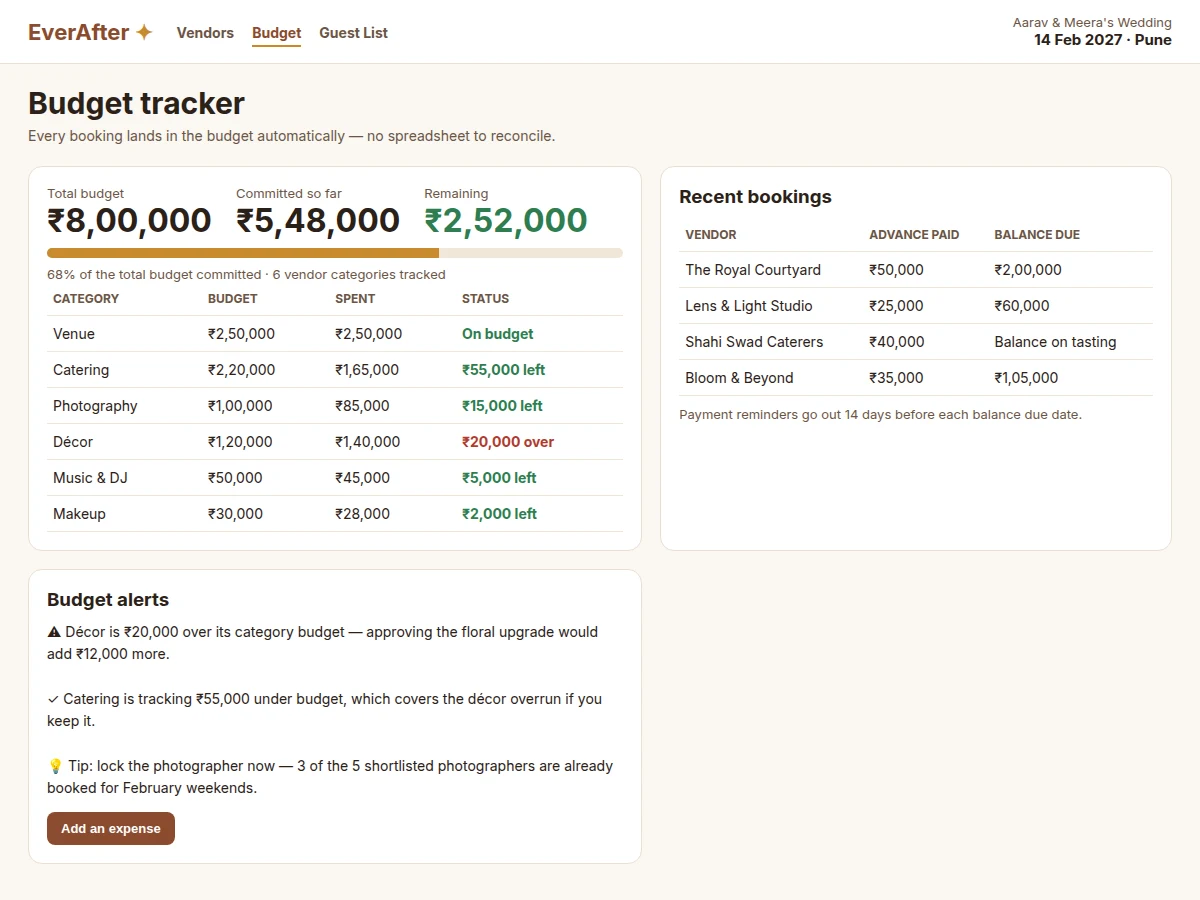
- [Automatic budget tracker] Every confirmed booking flows into category totals against the overall budget, with over-budget categories flagged and remaining amounts shown per category.
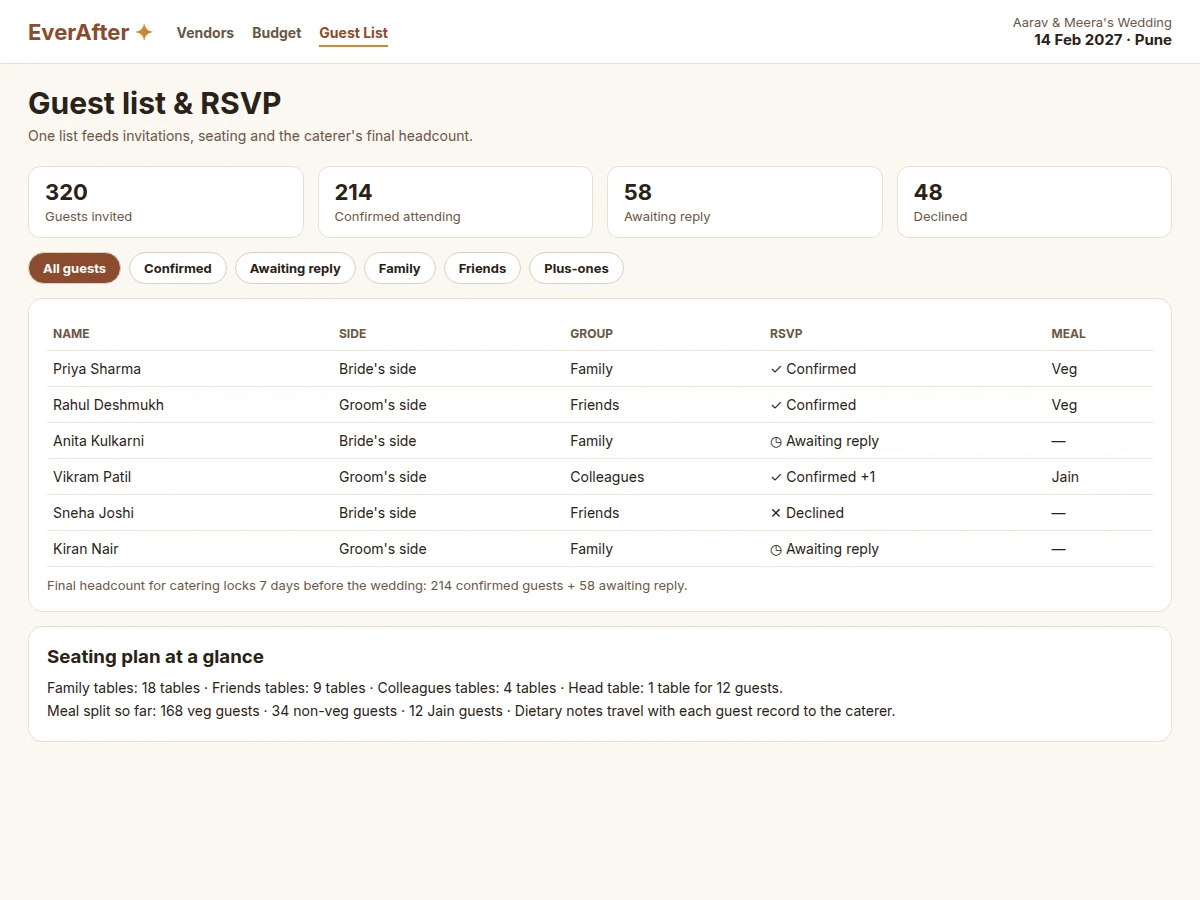
- [Guest list with RSVP tracking] Guests carry a side, a group, an RSVP state and a meal preference, and the confirmed count feeds the caterer's headcount and the seating plan.
- [Shortlists and comparisons] Couples save shortlisted vendors per category and compare them side by side on price, rating and availability before committing.
- [Payment reminders] Balance due dates generate reminders ahead of time, so no vendor payment is missed in the final busy weeks.
- [Wedding dashboard] One screen shows the wedding date, total budget, committed amount, remaining amount and RSVP totals, so the planning state is visible in seconds.
What is included
- Complete vendor booking web application source code
- Vendor directory with search, filters and shortlists
- Booking request workflow with advance and balance tracking
- Budget tracker with category totals and overrun alerts
- Guest list with RSVP states, meal preferences and seating summary
- Working single-file web demo with vendor, budget and guest views
- Project report PDF (background, system design, database schema, testing)
- PPT presentation for final review
- Viva Q&A preparation document (web architecture, REST APIs, authentication, database design)
Limitations & prerequisites
- The demo uses design data for vendors, prices and guests; real listings would need vendor onboarding and verification before public use.
- No real payment gateway is integrated in the demo build — advances and balances are recorded, not collected online.
- Vendor availability is self-reported in this design; the app does not verify a vendor's calendar with an external system.
- The budget tracker records planned and committed amounts; it is a planning aid, not an accounting or tax tool.
- Guest messaging (invitation delivery by SMS or email) is listed as future scope and is not part of the demo build.
Frequently Asked Questions
What does this web app do?
This web app gives a couple one workspace to search wedding vendors by category, city and date, compare prices and reviews, send booking requests, track the wedding budget as bookings are confirmed, and manage the guest list with RSVP states. The demo shows all three views working: a vendor grid with prices and availability, a budget tracker with category totals and alerts, and a guest list with RSVP and seating summaries.
How is this different from a plain vendor directory?
A plain directory only lists vendors, while this app carries the booking through to money and guests: a confirmed booking updates the budget automatically, and the guest list feeds seating and the caterer's headcount. That end-to-end flow is the core of the project, not an extra feature. The comparison table above shows how each planning task changes when bookings, budget and guests share one set of records.
How does the budget tracker work?
The budget tracker starts from the couple's overall budget in rupees, then adds each confirmed booking to its category total and shows the remaining amount per category. When a category passes its budget, the dashboard flags the overrun and shows the excess amount in rupees. The demo's budget view shows this clearly: décor is flagged over budget while catering still has room, so the couple can see the trade-off before approving more spending.
How does the guest list help with catering and seating?
The guest list keeps one record per guest with side, group, RSVP state and meal preference, so invitations, seating and catering all read from the same list. Confirmed guests plus plus-ones give the caterer a final headcount, and the group field feeds the seating plan by family, friends and colleagues. Because the list is shared, a late RSVP change updates the headcount instead of living in a separate spreadsheet nobody rechecks.
What would I demonstrate in the final review?
A reviewer can search vendors by category and city, open a vendor card, send a booking request, watch the budget totals update, add guests and change RSVP states, and read the seating summary. The demo's three views — vendors, budget and guests — map directly to the project's three modules, so the demonstration follows the report's system design chapter step by step.
Is this project suitable for a final-year project?
Yes, for Computer Science and Web Development programmes, because it combines a searchable directory, a transactional booking workflow, budget computation and guest data management in one full-stack application. It demonstrates frontend design, REST API design, database modelling and authentication, and the working demo makes each module demonstrable in a review without relying on invented results.
Components & software requirements
- HTML5 · CSS3 · JavaScript (frontend)
- Node.js · Express (backend API)
- MongoDB · Mongoose (data storage)
- REST API · JSON (client-server communication)
- JWT authentication (user sessions)
- Responsive CSS layout (mobile and desktop)
- Git (version control)
Delivery information
Built-to-order project. Delivery timeline is shared after order confirmation based on current queue.
Support terms
Complete documentation, setup guide, and viva preparation included. Support for setup and explanation provided.
Download free synopsis (PDF)
Enter your name and WhatsApp number — the synopsis PDF downloads immediately. We may send occasional project updates on WhatsApp; no spam.