
More project photos (3)
The problem
Renting a home in a new city usually starts with a listings site full of stale posts, fake owners and phone numbers that go unanswered. Tenants waste days visiting flats that were already rented or were never the poster's property, and owners waste time on visitors who never show up. This project answers that problem with a rental property portal that puts owner verification before contact: an owner uploads a government ID and a property document, an admin matches the names, and only then does the listing carry a verified-owner badge and accept visit requests. Tenants filter by city, budget, BHK and furnishing, open a listing to see its owner status, and book a visit in a real date and time slot instead of chasing phone calls. The result is a smaller, trustworthy set of listings where every visit request reaches a checked owner, and every confirmed visit has a reference the tenant can quote.
The demo portal built for this project lists 12 homes across 5 cities, with 9 verified owners and 3 owners still pending verification, so the badge states and the visit-scheduling gate can be seen working rather than described. Filtering the demo by the city Pune returns 4 listings, and filtering by a budget of up to ₹15,000 per month also returns 4 listings — both counts measured from the demo's own data during the build. In the demo, the visit scheduler renders only for verified owners; for the 3 pending listings it stays hidden until approval, which is how the verification gate is enforced in the interface.
How it works
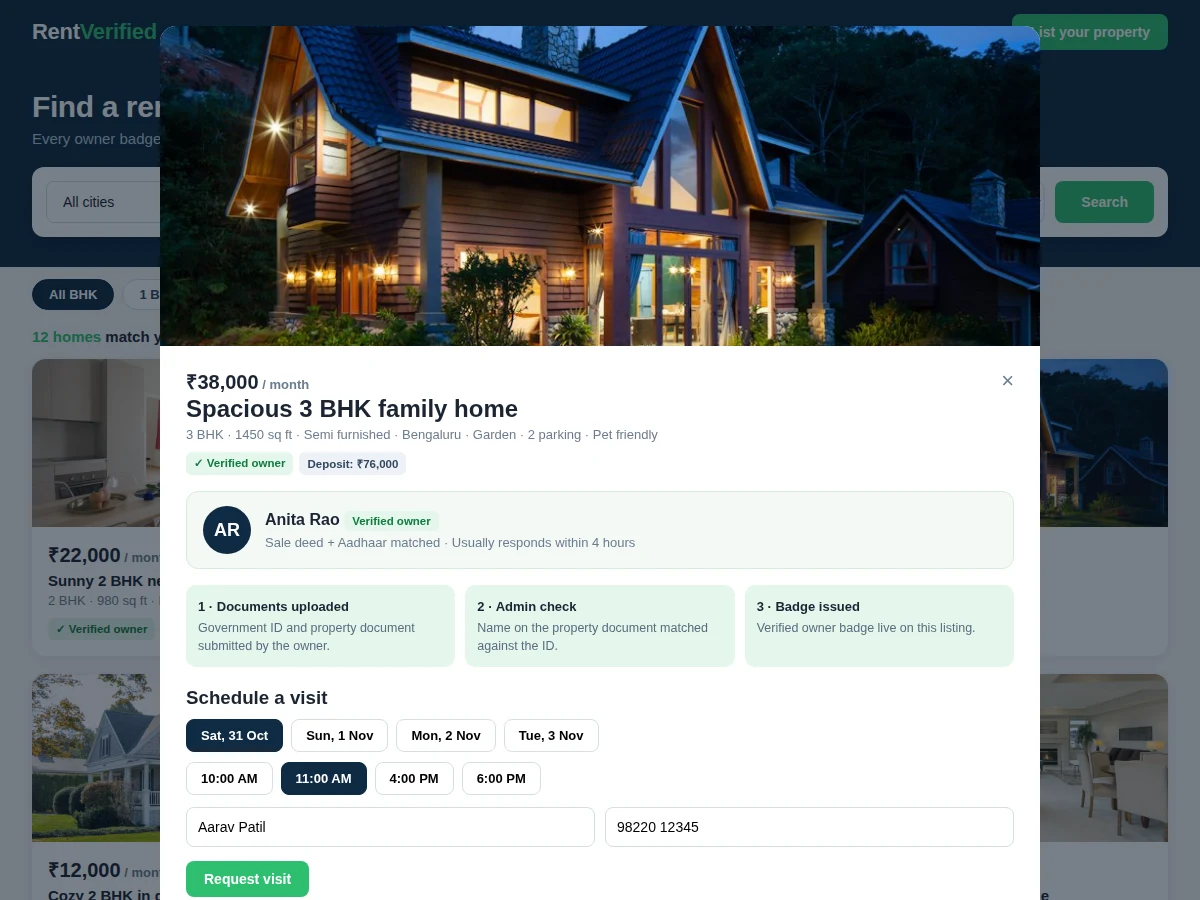
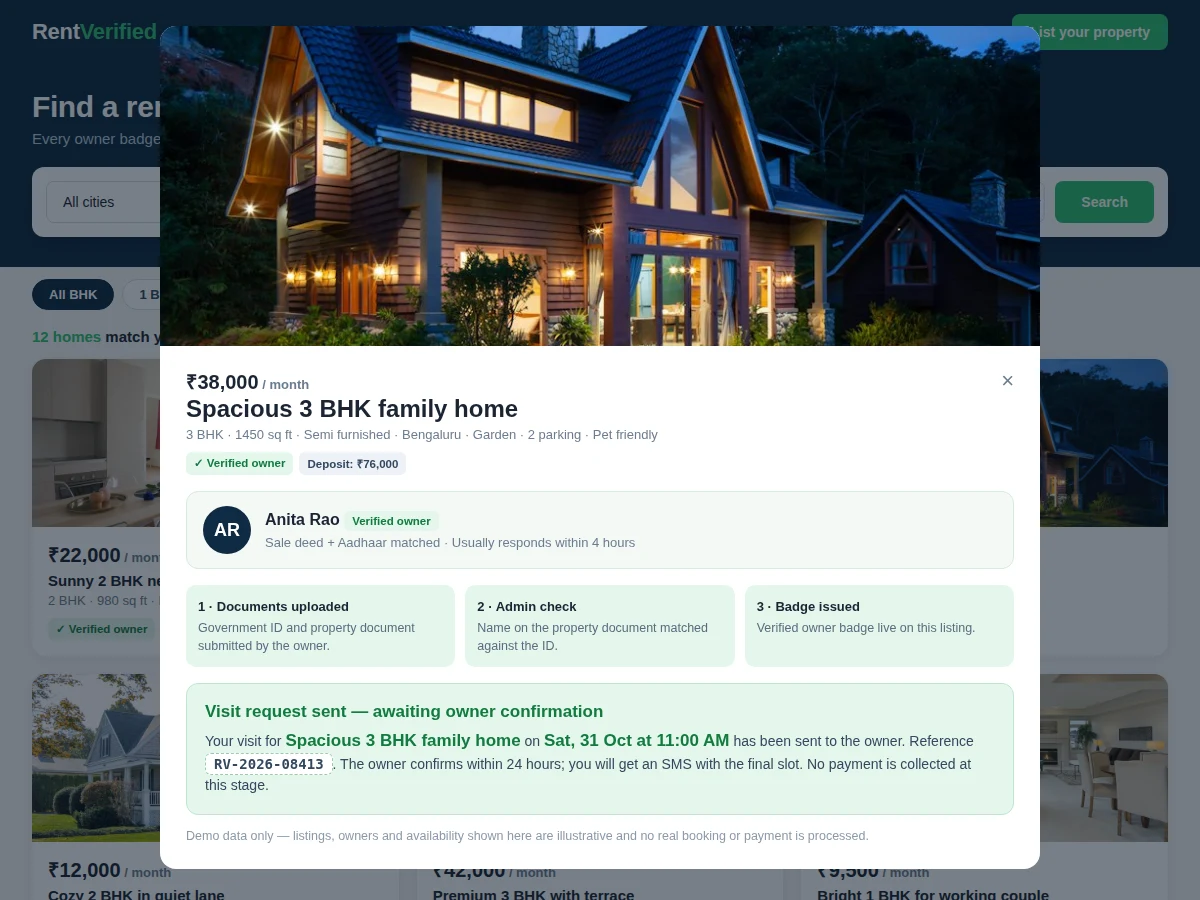
A tenant opens the portal and searches by city, budget, BHK and furnishing, then scans the results for the green verified-owner badge. Opening a listing shows the home's photos, rent, deposit and amenities alongside the owner's name and verification state, so trust is judged before any contact happens. If the owner is verified, the tenant picks a visit date and time slot and submits the request; the owner then confirms it, and the tenant keeps a reference number for the visit. Pending owners stay visible but cannot receive visit requests, so no tenant ever books a visit with an owner whose documents are still unchecked. The whole journey runs inside the portal — no phone numbers are exposed before a visit is confirmed. Listings from pending owners stay visible for browsing but cannot take a visit request, so trust is enforced by the workflow itself rather than by a warning label.
- The tenant searches with 4 filters — city, budget, BHK and furnishing — and the portal returns matching listings with a live count of verified owners among them.
- Each listing card shows rent per month, BHK, area in sq ft, city, furnishing and the owner's verification badge.
- Opening a listing shows its photos, amenities, deposit (2 months' rent by design) and the owner's verification state, including which documents were matched.
- The owner onboards by uploading a government ID and a property document; an admin compares the names and approves or rejects the application with a reason.
- Only approved owners display the verified badge and receive visit requests; pending owners' listings show "Verification pending" and hide the scheduler.
- The tenant picks a visit date from the next 4 days and one of 4 daily time slots, enters a name and mobile number, and submits the request.
- The owner confirms the visit within a 24-hour design window, and the tenant receives a confirmation state with a reference number such as RV-2026-08413.
Tech stack:
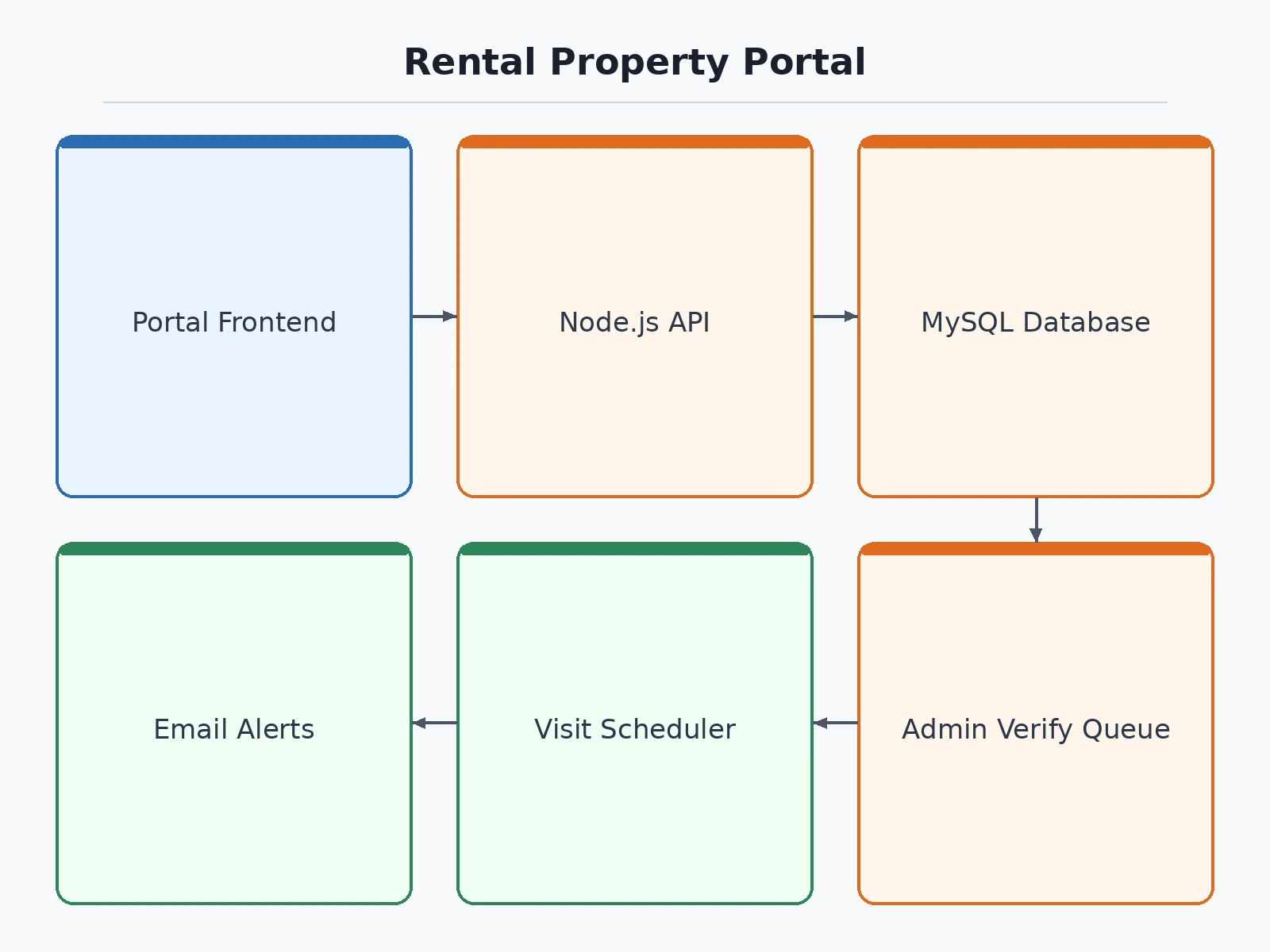
- HTML5 · CSS · JavaScript (single-file demo front end)
- Node.js · Express (REST API)
- MySQL database
- JWT authentication
- Multer file uploads for owner documents
- Nodemailer visit alerts
- Responsive CSS grid layout
- Git version control
| Parameter | Value |
|---|---|
| Demo listings | 12 listings (demo data) |
| Demo cities | 5 cities (Pune · Mumbai · Bengaluru · Nashik · Nagpur) |
| Verified owners in demo | 9 owners out of 12 listings |
| Demo rent range | ₹8,000–₹55,000 per month |
| Search filters | 4 filter fields (city · budget · BHK · furnishing) |
| Visit dates offered | 4 days ahead (design target) |
| Time slots per day | 4 slots (design target) |
| Owner confirmation window | Within 24 hours (design target) |
| Deposit rule | 2 months' rent (design rule) |
| Demo views | 3 views (grid · detail · confirmation) |
Project features
Searching, verifying and booking are the three capabilities this portal is built around. Tenants get a filterable listing search with a verified-owner badge on every genuine home, owners get a document-upload registration that ends in an admin check rather than instant self-approval, and both sides get a visit scheduler that replaces phone-tag with dated slots and a confirmation reference. Around that core sit an admin verification queue, listing management for owners, and a responsive interface that works on a phone — the device most tenants actually search on. Online rent payment and deposit escrow are deliberately left out of the core build and listed as future scope, so the project stays honest about what it does and does not handle. A tenant never sees a phone number before a visit is confirmed, which is what keeps unverified contact out of the process entirely.
- [Verified-owner badges] Every listing shows its owner's verification state: a green badge once an admin has matched the owner's ID against a property document, or a "Verification pending" label until then. Implemented in the demo.
- [Search and filters] Filter the 12 demo listings by city, budget, BHK and furnishing, with a live count of matching homes and how many come from verified owners. Implemented in the demo.
- [Visit scheduler with confirmation] Pick a date from the next 4 days and one of 4 daily time slots, then receive a confirmation state with a visit reference number. Implemented in the demo.
- [Owner registration and document upload] Owners submit a government ID plus a property document (sale deed, tax receipt or society letter) as the first step of verification. Implemented as a workflow in the full build; the demo models the resulting states.
- [Admin verification queue] Admins review submitted documents, approve or reject with a reason, and only approved owners can receive visit requests. Implemented as a workflow in the full build.
- [Listing management] Owners create, edit and deactivate their own listings, with rent, deposit (2 months' rent by design), furnishing and amenities fields. Implemented in the full build.
- [Responsive portal interface] The listing grid, detail view and scheduler adapt from desktop to mobile widths without a separate app. Implemented in the demo.
- [Online rent payment] Tenants paying rent or deposits through the portal, with receipts and reminders. Future scope — not built into this project.
What is included
- Working demo portal (single-file HTML/CSS/JS) with 12 listings, verification states and visit scheduler
- Full-stack portal source code (Node.js · Express · MySQL) with owner registration, admin queue and visit booking
- Database schema for listings, owners, verification applications and visit requests
- Project report PDF (problem, methodology, verification workflow, screenshots, limitations)
- PPT presentation for final review
- Viva Q&A preparation document (web architecture, authentication, verification design, scheduling logic)
- Setup guide for running the demo and the full-stack build locally
Limitations & prerequisites
- All 12 listings in the demo are sample data — no real properties, owners or availability exist behind them.
- Owner verification is a modelled workflow (document upload plus admin approval state), not a legal identity check and not linked to any government database.
- No real payments are handled: rent collection, deposit escrow and payment gateways are out of scope for this build.
- Visit confirmation in the demo is a screen state only — no SMS or email is actually sent by the demo front end.
- Search covers only the 5 demo cities and 12 listings, so results do not reflect any live rental market.
- Owner documents shown in the demo are illustrative labels, not real uploads, and nothing is stored or checked by a third party.
Frequently Asked Questions
How does owner verification work in this project?
An owner uploads a government ID and a property document, and an admin matches the name on the document against the ID before issuing the verified badge. Accepted documents in the design are a sale deed, a municipal tax receipt or a society letter, and a mismatch or unreadable upload stays pending with a reason. Only after approval does the listing show the verified badge and accept visit requests.
Can a tenant book a visit without calling the owner?
Yes — the tenant picks a date from the next 4 days and one of 4 daily time slots directly on the listing page, then submits the request with a name and mobile number. The owner confirms within a 24-hour design window, and the tenant keeps a confirmation state with a reference number for the visit. No phone number is exposed before confirmation, which is exactly what keeps unverified contact out of the process.
What happens if an owner is not verified yet?
The listing stays visible but carries a "Verification pending" label, and the visit scheduler is hidden for that listing. Tenants can still read the rent, area and amenities, but they cannot submit a visit request until an admin approves the owner's documents. This gate is the core honesty mechanism of the portal: visibility without contact until verification passes, so no tenant books a visit with an unchecked owner.
Does the portal handle rent payments?
No — rent payment, deposit escrow and payment-gateway integration are explicitly out of scope for this build. The portal covers discovery, verification and visit scheduling only, and the deposit shown on a listing (2 months' rent by design) is an informational figure, not a collected amount. Adding a payment flow with receipts and reminders is listed as future scope in the report, so the project's boundary stays clear.
Is this project suitable for a final-year project?
Yes — for Computer Science, IT and Web Development programmes. It demonstrates full-stack web development, authentication, file-upload handling, an admin approval workflow and a booking system with real states, all in one coherent product. The demo portal gives reviewers something working to click through, and the verification gate gives the project a genuine design decision to defend in the viva.
Can this portal be extended to a real city-level service?
Yes, with work the report names explicitly: real document checks would need a verification partner or manual review team, availability would need owner-side calendar management, and payments would need a gateway and escrow rules. The current build is the right foundation for that extension because its data model already separates listings, owners, verification applications and visit requests, so each piece can grow without a rewrite.
Components & software requirements
- HTML5 · CSS · JavaScript (single-file demo front end)
- Node.js · Express (REST API)
- MySQL database
- JWT authentication
- Multer file uploads for owner documents
- Nodemailer visit alerts
- Responsive CSS grid layout
- Git version control
Delivery information
Built-to-order project. Delivery timeline is shared after order confirmation based on current queue.
Support terms
Complete documentation, setup guide, and viva preparation included. Support for setup and explanation provided.
Download free synopsis (PDF)
Enter your name and WhatsApp number — the synopsis PDF downloads immediately. We may send occasional project updates on WhatsApp; no spam.