
More project photos (2)
The problem
The Web-Based College Fest Sponsorship Tracking Portal is a single web application where a college fest team records every sponsor, the tier the sponsor bought, the benefits promised for that tier, and every payment received against that sponsor. Fest sponsorship usually lives in scattered spreadsheets, chat messages, and notebooks, so nobody can answer the simplest questions quickly: how much has been pledged, how much has actually arrived, which benefits are still owed, and which sponsor needs a follow-up today. That confusion leads to missed follow-ups, double-promised benefits, and awkward conversations when a sponsor asks for proof of a logo placement or a stage mention that was never logged. This portal fixes that by keeping the sponsor record, the tier benefits, and the payment history together, so pledged, received, and pending amounts stay consistent, benefit delivery is visible, and the team works from one shared record instead of several private lists.
This is a built-to-order software project: the web portal, the demo records, and the complete documentation set are prepared fresh for you.
Concept
The portal is built around one idea: a sponsor is not just a name and an amount, but a deal with three linked parts — a pipeline stage, a set of promised benefits, and a payment history. An organiser creates the sponsor, picks a tier such as Platinum, Gold, Silver, or Bronze, and the portal generates the benefit checklist for that tier. Payments are added to the same record, so the balance is always derived from receipts rather than typed in by hand. Three roles keep the work organised: an admin who manages tiers and users, an organiser who updates sponsors and benefits, and a finance volunteer who records payments. The demo uses illustrative sponsor data so the workflow can be tried end to end before real fest data is entered.
The organiser creates a sponsor with company name, contact person, tier and pledged amount.
Follow the working sequence
How it works
Data enters the portal as sponsor records, tier definitions, and payment receipts, and the portal turns those records into a single sponsorship picture. An organiser creates a sponsor, assigns a tier, and the portal generates that sponsor's benefit checklist from the tier template, with items added or removed for that sponsor's deal. Payments are entered against the sponsor with a date, a mode, and an amount, and the portal updates the received total, the pending balance, and the pipeline stage automatically. Benefit items are ticked only when delivered, so the checklist becomes proof of delivery rather than a wish list. Dashboards then summarise pledged, received, and pending amounts by tier and by sponsor, and flag sponsors with pending balances or undelivered benefits, so follow-ups happen before fest week instead of after a sponsor complains.
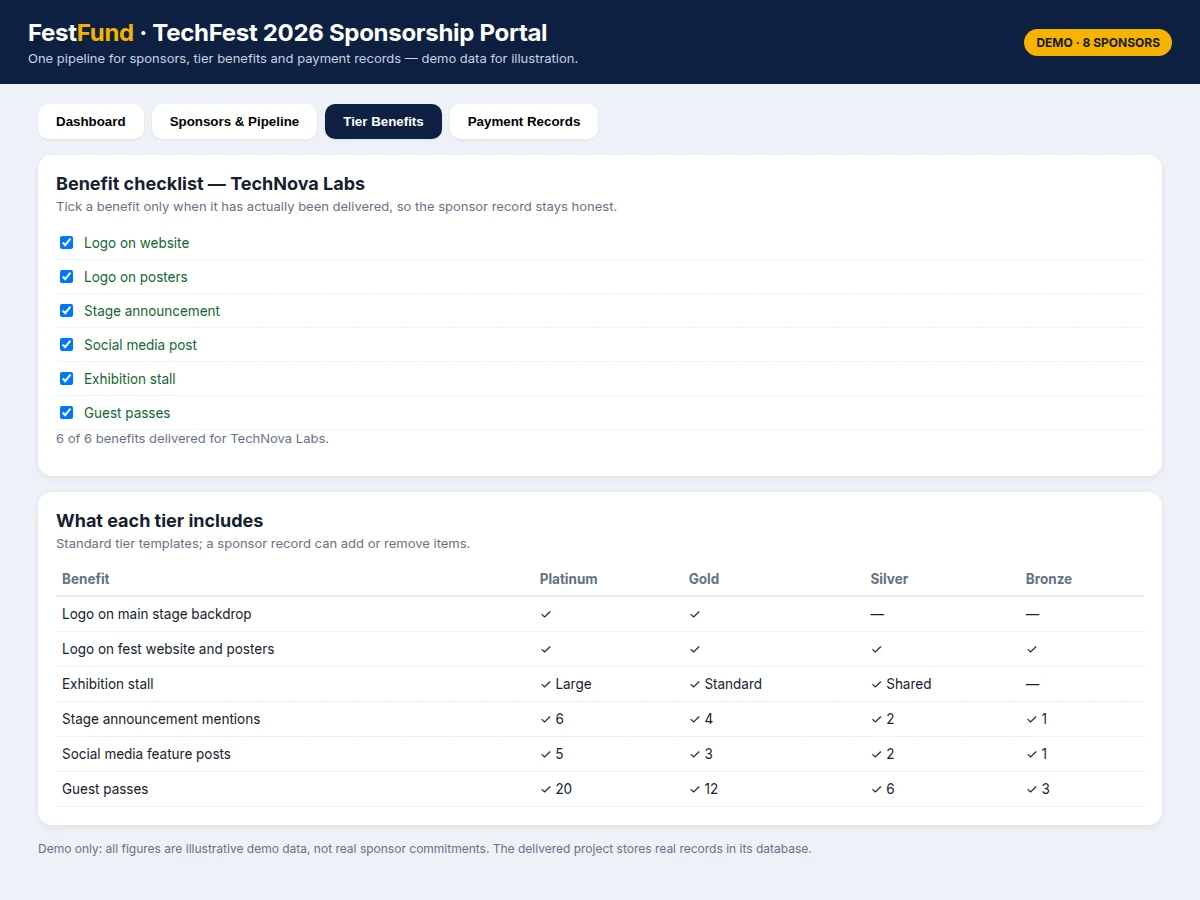
- The admin sets up the fest edition and the tier templates, defining the benefits each tier promises, such as logo placement, stall space, stage mentions, social media posts, and guest passes.
- An organiser adds a sponsor with its company name, contact person, tier, and pledged amount in Indian rupees (₹), and the portal creates that sponsor's benefit checklist from the tier template.
- As talks progress, the organiser moves the sponsor through the pipeline stages, from Lead through Negotiation and Committed, recording notes on what was discussed.
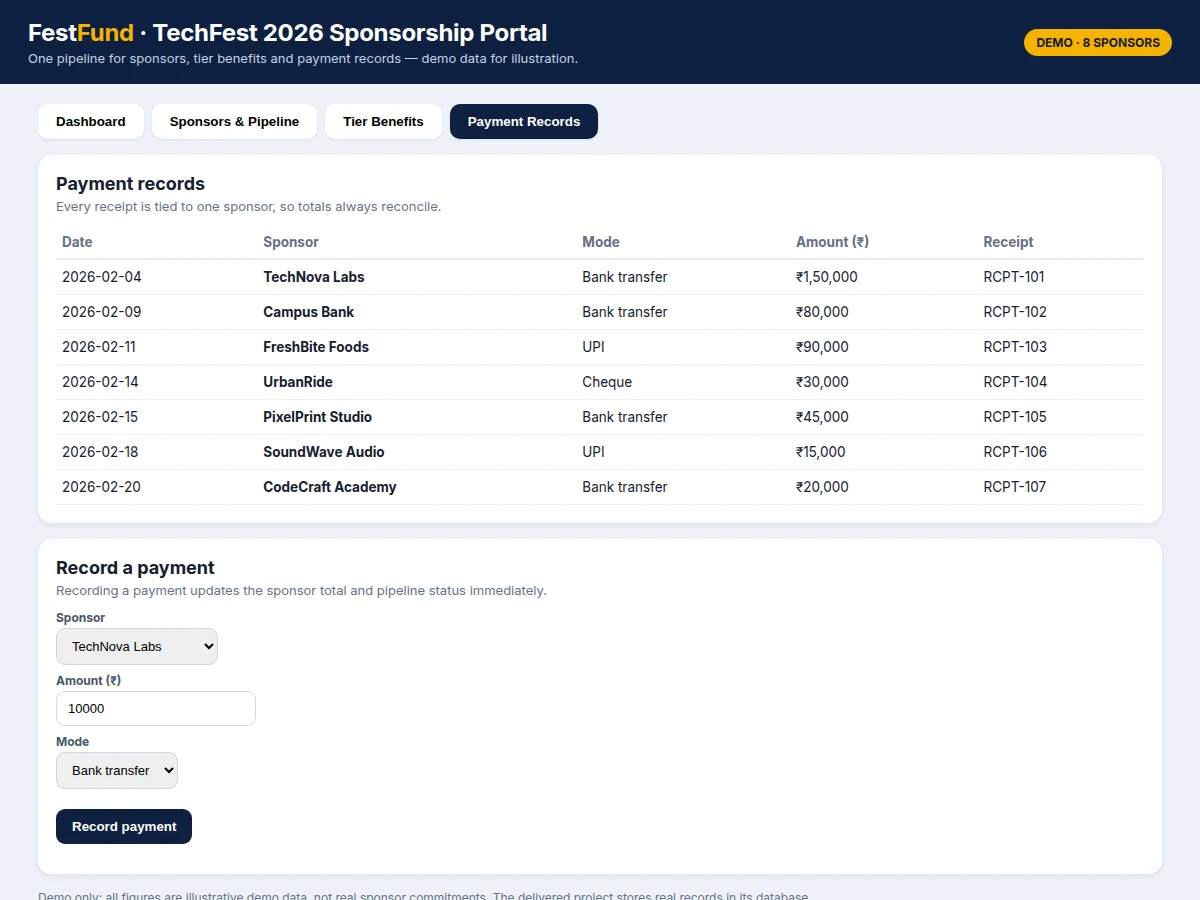
- The finance volunteer records each payment against the sponsor, with a date, a payment mode, an amount in Indian rupees (₹), and a receipt reference; the portal updates the received total and the pending balance.
- When a payment completes the pledged amount, the sponsor stage changes to Paid automatically; partial payments keep the stage at Partial until the balance is cleared.
- Organisers tick benefit items only as they are delivered, and the dashboard reports pending balances and undelivered benefits so nothing is promised twice or forgotten.
Tech stack:
- HTML, CSS, and JavaScript (portal front end)
- PHP with Laravel or Node.js with Express (back end, one framework for the delivered build)
- MySQL or PostgreSQL (relational database)
- Responsive web design for desktop and mobile browsers
- Server-side validation and role-based access control
- Printable receipt and summary views
| Parameter | Value |
|---|---|
| Project type | Web application (software, no hardware component) |
| Sponsor tiers | 4 tiers: Platinum, Gold, Silver, Bronze |
| Pipeline stages | 5 stages: Lead, Negotiation, Committed, Partial, Paid |
| Benefit items per sponsor template | 6 items (template count, demo build) |
| Demo sponsor records | 8 sponsors (demo data, illustrative only) |
| Demo pledged total | ₹5,20,000 (Indian rupees, demo data, computed by the demo) |
| Demo received total | ₹4,30,000 (Indian rupees, demo data, computed by the demo) |
| Demo pending total | ₹90,000 (Indian rupees, demo data, computed by the demo) |
| Demo collection rate | 83% (percentage, demo data, computed by the demo) |
| Demo payment receipts | 7 receipts (demo data, illustrative only) |
| User roles | 3 roles: admin, organiser, finance volunteer |
| Delivery | Built-to-order web application with demo data and documentation |
Project features
The portal's strongest capabilities are sponsor pipeline tracking, tier benefit checklists, and payment records that always reconcile with the sponsor total. Pipeline tracking moves each sponsor through clear stages, from first contact through negotiation and commitment to partial payment and paid status, so the team sees at a glance who needs attention next. Tier benefit checklists turn each tier's promises into tickable items, such as logo placement, stall space, stage mentions, and guest passes, and only a delivered item is ticked off. Payment records attach every receipt to one sponsor, with date, mode, and amount, so the pledged, received, and pending figures are computed from the same records rather than typed separately. Together, these three capabilities replace scattered spreadsheets with one auditable record that a fest team can defend in front of any sponsor.
- [Sponsor pipeline tracking] (Implemented) Each sponsor moves through defined stages — Lead, Negotiation, Committed, Partial, and Paid — and the list can be filtered by tier or stage, so follow-ups are assigned to the right sponsor at the right time.
- [Tier benefit checklists] (Implemented) Every tier has a benefit template, and each sponsor gets a tickable checklist generated from it, with items added or removed for that sponsor's deal; an item is ticked only when it has actually been delivered.
- [Payment records and reconciliation] (Implemented) Each payment stores a date, a payment mode, an amount in Indian rupees (₹), and a receipt reference, and the sponsor's received total and pending balance are recomputed from those receipts.
- [Dashboard and tier summaries] (Implemented) The dashboard totals pledged, received, and pending amounts, shows collection by tier, and lists sponsors by pipeline stage, so the team spots shortfalls before fest week.
- [Search, filter, and sponsor detail] (Implemented) Sponsors can be searched by name and filtered by tier or stage, and selecting a sponsor opens its benefits and payment history in one view.
- [Receipt export] (Optional add-on) Payment receipts and a sponsor summary can be exported as a printable document on request; this is not part of the base build and is quoted separately.
- [Sponsor self-service view] (Future scope) A future version could let a sponsor log in to view only its own benefits and payment status; this is not built in the current version and no sponsor login is shipped.
What is included
- Complete web portal: sponsor pipeline, tier benefit checklists, payment records, and dashboard
- Demo records with illustrative sponsors, tiers, benefits, and payment receipts for trying the workflow
- Project report PDF (background, system design, database design, workflow, testing, limitations)
- PPT presentation for final review
- Viva Q&A preparation document (web architecture, database design, validation, role-based access)
- Setup guide for running the portal on a local server
Requirements
- A computer with a current web browser and a local server environment for running the delivered web application
- A relational database server (MySQL or PostgreSQL, as chosen for the delivered build)
- Fest data entered by the organising team: sponsor names, contacts, tiers, pledged amounts, and payment details
- One admin user to manage tiers, users, and the fest edition; organiser and finance roles are assigned by the admin
Limitations & prerequisites
- No online payment gateway in the base build — payments are received outside the portal and recorded manually, so the portal never moves money itself.
- One fest edition per installation (scope: 1 edition); running two fests at once needs a separate installation or an edition-management extension.
- Benefit delivery is confirmed by the organiser ticking an item — the portal does not verify logo placement or stage mentions automatically.
- Receipt references are entered by the finance volunteer; the portal does not validate them against a bank statement.
- Sponsor data is only as good as what the team enters — late or missing entries make the dashboard figures incomplete until updated.
- No sponsor login in the current version — sponsors cannot view their own record online (listed as future scope).
Timeline
- Weeks 1–2 (duration: 2 weeks): requirements, tier and benefit design, and database design.
- Weeks 3–4 (duration: 2 weeks): sponsor pipeline, benefit checklists, and payment records build.
- Week 5 (duration: 1 week): dashboard, search and filters, validation, and testing with demo data.
- Week 6 (duration: 1 week): documentation, review presentation, and handover. Total duration: 6 weeks (design target).
Support
- Support period: 30 days (support period, after delivery) for setup help and fixing defects in the delivered build.
- Support covers: running the portal locally, entering the first fest data, and correcting faults in delivered features.
- Support does not cover: new features, payment gateway integration, or data entry for the fest team.
Frequently Asked Questions
How does the portal keep pledged, received, and pending amounts consistent?
It computes them from the same records instead of storing three separately typed figures. A sponsor has one pledged amount, and every payment receipt is attached to that sponsor; the portal adds the receipts to get the received total and subtracts it from the pledged amount to get the pending balance. Detail: because the balance is derived, a new receipt updates the sponsor total, the tier summary, and the dashboard at once, so the figures cannot drift apart the way separate spreadsheet columns can.
Can tiers and benefits be customised for our fest?
Yes, the admin defines the tiers and their benefit templates before sponsors are added. A tier template lists benefits such as logo placement, stall space, stage mentions, social media posts, and guest passes, and each sponsor's checklist is generated from its tier template. Detail: individual items can be added or removed for one sponsor's deal without changing the template for other sponsors in the same tier.
Does the portal accept online payments from sponsors?
No, the base build records payments rather than collecting them. Sponsors pay through the fest team's existing channels, and the finance volunteer enters each payment with its date, mode, amount, and receipt reference. That separation is deliberate, because collecting money online would add gateway fees and extra compliance work for a student fest team. Detail: this keeps the base build simpler and avoids payment gateway charges and compliance work; gateway integration is an optional add-on, not a shipped feature.
How does the team prove a benefit was actually delivered?
By ticking checklist items only when delivery has happened, with the checklist acting as the delivery record. Each sponsor's checklist shows which benefits are delivered and which are still outstanding, so the team can answer a sponsor's question from the record rather than from memory. Detail: the rule is enforced by process, not by automation — the portal cannot verify a logo on a banner by itself, so organisers must tick items honestly.
Is this project suitable for a final-year project?
Yes, it fits Web Development and Computer Science programmes because it combines database design, role-based access, form validation, and reporting in one complete system. It gives the student a working product with real users — the fest organising team — plus clear design decisions to explain, from the sponsor data model to the reconciliation logic. Detail: the report documents the architecture, the database schema, and the testing done with demo data, which together make the review discussion concrete.
Components & software requirements
- HTML, CSS, and JavaScript (portal front end)
- PHP with Laravel or Node.js with Express (back end, one framework for the delivered build)
- MySQL or PostgreSQL (relational database)
- Responsive web design for desktop and mobile browsers
- Server-side validation and role-based access control
- Printable receipt and summary views
Delivery information
Built-to-order project. Delivery timeline is shared after order confirmation based on current queue.
Support terms
Complete documentation, setup guide, and viva preparation included. Support for setup and explanation provided.
Download free synopsis (PDF)
Enter your name and WhatsApp number — the synopsis PDF downloads immediately. We may send occasional project updates on WhatsApp; no spam.