
More project photos (2)
The problem
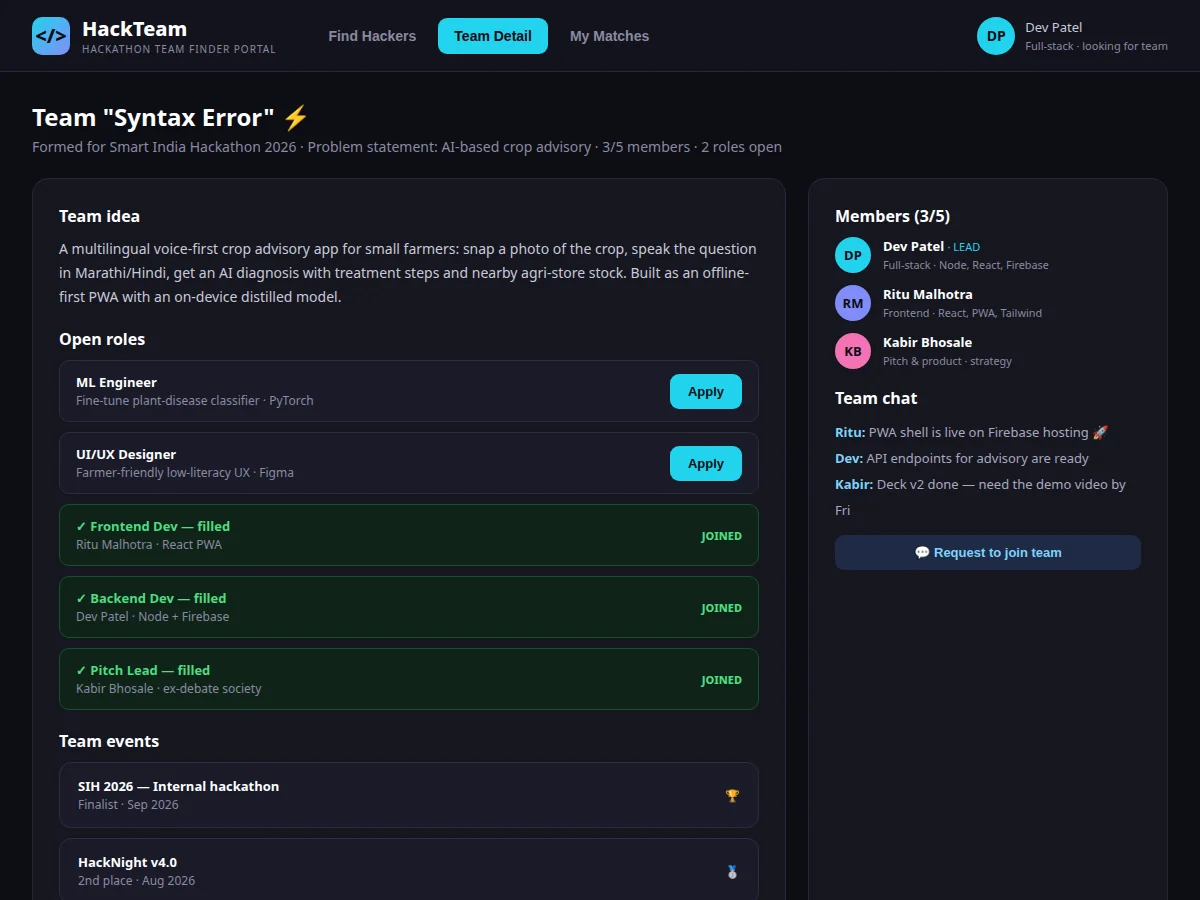
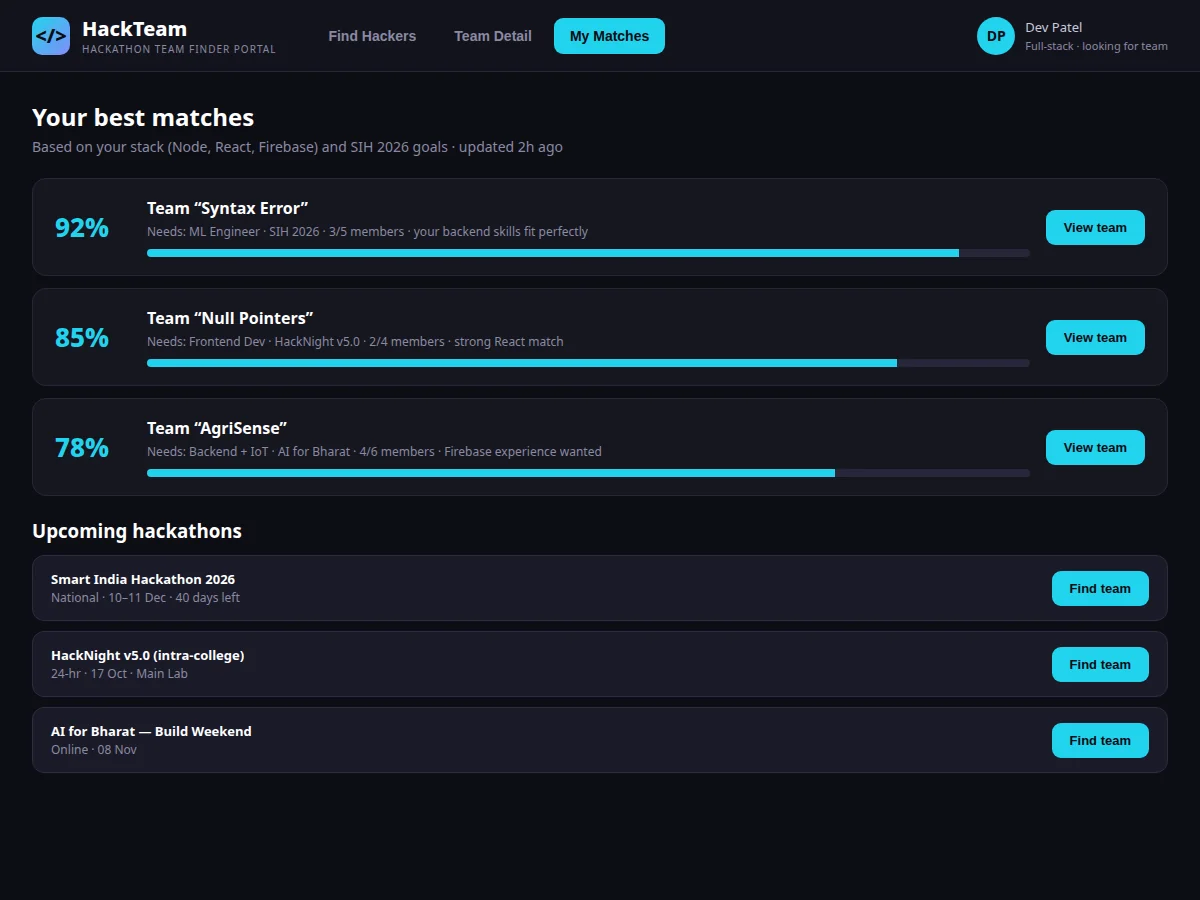
Hackathon teams form in the last 48 hours before the event — in class groups and club chats, where the loudest voices pick friends instead of skills. The result is predictable: four frontend developers and nobody who can pitch, or a great idea with no ML engineer. Meanwhile skilled students sit out because they don't know any team needs them. This project is a team-finder portal that makes team formation deliberate. Every student builds a hacker profile — stack, roles they can play, hackathon history, availability status. Teams form around a hackathon and a problem statement, list their members and the roles still open, and browse candidates filtered by stack. A match score ranks teams for each student from skill overlap with open roles, hackathon experience and availability, so the right introductions happen. Team pages carry the idea, open roles with apply buttons, a team chat, and the hackathons they're targeting — everything formation needs in one place instead of scattered chats.
How it works
- Students create hacker profiles with their stack, preferred roles and availability status.
- A team lead creates a team around a hackathon and problem statement, adds founding members and posts open roles.
- Students browse the hacker directory filtered by stack, or open team pages to see open roles.
- The match view scores teams against the student's profile and ranks them with reasons.
- The student applies to an open role or requests to join; the team lead accepts from the team page.
- Accepted members appear on the roster, the role closes, and the team coordinates in the team chat toward the hackathon.
Tech stack:
- PHP · Laravel (REST API + Blade views)
- MySQL (relational schema with seed data)
- HTML · CSS · JavaScript (responsive frontend)
- Weighted team-match scoring engine
- Session authentication
- Role-based access (hacker, team lead, admin)
- Per-team messaging
- Git
| Parameter | Value |
|---|---|
| Team size model | Configurable max (demo uses 5–6 per team) |
| Match score | 0–100, weighted: skill overlap, experience, availability |
| Roles taxonomy | Frontend, Backend, ML/AI, UI/UX, IoT/Hardware, Pitch/PM |
| Application flow | Apply → team lead accept/decline → roster update |
| Chat scope | Per-team thread |
| Hackathon linkage | Teams target listed hackathons |
| Deployment | Shared hosting, VPS or college intranet |
| Client requirement | Any modern browser, mobile-friendly layout |
Project features
- [Hacker profiles] Stack tags, roles, hackathon count, availability status and a short bio — a searchable directory of every participant.
- [Stack filters] One-click filters (Frontend, Backend, ML/AI, UI/UX, IoT/Hardware, Pitch/PM) narrow the directory to the skills a team needs.
- [Team pages] Idea writeup, member roster with roles, open roles with apply buttons, team chat and target hackathons per team.
- [Open roles board] Teams post roles with required skills; applications flow to the team lead for accept or decline.
- [Match scoring] Teams ranked per student from skill overlap with open roles, experience and availability — an explainable weighted score.
- [Team chat] A per-team message thread for coordination, visible on the team page.
- [Hackathon listings] Upcoming hackathons with dates and format, each with a find-team action linking teams to events.
What is included
- Complete working web application (profiles, teams, roles, matching, chat, hackathons)
- Database schema with seed data (hackers, teams, open roles, matches, chat threads)
- Match-scoring engine with documented weights
- Team-lead role management (accept/decline, role posting)
- Project report PDF (SRS, ER diagram, DFD, test cases, screenshots)
- PPT presentation for final review
- Viva Q&A preparation document (matching logic, team state model, moderation)
Limitations & prerequisites
- Match scores are a transparent weighted formula, not machine-learned recommendations; no training data is used or claimed.
- Team chat is a simple per-team thread; it is not a full messenger (no file sharing, no read receipts).
- Profile verification is self-declared plus admin spot-checks; skill endorsements are future scope.
- The demo does not handle hackathon registration itself — teams register on the event's own platform.
- Profiles, teams and match scores in the demo are illustrative seed data.
Frequently Asked Questions
How is the match score calculated?
From skill overlap between the student's stack and the team's open roles, the student's hackathon experience, and current availability. Weights are documented in the report — explainable, not a black box.
Who decides who joins a team?
The team lead. Applications and join requests land on the team page; accepting updates the roster and closes the role automatically.
Can a student be on multiple teams?
The demo allows one active team per hackathon, enforced when accepting an application — the report documents the rule and how to relax it.
Does it register teams for the hackathon?
No — formation only. Teams still register on the hackathon's own platform; the portal links each team to its target events.
How is spam or fake profiles handled?
Admin moderation with profile reporting; verification badges are documented as future scope tied to college identity.
Is this project suitable for a final-year project?
Yes — for Computer Science, IT and Web Development programs. It demonstrates profile matching, team state management, role-based flows and in-app messaging. Suitable for B.E./B.Tech final-year projects in Computer Science, IT and Web Development.
Components & software requirements
- PHP · Laravel (REST API + Blade views)
- MySQL (relational schema with seed data)
- HTML · CSS · JavaScript (responsive frontend)
- Weighted team-match scoring engine
- Session authentication
- Role-based access (hacker, team lead, admin)
- Per-team messaging
- Git
Delivery information
Built-to-order project. Delivery timeline is shared after order confirmation based on current queue.
Support terms
Complete documentation, setup guide, and viva preparation included. Support for setup and explanation provided.