
More project photos (2)
The problem
Every semester, students pass study material around through scattered WhatsApp groups and drive links. Good notes from seniors get buried under forwards, there is no way to tell which PDF is actually worth reading, and nobody gets credit for sharing quality material. The result is that juniors waste hours opening low-quality files while genuinely good notes never reach the people who need them. This project builds a central web platform that fixes the discovery problem: students upload their notes as PDFs with subject, semester and tags; every note can be rated on a 5-star scale and reviewed by peers; ratings and download counts rank the feed so the most trusted material surfaces first; and uploaders earn reputation points that feed a public leaderboard. It is a complete, realistic full-stack web application — authentication, file uploads, search and filtering, ratings, reviews and reputation — the kind of system students actually use, built with standard tools they can defend in a viva.
Students who upload notes, browse the feed and rate peer material.
Follow the working sequence
How it works
- A student registers and logs in; passwords are hashed with bcrypt and sessions are managed with JWT tokens.
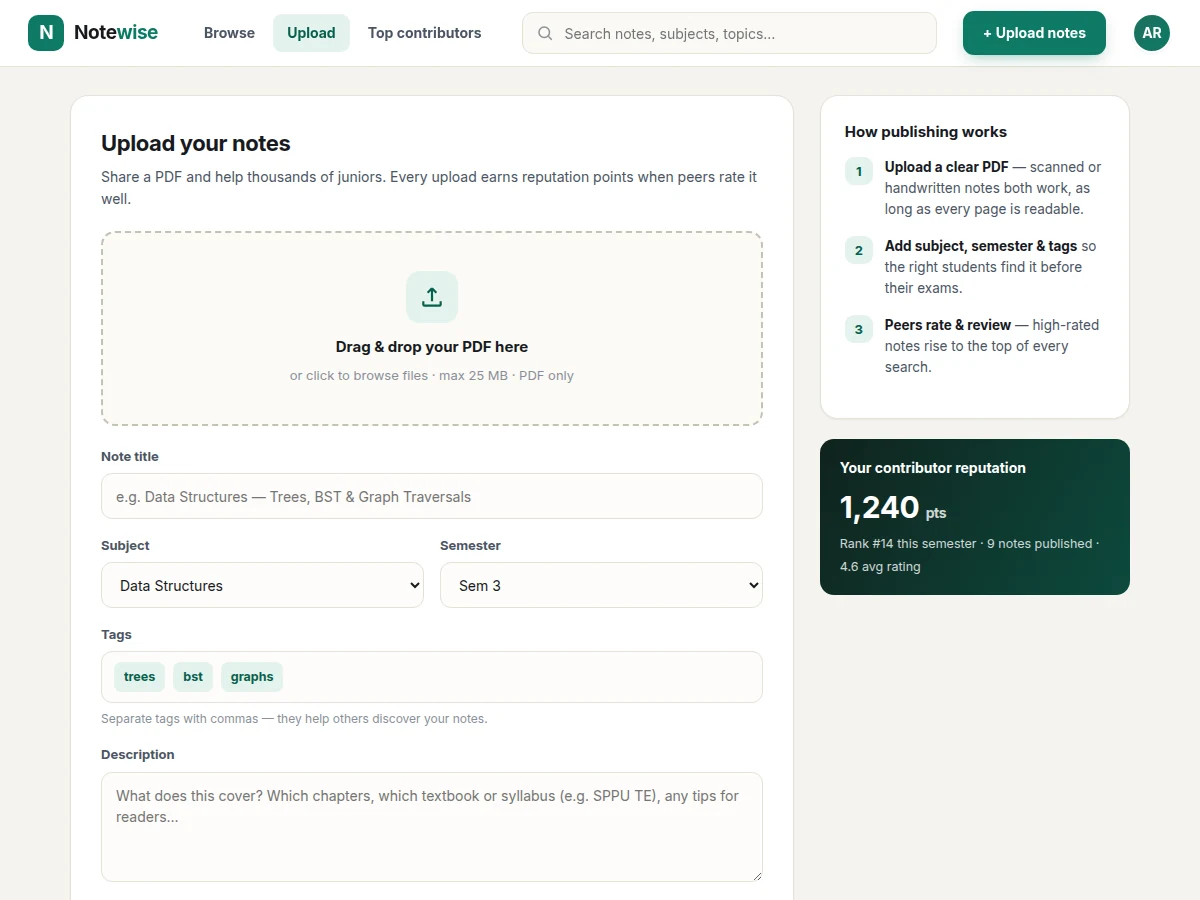
- The uploader fills the upload form — title, subject, semester, tags, description — and attaches a PDF; Multer validates the file type and size before saving it to server storage.
- The note's metadata is stored in MongoDB and indexed by subject, semester and tags so filters and search stay fast.
- Visitors browse the feed, combine subject/semester filters with the search box, and sort by rating, recency or downloads.
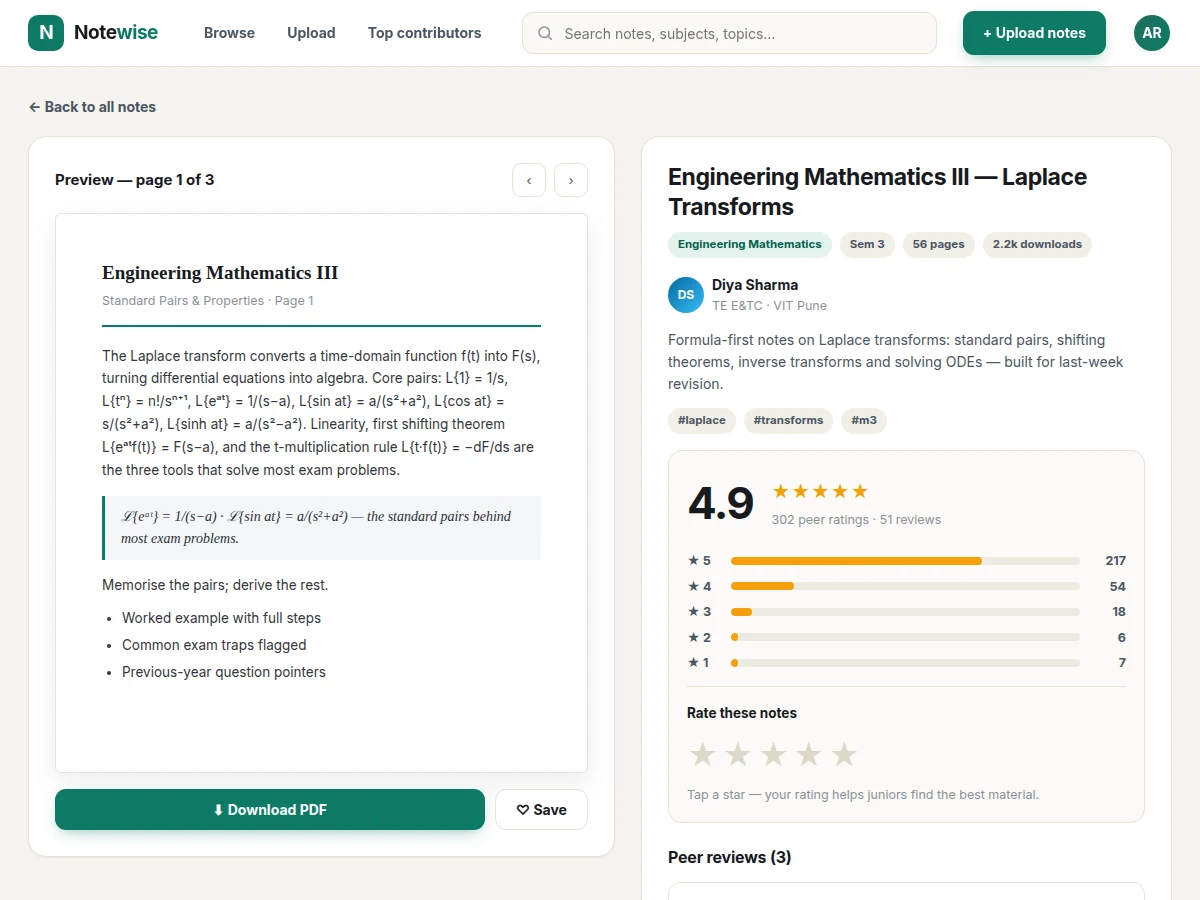
- Opening a note shows its preview pages, full description, uploader info, rating distribution and all peer reviews.
- A logged-in peer submits a star rating and an optional written review; the note's average and the uploader's reputation score are recomputed.
- The leaderboard aggregates reputation across all contributors and re-ranks hourly, giving consistent uploaders visible credit.
Tech stack:
- Node.js + Express (REST backend)
- MongoDB + Mongoose (database & ODM)
- React (component frontend)
- JWT authentication
- Multer (PDF upload handling)
- bcrypt (password hashing)
- REST API design
- HTML5 + CSS3 + JavaScript
| Parameter | Value |
|---|---|
| PDF upload limit | 25 MB per file (design target) |
| Rating scale | 1–5 stars, one rating per user per note |
| Search response | Under 1 s on a typical catalogue of a few thousand notes (design target) |
| Concurrent users | Approximately 200–500 on a single modest VPS (expected, hosting-dependent) |
| Authentication | Email + password, bcrypt-hashed, JWT sessions |
| File storage | Local server storage in the base build; cloud storage as an optional customization |
| Browser support | Current Chrome, Edge, Firefox, Safari (expected) |
| Reputation formula | Weighted score from uploads, ratings received and reviews (design target, configurable) |
Project features
- [Notes feed with subject & semester filters] Browse all uploaded notes in a card grid; filter by subject or semester and sort by top-rated, newest or most-downloaded, with a live search box across titles, subjects and tags.
- [PDF upload flow] Upload a PDF (up to 25 MB design target) with title, subject, semester, tags and description through a guided form with drag-and-drop and instant validation feedback.
- [5-star peer ratings] Every note carries an average rating, total rating count and a 1-to-5 distribution chart; logged-in users rate with an interactive star widget.
- [Peer reviews] Written reviews sit under each note with the reviewer's name, date and their star rating, so readers see why a note earned its score.
- [Note preview pages] A paged document preview lets visitors read sample pages before downloading, with page navigation controls.
- [Contributor reputation & leaderboard] Uploads, ratings received and reviews feed a reputation score; top contributors are ranked on a public leaderboard page.
- [Uploader profiles] Each note shows its uploader with their program and college, so trusted seniors become recognisable.
What is included
- Complete frontend + backend source code with setup instructions
- MongoDB schema and seed data (sample notes, users, ratings, reviews)
- Working demo with realistic data, ready to run locally
- Project report PDF (background, system design, database design, methodology, testing)
- PPT presentation for final review
- Viva Q&A preparation document (REST concepts, JWT vs sessions, file-upload handling, MongoDB indexing, rating-system design)
Limitations & prerequisites
- PDF is the only supported upload format in the base build; DOCX or image uploads would need conversion handling (optional customization).
- The reputation scoring formula is a design target — it has not been tuned against real user behaviour at scale.
- Concurrent-user figures are expected values on modest hosting, not load-test measurements; actual capacity depends on the server and database sizing.
- No plagiarism or duplicate detection is included — moderation is manual in the base build.
- The preview renders sample pages client-side; very large PDFs may preview slowly on low-end devices.
- Email notifications (new review alerts, weekly digests) are not in the base build and can be added as an optional customization.
- There is no native mobile app; the web UI is responsive but mobile-first polish is a customization.
Frequently Asked Questions
Is this project suitable for a final-year project?
Yes — for Computer Science, IT and Web Development programs. It demonstrates a complete request lifecycle: authentication, file uploads, database design with indexing, search and filtering, a rating and review subsystem, and a reputation algorithm, all wrapped in a polished UI. The viva Q&A document maps every module to its underlying concept, so the student can explain the full stack confidently.
What is the main technology used?
A Node.js and Express REST API backed by MongoDB through the Mongoose ODM, with a React component-based frontend. Authentication uses JWT with bcrypt-hashed passwords, and PDF uploads are handled by Multer with server-side file-type and size validation. The design follows standard REST conventions, so each endpoint's purpose is easy to explain in a viva.
Is the database included?
Yes. The MongoDB schema ships with the code along with seed data — sample users, notes, ratings and reviews — so the demo runs with realistic content immediately after setup. The seed script is idempotent, meaning it can be re-run safely to reset the demo database before a review or demonstration.
Can it be hosted online?
Yes. The app is a standard Node.js plus MongoDB deployment that runs on any VPS or Node-compatible platform such as Render, Railway or a Hostinger VPS. The setup guide covers environment variables, the database connection string and the build steps. Hosting and domain charges are separate from the project development cost.
Can more features be added?
Realistic additions include DOCX upload support, email notifications for new reviews, an admin moderation panel, full-text search inside uploaded PDFs, and a companion mobile app. Each is scoped and quoted separately based on effort, and the modular code structure keeps such extensions straightforward to build.
How does the reputation system work?
Uploads, average ratings received and review activity combine into a weighted score with configurable weights, and contributors are ranked on a public leaderboard that re-ranks hourly. It is a sensible starting design for rewarding consistent contributors, not a researched engagement metric, and the weights can be tuned. Suitable for B.E./B.Tech final-year projects in Computer Science, Information Technology and Web Development.
Components & software requirements
- Node.js + Express (REST backend)
- MongoDB + Mongoose (database & ODM)
- React (component frontend)
- JWT authentication
- Multer (PDF upload handling)
- bcrypt (password hashing)
- REST API design
- HTML5 + CSS3 + JavaScript
Delivery information
Built-to-order project. Delivery timeline is shared after order confirmation based on current queue.
Support terms
Complete documentation, setup guide, and viva preparation included. Support for setup and explanation provided.
Download free synopsis (PDF)
Enter your name and email — the synopsis PDF downloads immediately. We may send occasional project updates; no spam, unsubscribe anytime.