
More project photos (3)
The problem
Small courier firms, campus parcel desks and local logistics startups lose parcels and drown in "where is my package" phone calls because tracking lives in spreadsheets or in the dispatcher's head. Customers have no self-serve way to check status, couriers update deliveries over WhatsApp, and nobody can prove a parcel was handed over when a dispute arises. This project builds a courier tracking web application that closes all three gaps: a public tracking page where anyone enters an AWB number and sees a live status timeline, a mobile-friendly courier flow for scanning parcels and pushing status updates from the field, and tamper-evident proof of delivery through a doorstep photo, receiver signature and a delivery OTP sent to the recipient's phone. An admin dashboard aggregates the operation — daily volumes, delayed shipments and per-courier performance — so the owner can spot stuck parcels before customers complain. The build uses a standard backend stack (Node.js/Express or Django with PostgreSQL) with QR/barcode AWB labels printed at booking, and is structured so the student can explain every request, table and role in the viva.
Field courier scanning parcels and updating status.
Follow the working sequence
How it works
- The admin books a parcel at the counter: sender, receiver, weight and service level are entered, and the system generates a unique AWB number plus a printable QR label.
- At each handoff the courier scans the label (or selects the parcel) and taps a status — picked up, arrived at hub, in transit, out for delivery — which appends a timestamped event to the parcel's timeline.
- The customer opens the public tracking page, enters the AWB number and sees the full event timeline rendered live from the database.
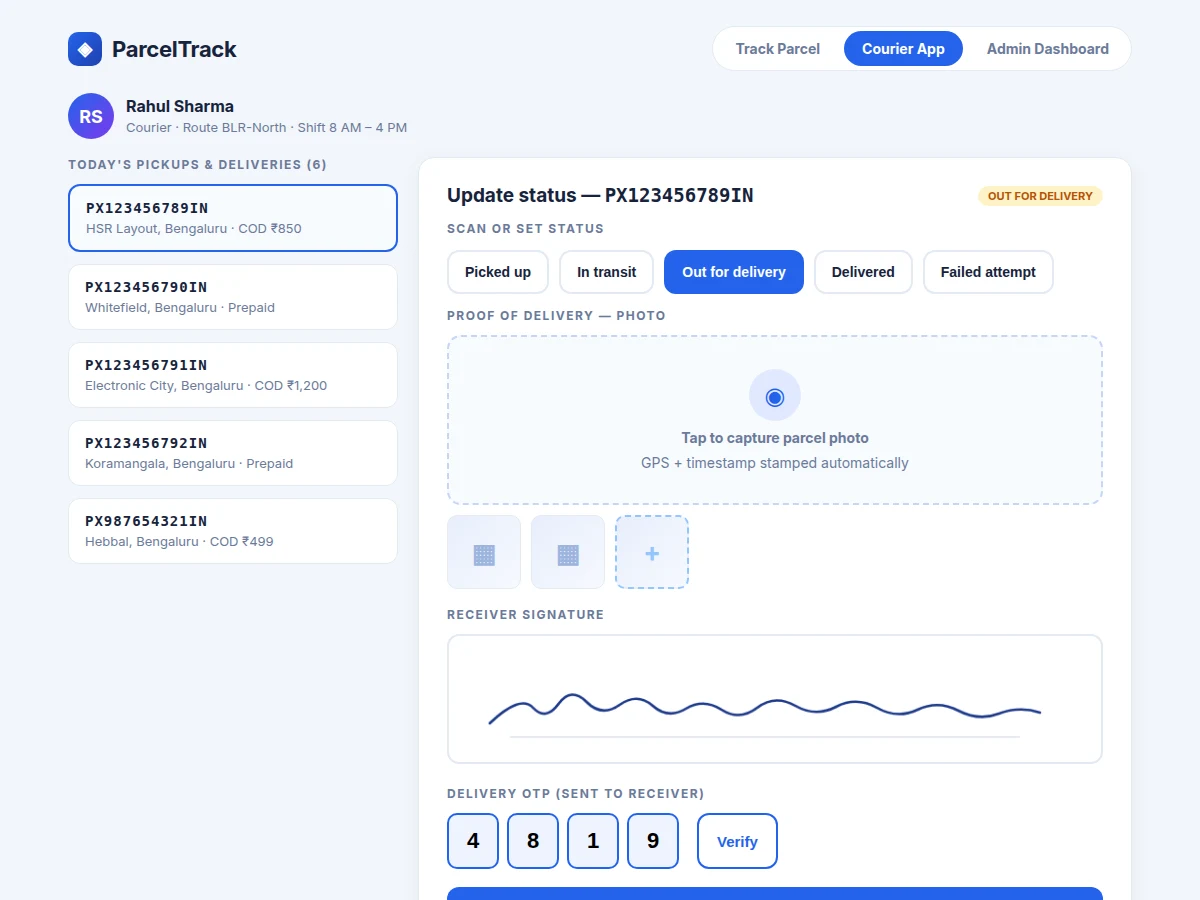
- On the final stop the courier captures a doorstep photo, collects the receiver's signature on the canvas, and enters the delivery OTP sent to the receiver's phone.
- All three proofs validate before the parcel can be marked delivered; the status, photo, signature and OTP record are stored atomically.
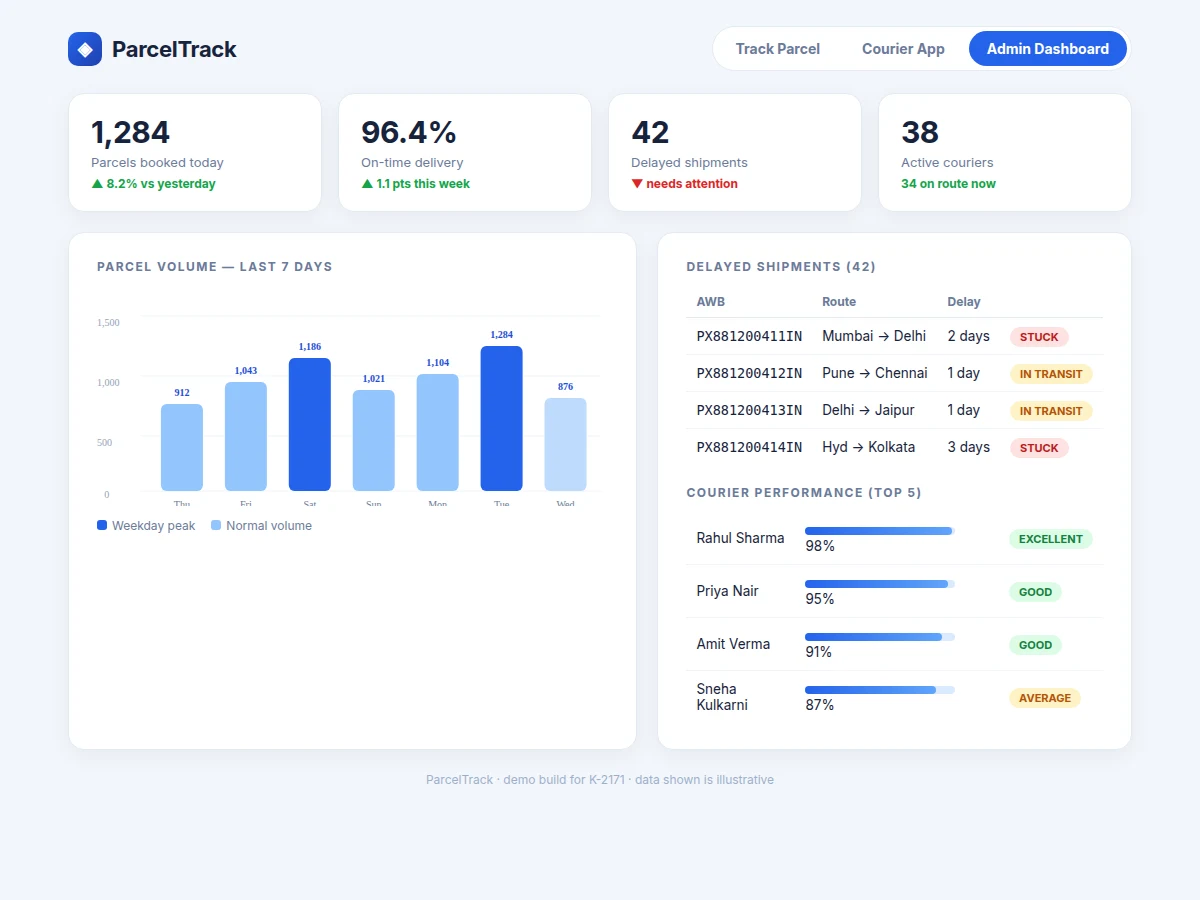
- The admin dashboard aggregates events into KPIs, flags parcels stuck beyond their promised window, and ranks couriers by on-time delivery rate.
Tech stack:
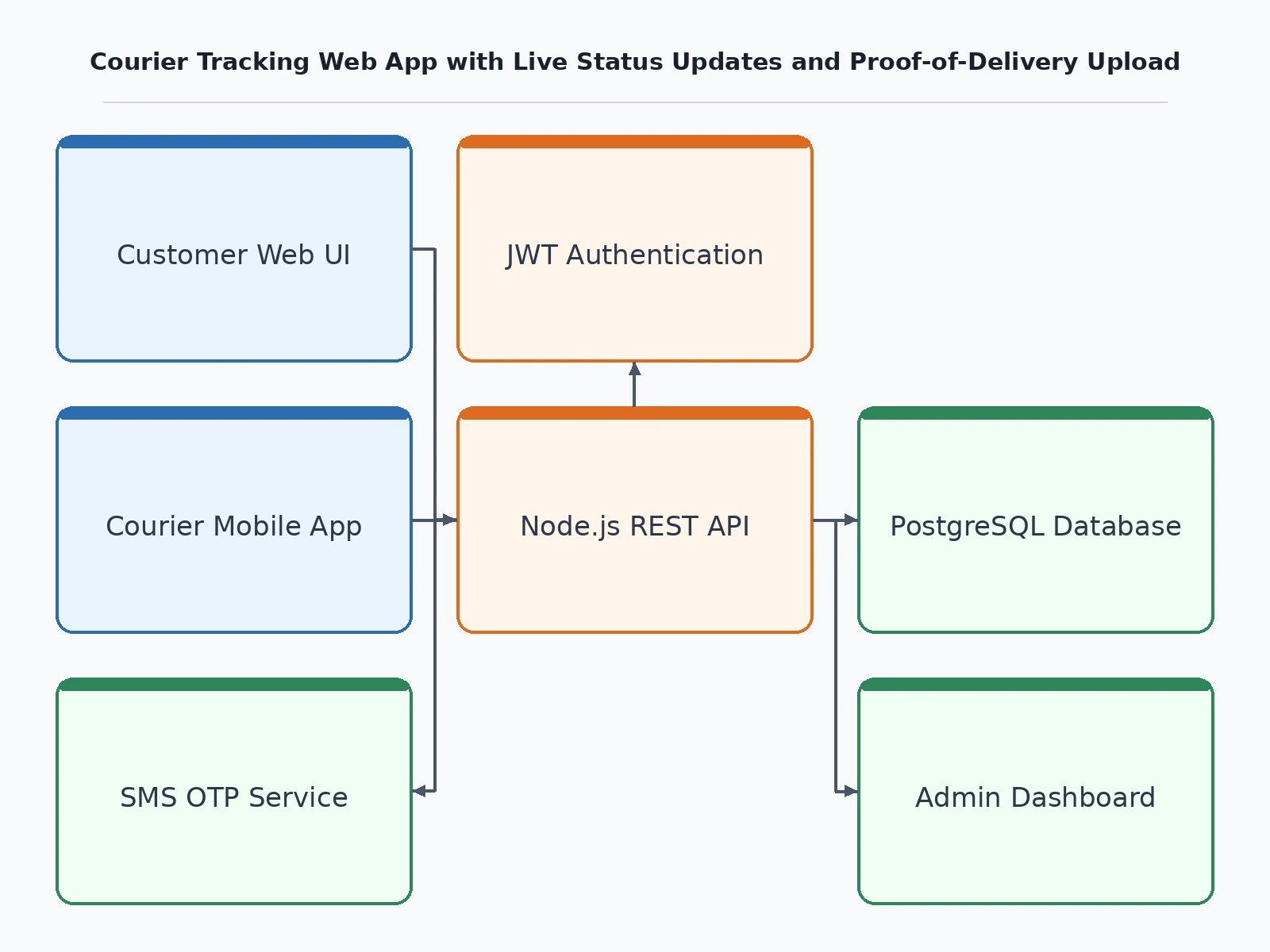
- Node.js + Express (REST API)
- PostgreSQL (parcels, events, users, POD records)
- HTML · CSS · JavaScript (responsive frontend)
- JWT authentication with role-based access
- QR/barcode label generation
- File upload handling for POD photos
- SMS gateway integration for delivery OTP
- Docker deployment configuration
| Parameter | Value |
|---|---|
| User roles | 3 (customer, courier, admin) |
| Tracking statuses | 7 (booked → delivered, design target) |
| AWB format | 14 characters, e.g. PX123456789IN (design target) |
| POD photo size | Approximately 200–500 KB after compression (expected) |
| Signature capture | Touch canvas, stored as PNG (design target) |
| OTP | 4-digit, SMS to receiver (design target) |
| Concurrent couriers | Approximately 50 per deployment (design target) |
| Database | PostgreSQL 14+ |
Project features
- [Public live-tracking page] Enter any AWB number to see an animated status timeline — booked, picked up, in transit, out for delivery, delivered — with per-event timestamps and hub locations.
- [Courier scan-and-update flow] Mobile-friendly screen where couriers select a parcel, scan its QR label and set its status in a few taps; every update is GPS- and timestamp-stamped automatically.
- [Proof-of-delivery upload] Couriers capture a doorstep photo at handover; the app compresses, stores and links it to the parcel record with EXIF-style timestamp metadata.
- [Receiver signature capture] A touch-friendly signature canvas collects the receiver's signature at delivery, stored as an image against the shipment.
- [Delivery OTP verification] A one-time passcode is sent to the receiver's phone and must be entered by the courier before a delivery can be closed.
- [Admin operations dashboard] KPI cards (bookings, on-time rate, delayed count, active couriers), a 7-day volume chart, a delayed-shipments watchlist and per-courier performance scores.
- [QR/barcode AWB labels] Every booking generates a printable AWB label; scanning it opens the parcel directly in the courier flow, removing manual number entry.
- [Role-based access] Separate customer, courier and admin roles with JWT sessions, so couriers can only update their own route's parcels.
What is included
- Complete backend source code (REST API with auth, parcel and event endpoints)
- Responsive frontend for tracking page, courier app and admin dashboard
- PostgreSQL schema with migrations and seed data
- QR/barcode AWB label generator and print template
- POD photo upload, signature canvas and OTP verification modules
- Admin dashboard with volume charts and courier performance views
- API documentation and deployment guide (Docker)
- Project report PDF (architecture, schema design, API contracts, test cases)
- PPT presentation for final review
- Viva Q&A preparation document (REST design, auth, indexing, concurrency)
Limitations & prerequisites
- GPS stamping depends on the courier's device location services; a phone with GPS disabled records the update without coordinates.
- SMS OTP delivery depends on a third-party gateway and the receiver's network; the build includes a resend flow but cannot guarantee sub-minute delivery in low-signal areas.
- The demo dataset is synthetic — real volumes, on-time rates and courier names are illustrative, not measured from a production deployment.
- Real-time push updates use polling in this build; true WebSocket push is documented as future scope.
- Photo storage sizing (approximately 200–500 KB per POD) assumes JPEG compression; RAW uploads would need storage planning for the order's expected volume.
- No built-in payment collection — COD amounts are recorded, not collected, through the app.
Frequently Asked Questions
How does the customer track a parcel?
They open the public tracking page and enter the AWB number from their receipt or QR label. The app fetches the parcel's event history and renders an animated timeline — booked, picked up, in transit, out for delivery, delivered — with timestamps and hub names for every scan.
What counts as proof of delivery?
Three artifacts are captured at handover: a doorstep photo with automatic timestamp, the receiver's signature on a touch canvas, and a 4-digit OTP sent to the receiver's phone that the courier must enter. All three are stored against the shipment before it can be closed.
How do couriers use it in the field?
The courier screen is mobile-friendly: today's parcel list, tap-to-select, scan the QR label to jump straight to a parcel, set status with one tap, then capture the POD photo, signature and OTP. Updates sync to the server and appear on the tracking page immediately.
What does the admin dashboard show?
KPI cards for bookings, on-time rate, delayed shipments and active couriers, a 7-day volume bar chart, a delayed-shipments watchlist with stuck/in-transit flags, and per-courier performance scores so the owner can spot problems early.
Does it work without a smartphone?
The courier flow is designed for phones, but it runs in any modern mobile browser — no app-store install is needed. Status buttons are large and tap-friendly, and the signature canvas works with touch or mouse.
Is this project suitable for a final-year project?
Yes — for Computer Science, IT and Web Development programs. It demonstrates REST API design, relational schema modelling, authentication and roles, file uploads, third-party SMS integration and dashboard analytics in one coherent build.
Components & software requirements
- Node.js + Express (REST API)
- PostgreSQL (parcels, events, users, POD records)
- HTML · CSS · JavaScript (responsive frontend)
- JWT authentication with role-based access
- QR/barcode label generation
- File upload handling for POD photos
- SMS gateway integration for delivery OTP
- Docker deployment configuration
Delivery information
Built-to-order project. Delivery timeline is shared after order confirmation based on current queue.
Support terms
Complete documentation, setup guide, and viva preparation included. Support for setup and explanation provided.
Download free synopsis (PDF)
Enter your name and WhatsApp number — the synopsis PDF downloads immediately. We may send occasional project updates on WhatsApp; no spam.