
More project photos (2)
The problem
A mid-sized coaching institute runs hundreds of students across dozens of batches, and most still manage it in registers and spreadsheets: admissions on paper forms, attendance in notebooks, fee dues chased by phone. The data exists but never becomes insight — nobody knows which batch is under-enrolled or how this month's collection compares to last. The engineering gap is an integrated admin system where admissions, batches, attendance and fees share one database, so the dashboard can answer those questions instantly. This project builds that system: a KPI dashboard (students, batches, monthly collection, daily attendance), batch occupancy tracking, a searchable student registry with fee status, and a fee-management module with dues lists, payment recording and collection trends. The shared data model is what makes it more than four separate tools.
How it works
- The admin creates batches (course, schedule, capacity) and assigns faculty; admissions add students to batches with fee plans.
- Teachers mark daily attendance per batch; the system aggregates institute-wide attendance percentages.
- The accountant records fee payments against student ledgers; digital receipts are generated per transaction.
- The dues module lists outstanding balances ranked by amount with due dates for follow-up.
- The dashboard recomputes KPIs — active students, batch count, monthly collection, attendance — from the shared database.
- Collection trends and batch occupancy reports support enrollment and pricing decisions each term.
Tech stack:
- React (frontend SPA)
- Node.js + Express (REST API)
- PostgreSQL (relational schema)
- JWT authentication, role-based access
- PDF receipt generation
- Deployed as containerized services
| Parameter | Value |
|---|---|
| Architecture | Full-stack web app (SPA + REST API + RDBMS) |
| User roles | 3 (admin, teacher, accountant) |
| Seed data | 1,248 students, 36 batches (expected) |
| Fee ledger | Per-student transactions with receipts |
| Attendance | Daily batch-wise marking |
| Auth | JWT with role-based route guards |
| Demo | Interactive multi-view web demo |
Project features
- [Admin dashboard] KPI cards for active students, running batches, monthly fee collection and daily attendance, with trend indicators.
- [Batch management] Batch creation with capacity, faculty assignment and live occupancy bars against enrollment.
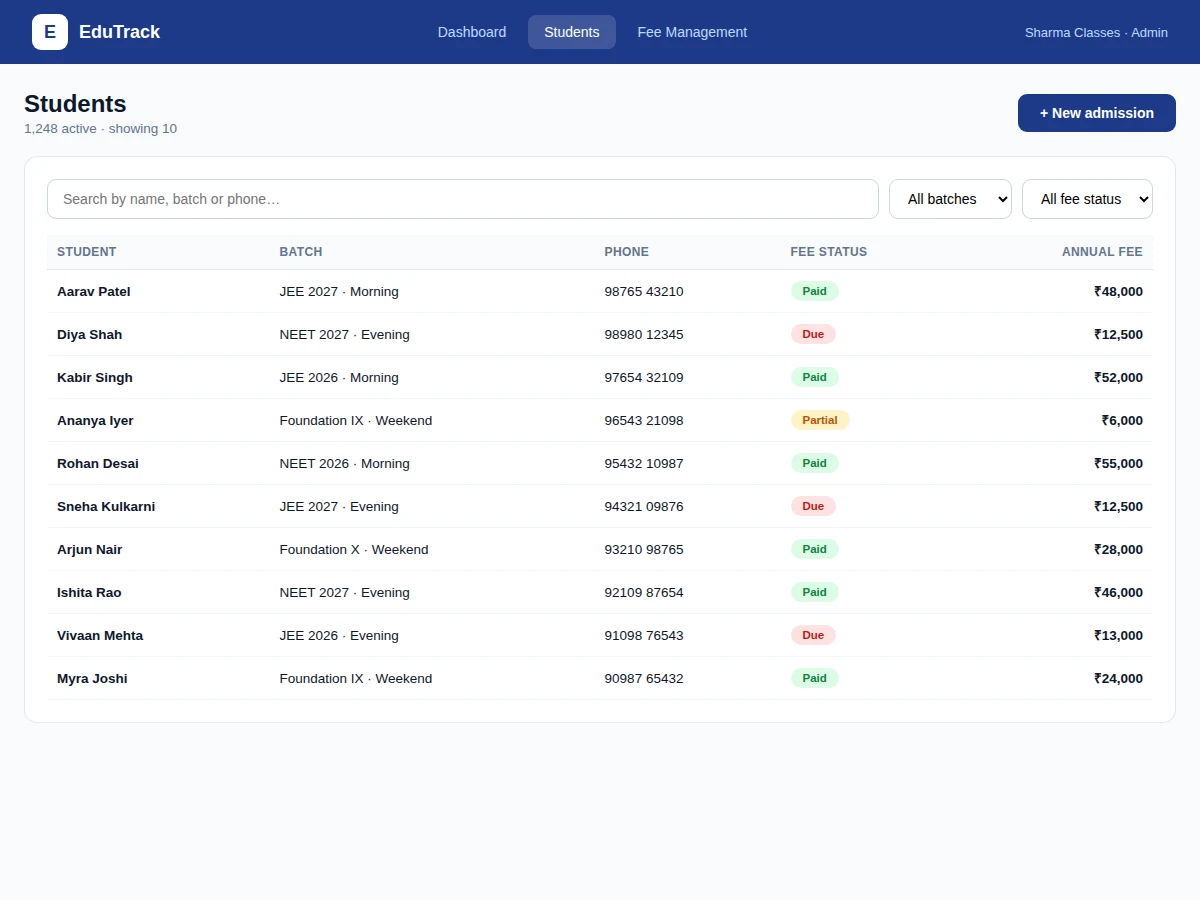
- [Student registry] Searchable, filterable student records with batch, contact and fee-status tracking.
- [Attendance tracking] Daily batch-wise attendance marking with institute-wide percentage reporting.
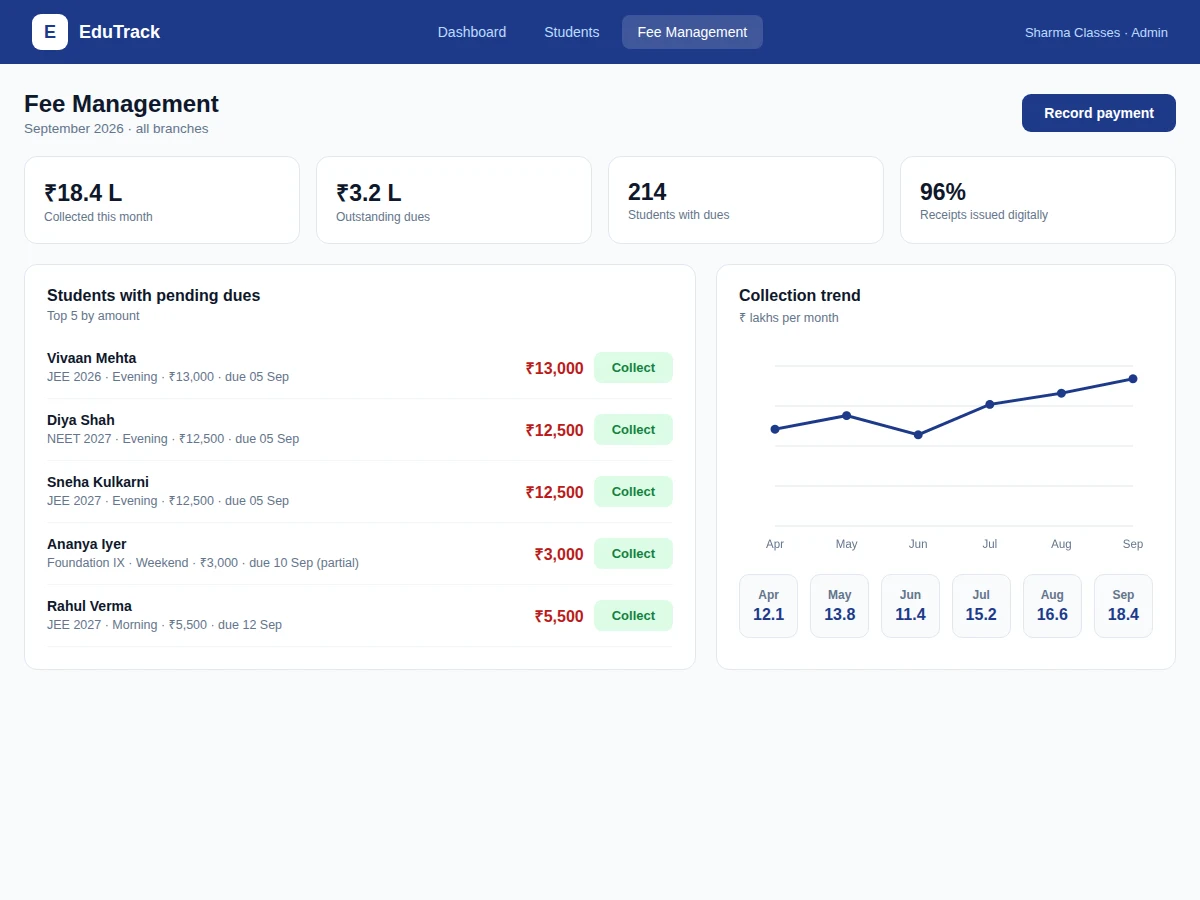
- [Fee collection] Payment recording with digital receipts, monthly collection trends and per-student fee ledgers.
- [Dues follow-up] Outstanding-dues list ranked by amount with due dates and one-click payment recording.
- [Role-based access] Admin, teacher and accountant roles with appropriate permissions on admissions, attendance and fees.
What is included
- Complete frontend + backend source code
- Database schema with migrations and seed data
- REST API documentation
- Fee-ledger and receipt-generation implementation
- Attendance-marking workflow
- Project report PDF (background, system design, database design, fee workflows)
- PPT presentation for final review
- Viva Q&A preparation document (full-stack architecture, relational modeling, role-based access, reporting)
Limitations & prerequisites
- Single-institute deployment — multi-branch consolidation is future scope.
- Online fee payment is stubbed; real gateway integration is future scope.
- Timetable/scheduling conflicts are not auto-detected in the demo build.
- SMS/WhatsApp fee reminders are documented but stubbed; production wiring is future scope.
- Demo seed data is illustrative; production needs the institute's real records migrated.
Frequently Asked Questions
What does the system cover?
The full admin loop of a coaching institute: admissions into batches, daily attendance, fee collection with dues follow-up, and a dashboard that turns all of it into KPIs and trends — one shared database underneath.
How do the three roles differ?
Admins manage batches, admissions and everything; teachers mark attendance for their batches; accountants record payments and follow up dues. JWT role guards enforce this on every route.
How does fee tracking work?
Each student has a fee ledger: the annual fee plan, payments recorded with dates and modes, digital receipts per transaction, and an outstanding balance that feeds the dues list automatically.
What reports does the dashboard give?
Active students, running batches, monthly collection with trend, daily attendance percentage, batch occupancy vs capacity, and month-wise collection history — the numbers an institute owner actually checks.
Can parents see anything?
Not in the demo build — a parent login showing attendance and fee status is documented as future scope in the report.
Is this project suitable for a final-year project?
Yes — for Computer Science, IT and Web Development programs. It demonstrates full-stack development, relational database design and real administrative workflows. Suitable for B.E./B.Tech final-year projects in Computer Science, IT and Web Development.
Components & software requirements
- React (frontend SPA)
- Node.js + Express (REST API)
- PostgreSQL (relational schema)
- JWT authentication, role-based access
- PDF receipt generation
- Deployed as containerized services
Delivery information
Built-to-order project. Delivery timeline is shared after order confirmation based on current queue.
Support terms
Complete documentation, setup guide, and viva preparation included. Support for setup and explanation provided.