
More project photos (2)
The problem
Walk-in restaurants lose money twice: once when a table sits empty because a booking never showed up, and again when walk-ins leave because nobody could tell them how long the wait would be. Most small restaurants still run reservations on a paper diary and the host's memory — no confirmations, no reminders, no waitlist discipline, and no record of which tables turn fastest. This project replaces the diary with a purpose-built web app. Guests pick a date, time slot and table from a live floor map; the moment they confirm, the table is locked and an SMS confirmation carrying a booking reference code goes out. Before the slot, a reminder SMS nudges the guest and offers a one-word reply to cancel, which releases the table back to the pool instantly. Walk-ins join a digital waitlist with a quoted wait time, and the system texts each party the moment their table is ready. On the host side, one console shows every table's live state plus occupancy, covers and waitlist length for the service, so the floor is visible instead of guessed.
Picks a date, slot and table on the floor map, or joins the walk-in waitlist.
Follow the working sequence
How it works
- The guest opens the booking page, picks a date from the 7-day strip, a time slot and party size; the app lists only tables that fit the party.
- On confirm, the backend creates the reservation inside a database transaction so two guests can never lock the same table, and generates a unique reference code.
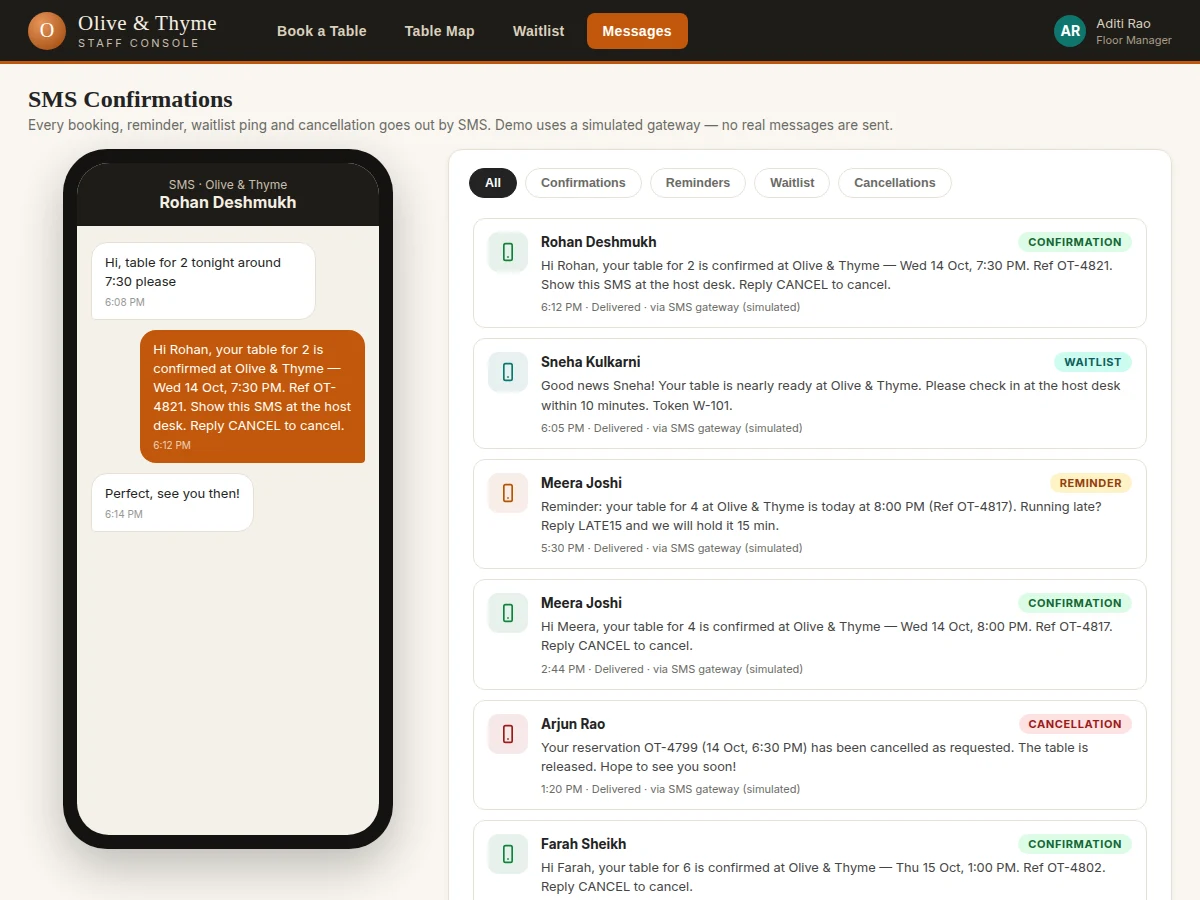
- The SMS service sends the confirmation text with date, time, table and reference code, and queues a reminder for two hours before the slot.
- Walk-ins are added to the waitlist with a quoted wait derived from rolling average table-turn times; each party gets an SMS with their token number.
- When a table frees up, the host marks it on the map, clicks Notify on the next matching party, and the system texts them to check in within ten minutes.
- A guest replying CANCEL (or the host cancelling) releases the table immediately, updates the map, and the next waitlist party is notified in turn.
Tech stack:
- Node.js + Express (REST API)
- PostgreSQL (reservations, tables, waitlist schema)
- HTML5 · CSS3 · JavaScript (front end)
- Twilio SMS API (confirmations, reminders, waitlist pings)
- Redis (wait-time estimates and caching)
- JWT authentication (staff roles)
- Docker (deployment)
| Parameter | Value |
|---|---|
| Tables supported | Up to 60 per restaurant (design target) |
| Booking window | 7 days ahead (configurable) |
| SMS confirmation latency | Typically under 10 seconds via gateway (expected) |
| Reminder lead time | 2 hours before slot (configurable) |
| Wait-time quote basis | Rolling 7-day average table-turn data (design target) |
| Concurrent staff sessions | Up to 5 host logins (design target) |
| Browser support | Latest 2 versions of Chrome, Edge, Firefox (expected) |
| Demo dataset | 14 tables across 3 zones, 5 waitlist parties (as shipped) |
Project features
- [Visual table map] A live floor plan of the restaurant's tables with color-coded states — available, booked, seated, cleaning — switchable between lunch and dinner services, with per-table capacity and type.
- [Online booking with instant SMS confirmation] Guests choose date, slot, party size and table; confirming locks the table and fires an SMS with a booking reference code, no account needed.
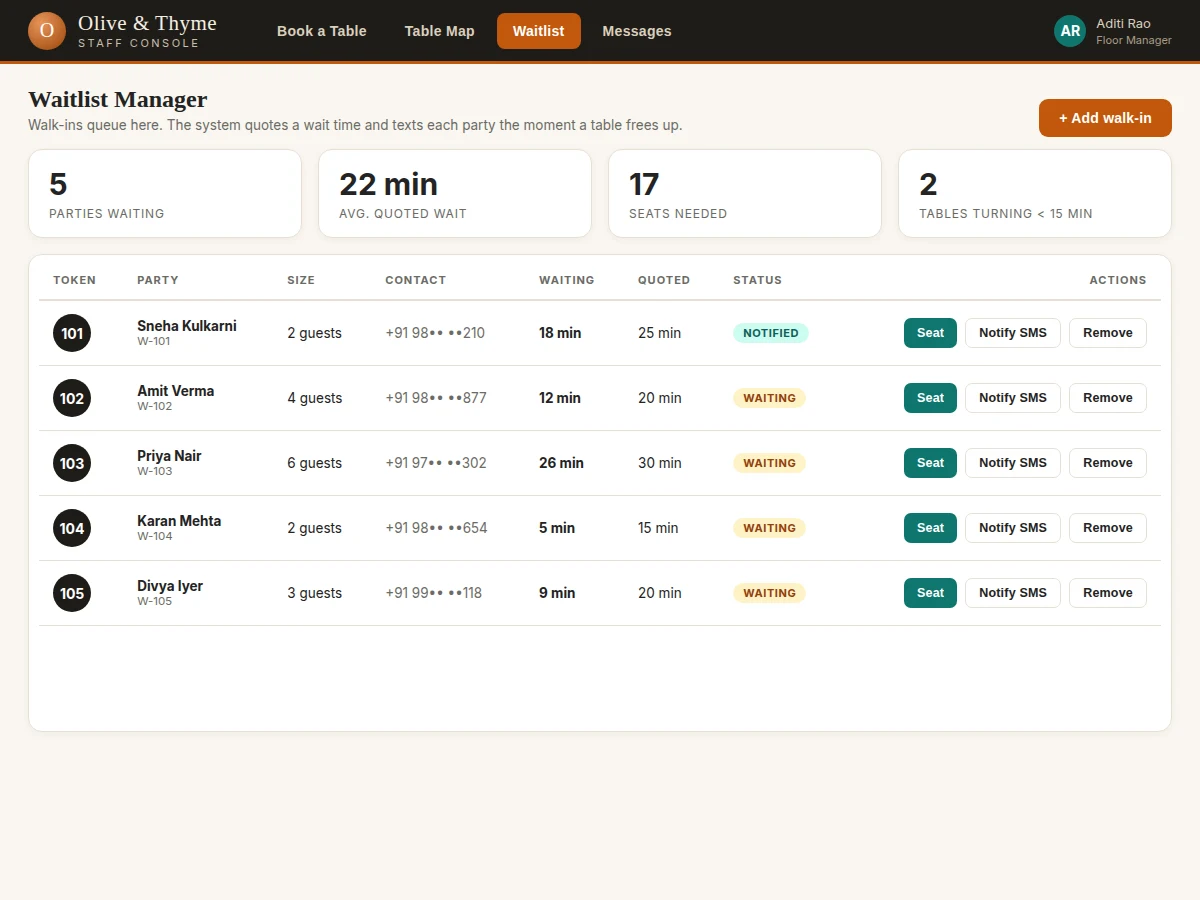
- [Waitlist manager] Walk-ins are queued with token numbers, party sizes and quoted wait times; the host sees waiting time, seats needed and tables turning within 15 minutes at a glance.
- [Table-ready SMS pings] One click notifies the next party by SMS when their table frees up; seating them clears them from the queue and updates the map.
- [Reminder and cancellation SMS] Guests get a reminder before their slot with a reply-to-cancel option; cancellations release the table instantly and are logged.
- [Host service dashboard] Live occupancy percentage, upcoming bookings, parties waiting, average table-turn time and covers for the service, refreshed as the floor changes.
- [Booking reference codes] Every reservation gets a unique alphanumeric reference used in all SMS messages and at the host desk for check-in.
Future scope (not implemented): online payment or deposit collection for bookings, multi-branch restaurant support, guest loyalty and repeat-visit analytics.
What is included
- Complete web app source code (front end + REST API)
- PostgreSQL schema and seed data for a 14-table restaurant
- SMS gateway integration module (Twilio; sandbox/simulated mode in the demo)
- Project report PDF (background, system design, schema, methodology, testing)
- PPT presentation for final review
- Viva Q&A preparation document (REST design, concurrency control, SMS APIs, schema choices)
Limitations & prerequisites
- The demo ships with a simulated SMS gateway — sending real texts needs a Twilio account and, in India, DLT sender-ID registration, which the buyer arranges separately.
- Wait-time quotes are heuristic rolling averages, not guarantees; an unusually slow service will overshoot them.
- Bookings are confirmation-only with no payment or deposit step, so reminders reduce no-shows but cannot eliminate them.
- Single-restaurant deployment as built; multi-branch support is future scope.
- Table states change only when the host updates them — the map is exactly as current as the staff using it.
Frequently Asked Questions
How do the SMS messages actually go out?
Through the Twilio SMS API, called from the Node.js backend whenever a booking is created, a reminder falls due, a waitlist party is notified, or a cancellation happens. The demo runs a simulated gateway so no real messages or credits are needed to evaluate it.
Does the waitlist really text guests automatically?
The host clicks Notify on the next party and the SMS goes out immediately; the party's status flips to Notified and the message is logged. Seating them from the same row clears the queue entry and frees the flow for the next party.
What happens when a guest cancels?
A guest replies CANCEL to any SMS, or the host cancels from the console. The reservation is marked cancelled, the table returns to available on the map instantly, and the next matching waitlist party can be notified without delay.
Can the restaurant change tables, timings and slots?
Yes — table count, capacities, zones, slot list and the reminder lead time are all configuration, not hard-coded. The demo seeds a 14-table restaurant across a main hall, window row and patio, which the buyer replaces with their own floor plan.
Is this project suitable for a final-year project?
Yes — for Computer Science, IT and Web Development programs. It demonstrates full-stack development, relational schema design, transactional concurrency control, third-party API integration and a genuinely usable product with clear viva talking points.
Components & software requirements
- Node.js + Express (REST API)
- PostgreSQL (reservations, tables, waitlist schema)
- HTML5 · CSS3 · JavaScript (front end)
- Twilio SMS API (confirmations, reminders, waitlist pings)
- Redis (wait-time estimates and caching)
- JWT authentication (staff roles)
- Docker (deployment)
Delivery information
Built-to-order project. Delivery timeline is shared after order confirmation based on current queue.
Support terms
Complete documentation, setup guide, and viva preparation included. Support for setup and explanation provided.
Download free synopsis (PDF)
Enter your name and WhatsApp number — the synopsis PDF downloads immediately. We may send occasional project updates on WhatsApp; no spam.