
More project photos (2)
The problem
A farm produce marketplace web app connecting farmers and local buyers removes the middleman from the first mile of farm trade. Farmers list crop, variety, quantity in quintals and price per quintal; buyers search by crop or district, see stock next to a mandi reference price, negotiate in chat, and order against a delivery slot. Small farmers sell through commission agents or mandis, where transport, waiting time and commission eat thin margins, while small buyers — kirana shops, tiffin services, hostels — overpay for the same produce through wholesalers. Neither side can easily find the other. This project builds that meeting point: a searchable marketplace with dual roles, a negotiation simulation modelling real haggling, and a farmer dashboard for listings and orders. The demo build ships 16 sample listings across 6 crops with a working order flow, demonstrating the full buyer journey end to end.
How it works
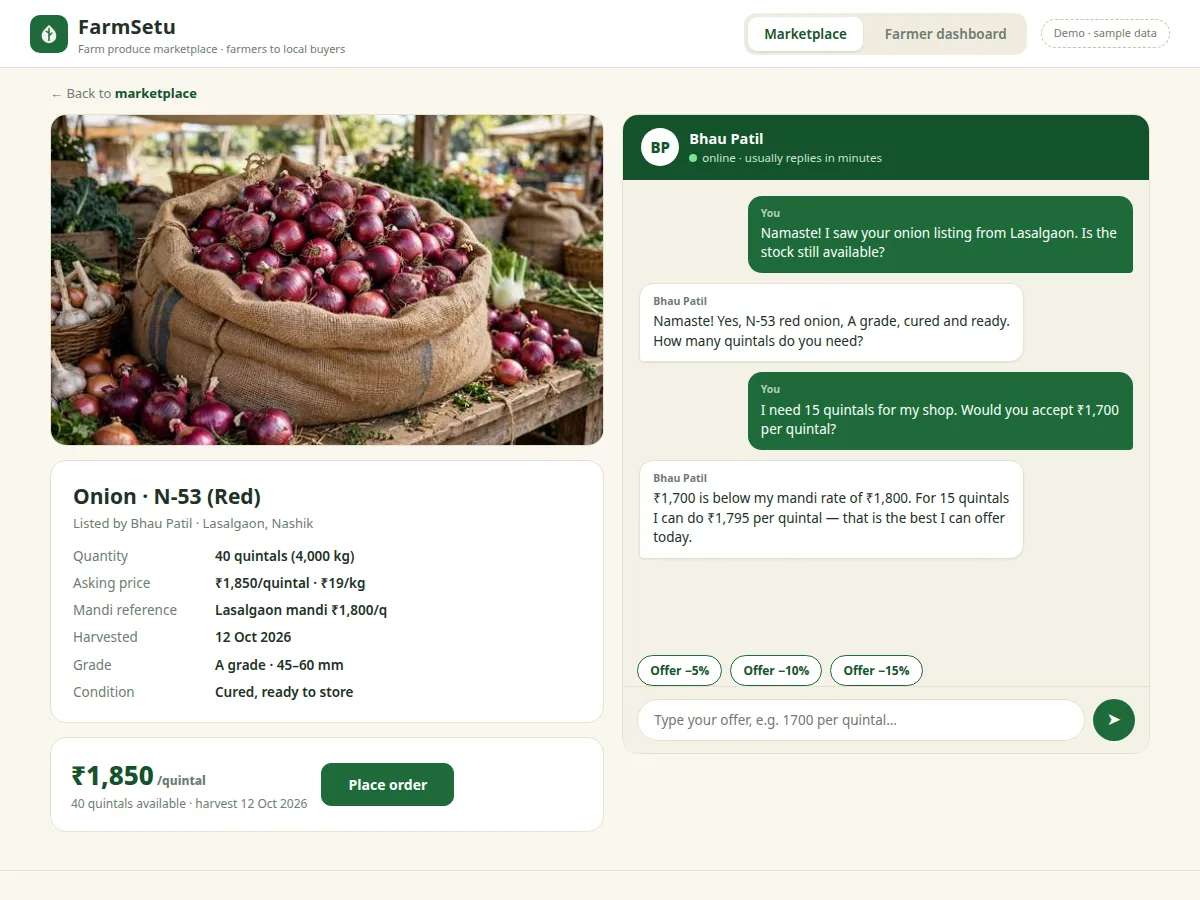
A farmer creates a listing — crop, variety, quantity in quintals, asking price, harvest date, village — and it appears on the marketplace home as a photo card with a mandi reference price. A buyer searches for the crop, filters by district, and opens the listing to see the full specification sheet. Price is where the two sides meet: the buyer opens the negotiation chat, types an offer per quintal, and the simulated farmer accepts near the ask, counters within a margin, or declines below a floor tied to the mandi rate. Once the price is agreed, the buyer selects a quantity and one of six delivery slots across three days and confirms; the order appears in the farmer dashboard as pending and the listing's available stock drops. The farmer accepts or declines the order, completing the loop from harvest listing to confirmed sale.
- A farmer posts a listing: crop, variety, quantity in quintals, price per quintal, harvest date, village/district and a produce photo (1 photo per listing in the demo build).
- The listing renders as a marketplace card with the mandi reference price beside the asking price, anchoring the buyer's expectation before negotiation starts.
- A buyer searches or filters by crop and district, opens the detail page, and negotiates in chat — the simulated farmer accepts offers at 95% of the ask or above, counters in the 80–95% band, and declines below the mandi floor.
- The buyer confirms quantity and picks one of 6 delivery slots (3 days × 8 AM–12 PM / 2 PM–6 PM); available stock reduces immediately and the order is recorded.
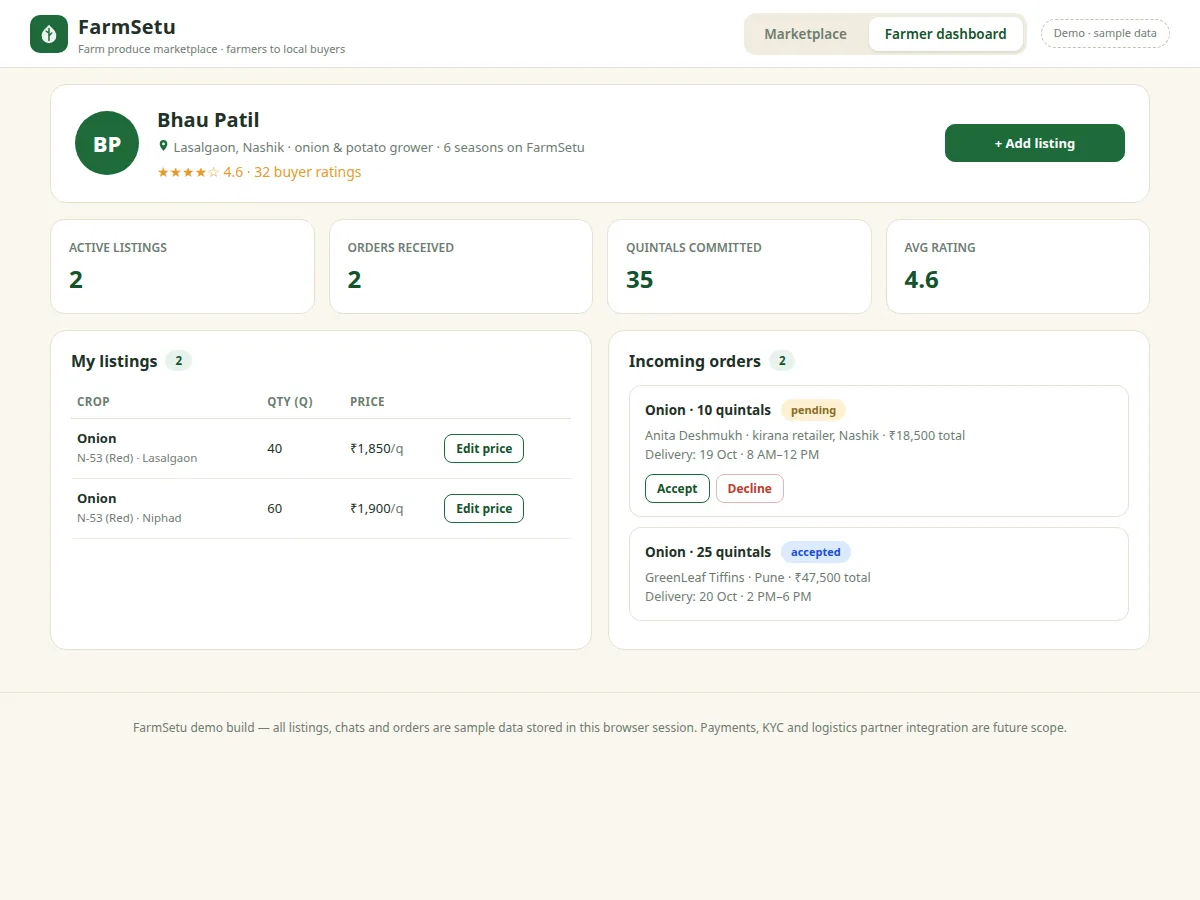
- The order lands in the farmer dashboard's incoming-orders panel, where the farmer accepts or declines it; accepted orders count toward the committed-quintals statistic.
- Online payment stays optional: the base build confirms orders without payment; UPI/card collection via Razorpay can be added as a module.
Tech stack:
- React.js (marketplace + farmer dashboard UI)
- Node.js + Express (REST API)
- MongoDB (listings, orders, users, chat)
- JWT (buyer/farmer authentication)
- Socket.IO (real-time negotiation chat)
- HTML5 · CSS3 · JavaScript (working single-file demo)
- Razorpay (optional online payments)
- Git (version control)
| Parameter | Value |
|---|---|
| Demo listings | 16 listings across 6 crops (demo build, sample data) |
| Photos per listing | 1 photo (demo build; design target: up to 4 per listing) |
| Delivery slots | 6 slots — 3 days × 2 windows: 8 AM–12 PM, 2 PM–6 PM |
| Price unit | ₹/quintal primary; ₹/kg toggle (1 quintal = 100 kg) |
| Negotiation thresholds | Accept ≥ 95% of ask · counter in 80–95% band · decline below (simulation rules) |
| User roles | 2 roles: buyer, farmer |
| Authentication | JWT-based login (design target for production build) |
| Payments | Optional module via Razorpay payment gateway (not in base build) |
Project features
FarmSetu ships four working capabilities that the student can demonstrate live. The marketplace home lists every farmer listing as a card with a real produce photo, quantity in quintals, a price that toggles between per-quintal and per-kilo, and a nearby mandi reference price that anchors the negotiation before it starts. The listing detail page pairs a specification sheet with a negotiation chat: the buyer types an offer and the simulated farmer accepts, counters or declines using mandi-aware rules. The order flow converts agreement into action — the buyer picks a quantity, chooses one of six delivery slots across three days, and the order lands in the farmer's dashboard. Finally, the farmer dashboard gives the seller a profile, statistics and two working panels: a listings table with price editing, and an incoming-orders panel with accept and decline actions.
Implemented in the demo build:
- [Farmer listings with produce photos] Farmers create listings with crop, variety, quantity, harvest date, village and district; in the demo build each listing carries one real produce photo (16 listings across 6 crops).
- [Buyer search, crop filters and sorting] Buyers search by crop, farmer, village or district, filter by crop chip, and sort by price or quantity — all client-side and instant in the demo.
- [Quintal-to-kg price toggle] Every price toggles between ₹/quintal and ₹/kg (1 quintal = 100 kg), so retail buyers who think in kilos and farmers who quote in quintals negotiate without unit confusion.
- [Mandi-anchored negotiation chat] Each listing shows a nearby mandi reference price, and the simulated farmer accepts, counters or declines offers relative to that anchor — modelling real haggling instead of free-form chat.
- [Order placement with delivery slots] Orders capture quantity and one of 6 delivery slots (3 days × morning 8 AM–12 PM / evening 2 PM–6 PM); confirming reduces available stock and routes the order to the farmer's dashboard.
- [Farmer dashboard] Profile with buyer ratings, four statistics tiles, a listings table with working price editing, and an incoming-orders panel with accept and decline actions that change order state.
Optional / future scope (not in the base build):
- [Online payments] Payment collection is intentionally excluded from the base build; UPI and card collection through the Razorpay payment gateway is an optional add-on, with orders marked paid before farmer acceptance.
What is included
- Complete source code: React frontend, Node.js + Express backend, MongoDB schemas
- Working single-file demo with 16 sample listings and the full order flow
- Database setup guide and REST API documentation
- Negotiation-chat simulation rules, documented and editable
- Project report PDF (background, methodology, architecture, screenshots)
- PPT presentation for final review
- Viva Q&A preparation document (marketplace logic, auth, real-time chat, trade-offs)
Limitations & prerequisites
- Farmer KYC and trust verification are out of scope — the base build has no identity verification for sellers.
- No logistics partner is included; pickup is assumed at the farm gate or farmer-arranged transport.
- Online payment is optional and not part of the base build; orders are confirmed without payment.
- All demo data is sample data — prices, mandi references and farmer profiles are illustrative, not live market data.
- The negotiation chat is a simulation with fixed rules; there is no real farmer on the other end.
- Single-language (English) UI in the demo build; regional-language support is future scope.
- Built for one region/district scale; multi-region scaling and performance testing are not included.
Frequently Asked Questions
How does the mandi reference price work?
Each listing shows the asking price next to a nearby mandi's reference price for the same crop, so the buyer sees the fair band before negotiating. The simulation uses that anchor: offers near the ask are accepted, mid-range offers are countered, and offers far below the mandi floor are declined. In production the reference line is designed to pull from public price data such as the eNAM live price dashboard.
Is the negotiation chat with a real farmer?
No — the chat is a simulation with documented rules: accept at 95% of the asking price or above, counter within the 80–95% band, decline below it against the mandi floor. That keeps the demo self-contained and viva-safe, because the student can explain every reply rule. A real buyer-to-farmer chat is straightforward future scope using the same message panel wired to Socket.IO.
How do payments work in this project?
Payments are deliberately left out of the base build — orders are confirmed with quantity and delivery slot only, which matches how farm-gate trade actually settles in cash or UPI on delivery. Online collection is an optional module: UPI and card payments through the Razorpay payment gateway, with the order marked paid before the farmer accepts. Keeping it optional also keeps the project scope honest for a final-year timeline.
What can the farmer do in the dashboard?
The farmer gets a profile with ratings, four statistics tiles (active listings, orders received, committed quintals, average rating), a listings table with working price editing, and an incoming-orders panel with accept and decline buttons that change order state immediately. Adding a listing publishes it to the marketplace instantly in the demo, so the whole sell side is demonstrable in the viva.
Is this project suitable for a final-year project?
Yes — for Web Development and Computer Science programs. It covers the full web stack: a two-role UI, REST API design, database modelling for listings and orders, real-time chat, and a simulation whose rules the student can explain and defend. The scope is realistic for one semester, and the optional payments module gives a clean extension if the examiner asks for more.
Components & software requirements
- React.js (marketplace + farmer dashboard UI)
- Node.js + Express (REST API)
- MongoDB (listings, orders, users, chat)
- JWT (buyer/farmer authentication)
- Socket.IO (real-time negotiation chat)
- HTML5 · CSS3 · JavaScript (working single-file demo)
- Razorpay (optional online payments)
- Git (version control)
Delivery information
Built-to-order project. Delivery timeline is shared after order confirmation based on current queue.
Support terms
Complete documentation, setup guide, and viva preparation included. Support for setup and explanation provided.
Download free synopsis (PDF)
Enter your name and WhatsApp number — the synopsis PDF downloads immediately. We may send occasional project updates on WhatsApp; no spam.