
More project photos (2)
The problem
The Previous Year Question Paper Repository Web App is a searchable online library where engineering students find past university question papers by university, branch, semester, subject, exam session and year, then read each paper instantly in an in-browser PDF preview. It targets a daily student frustration: question papers today live scattered across Telegram groups, seniors' Google Drives and photocopy-shop binders, so tracking down the exact Data Structures paper for SPPU Semester 4, May 2023, can cost hours of asking around. The repository replaces that hunt with one search box and six structured filters, returns the right paper in seconds, and renders it page-by-page without forcing a download first. Contributors upload missing papers through a moderation queue, so every listing carries verified metadata — university, subject code, marks and duration — instead of a mystery filename. Download counts and a request-a-paper board then surface which papers the community actually needs next.
University exam preparation in Indian engineering colleges runs on previous-year papers, yet no single dependable source exists for them. Students collect papers piecemeal — a forwarded PDF here, a senior's folder there — with no way to confirm which university, semester or exam session a paper belongs to, and a mislabeled paper wastes an evening of study. Campus photocopy shops keep paper binders, but they are incomplete and tied to one location. The repository closes this gap with structured metadata on every paper: the student who opens a listing sees the university, branch, semester, subject code, year, session, marks and duration before reading a single question. Because the build is prepared fresh for each order, the student can also explain every design decision in the viva — why metadata is normalized in PostgreSQL, why files live in object storage, and why previews render on the client.
Types a subject or picks filters; reads the paper in the browser preview.
Follow the working sequence
How it works
End to end, the Previous Year Question Paper Repository Web App works like this: a student types a subject or code into the search box or picks values across the six filters; the React frontend sends those parameters to the Node.js API, which builds one parameterized PostgreSQL query combining full-text search with exact metadata matches and returns the matching papers in milliseconds. Each card shows verified metadata — university, branch, semester, subject code, year, session, marks and duration — plus its download count. Opening a paper launches the PDF.js preview, which fetches the file from object storage and renders it page-by-page; downloading uses a short-lived signed URL instead of an exposed file path. An uploaded PDF lands in a staging bucket as a pending record invisible to students; a moderator checks the scan, corrects the metadata and approves it, flipping the record to published. Every download and request vote increments counters that feed the trending ranking.
- The student sets filters or types a query; the React frontend sends the parameters to the Node.js/Express API as one request.
- The API builds a parameterized PostgreSQL query combining full-text search on subject and code with exact metadata filters, and returns matching papers.
- Each result card renders verified metadata — university, branch, semester, subject code, year, session, 70 marks, 2.5-hour duration — with its download count.
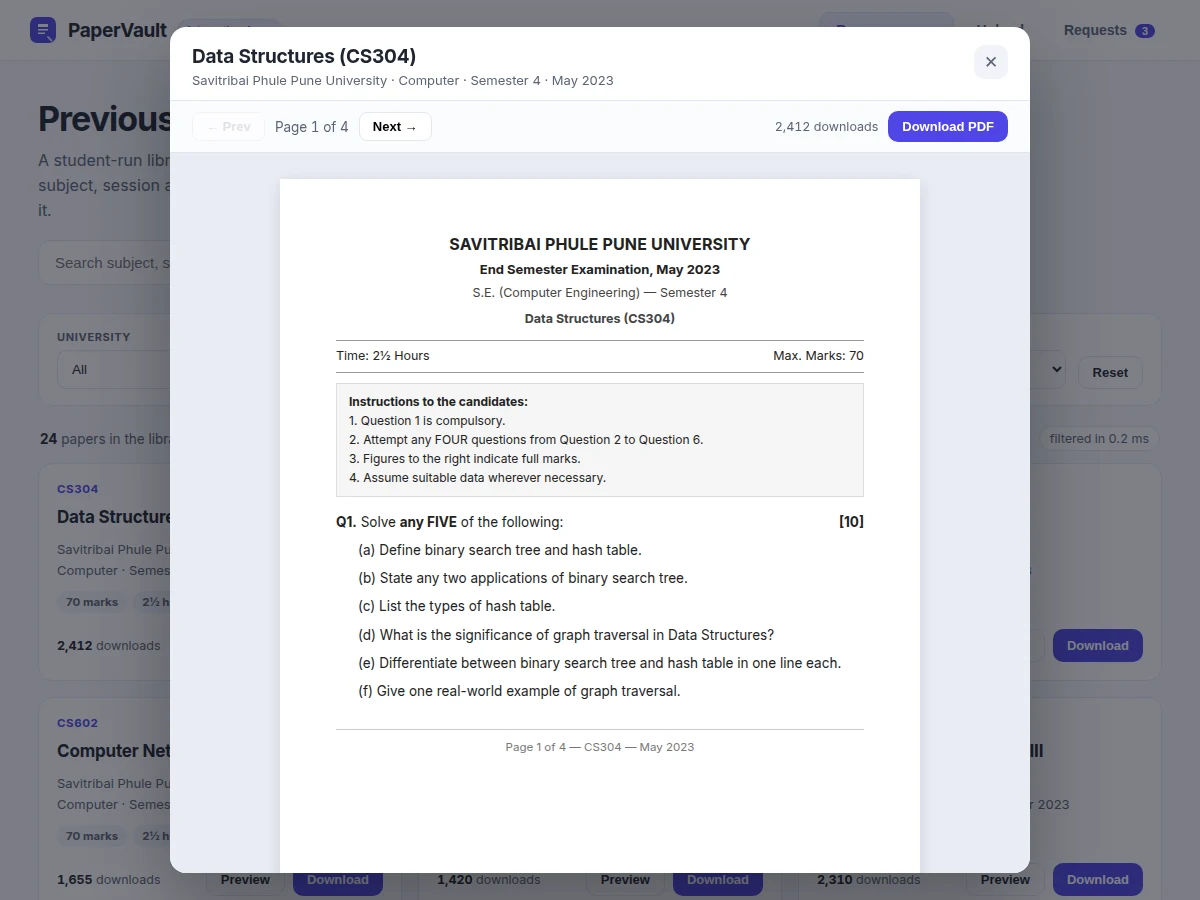
- Opening a paper launches the PDF.js preview, which streams the PDF from object storage and renders it page-by-page in the browser.
- Downloads use short-lived signed URLs (15-minute expiry, design target); the raw storage path is never exposed to the browser.
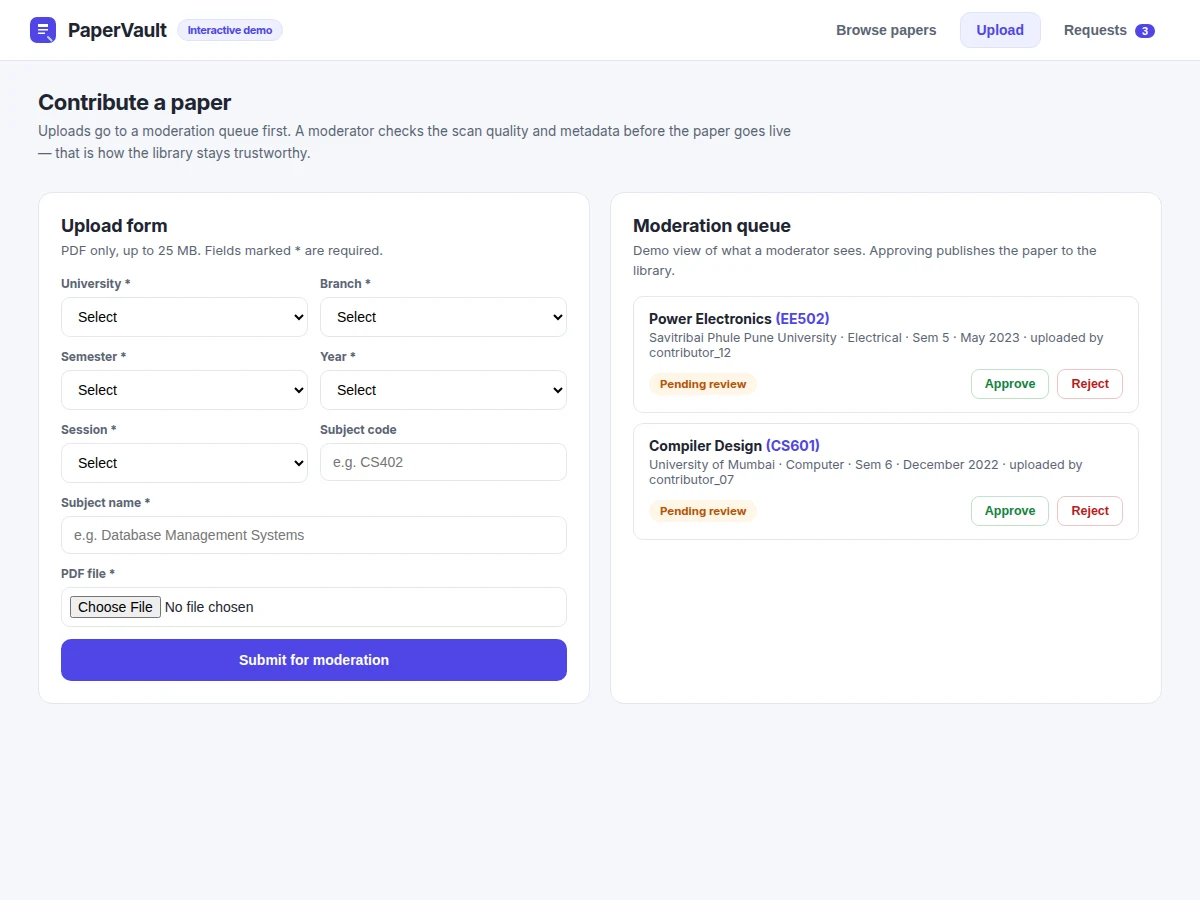
- Contributor uploads wait in a pending queue until a moderator verifies quality and metadata, then approves them into the public catalogue.
Tech stack:
- React (frontend UI)
- Node.js · Express (REST API)
- PostgreSQL (metadata + full-text search)
- PDF.js (in-browser preview)
- S3-compatible object storage (paper files)
- JWT authentication (roles)
- Docker · docker-compose (deployment)
- Git (version control)
| Parameter | Value |
|---|---|
| Filter dimensions | 6 (university, branch, semester, subject, session, year) |
| Demo seed catalogue | 24 papers across 2 universities (illustrative demo data) |
| Filter + search time | Under 1 ms on the demo seed (measured 0.4 ms on the build machine) |
| Preview pages | 4 pages per paper (demo rendering) |
| Upload limit | 25 MB per PDF (design target) |
| Accepted format | PDF only |
| Typical paper | 70 marks · 2.5 hours (typical SPPU end-semester pattern) |
| Download link expiry | 15 minutes per signed URL (design target) |
| Concurrent users | 50 users on a single container (design target) |
| User roles | 4 (student, contributor, moderator, admin) |
Project features
The Previous Year Question Paper Repository Web App stands on four capabilities that map directly to how students actually hunt for papers. First, six-dimension filtering plus full-text search: university, branch, semester, subject, exam session and year combine with a search box over subject names and codes, so the exact paper surfaces in one query — the demo filters its full 24-paper seed catalogue in under 1 ms (measured 0.4 ms on the build machine). Second, the in-browser PDF preview: every paper opens as a page-by-page reader rendered with PDF.js, with page navigation and a download counter, so students verify the paper before downloading anything. Third, the moderated upload queue: contributor uploads sit invisible until a moderator checks scan quality and corrects metadata, which is what keeps the library trustworthy as it grows. Fourth, the request-a-paper board: students request missing papers and vote, giving uploaders a demand-ranked hit list.
- [Six-dimension filter + text search] Combine university, branch, semester, subject, exam session and year filters with a search box over subject names and codes; results re-render instantly on every change.
- [In-browser PDF preview] Every paper opens in a page-by-page reader rendered with PDF.js — page navigation, a download button and a live download counter — with no forced download.
- [Moderated upload queue] Contributor uploads land in a staging area invisible to students; a moderator verifies scan quality and metadata, then approves or rejects each submission.
- [Download counts and trending] Each paper carries a download counter that increments on every download, feeding a download-ranked list of the most-used papers.
- [Request-a-paper board] Students request papers the library lacks and vote on others' requests; the board sorts by votes so uploaders see demand first.
- [Role-based access] Four roles — student, contributor, moderator and admin — with JWT authentication; only moderators and admins can publish uploads.
- [Responsive student-first UI] The interface is built mobile-first, since most students browse from phones; filters collapse cleanly and the preview reader fits small screens.
Optional customizations (separate scope, not in the base build): email alerts when a requested paper goes live; a companion Android app; full-text search inside PDF content using an OCR pipeline.
Future scope: university partnerships for official paper feeds; multi-language question paper support.
What is included
- Complete React frontend source code
- Node.js/Express REST API source with JWT authentication
- PostgreSQL schema, migrations and seed data scripts
- PDF.js preview integration with page navigation
- Upload and moderation-queue module with role checks
- Request-a-paper board module with voting
- Docker and docker-compose deployment files with setup guide
- Project report PDF (background, architecture, schema design, API reference)
- PPT presentation and viva Q&A preparation document
Limitations & prerequisites
- Preview fidelity follows the uploaded scan — a skewed phone photograph of a paper renders as-is; the build does not deskew, denoise or OCR uploads.
- Search covers metadata (subject, code, university, branch) only; text inside the PDFs themselves is not indexed in the base build.
- Uploads are PDF-only with a 25 MB cap (design target); large scanned bundles must be split before upload.
- Download links are signed URLs with 15-minute expiry (design target); an expired link needs a fresh page load.
- The demo seed ships 24 illustrative papers across 2 universities; production content depends on real contributor uploads.
- The base build targets a single container (approximately 50 concurrent users, design target); horizontal scaling is future scope.
Frequently Asked Questions
What does the repository actually store?
It stores PDF files of previous-year university question papers plus structured metadata for each: university, branch, semester, subject name and code, exam session, year, marks and duration. The PDFs live in object storage while the metadata lives in PostgreSQL, which is what the six filters and the search box query. Students browse the metadata and preview the PDF in the browser before downloading. The demo ships with 24 illustrative papers across SPPU and the University of Mumbai; the production library grows through the moderated upload queue.
How does the PDF preview work without downloading?
The preview uses PDF.js, Mozilla's open-source PDF renderer, which runs entirely in the browser. When a student opens a paper, the app fetches the PDF from object storage and PDF.js draws each page onto the screen with page navigation — no download is forced and no plugin is needed. This matters on phones, where students check whether a paper is the right one before spending mobile data on the full download.
Who can upload papers, and what stops junk uploads?
Any registered contributor can upload, but uploads do not go live directly. Each file lands in a staging area and enters a moderation queue, where a moderator checks scan quality, corrects the metadata and approves or rejects the submission — only approved papers appear in the catalogue. Roles are enforced with JWT authentication: students browse, contributors upload, moderators approve, and admins manage everything.
Can this be hosted online for my college?
Yes — the project is built to be hosted online for a college or department. It ships with Docker and docker-compose files, so it deploys on any VPS or college server that runs Docker, with PostgreSQL and the object-storage bucket configured through environment variables. The setup guide walks through the deployment step by step, and the same container runs unchanged on a laptop for the viva demo. Hosting and domain costs sit outside the project itself.
What can be customized?
Realistic customizations include extra filter dimensions (paper setter, question topic tags), email alerts when a requested paper goes live, a companion Android app, full-text search inside PDFs via an OCR pipeline, and college-specific branding. Each customization is scoped separately after the base build, so the student knows exactly what the base project contains.
Is this project suitable for a final-year project?
Yes — this is a strong fit for Computer Science, IT and Web Development final-year programs. It demonstrates full-stack development with a React frontend and a Node.js API, relational database design including full-text search, object-storage file architecture, JWT-based role access control, and a real content-moderation workflow with pending and published states. Strong viva angles include schema normalization choices, signed-URL security, client-side PDF rendering and the moderation state machine.
Components & software requirements
- React (frontend UI)
- Node.js · Express (REST API)
- PostgreSQL (metadata + full-text search)
- PDF.js (in-browser preview)
- S3-compatible object storage (paper files)
- JWT authentication (roles)
- Docker · docker-compose (deployment)
- Git (version control)
Delivery information
Built-to-order project. Delivery timeline is shared after order confirmation based on current queue.
Support terms
Complete documentation, setup guide, and viva preparation included. Support for setup and explanation provided.
Download free synopsis (PDF)
Enter your name and WhatsApp number — the synopsis PDF downloads immediately. We may send occasional project updates on WhatsApp; no spam.