
More project photos (2)
The problem
Most neighbourhood gyms still run on a paper register at the front desk and fee records scattered across notebooks or spreadsheets. The register tells the owner who walked in today but nothing about who stopped coming three weeks ago; fee follow-ups depend on the trainer remembering to ask, so renewals slip and revenue leaks quietly every month. This project replaces that fragile setup with a single web app purpose-built for gym operations. Members are registered once with a plan (monthly, quarterly, half-yearly or annual), each gets a unique QR card, and every visit is logged with a timestamp at check-in. Attendance accumulates into per-member heatmaps that make irregular members obvious, while a fee engine watches every plan's expiry date and raises renewal and overdue reminders before income is lost. A trainer roster and weekly class schedule complete the daily operations picture, and the admin dashboard rolls it all up — live check-ins, plan mix and monthly collection — into one screen the owner can read in seconds.
Checks in with the membership QR code at each visit.
Follow the working sequence
How it works
- The admin registers a member with contact details and assigns a plan; the system generates the member ID and a unique QR code for the membership card.
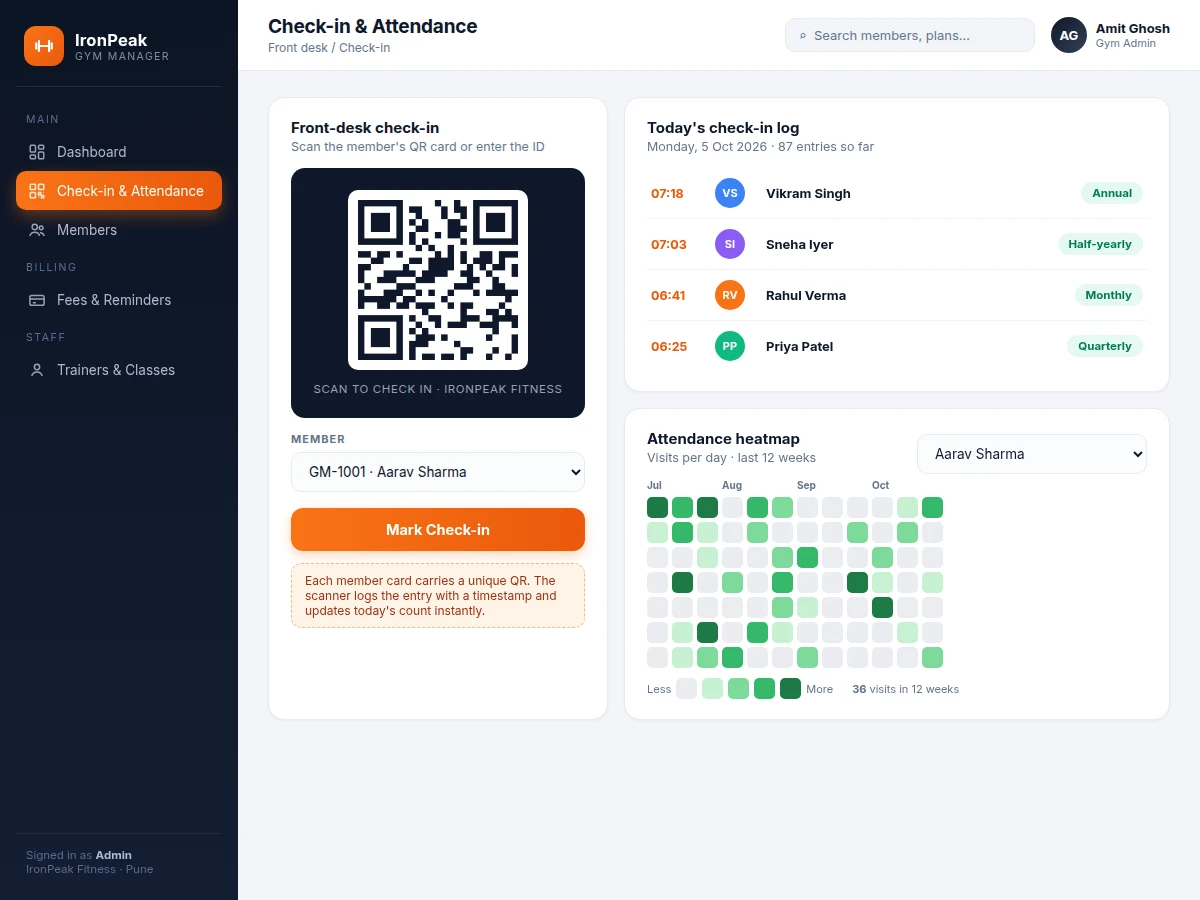
- At each visit the front-desk operator scans the QR (or types the member ID); the check-in is written to the attendance log with a timestamp and today's count updates.
- Attendance records aggregate automatically into the per-member 12-week heatmap and the daily check-in log on the dashboard.
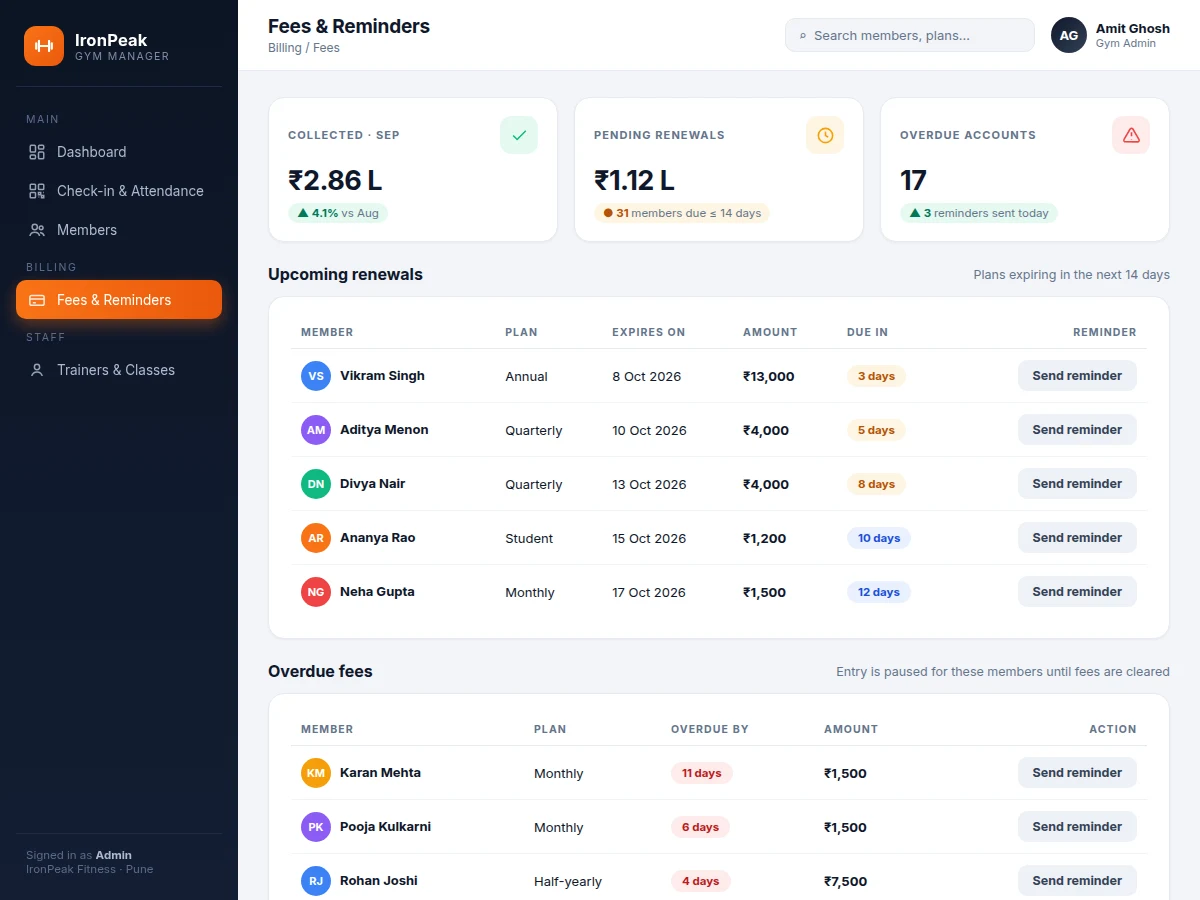
- The fee engine compares every plan's expiry date against the calendar daily: plans expiring within 14 days appear under upcoming renewals, lapsed ones under overdue fees with days-overdue counts.
- The admin sends renewal or overdue reminders from those lists; each send is recorded so follow-ups are never duplicated or forgotten.
- Trainers and the weekly class timetable are maintained as master data, and the dashboard continuously rolls up members, check-ins, plan mix and collections for the owner.
Tech stack:
- HTML5 · CSS3 · JavaScript (single-page frontend)
- Node.js · Express (REST API backend)
- MySQL (relational database)
- JWT (role-based authentication)
- QR code generation (qrcode library)
- SVG charts (dashboard analytics)
- SMS/WhatsApp reminder hooks (configurable gateway)
- Git (version control)
| Parameter | Value |
|---|---|
| User roles | Admin + front-desk operator (2 roles, JWT-authenticated) |
| Member capacity | Approximately 1,000 member profiles (design target) |
| Check-in methods | QR scan + manual member-ID entry (2 methods) |
| Attendance view | 12-week per-member heatmap + daily timestamped log |
| Fee plans | 4 plan types (monthly/quarterly/half-yearly/annual), prices configurable |
| Renewal window | Plans expiring within 14 days listed (configurable) |
| Reminder channels | SMS/WhatsApp via buyer-configured gateway (credentials not included) |
| Dashboard refresh | On every check-in and reminder action (event-driven) |
| Deployment | Node.js host or localhost; demo runs fully offline |
| Included demo | Interactive build preloaded with 14 sample members (simulated data) |
Project features
- [QR-based member check-in] Every member gets a unique QR card; a scan at the front desk logs the visit with an exact timestamp, and a manual member-ID entry covers lost or forgotten cards.
- [Per-member attendance heatmap] Twelve weeks of visits render as a GitHub-style intensity grid, so the admin can spot at a glance who trains regularly and who has gone quiet.
- [Fee engine with reminders] The system tracks each plan's expiry, lists renewals due in the next 14 days and flags overdue accounts; one click marks a reminder as sent via the configured SMS/WhatsApp channel.
- [Admin dashboard] Live stat cards (total members, active plans, monthly collection, today's check-ins), a six-month fee-collection bar chart and a plan-mix donut give the owner the whole business in one view.
- [Searchable member directory] Every member profile carries contact details, plan, fee, status (active, expiring soon, overdue) and last-visit date, with instant search by name or member ID.
- [Trainer roster] Trainer profiles with speciality, weekly batch count and assigned members, so staffing is visible next to the member base it serves.
- [Weekly class schedule] Morning and evening batch timetable by day-group, trainer and time slot, editable for the gym's actual batch structure.
What is included
- Complete web app source code (frontend + Node.js/Express REST API)
- MySQL database schema with seed data for plans, trainers and classes
- Interactive demo build preloaded with realistic simulated gym data
- QR code generation module for membership cards
- Fee-reminder workflow with send-status tracking
- Project report PDF (system design, database schema, API documentation, testing)
- PPT presentation for final review
- Viva Q&A preparation document (web architecture, authentication, database design)
- Setup and user guide
Advantages
- QR-based member check-in: every member gets a unique QR card at registration; a front-desk scan logs the visit with an exact timestamp, and manual member-ID entry covers lost or forgotten cards.
- Per-member 12-week attendance heatmap rendered as a GitHub-style intensity grid, so irregular members are visible at a glance; daily check-in log on the dashboard.
- Fee engine: tracks each plan's expiry across four plan types (monthly/quarterly/half-yearly/annual, prices configurable), lists renewals due in the next 14 days, flags overdue accounts with days-overdue counts; one click marks a reminder as sent via the configured SMS/WhatsApp channel, with send-status tracking so follow-ups are never duplicated.
- Admin dashboard: live stat cards (total members, active plans, monthly collection, today's check-ins), a six-month fee-collection bar chart and a plan-mix donut; searchable member directory (contact, plan, fee, status active/expiring-soon/overdue, last-visit date); trainer roster with speciality, batch count and assigned members; editable weekly class schedule. Interactive demo preloaded with 14 sample members. Tech stack: HTML5/CSS3/JavaScript SPA frontend, Node.js/Express REST API, MySQL, JWT role-based auth, qrcode library, SVG charts.
Disadvantages
- Reminders need the buyer's own SMS/WhatsApp gateway credentials; gateway per-message charges are separate and not included.
- The base build assumes a single front-desk device; multi-counter concurrent use needs a hosted deployment (optional extension).
- QR cards identify the card, not the person - a shared card checks in as the cardholder, so this is not a biometric attendance system.
- No payment gateway is integrated in the base build - fee collection is tracked, not transacted; online payment is an optional extension. The demo ships with simulated member data; the production database starts empty.
Limitations & prerequisites
- Reminders need the buyer's own SMS/WhatsApp gateway credentials; gateway per-message charges are separate and not included.
- The base build assumes a single front-desk device; multi-counter concurrent use needs a hosted deployment (optional extension).
- QR cards identify the card, not the person — a shared card checks in as the cardholder, so this is not a biometric attendance system.
- The demo ships with simulated member data; the production database starts empty and is populated during buyer setup.
- No payment gateway is integrated in the base build — fee collection is tracked, not transacted; online payment is an optional extension.
- Collection and attendance figures in the demo are illustrative sample values, not measured results from a real gym.
Frequently Asked Questions
Is this project suitable for a final-year project?
Yes — for Computer Science, IT and Computer Engineering programs. It demonstrates full-stack web development (REST API design, relational database modelling, JWT authentication), a real operational workflow (check-in, attendance aggregation, fee lifecycle), and dashboard analytics, which together give strong viva material.
How does the QR check-in actually work?
Each member is issued a unique QR code at registration. Scanning it at the front desk submits the member ID to the check-in API, which writes a timestamped attendance record. If a member forgets the card, the operator can type the member ID instead — both paths write to the same log.
Are the fee reminders fully automatic?
The detection is automatic — the fee engine flags expiring and overdue plans every day. Sending uses your configured SMS/WhatsApp gateway, and each send is logged against the member so nobody gets reminded twice. Gateway credentials and message charges are the buyer's own.
Can plans, prices and the class timetable be changed?
Yes. Plan types, fees, the renewal window (default 14 days) and the weekly batch schedule are all master data editable from the admin side — the demo's ₹1,500 monthly / ₹13,000 annual figures are just sample values.
Can this be hosted online so the owner can see it from home?
Yes — the app is a standard Node.js + MySQL build that deploys to any Node-capable host. The base deliverable includes localhost setup; hosted deployment with multi-device access is a supported optional extension.
What will I receive with the project?
The complete source code (frontend + backend API), MySQL schema with seed data, the interactive demo with simulated gym data, project report PDF, PPT, viva Q&A document and a setup/user guide.
Components & software requirements
- HTML5 · CSS3 · JavaScript (single-page frontend)
- Node.js · Express (REST API backend)
- MySQL (relational database)
- JWT (role-based authentication)
- QR code generation (qrcode library)
- SVG charts (dashboard analytics)
- SMS/WhatsApp reminder hooks (configurable gateway)
- Git (version control)
Delivery information
Built-to-order project. Delivery timeline is shared after order confirmation based on current queue.
Support terms
Complete documentation, setup guide, and viva preparation included. Support for setup and explanation provided.
Download free synopsis (PDF)
Enter your name and email — the synopsis PDF downloads immediately. We may send occasional project updates; no spam, unsubscribe anytime.