
More project photos (2)
The problem
College event coordination still runs on a patchwork of Google Forms, WhatsApp forwards and printed attendee lists. Registrations live in one spreadsheet, payments are confirmed over chat, and at the gate a volunteer scrolls through a phone trying to find a name — entry is slow, duplicate entries slip through, and nobody has a reliable headcount. Organizers also lack a trustworthy attendance record, which matters when participation certificates or attendance credits are issued. This project solves it with a single web app: students discover campus events, register online with their details, and immediately get a QR ticket encoding a unique ticket ID; organizers log in, scan tickets at the gate, and watch live check-in counts with a one-click attendance export. Duplicate and invalid scans are rejected with a clear reason. Every ticket ID is unique per registration and every check-in is timestamped, so the attendance record is honest by construction.
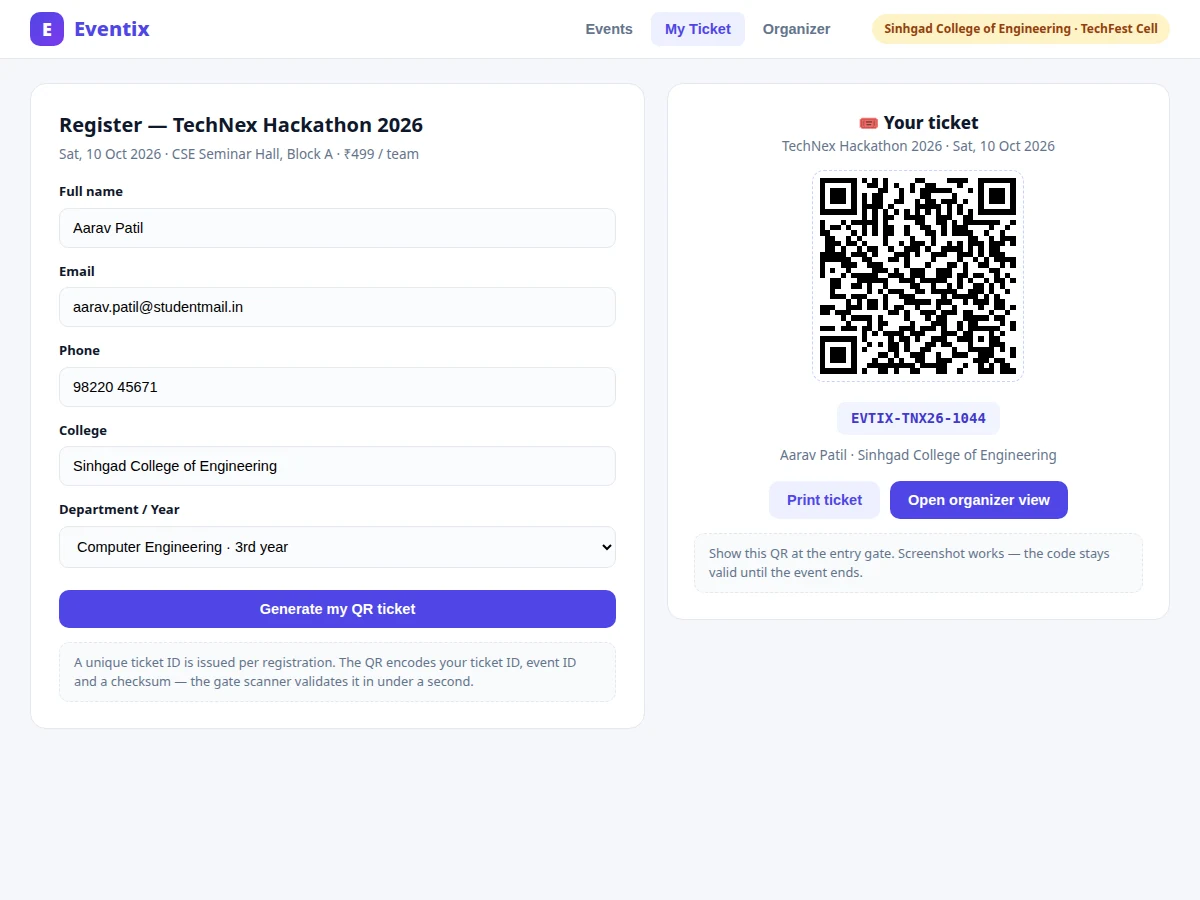
Browses events, registers and receives a QR ticket.
Follow the working sequence
How it works
- The organizer creates an event (name, date, time, venue, fee, seat capacity) from the admin panel; it goes live on the student portal immediately.
- A student opens the event, fills the registration form, and the server validates the details and inserts the attendee row in MySQL.
- The server generates a unique ticket ID and encodes it with the event ID and a checksum into a QR image, which is shown to the student as their ticket.
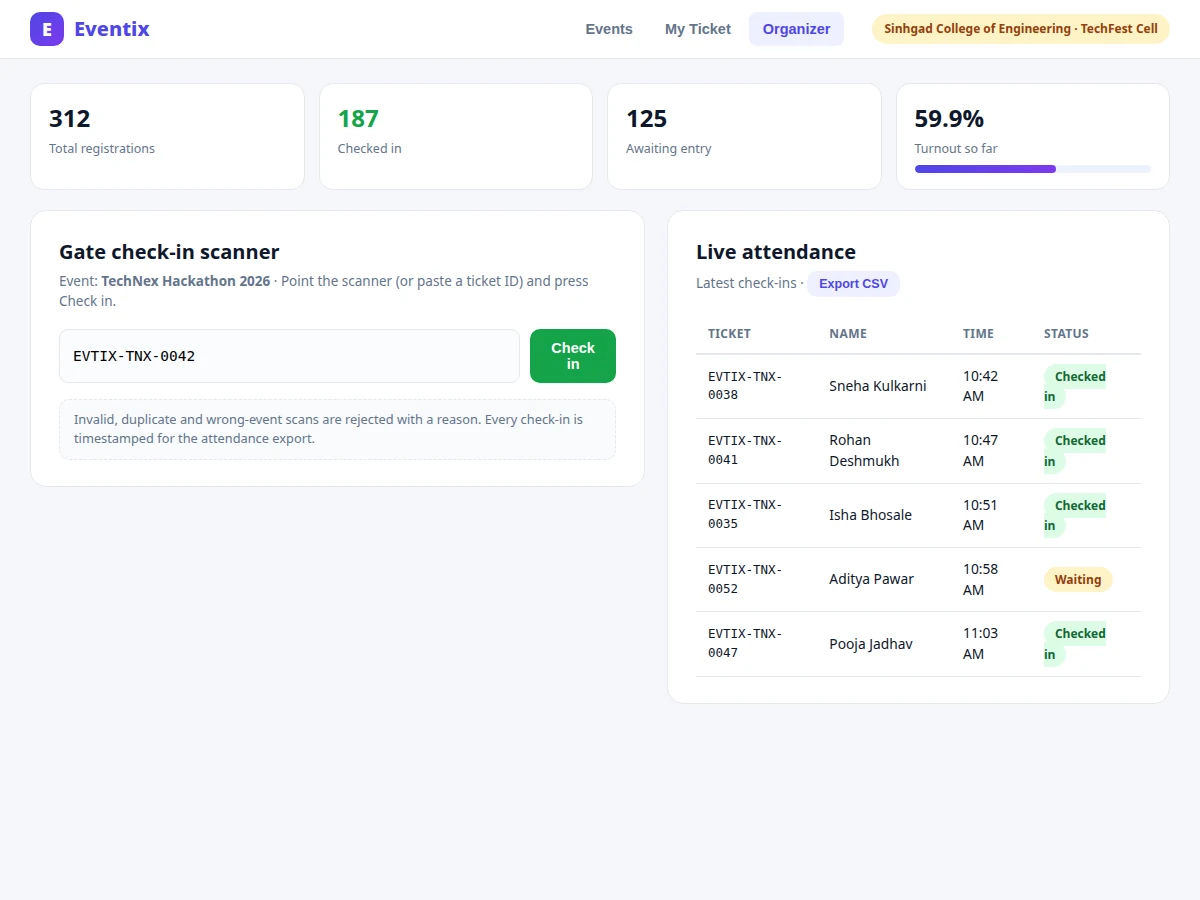
- At the gate, the organizer logs in and scans each ticket with the check-in scanner (camera input or typed ticket ID).
- The server validates the ticket: format and checksum, that it belongs to this event, and that it has not been used before — duplicates and invalid codes are rejected with a stated reason.
- On acceptance, the check-in is timestamped in the database; the dashboard counters and live attendance table update, and the CSV export reflects the new entry.
Tech stack:
- Node.js · Express.js
- MySQL
- HTML5 · CSS3 · JavaScript
- qrcode (server-side QR generation)
- REST APIs
- JWT authentication
- CSV export
- Git
| Parameter | Value |
|---|---|
| User roles | 2 (student, organizer) |
| Ticket ID format | EVTIX-<EVENT>-<4-digit sequence>, unique per registration |
| QR payload | Ticket ID + event ID + checksum (design target, JSON-encoded) |
| Check-in validation | Format, checksum, event match, duplicate rejection (all server-side) |
| Check-in latency | Sub-second per scan on a local network (expected, not measured) |
| Database tables | Approximately 4 (users, events, registrations, checkins) |
| Attendance export | CSV (ticket ID, name, check-in time, status) |
| Browser support | Chrome, Edge, Firefox (recent versions, expected) |
| Deployment | Node.js server + MySQL; runs on a laptop or shared hosting (expected) |
Project features
- [Event listing portal] Students browse live campus events with dates, venues, fees, seat availability and a real-time "seats left" progress bar; events can be filtered and each carries full details before registration.
- [Online registration] A validated registration form (name, email, phone, college, department/year) creates the attendee record; server-side validation rejects incomplete or malformed entries.
- [QR ticket generation] Every successful registration issues a unique ticket ID (e.g. EVTIX-TNX26-1044) and a scannable QR code encoding the ticket ID, event ID and a checksum — generated server-side, printable, and valid until the event ends.
- [Organizer check-in scanner] The gate dashboard accepts ticket IDs by camera scan or manual entry, validates format and checksum, rejects invalid, wrong-event and duplicate scans with reasons, and timestamps each successful entry.
- [Live attendance dashboard] Organizers see registrations, checked-in count, awaiting-entry count and turnout percentage updating in real time as the gate processes entries.
- [One-click attendance export] The full check-in log — ticket ID, name, time, status — exports to CSV for certificates, reports and audit.
- [Role-based login] Separate student and organizer accounts; organizer routes are protected so the scanner dashboard and attendance data are never publicly accessible.
What is included
- Complete source code (Node.js + Express backend, MySQL schema, front-end pages)
- Working demo with sample events and registrations
- QR ticket generation and gate check-in scanner modules
- Live attendance dashboard with CSV attendance export
- Role-based login (student + organizer) with JWT
- Database schema and setup instructions
- Project report PDF (background, system design, ER diagram, methodology, screenshots)
- PPT presentation for final review
- Viva Q&A preparation document (REST APIs, JWT auth, QR encoding, database design, validation logic)
Advantages
- Event listing portal: students browse live campus events with dates, venues, fees, seat availability and a real-time 'seats left' progress bar, with filtering and full details before registration.
- Validated online registration (name, email, phone, college, department/year; server-side validation rejects malformed entries) issuing a unique ticket ID (e.g. EVTIX-TNX26-1044) plus a server-side QR code encoding ticket ID, event ID and checksum - printable, valid until the event ends.
- Organizer gate check-in scanner: camera scan or manual ticket-ID entry; server-side validation of format, checksum and event match; invalid, wrong-event and duplicate scans rejected with stated reasons; every check-in timestamped - a screenshot of a ticket cannot grant re-entry.
- Live attendance dashboard: registrations, checked-in count, awaiting-entry count and turnout percentage updating in real time as the gate processes entries; one-click CSV export of the full check-in log (ticket ID, name, time, status) for certificates and audit. Role-based login (student + organizer, JWT); organizer routes protected. Tech stack: Node.js/Express, MySQL (~4 tables: users, events, registrations, checkins), HTML5/CSS3/JavaScript, server-side qrcode, REST APIs, JWT.
Disadvantages
- No payment gateway integration - event fees are displayed but payment collection happens outside the app (UPI/cash at the desk); online payment is listed as future scope.
- Single-campus scope: one organizer tenant per deployment; multi-college or multi-tenant hosting is not included.
- Gate scanning needs a device with a camera or a USB scanner at the entry point; the app does not ship scanning hardware.
- No email or SMS notifications - ticket delivery and reminders are not part of this build. Load figures are expected values, not measured; the report documents a buyer-run load-check procedure rather than claimed benchmarks.
Limitations & prerequisites
- No payment gateway integration — event fees are displayed but payment collection happens outside the app (UPI/cash at the desk); online payment is listed as future scope.
- Single-campus scope: one organizer tenant per deployment. Multi-college or multi-tenant hosting is not included.
- Gate scanning needs a device with a camera or a USB scanner at the entry point; the app does not ship scanning hardware.
- No email or SMS notifications — ticket delivery and reminders are not part of this build (listed as optional scope in the report).
- Attendance figures in screenshots are sample data for demonstration; live counts come from the buyer's own database once deployed.
- Load figures are expected values, not measured — the report documents a buyer-run load-check procedure rather than claimed benchmarks.
Frequently Asked Questions
How does the QR ticket actually work?
On registration the server creates a unique ticket ID, then encodes it together with the event ID and a checksum into a QR image using a standard QR library. At the gate the scanner decodes it and the server validates format, checksum, event match and single use — any standard QR reader can read the code, but only this app can authorize entry.
What stops someone from reusing a screenshot of a ticket?
Every ticket ID can be checked in exactly once. A second scan of the same code is rejected as a duplicate with the original check-in time shown, so screenshots and photocopies cannot grant re-entry.
Do organizers need special hardware?
No — any phone, tablet or laptop with a camera works with the scanner page, or a ticket ID can be typed manually. The project does not include dedicated scanner hardware.
Is payment collection included?
No. Event fees are shown on the listing and registration pages, but payment is handled outside the app (UPI or cash). Integrating a payment gateway is listed as future scope in the report.
Can it handle a whole college fest with thousands of students?
The design supports it — registrations and check-ins are simple indexed database rows, and check-in validation is sub-second per scan on a local network (expected). Actual load figures are left for the buyer's own deployment testing, with the procedure documented in the report.
Is this project suitable for a final-year project?
Yes — for Computer Science, IT and Web Development programs. It demonstrates full-stack development, REST API design, relational database modelling, authentication, QR-code integration and a complete user-facing workflow with real utility. Suitable for B.E./B.Tech final-year projects in Computer Science, IT and Web Development.
Components & software requirements
- Node.js · Express.js
- MySQL
- HTML5 · CSS3 · JavaScript
- qrcode (server-side QR generation)
- REST APIs
- JWT authentication
- CSV export
- Git
Delivery information
Built-to-order project. Delivery timeline is shared after order confirmation based on current queue.
Support terms
Complete documentation, setup guide, and viva preparation included. Support for setup and explanation provided.
Download free synopsis (PDF)
Enter your name and email — the synopsis PDF downloads immediately. We may send occasional project updates; no spam, unsubscribe anytime.