
More project photos (2)
The problem
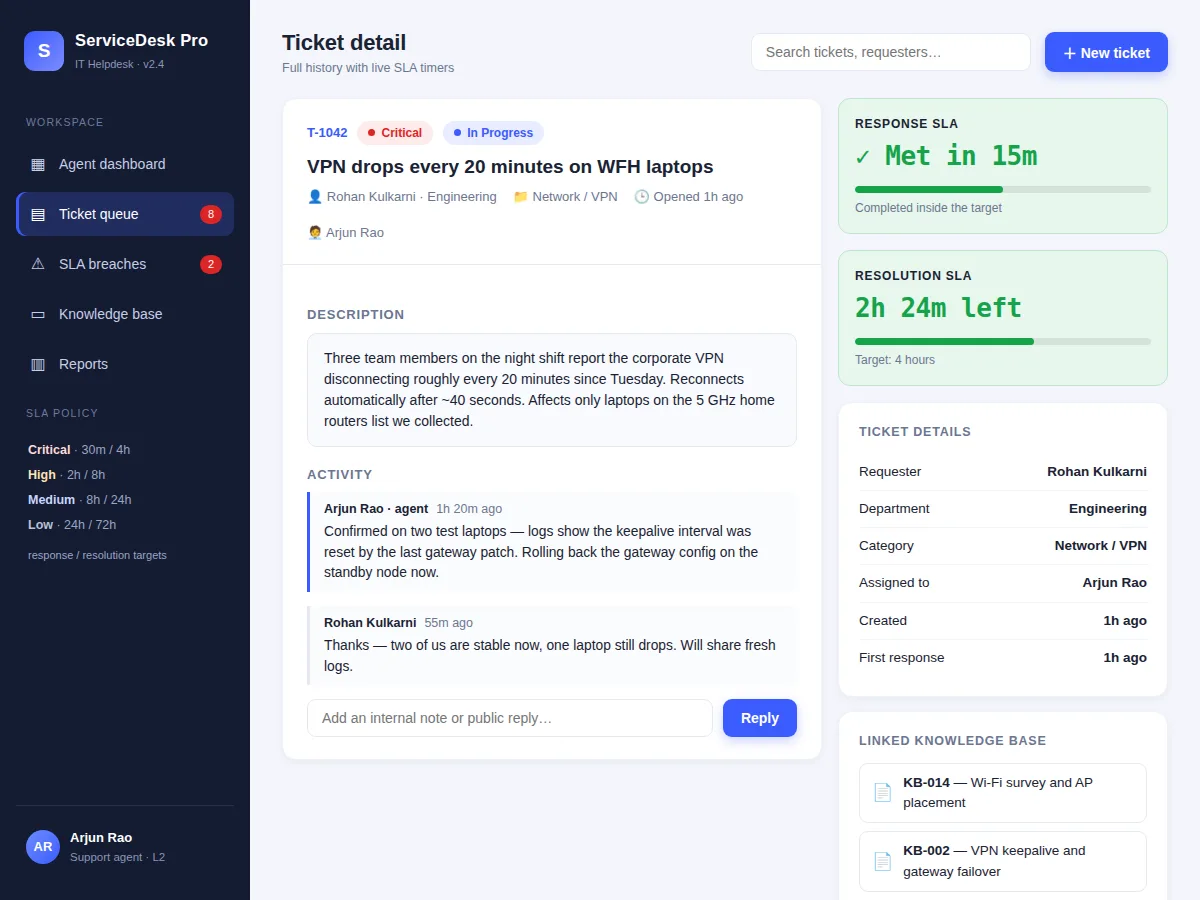
Small and mid-size IT teams usually manage support requests over email threads and chat messages, where nothing tracks who owns an issue or how long it has been waiting. Requests go stale silently, urgent problems get the same attention as trivial ones, and nobody can answer the basic management question: what share of issues did we close inside our promised response time? This project builds the tool that fixes that — a web-based helpdesk where every request becomes a ticket with a priority, an owner, and two live SLA countdowns (first response and resolution). The SLA engine watches every open ticket, flags warnings as deadlines approach, and auto-escalates breaches to the team lead so nothing quietly expires. Agents work from a queue with search and filters, link reusable knowledge-base articles into repeat issues, and watch their load on a dashboard with compliance charts. Because the SLA policy, the timers and the escalation path are all implemented in the open, the student can walk an examiner through the complete request lifecycle.
Raises tickets with a category and priority; gets notified on replies and breaches.
Follow the working sequence
How it works
- A requester raises a ticket through the new-ticket form, picking a category and priority; the system records the creation timestamp and starts both SLA clocks immediately.
- The ticket lands in the agent queue, where filters by status and priority plus full-text search surface the right work; an agent takes ownership through assignment.
- The SLA engine maps the priority to its policy (e.g. Critical = 30-minute response, 4-hour resolution) and evaluates elapsed time on every view and on a server-side schedule.
- As a deadline approaches the ticket is flagged at-risk; when a clock expires the ticket is marked breached, an escalation entry is written, and the team lead is notified automatically.
- Agents work the ticket with public replies, internal notes and linked knowledge-base articles; the requester sees status changes, and resolving the ticket records SLA compliance against its targets.
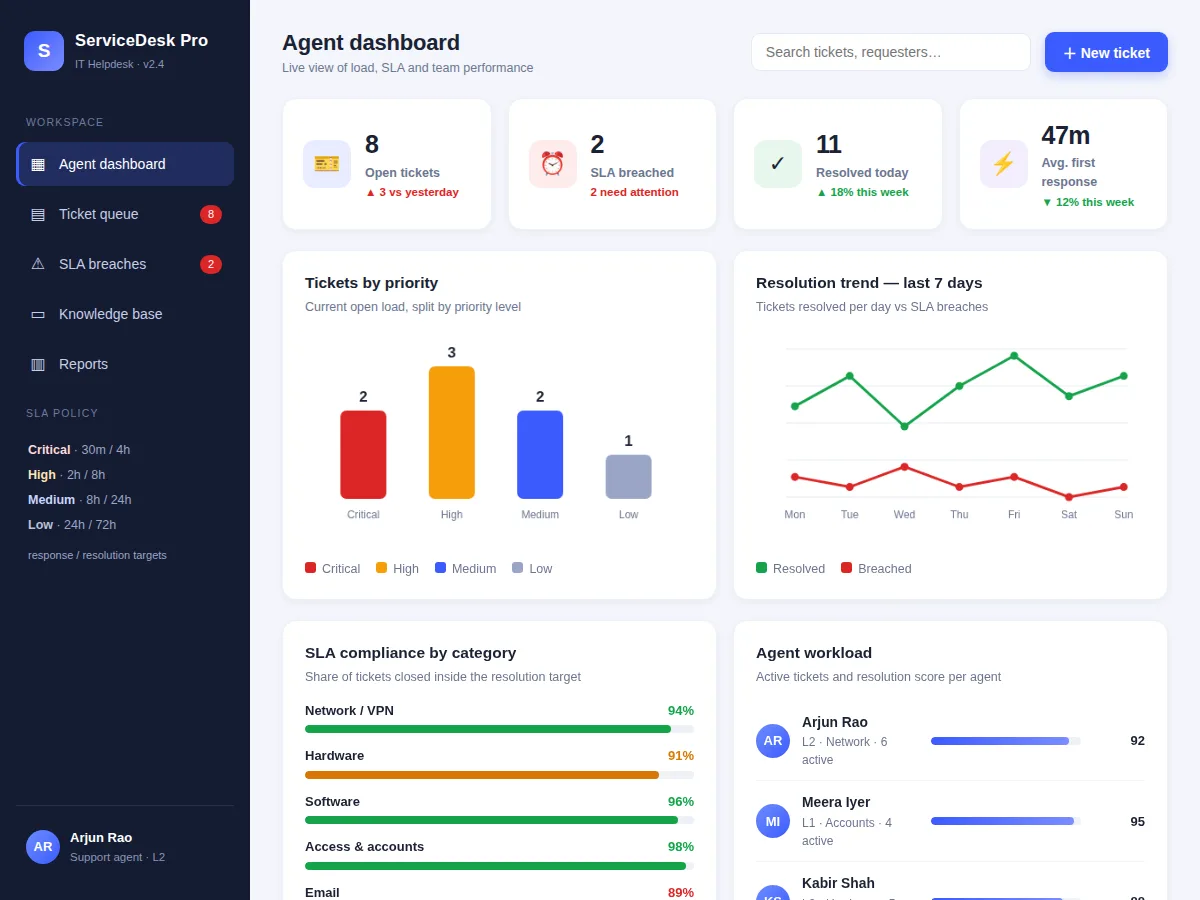
- The dashboard aggregates everything into KPI cards, priority and trend charts, per-category compliance bars and agent workload scores; the weekly report summarizes tickets handled, compliance and breach causes for the IT manager.
Tech stack:
- HTML5, CSS3, JavaScript (single-page frontend)
- Node.js + Express (REST API backend)
- MySQL (ticket, agent and audit tables)
- Nodemailer + transactional email provider (notifications)
- Canvas-based charts (dashboard)
- JWT authentication (agent sessions)
- Docker (deployment)
- Git
| Parameter | Value |
|---|---|
| SLA policy | Critical 30 min / 4 h, High 2 h / 8 h, Medium 8 h / 24 h, Low 24 h / 72 h (response / resolution) |
| SLA check cadence | Approximately every 60 seconds via server scheduler (design target) |
| Concurrent agents | Approximately 50 on the reference Docker deployment (design target) |
| Ticket volume | Expected around 5,000 tickets per month per deployment (design target) |
| Escalation warning threshold | Warning flag at 75% of elapsed SLA (configurable) |
| Email notification latency | Expected under 2 minutes after the triggering event |
| Data retention | Configurable; default 24 months of ticket history |
| Deployment | Single Docker container plus MySQL database |
Project features
- [Ticket lifecycle management] Raise, triage, assign, hold, resolve and close tickets with a complete status history and an activity timeline on every ticket.
- [Live SLA timers with breach escalation] Each priority carries response and resolution deadlines; countdowns tick live on the ticket detail page, warnings fire at 75% elapsed, and breached tickets auto-escalate to the team lead with a visible escalation banner.
- [Priority matrix] A four-level policy (Critical 30 min/4 h, High 2 h/8 h, Medium 8 h/24 h, Low 24 h/72 h) drives SLA targets, queue ordering and escalation rules.
- [Agent assignment and workload view] Manual per-ticket assignment plus a dashboard showing each agent's active load and resolution score for fair distribution.
- [Knowledge-base article linking] Reusable solution articles attach to tickets so repeat issues are answered with one click instead of retyped replies.
- [Email notifications] Requesters and agents are notified on ticket creation, assignment, replies and SLA breaches through a transactional email integration.
- [Agent dashboard and reports] KPI cards (open, breached, resolved, average first response), priority mix, 7-day resolution trend, SLA compliance by category, and an auto-generated weekly SLA summary.
What is included
- Complete frontend + REST API source code
- MySQL schema with migrations and seeded demo data
- SLA timer and escalation engine module with the documented priority policy
- Email notification templates (creation, assignment, reply, breach)
- Knowledge-base starter article set
- Deployment guide (Docker, scheduler setup, clock-sync check)
- Project report PDF (background, requirements, architecture, methodology, results)
- PPT presentation for final review
- Viva Q&A preparation document (SLA concepts, ticket lifecycle, escalation design)
Limitations & prerequisites
- Single-tenant design — one support desk per deployment; multi-organization support is future scope.
- Email delivery depends on the buyer's own SMTP or transactional provider credentials; no provider account is bundled.
- SLA timers use server time — a misconfigured host clock shifts deadlines, so the deploy guide includes a clock-sync check.
- Support is ticket-based and asynchronous; there is no live chat widget as shipped.
- Search covers indexed ticket fields only; fuzzy typo-tolerant search is not in this build.
- Load figures are design targets for the reference deployment, not measured production benchmarks.
Frequently Asked Questions
How does the SLA tracking work?
Every ticket gets two countdowns at creation — first response and resolution — derived from its priority's policy (e.g. Critical: 30 minutes / 4 hours). The timers tick live on the ticket detail page, and a server-side scheduler re-evaluates all open tickets roughly every minute so nothing is missed between page views.
What happens when an SLA is breached?
The ticket is marked breached with the overdue duration shown, an escalation entry is written to its activity timeline, and the team lead is notified automatically by email. The ticket stays open and keeps accumulating overdue time until resolved, so breaches are always visible on the dashboard.
Can the SLA policy be changed?
Yes — response and resolution targets per priority, the 75% warning threshold and escalation recipients are configuration values, not hard-coded. The report documents exactly where they live so the student can demonstrate a policy change in the viva.
Does it send real email notifications?
Yes, through a transactional email integration: ticket creation, assignment, replies and breach escalations each have their own template. The buyer supplies their own SMTP or provider credentials during deployment — no provider account is bundled with the project.
Is this project suitable for a final-year project?
Yes — for Computer Science, IT and Web Development programs. It demonstrates full-stack development, a real-time rule engine (SLA timers with escalation), relational data modeling, email integration and data visualization, all wrapped in a genuinely useful tool an IT team would actually run. Suitable for B.E./B.Tech final-year projects in Computer Science, IT and Web Development.
Components & software requirements
- HTML5, CSS3, JavaScript (single-page frontend)
- Node.js + Express (REST API backend)
- MySQL (ticket, agent and audit tables)
- Nodemailer + transactional email provider (notifications)
- Canvas-based charts (dashboard)
- JWT authentication (agent sessions)
- Docker (deployment)
- Git
Delivery information
Built-to-order project. Delivery timeline is shared after order confirmation based on current queue.
Support terms
Complete documentation, setup guide, and viva preparation included. Support for setup and explanation provided.
Download free synopsis (PDF)
Enter your name and email — the synopsis PDF downloads immediately. We may send occasional project updates; no spam, unsubscribe anytime.