
More project photos (2)
The problem
AI Expense Tracker using Gemini 4 Carbon is a web application that helps a student record everyday spending, stay inside monthly budgets and understand where the money actually goes, with Google's Gemini 4 Carbon model doing the explaining. A student types an expense in plain words — "Swiggy biryani 320" or "metro card recharge 500" — or photographs a receipt, and the system files it under the right category, checks it against the month's budget and tells the student, in plain English, whether anything looks unusual. The problem is ordinary and persistent: students track spending in scattered notes, so small daily outflows — food delivery, auto fares and recharge top-ups — add up unnoticed until the month ends short. Most tracker apps record numbers but rarely explain them, and the ones that do expect the user to build charts and read reports.
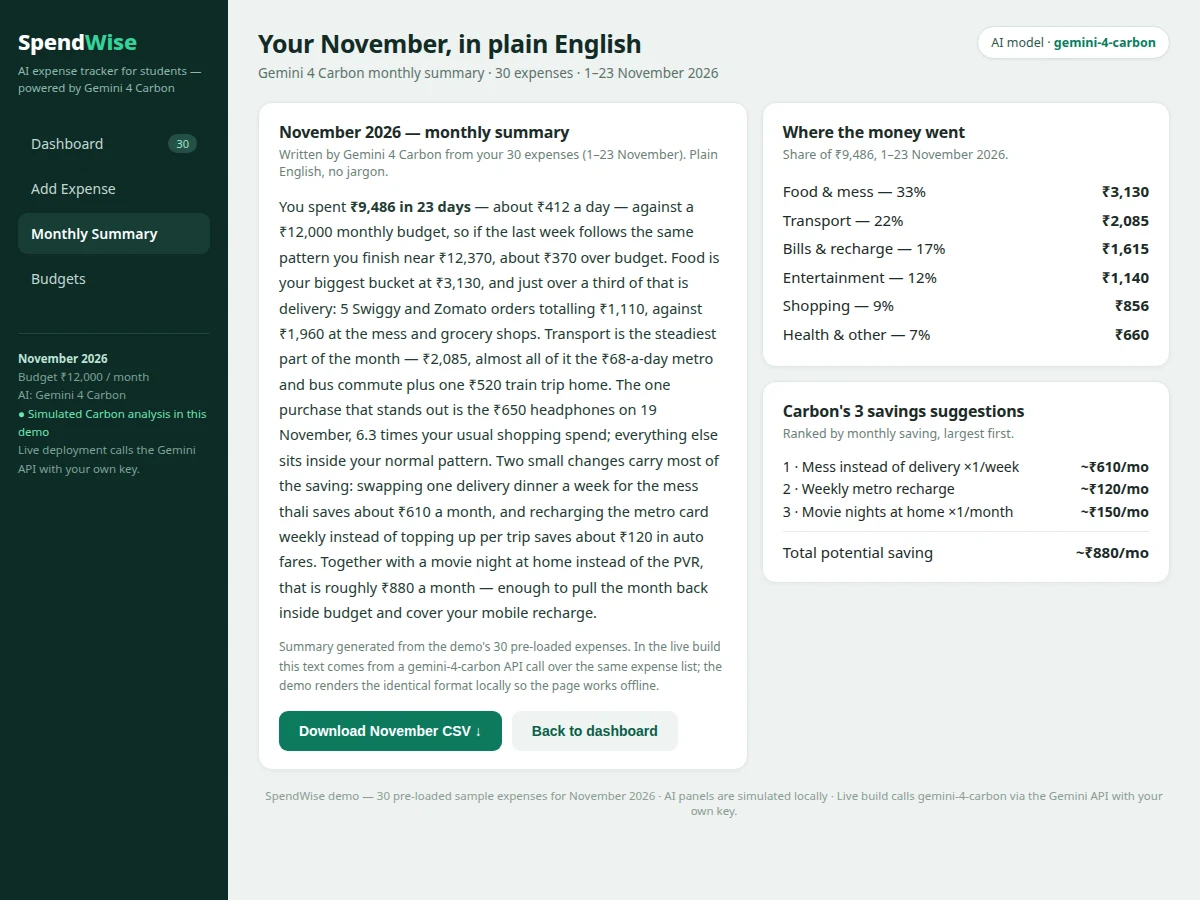
This project closes that gap by pairing a complete tracker — expenses, budgets, category charts, search and CSV export — with a model that turns the raw list into a short monthly story with concrete savings suggestions, so the student sees both the numbers and what to do about them. Builder note from the demo build: the 30 pre-loaded November expenses total ₹9,486 across 23 days — about ₹412 per day — and the category shares computed from that list are Food 33%, Transport 22%, Bills 17%, Entertainment 12%, Shopping 9% and Health and other 7%.
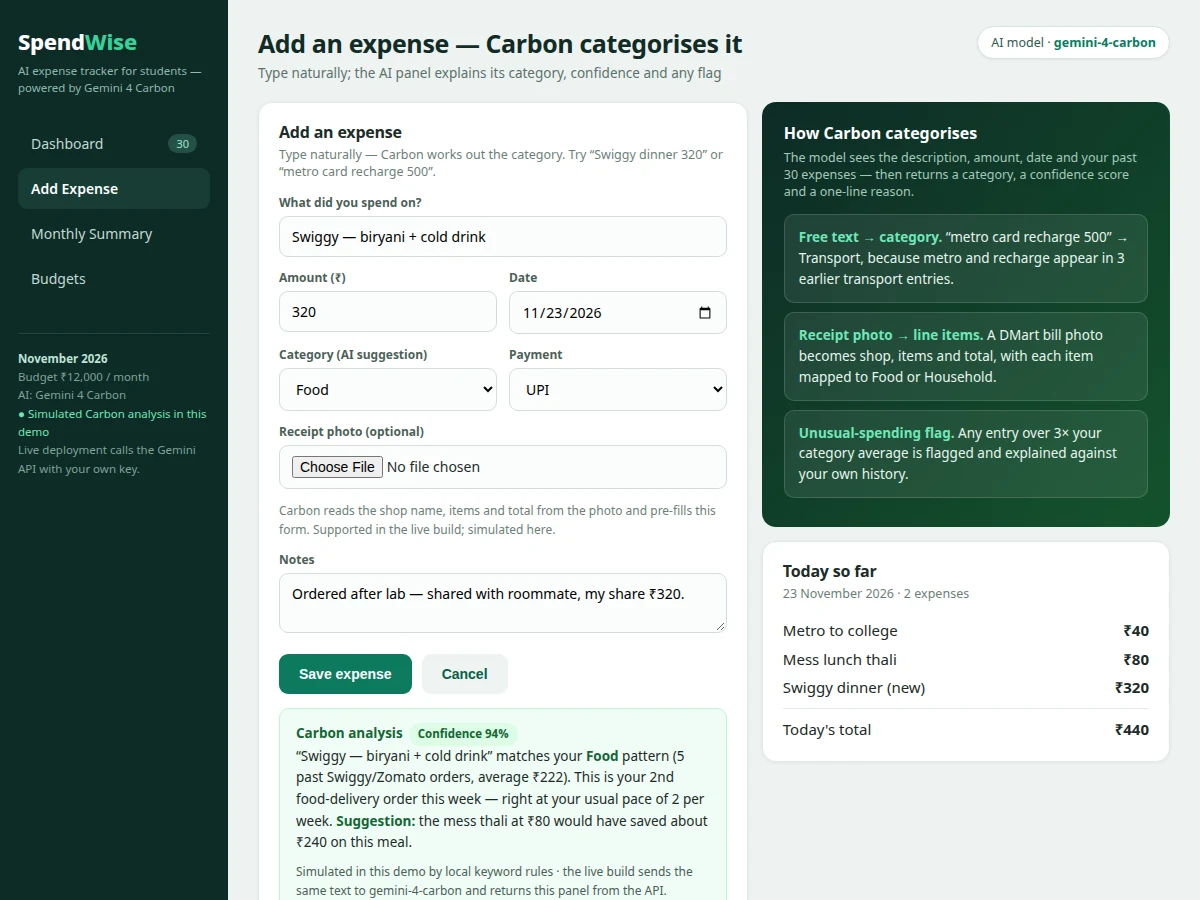
Type spending in plain words or add a receipt photo.
Follow the working sequence
How it works
An expense enters the system in one of two ways — typed as free text or photographed as a receipt. The typed text or receipt image goes to Gemini 4 Carbon with the user's recent expense history, and the model returns a category, a confidence score and a short reason, plus a flag when the amount breaks the user's own pattern for that category. The expense is stored in the browser, the dashboard totals and the category chart update immediately, and the budget bar for that category moves. At any point the user can search or filter the list and export it as CSV; at month end the full expense list is sent to the model once more, and it returns the monthly summary with savings suggestions. The demo runs the same flow with local keyword rules standing in for the API, so every screen works offline with no key.
- The user adds an expense by typing free text ("Swiggy biryani 320") or by uploading a photo of a receipt.
- The text or receipt image is sent to Gemini 4 Carbon (model id gemini-4-carbon) together with the user's recent expense history for context.
- The model returns a category, a confidence score and a one-line reason, and flags the entry when it is far above the user's own average for that category.
- The expense is stored in the browser and the dashboard — totals, daily average, category chart and budget bars — updates immediately.
- Budget bars warn at 80% of the monthly cap for a category and flag the category at 100% of the cap.
- The user searches or filters the expense list at any time and downloads it as a CSV file with one click.
- At month end, the full expense list is sent to the model once more, which returns the plain-English monthly summary with ranked savings suggestions.
Tech stack:
- HTML5 · CSS · JavaScript
- Gemini 4 Carbon (gemini-4-carbon)
- Gemini API via Google AI Studio
- Fetch API (Gemini API calls)
- Browser local storage
- SVG + CSS charts
- CSV export (Blob download)
- Git
| Parameter | Value |
|---|---|
| AI model | gemini-4-carbon (Gemini API, paid tier) |
| Context window | 1,048,576 tokens (Google published figure) |
| Introductory API pricing | $2 input / $10 output per 1M tokens through 30 Nov 2026, then $4 / $20 per 1M tokens (Google pricing page) |
| Free tier | Not available for Gemini 4 Carbon (Google pricing page) |
| Demo expenses (pre-loaded) | 30 expenses (November 2026 sample data) |
| Demo month total | ₹9,486 across 23 days (demo sample data) |
| Demo daily average | Approximately ₹412 per day (computed from the demo sample data) |
| Categories | 7 categories (Food, Transport, Bills, Entertainment, Shopping, Health, Other) |
| Monthly budget (demo) | ₹12,000 per month (demo setting) |
| Receipt input | 1 photo per expense (JPG or PNG format) |
| CSV export | 1 file per export (all listed expenses) |
| Demo offline use | Yes — simulated analysis, no API key needed for the demo |
Project features
The tracker is built around four capabilities that work together: free-text and receipt entry that Gemini 4 Carbon turns into categorised expenses, monthly budgets with visual progress bars, an AI insights panel that flags unusual spending and explains it against the user's own history, and a plain-English monthly summary with ranked savings suggestions. Around those sit the everyday tools a student actually uses — category charts, search and filtering, and a one-click CSV export — so the app is a complete expense tracker first and an AI demonstration second, not a chatbot wrapped around a spreadsheet. Every feature below is implemented in the base project; the demo shows each one working with realistic November sample data. The AI panels in the demo are simulated by local rules, and the live build returns the same panels from gemini-4-carbon.
- [AI auto-categorisation] Typing "Swiggy biryani 320" or "metro card recharge 500" returns a category, a confidence score and a one-line reason, based on the description, amount and the user's earlier expenses.
- [Receipt photo reading] A photo of a shop bill is read by Gemini 4 Carbon into shop name, items and total, and the add-expense form is pre-filled from it, so paper receipts become searchable expenses.
- [Unusual-spending flags] Any entry far above the user's own average for its category is flagged and explained against that history — for example, a ₹650 headphones purchase flagged as 6.3 times the usual single shopping spend of ₹103.
- [Plain-English monthly summary] Carbon writes a short summary of the month from the expense list — biggest bucket, delivery share, transport pattern and the one purchase that stands out — with ranked savings suggestions and a monthly saving estimate.
- [Monthly budgets with progress bars] A monthly cap per category with a visual bar that warns at 80% of the budget and flags the category at 100%, so overspending is visible before the month ends.
- [Category charts and dashboard] A donut chart of spending by category, a daily average, a top-category card and an unusual-spending card, all recomputed from the stored expenses.
- [Search, filter and CSV export] Full-text search across descriptions, a category filter and a one-click CSV download of the listed expenses for the report or a spreadsheet.
What is included
- Complete expense-tracker web app source code with the Gemini API integration
- Working single-file browser demo with 30 pre-loaded November sample expenses
- AI categorisation, receipt reading, unusual-spending flags and monthly-summary prompts
- Monthly budgets, category charts, search/filter and CSV export
- Project report PDF (background, Gemini 4 Carbon pricing and limits, methodology, results)
- PPT presentation for final review
- Viva Q&A preparation document (Gemini API, prompt design, categorisation logic, budgets, limitations)
Limitations & prerequisites
- Gemini 4 Carbon is a paid-tier model with no free tier, so the live build needs the user's own Gemini API key and a payment method on the account.
- API pricing changes after the introductory period: $2 input / $10 output per 1M tokens through 30 Nov 2026, then $4 / $20 per 1M tokens, so heavy receipt-photo use costs more than text-only use.
- The demo's AI panels are simulated by local keyword rules, not live API calls — the live build replaces them with real gemini-4-carbon responses.
- Receipt reading depends on photo quality: a blurred or cropped bill can misread the shop name, items or total, and the user must check the pre-filled form.
- Auto-categorisation can misclassify ambiguous text (for example, "Apple 1,200" could be fruit or electronics) and the user must correct the category.
- Expenses live in browser local storage in the demo build, so clearing browser data removes them; a multi-device setup needs a backend database, listed as future scope.
- The monthly summary is a spending explanation, not financial advice, and the savings figures are estimates from the user's own history, not guaranteed savings.
Frequently Asked Questions
What does Gemini 4 Carbon actually do in this project?
It does three jobs: it categorises free-text expenses and receipt photos into categories, it flags spending that breaks the user's own pattern, and it writes the plain-English monthly summary with savings suggestions. The tracker itself — entry, budgets, charts and export — is ordinary web code; the model supplies the understanding.
Does the demo call the live Gemini API?
No. The demo runs entirely in the browser with local keyword rules that simulate the Carbon analysis panel, so it works offline with no API key. The live build sends the same expense text and receipt images to gemini-4-carbon through the Gemini API, using the user's own key.
How much does the Gemini API cost for this project?
Gemini 4 Carbon costs $2 per 1M input tokens and $10 per 1M output tokens through 30 Nov 2026, then $4 and $20 per 1M tokens. A month of typed expenses is only a few thousand tokens, so the cost stays small; receipt photos cost more because images use more tokens.
Can it read receipts from Indian shops?
Yes — the receipt reader is designed for Indian bills such as DMart grocery bills, mess receipts and chemist bills, and it returns the shop name, items and total. Blurred or cropped photos can misread a line, so the form is always shown for the user to check before saving.
What happens if I go over a monthly budget?
The budget bar for that category turns amber at 80% of the cap and is flagged at 100%, and the monthly summary names the over-budget category and suggests where the saving can come from. Nothing is blocked — the tracker warns, it never refuses an expense.
Is this project suitable for a final-year project?
Yes — for Web Development and Computer Science programs. It demonstrates frontend development, REST API integration with a current large language model, prompt design, data visualisation and a complete product a student can show working live, with budgets, charts and the AI summary all running in the demo.
Components & software requirements
- HTML5 · CSS · JavaScript
- Gemini 4 Carbon (gemini-4-carbon)
- Gemini API via Google AI Studio
- Fetch API (Gemini API calls)
- Browser local storage
- SVG + CSS charts
- CSV export (Blob download)
- Git
Delivery information
Built-to-order project. Delivery timeline is shared after order confirmation based on current queue.
Support terms
Complete documentation, setup guide, and viva preparation included. Support for setup and explanation provided.
Download free synopsis (PDF)
Enter your name and WhatsApp number — the synopsis PDF downloads immediately. We may send occasional project updates on WhatsApp; no spam.