
More project photos (2)
The problem
Most college Training and Placement cells still run the placement season on spreadsheets and WhatsApp groups. A company announces a drive with eligibility criteria — minimum CGPA, backlog limits, eligible branches — and the cell filters hundreds of student records by hand, circulates shortlists as screenshots, and schedules interviews through ad-hoc phone calls. Eligibility filtering is inconsistent, shortlists leak through informal channels, interview slots double-book, and nobody keeps a reliable history of who registered, who was shortlisted and who received offers. Students, meanwhile, queue at the T&P office just to ask whether they made a list. This project replaces that fragile workflow with a single web application that models the entire drive lifecycle: drive announcement with eligibility rules, student registration, deterministic rule-based shortlisting with TPO confirmation, capacity-controlled interview slot scheduling with Scheduled/Completed tracking, and season analytics — funnel conversion, branch-wise placement rates, offers by company — with one-click CSV exports for office records.
Creates drives with eligibility rules and confirms shortlists.
Follow the working sequence
How it works
- The TPO creates a company drive: company, role, CTC, date, venue, selection rounds, and the eligibility rule (minimum CGPA, maximum live backlogs, eligible branches).
- Students register for drives through the registration flow; each registration lands in the drive's registered-student table with branch, CGPA and backlog count.
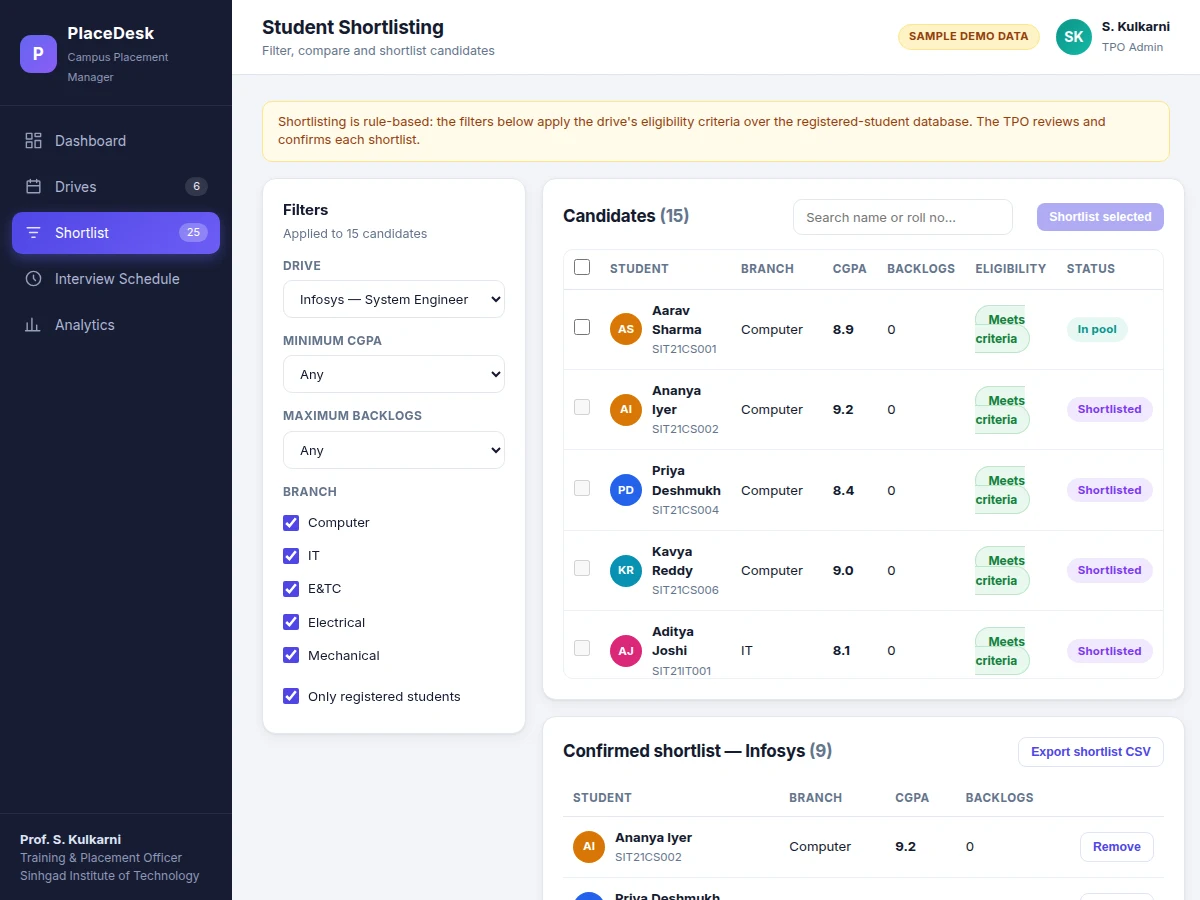
- In the shortlisting module, the TPO picks a drive and applies CGPA, backlog, branch and registration filters; every candidate is flagged against the eligibility rule.
- The TPO selects candidates and confirms the shortlist; confirmed students move to the drive's shortlist panel and become assignable to interview slots.
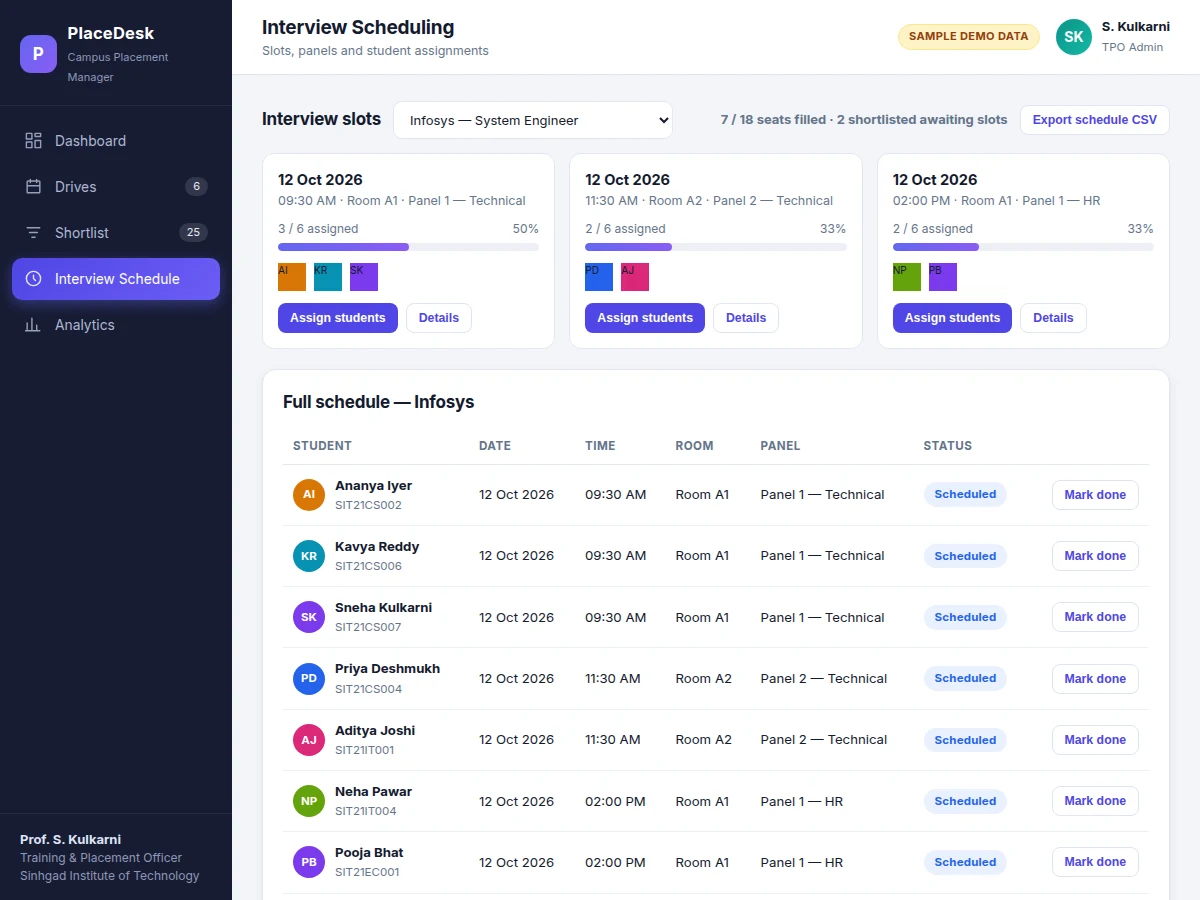
- Interview slots are defined per drive (date, time, room, panel, seat capacity); students are assigned from the confirmed shortlist with capacity enforced at assignment time.
- After interviews, each assignment is marked Completed; offers are recorded against the drive and flow into the analytics module automatically.
- The analytics module aggregates the season: funnel conversion, branch-wise placement rates, offers by company, and exports CSV reports for office records.
Tech stack:
- HTML5 · CSS3 · JavaScript (ES6)
- Responsive dashboard UI (no framework dependency in the demo)
- Node.js · Express (backend, built-to-order)
- MySQL · relational schema (backend, built-to-order)
- REST API · token authentication
- CSV export (client-side Blob generation)
- Git
| Parameter | Value |
|---|---|
| Application type | Full-stack web application (demo ships as a working single-file front-end prototype) |
| Demo data | 24 final-year students across 5 branches, 6 company drives (sample data, clearly labeled) |
| Supported browsers | Latest two versions of Chrome, Edge and Firefox (expected) |
| User roles | TPO admin, coordinator, student view (backend design) |
| Shortlisting logic | Deterministic rule evaluation: same filters over the same data always return the same list |
| Slot capacity | Enforced at assignment time; over-booking is rejected (design target) |
| Exports | CSV for drives, student lists, shortlists, schedules, offers and the student placement report |
| Deployment | Shared hosting or VPS with PHP/MySQL or Node.js support (approximately 1 GB RAM for a single-institute deployment) |
Project features
- [Drive management with eligibility rules] Each company drive stores its role, CTC, date, venue, selection rounds and eligibility criteria — minimum CGPA, maximum live backlogs and eligible branches — as structured data instead of a spreadsheet row.
- [Rule-based student shortlisting] CGPA, backlog, branch and registration-status filters evaluate the drive's eligibility rule over the student database; the candidate table flags every row as "Meets criteria" or "Misses criteria" and the TPO confirms the list before it is final.
- [Interview slot scheduling] Slots carry date, time, room and panel with a hard capacity; students are assigned only from the confirmed shortlist, so no room or panel is ever double-booked.
- [Placement analytics dashboard] Live funnel (registered → shortlisted → interviewed → offers), branch-wise placement rates, highest and average CTC, and an offers-by-company table with exportable student placement reports.
- [CSV exports everywhere] Drives, per-drive student lists, confirmed shortlists, interview schedules and offer reports all export to CSV for the T&P office's permanent records.
- [Drive detail views] Every drive opens a detail panel showing its full eligibility criteria, selection rounds and the registered-student table with per-student eligibility and status.
- [Role-based access design] TPO admin, coordinator and student views are separated in the backend design, so shortlists and internal data stay behind the admin login.
What is included
- Complete source code of the web application (front-end demo plus the full backend design)
- Relational database schema with all tables, keys and seed data
- Deployment guide for shared hosting or VPS
- Admin credentials and role-access documentation
- Project report PDF (background, requirements, architecture, methodology, screenshots)
- PPT presentation for final review
- Viva Q&A preparation document (web architecture, database design, shortlisting logic, scheduling constraints)
Limitations & prerequisites
- The shipped demo is a front-end prototype with sample data in the browser; the production backend (Node.js/Express + MySQL) is built to order for each buyer.
- Email/SMS notifications on shortlist or slot assignment are not included by default — they need the college's own email/SMS gateway credentials, which the deployment guide covers as an integration step.
- Scoped for a single institute per deployment; multi-college support with per-college data isolation is future scope, not in the base build.
- Student self-registration with login is part of the backend design; the demo shows the TPO-side workflow.
- The demo data (24 students, 6 drives) is illustrative; real deployments start from the buyer's own student records imported via CSV.
Frequently Asked Questions
How is shortlisting different from filtering a spreadsheet?
The eligibility rule (minimum CGPA, backlog limit, eligible branches) is stored with the drive as structured data, and every candidate row is evaluated against it deterministically — the same filters over the same data always produce the same list. The TPO then confirms the list in the app, so there is an auditable record of exactly who was shortlisted and when, instead of a screenshot in a WhatsApp group.
Can interview slots get double-booked?
No. Each slot has a fixed seat capacity, and the assignment action checks remaining seats before confirming. Students can only be assigned from the drive's confirmed shortlist, and the schedule table tracks each assignment as Scheduled or Completed. The capacity check runs at assignment time, so two coordinators working in parallel cannot overfill the same panel.
What reports can the T&P office take out of the system?
One-click CSV exports for the drive list, per-drive registered-student lists, confirmed shortlists, the full interview schedule, the offers table and a per-student placement report (drives registered, shortlists, offers). The analytics module also shows funnel conversion, branch-wise placement rates and CTC statistics.
Does it send SMS or email notifications to students?
Not in the base build. Notification hooks are part of the design, but actual delivery needs the college's own email/SMS gateway credentials, since messaging costs and sender IDs belong to the institution. The deployment guide documents the integration, so recurring messaging costs and sender-ID compliance stay with the college rather than the project vendor.
What does the backend look like?
The built-to-order backend uses Node.js with Express and a MySQL relational schema covering students, drives, eligibility rules, registrations, shortlists, slots and offers, exposed through a token-authenticated REST API with TPO, coordinator and student roles. The shipped demo is a working single-file front-end prototype on sample data that mirrors the final UI.
Is this project suitable for a final-year project?
Yes — for Computer Science, IT and Web Development programs. It demonstrates requirements analysis of a real institutional workflow, relational database design, REST API architecture, role-based access, and a complete working UI, with documentation written for a confident viva defense. Suitable for B.E./B.Tech final-year projects in Computer Science, IT and Web Development.
Components & software requirements
- HTML5 · CSS3 · JavaScript (ES6)
- Responsive dashboard UI (no framework dependency in the demo)
- Node.js · Express (backend, built-to-order)
- MySQL · relational schema (backend, built-to-order)
- REST API · token authentication
- CSV export (client-side Blob generation)
- Git
Delivery information
Built-to-order project. Delivery timeline is shared after order confirmation based on current queue.
Support terms
Complete documentation, setup guide, and viva preparation included. Support for setup and explanation provided.
Download free synopsis (PDF)
Enter your name and email — the synopsis PDF downloads immediately. We may send occasional project updates; no spam, unsubscribe anytime.