
More project photos (2)
The problem
Every Indian college knows the 1 PM canteen crush: a 25-minute queue for a vada pav, orders shouted across the counter, tokens scribbled on paper that get lost, and the kitchen cooking blind with no idea what's coming. This project moves the whole transaction online. Students browse the day's menu with veg/non-veg marks and prices, add items to a cart, choose a pickup slot and pay by UPI — then walk past the queue and collect against a token number. The kitchen gets a live order queue sorted by slot, advancing each token through received, preparing and ready with one tap. Students track their token's stage live instead of hovering at the counter. The scope is one canteen done completely — menu, cart, slots, tokens, kitchen display, history — which makes it an ideal viva project: every student has lived the problem.
How it works
- The canteen manager publishes the day's menu once: items, categories, veg/non-veg marks and prices.
- A student browses the menu, filters by category or searches, and adds items to the cart.
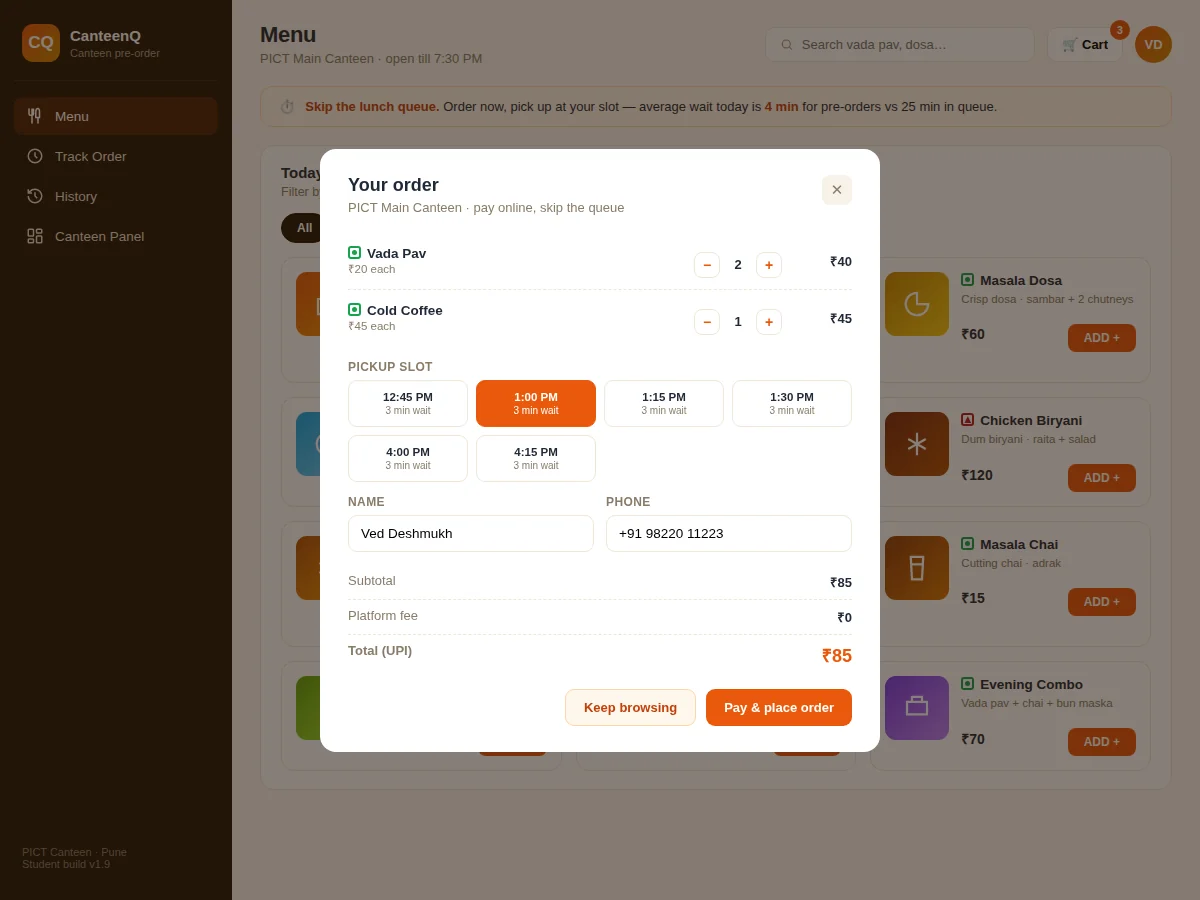
- At checkout they pick a pickup slot, enter name and phone, and pay by UPI.
- The order lands on the kitchen queue with its token number, items and slot.
- Kitchen staff tap to advance the token: received → preparing → ready.
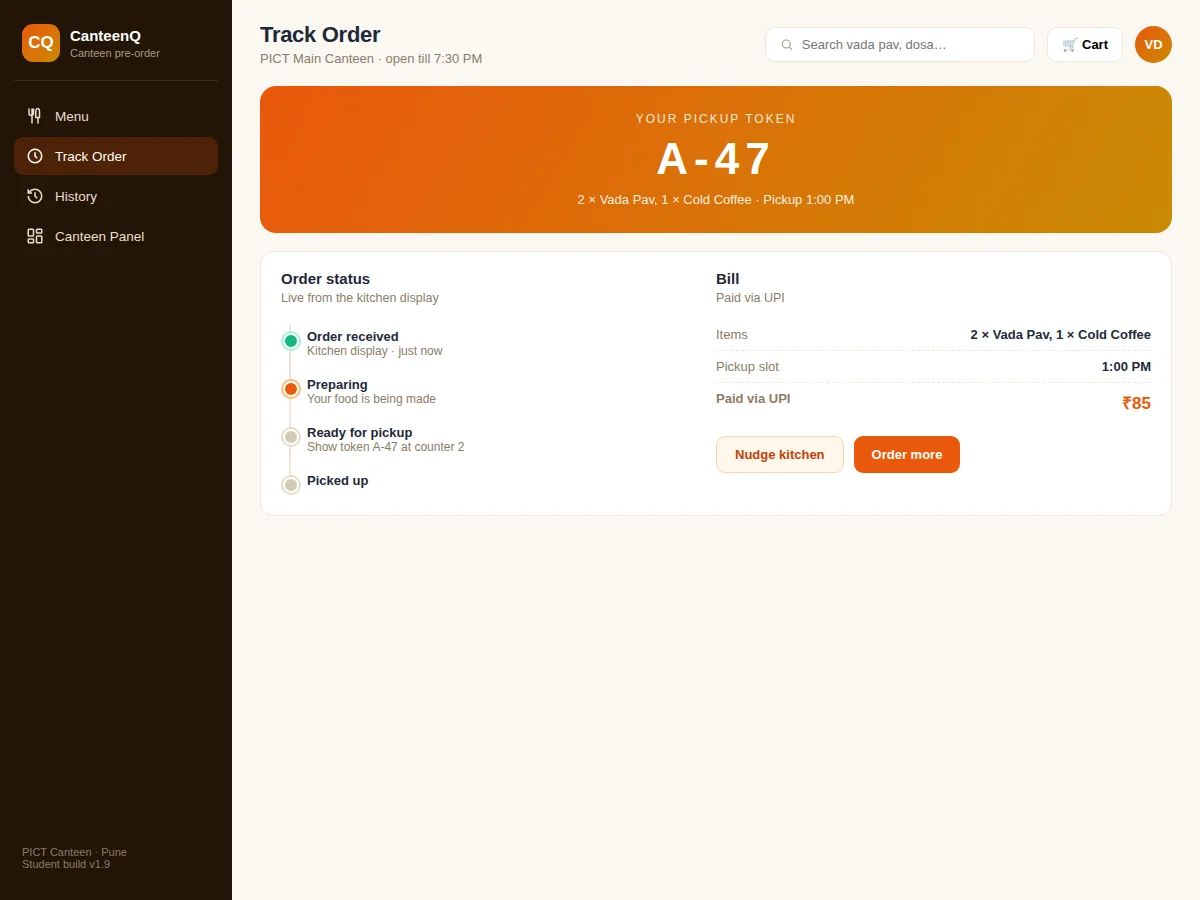
- The student's tracking screen updates live; they arrive at the slot and collect against the token at the counter.
- The dashboard aggregates orders, queue length, average prep time and daily revenue for the manager.
Tech stack:
- HTML5 · CSS3 · JavaScript (ES6)
- Node.js · Express
- MySQL · relational schema design
- REST API architecture
- Responsive mobile-first UI
- Token queue logic
- Live status updates
- Git · version control
| Parameter | Value |
|---|---|
| User roles | Student, kitchen staff and manager (design target) |
| Orders supported | Hundreds per lunch rush (expected) |
| Menu items | Unlimited; category-filtered (expected) |
| Pickup slots | 15-minute configurable slots (design target) |
| Page load | Under ~2 s on broadband (design target) |
| Database | MySQL with migration scripts and seed data |
| Deployment | Shared hosting or VPS; no special hardware needed |
| Browsers | Modern Chrome, Firefox, Edge, Safari (expected) |
Project features
- [Digital menu] Category-filtered menu (snacks, meals, South Indian, beverages, combos) with veg/non-veg indicators, descriptions and prices.
- [Cart with quantities] Add-to-cart with steppers, live totals and per-item pricing — the familiar food-app pattern.
- [Pickup slot selection] Choose a collection slot at checkout; the kitchen queue is sorted by slot so food is fresh at pickup.
- [Token system] Every order gets a token number (A-47…) displayed big on the tracking screen and the kitchen display.
- [Live order tracking] Student view shows received → preparing → ready → picked up with live stage updates from the kitchen.
- [Kitchen queue dashboard] Staff see all active tokens with items, slots and one-tap stage advancement, plus queue length and average prep time.
- [UPI payment recording] Orders record UPI payment at checkout with itemised bills.
- [Order history] Students see past orders for quick re-ordering; the canteen sees daily order counts and revenue.
What is included
- Complete source code: student frontend, kitchen dashboard, backend API and database schema
- Database migration scripts with realistic seed data (menu, slots, sample orders)
- Setup and deployment guide (local + shared hosting/VPS)
- Canteen staff manual
- Project report PDF (problem, design, schema, testing)
- PPT presentation for final review
- Viva Q&A preparation document
Limitations & prerequisites
- UPI payments are recorded at checkout; a production deployment would integrate a real UPI collect API.
- The kitchen display is a web dashboard — a dedicated KDS screen or printer integration is a documented extension.
- Menu availability (item sold out) is toggled manually by staff in this build.
- Delivery to hostel rooms is not included; the model is counter pickup.
- Real-time updates use polling in the demo; WebSocket push is documented as the production upgrade.
- One canteen per deployment; multi-outlet campuses are future scope.
Frequently Asked Questions
How does the token system replace the queue?
The order confirmation shows a big token number. The kitchen display calls tokens as they become ready, so students arrive at their slot and collect — the physical queue becomes unnecessary for pre-orders.
How does the kitchen know what to cook when?
The queue is sorted by pickup slot, not order time. Staff see exactly which tokens and items are due next, which is the operational insight paper tokens can't give.
What if the canteen runs out of an item?
Staff toggle the item off on the menu panel and it disappears from the student menu instantly. Out-of-stock handling is a manual but one-tap operation.
Is real UPI payment integrated?
The checkout records UPI payment against the order. Wiring a production UPI collect API is documented as an extension with the integration points marked — the demo keeps money out of scope deliberately.
Is this project suitable for a final-year project?
Yes — for Computer Science, IT and Web Development programs. It demonstrates e-commerce patterns (menu, cart, checkout), queue management, role-based dashboards and live status — built around a problem every examiner has personally experienced. Suitable for B.E./B.Tech final-year projects in Computer Science, IT and Web Development.
Components & software requirements
- HTML5 · CSS3 · JavaScript (ES6)
- Node.js · Express
- MySQL · relational schema design
- REST API architecture
- Responsive mobile-first UI
- Token queue logic
- Live status updates
- Git · version control
Delivery information
Built-to-order project. Delivery timeline is shared after order confirmation based on current queue.
Support terms
Complete documentation, setup guide, and viva preparation included. Support for setup and explanation provided.