
More project photos (3)
The problem
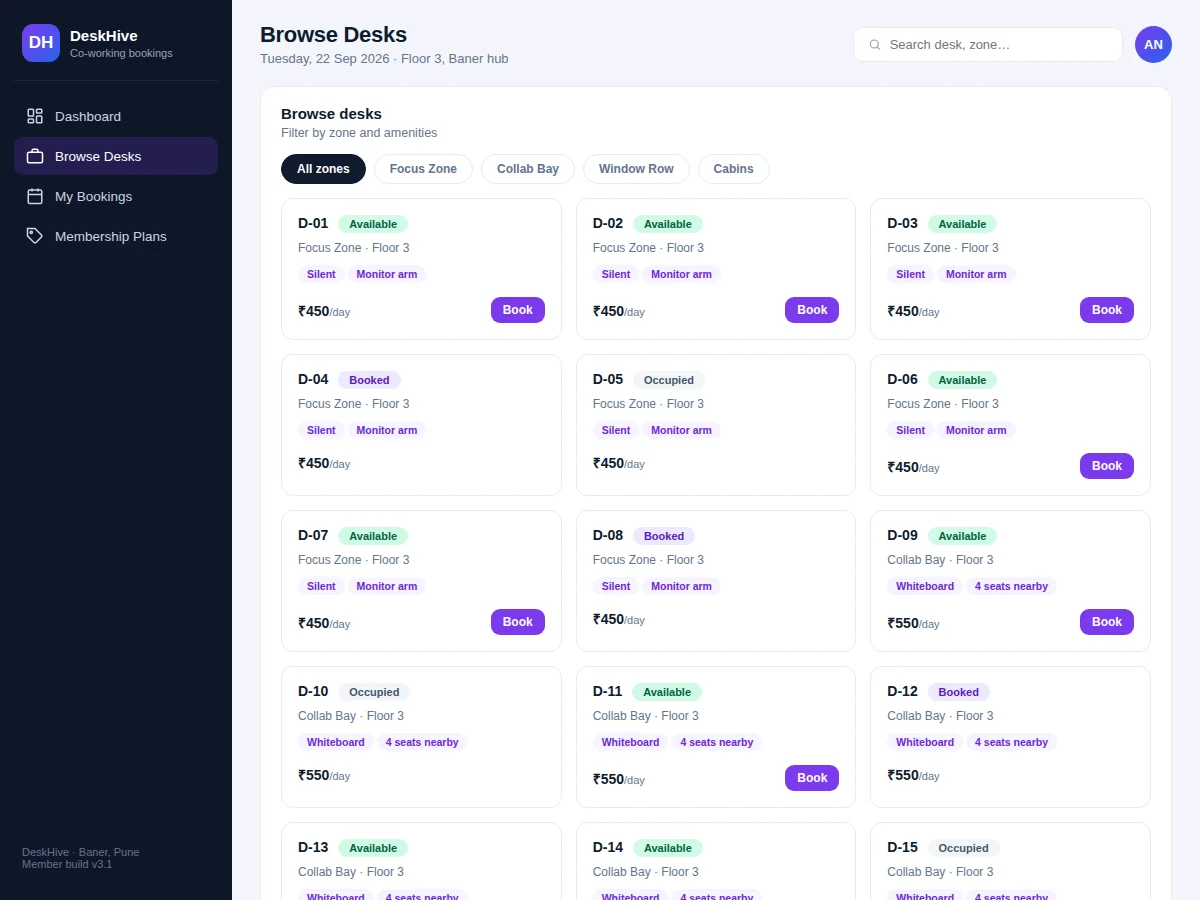
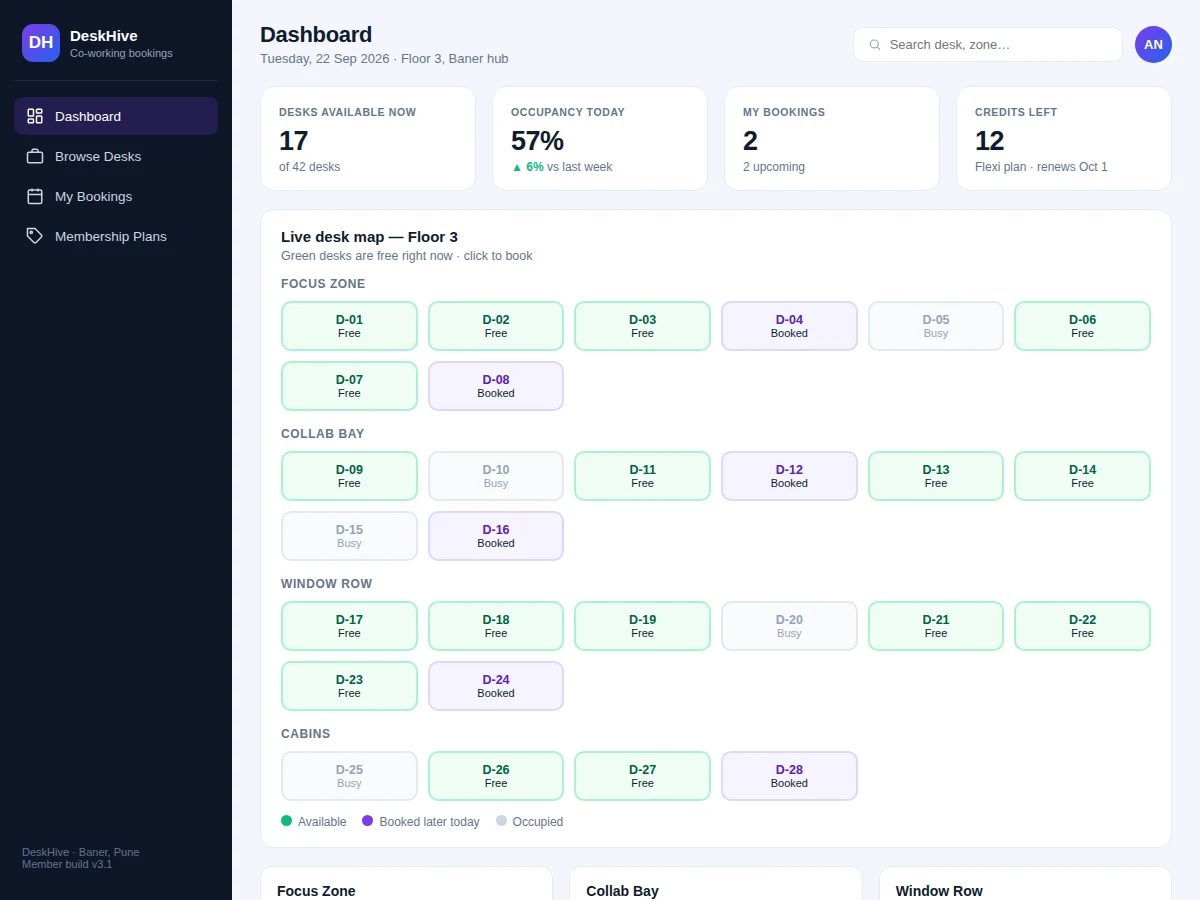
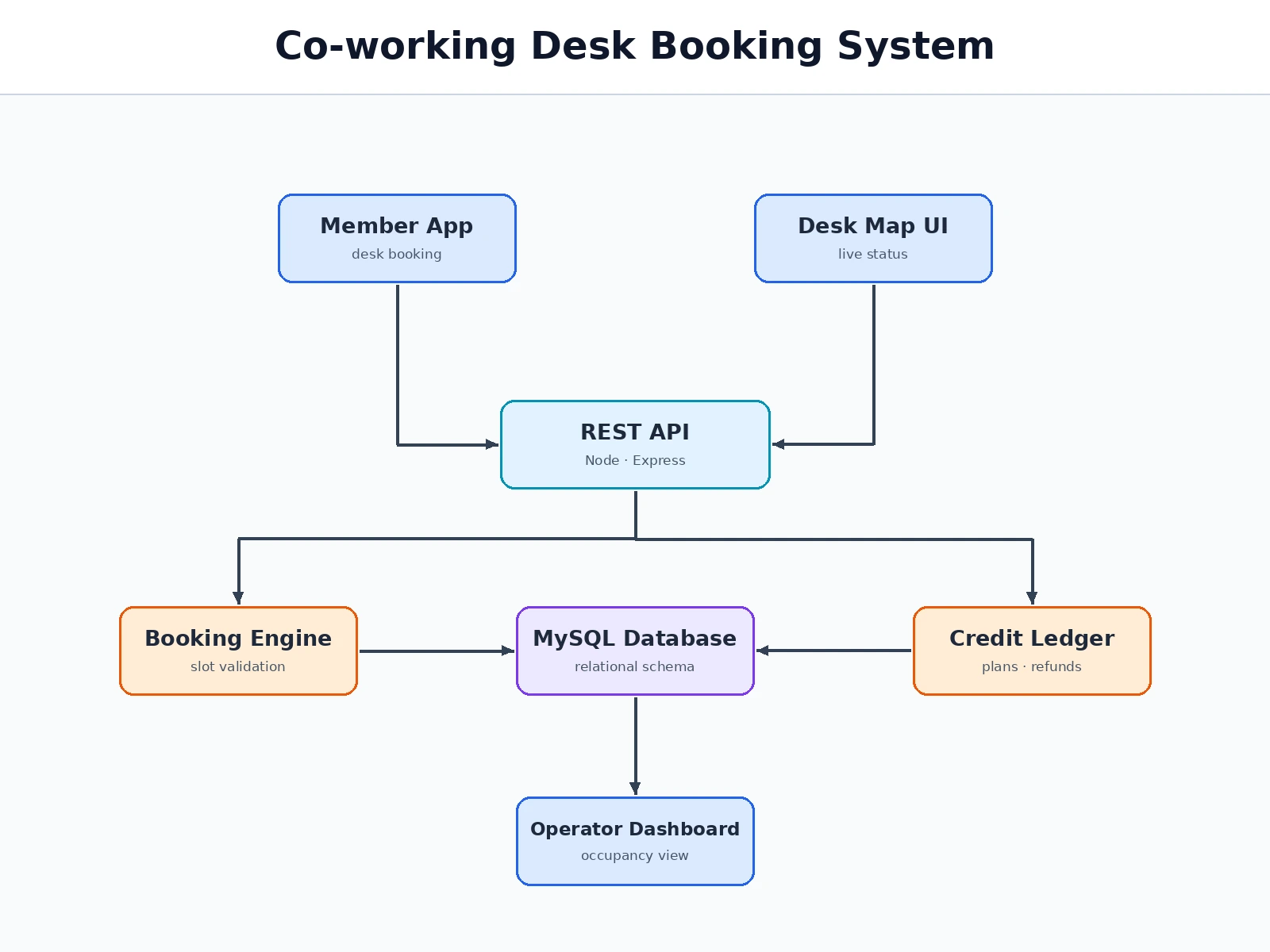
Co-working spaces sell their desks the way airlines sell seats — but many smaller spaces still manage bookings on spreadsheets and WhatsApp, which means double bookings, no-shows nobody tracks, and members who can't tell what's free without calling. This project builds the member-facing booking product and the operator dashboard as one system. The centrepiece is a live desk map: every desk on the floor shown as free, booked or occupied, grouped by zone (focus, collaboration, window row, private cabins). Members filter by amenities, pick a date and slot, and pay with plan credits; cancellations refund the credit automatically. Operators see occupancy by zone, plan uptake and booking history. The scope is deliberately one location done properly — the data model (desks, zones, plans, credits, bookings) is small enough to be fully understood and defended in a viva, yet realistic enough to demo like a real product.
Defines floors, zones, desk amenities and membership plans with credit allowances.
Follow the working sequence
How it works
- The operator defines the space once: floors, zones, desks with amenities, and membership plans with credit allowances.
- A member opens the live desk map, filters by zone or amenity, and picks a free desk.
- They choose a date and time slot; the app shows the credit cost and remaining balance before confirming.
- On confirm, a booking record is created, the credit is deducted, and the desk flips to booked on the map.
- The member checks in at the space against the booking ID; the desk shows occupied.
- Cancellations before the cutoff refund the credit instantly and free the desk.
- The operator dashboard aggregates occupancy, plan usage and revenue-affecting metrics.
Tech stack:
- HTML5 · CSS3 · JavaScript (ES6)
- Node.js · Express
- MySQL · relational schema design
- REST API architecture
- Responsive mobile-first UI
- Credit ledger logic
- Git · version control
| Parameter | Value |
|---|---|
| User roles | Member and operator (design target) |
| Desks supported | Up to ~500 per location (expected) |
| Booking window | Up to 30 days ahead (configurable) |
| Cancellation cutoff | 2 hours before slot (configurable) |
| Page load | Under ~2 s on broadband (design target) |
| Database | MySQL with migration scripts and seed data |
| Deployment | Shared hosting or VPS; no special hardware needed |
| Browsers | Modern Chrome, Firefox, Edge, Safari (expected) |
Project features
- [Live desk map] Floor-wise desk grid coloured by real-time status — free, booked later today, or occupied — grouped into zones with different pricing.
- [Zone & amenity filters] Members filter desks by zone and amenities (silent zone, monitor arm, natural light, private cabin) before booking.
- [Slot booking] Date picker plus time-slot grid; unavailable slots are struck through and unclickable, and the selection drives the price.
- [Membership plans with credits] Flexi, dedicated-desk and day-pass plans; bookings consume credits and cancellations refund them automatically.
- [Booking history] Every reservation listed with desk, zone, date and slot, with one-click cancellation for upcoming bookings.
- [Operator occupancy dashboard] Zone-wise availability bars, today's occupancy percentage and booking counts for the space manager.
- [Double-booking protection] Unique constraint on desk + date + slot at the database level, re-validated at booking time.
- [QR check-in ready] Each booking generates an ID designed to pair with a gate QR scanner (scanner hardware is outside project scope).
What is included
- Complete source code: member frontend, operator dashboard, backend API and database schema
- Database migration scripts with realistic seed data (desks, zones, plans, sample bookings)
- Setup and deployment guide (local + shared hosting/VPS)
- Operator manual for space managers
- Project report PDF (problem, design, schema, testing)
- PPT presentation for final review
- Viva Q&A preparation document
Limitations & prerequisites
- Scoped to a single co-working location; multi-city inventory is future scope.
- Credits are an internal ledger — no real-money wallet top-up or payment gateway is included.
- QR check-in IDs are generated, but the physical gate scanner integration is outside scope.
- Meeting-room booking is modelled as a documented extension, not a built module.
- Occupancy "live" status assumes staff or sensors update check-ins; the demo uses manual status.
- The credit rollover rules are simplified versus commercial plan contracts.
Frequently Asked Questions
How does the live desk map stay accurate?
Each desk carries a status derived from bookings plus a manual occupied flag the operator toggles at check-in. The map re-renders from the database on every load, so all members see the same truth.
How do membership credits work?
Plans grant a monthly credit allowance; one credit buys one desk-day. Booking deducts, cancelling before the cutoff refunds. The ledger records every movement for audit.
What prevents two members booking the same desk?
A unique database constraint on desk + date + slot rejects the second write, and the UI disables already-taken slots before the form can even be submitted.
Can this handle a second branch?
Not as shipped — the schema models one location. The report documents exactly which tables would gain a location key, so the extension path is clear for the viva.
Is this project suitable for a final-year project?
Yes — for Computer Science, IT and Web Development programs. It demonstrates inventory-style booking, ledger accounting, constraint-based concurrency control and dashboards in one product. Suitable for B.E./B.Tech final-year projects in Computer Science, IT and Web Development.
Components & software requirements
- HTML5 · CSS3 · JavaScript (ES6)
- Node.js · Express
- MySQL · relational schema design
- REST API architecture
- Responsive mobile-first UI
- Credit ledger logic
- Git · version control
Delivery information
Built-to-order project. Delivery timeline is shared after order confirmation based on current queue.
Support terms
Complete documentation, setup guide, and viva preparation included. Support for setup and explanation provided.
Download free synopsis (PDF)
Enter your name and WhatsApp number — the synopsis PDF downloads immediately. We may send occasional project updates on WhatsApp; no spam.