
More project photos (2)
The problem
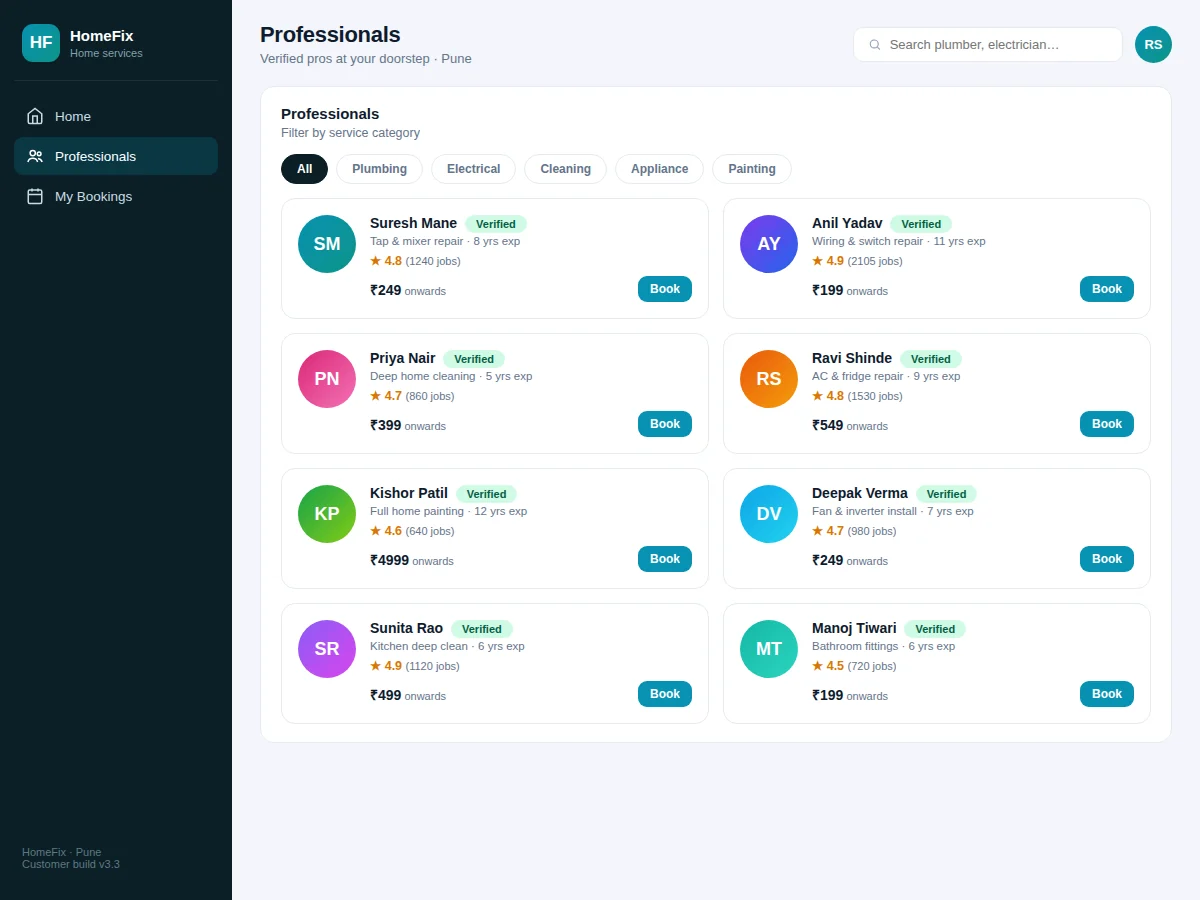
Finding a reliable plumber or electrician is still a referrals-and-prayer process for most households: no fixed prices, no-shows, haggling after the work, and no recourse when the repair fails a week later. This project builds the platform that professionalises it. Customers pick from 40+ services with fixed upfront prices, browse verified professionals with ratings and completed-job counts, choose a day and time slot, and book — paying only after the job is done, with a 30-day warranty on all work. Professionals get bookings with the issue description and address in advance, so they arrive prepared. The scope is one city's service network, which keeps the model (services, professionals, slots, bookings, ratings, warranties) realistic yet fully explainable in a viva.
How it works
- The platform owner configures the service catalogue once: categories, services and fixed prices.
- Professionals onboard with a profile — trade, experience, service area — and pass the verification step.
- A customer picks a service or searches ("AC repair"), browses verified pros with ratings, and selects one.
- They describe the issue, confirm the address, pick a day and a free time slot, and confirm the booking.
- The professional receives the booking with issue details and arrives in the slot with tools and spares.
- After the job, the customer pays (online or cash, recorded) and rates the work; the rating updates the pro's profile.
- The 30-day warranty window is tracked per booking for any rework claims.
Tech stack:
- HTML5 · CSS3 · JavaScript (ES6)
- Node.js · Express
- MySQL · relational schema design
- REST API architecture
- Responsive mobile-first UI
- Slot inventory logic
- Rating aggregation
- Git · version control
| Parameter | Value |
|---|---|
| User roles | Customer, professional and admin (design target) |
| Services | 40+ across 8 categories (design target) |
| Booking window | 5 days ahead with slot grid (configurable) |
| Warranty | 30 days per booking (design target) |
| Page load | Under ~2 s on broadband (design target) |
| Database | MySQL with migration scripts and seed data |
| Deployment | Shared hosting or VPS; no special hardware needed |
| Browsers | Modern Chrome, Firefox, Edge, Safari (expected) |
Project features
- [Service catalogue] 40+ services across plumbing, electrical, cleaning, appliance repair, painting, carpentry, pest control and salon-at-home, each with fixed upfront pricing.
- [Verified professional profiles] Photo-initial profiles with ratings, completed-job counts, experience years and a verification badge.
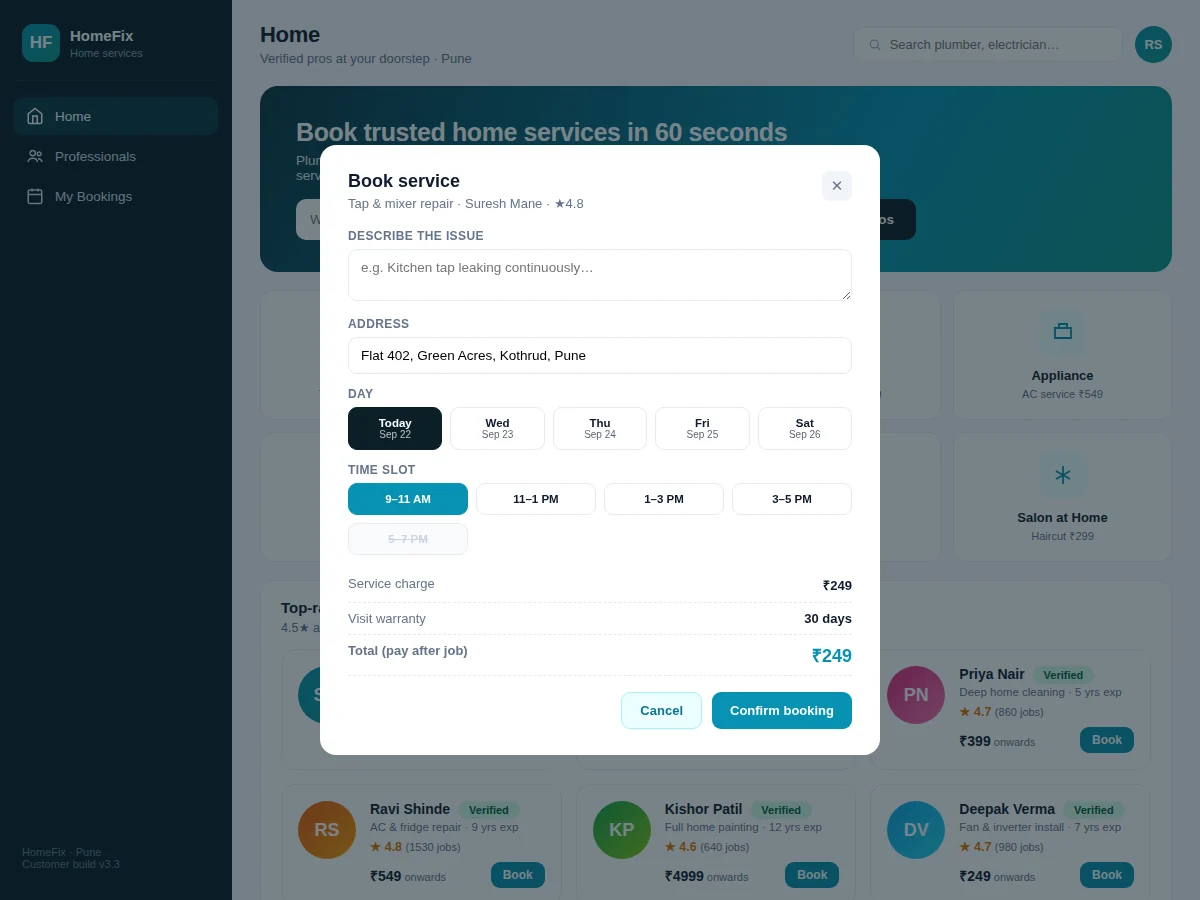
- [Day-and-slot booking] Five-day picker plus time-slot grid; taken slots are struck through and unbookable.
- [Issue description capture] Customers describe the problem in advance so the pro arrives with the right tools and spares.
- [Upfront pricing, pay-after-job] The price is shown before booking and collected after completion — no haggling.
- [30-day service warranty] Every booking records warranty coverage, building the trust mechanic into the data model.
- [Ratings from completed jobs] Professionals carry ratings computed from finished bookings with job counts as social proof.
- [Booking management] Upcoming and past bookings with one-click free cancellation for upcoming slots.
What is included
- Complete source code: customer frontend, professional dashboard, backend API and database schema
- Database migration scripts with realistic seed data (services, professionals, bookings, ratings)
- Setup and deployment guide (local + shared hosting/VPS)
- Professional onboarding guide
- Project report PDF (problem, design, schema, testing)
- PPT presentation for final review
- Viva Q&A preparation document
Limitations & prerequisites
- Payments are recorded as pay-after-job; integrated online payment collection is a documented extension.
- Professional "verification" is a badge workflow in the demo — real background checks are operational, not code.
- Real-time pro location tracking is not included; arrival windows are slot-based.
- Warranty claims are tracked as records; the dispute-resolution process is operational.
- One city per deployment; multi-city operations are future scope.
- Ratings are seeded realistically in the demo; production would need anti-gaming moderation.
Frequently Asked Questions
How does slot booking avoid double-booking a professional?
Slots are inventory: booking a pro for a day + time-slot creates a unique record, and the UI strikes through taken slots. The database constraint rejects any conflicting second booking.
What does "verified" mean for professionals?
In the platform it means the profile passed the onboarding checklist (ID, trade proof, service area) and carries the badge. The demo models the workflow; actual document verification is an operational step.
How does the 30-day warranty work in the app?
Every completed booking stores its warranty window. If the customer reports an issue within 30 days, it links back to the original booking, pro and price — the accountability trail is in the data.
Why pay after the job instead of online upfront?
Trust. Home services are intimate — strangers in your home — so the model collects payment after satisfactory completion. Online collection is documented as an extension.
Is this project suitable for a final-year project?
Yes — for Computer Science, IT and Web Development programs. It demonstrates marketplace design, slot-inventory booking, rating systems and warranty tracking — a complete on-demand services product. Suitable for B.E./B.Tech final-year projects in Computer Science, IT and Web Development.
Components & software requirements
- HTML5 · CSS3 · JavaScript (ES6)
- Node.js · Express
- MySQL · relational schema design
- REST API architecture
- Responsive mobile-first UI
- Slot inventory logic
- Rating aggregation
- Git · version control
Delivery information
Built-to-order project. Delivery timeline is shared after order confirmation based on current queue.
Support terms
Complete documentation, setup guide, and viva preparation included. Support for setup and explanation provided.