
More project photos (3)
The problem
A visitor management system replaces the paper register most apartment societies keep at their gates with a digital pass workflow. In this project, a resident pre-approves an expected visitor from a web portal; the system instantly issues a QR gate pass carrying an expiry time, and the guard scans or types the pass code to log the visitor's entry and exit. Every pass code ends in a checksum digit, so a forged or mistyped code fails validation before the visitor's name is ever read. Guards see a live list of who is inside the premises with elapsed time, and the society office gets daily entry-exit logs plus visitors-by-purpose reports. Frequent visitors such as domestic help and drivers get reusable long-validity passes instead of a new code every day. The system runs as a responsive PHP and MySQL web application with three roles — resident, guard and admin — deployable on ordinary shared hosting with no special hardware at the gate.
Paper registers fail at exactly the moments they matter. Handwriting is illegible and entries are unverifiable, so after an incident the log cannot establish who was actually inside. During morning and evening peaks, the guard's handwriting slows the queue while residents wait behind delivery agents. A paper entry never expires, so a visitor logged once can walk in and out unchecked for the rest of the day. The society office has no real-time occupancy view and no way to generate a report without retyping the register. Residents also cannot warn the gate in advance, so every visit begins with a phone call to the flat and a wait at the barrier. The digital alternative must therefore do more than store names: it must prove a pass is genuine before trusting it, bind every visit to a time window, and keep the inside list truthful as entries and exits happen. This project is built around those three guarantees, using checksums, expiring QR passes and a single append-only event log.
Pre-approves an expected visitor and issues a time-bound QR pass.
Follow the working sequence
How it works
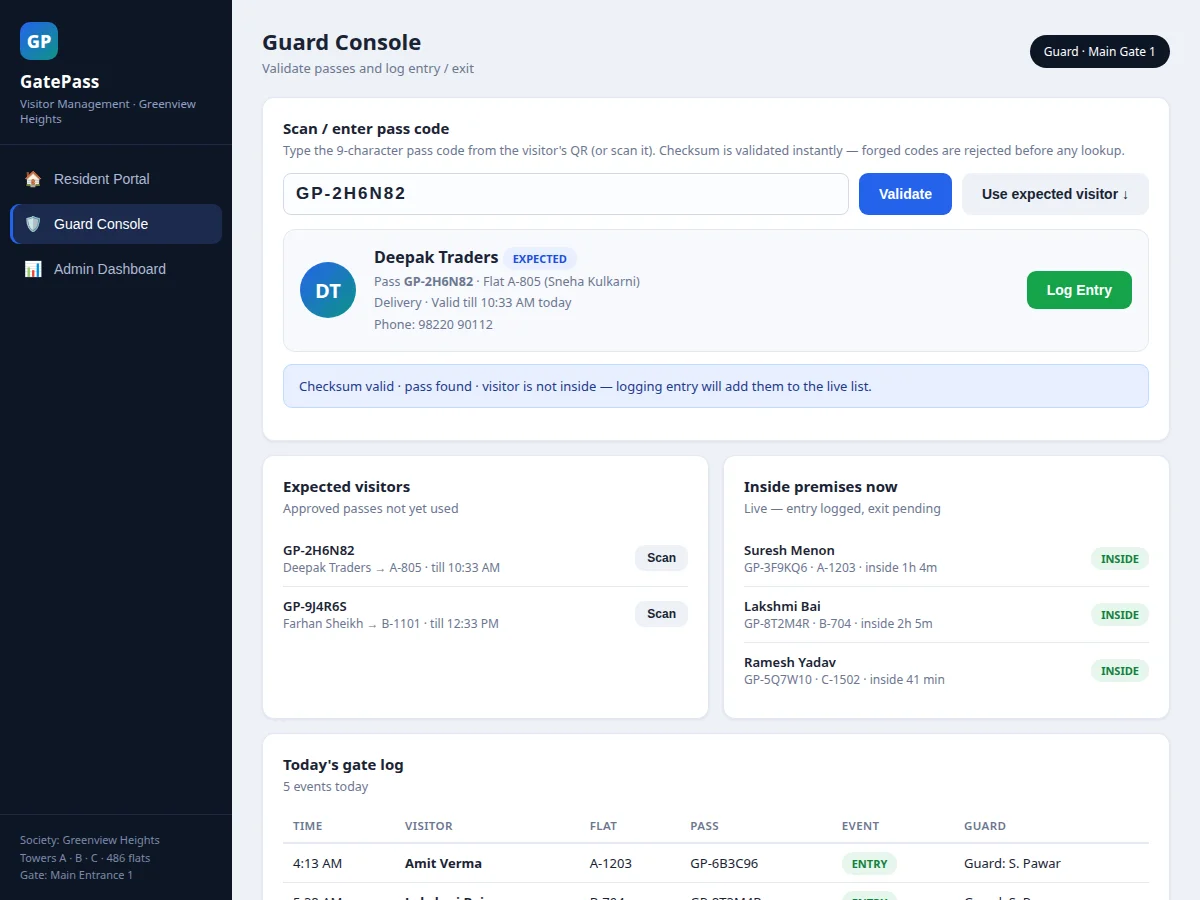
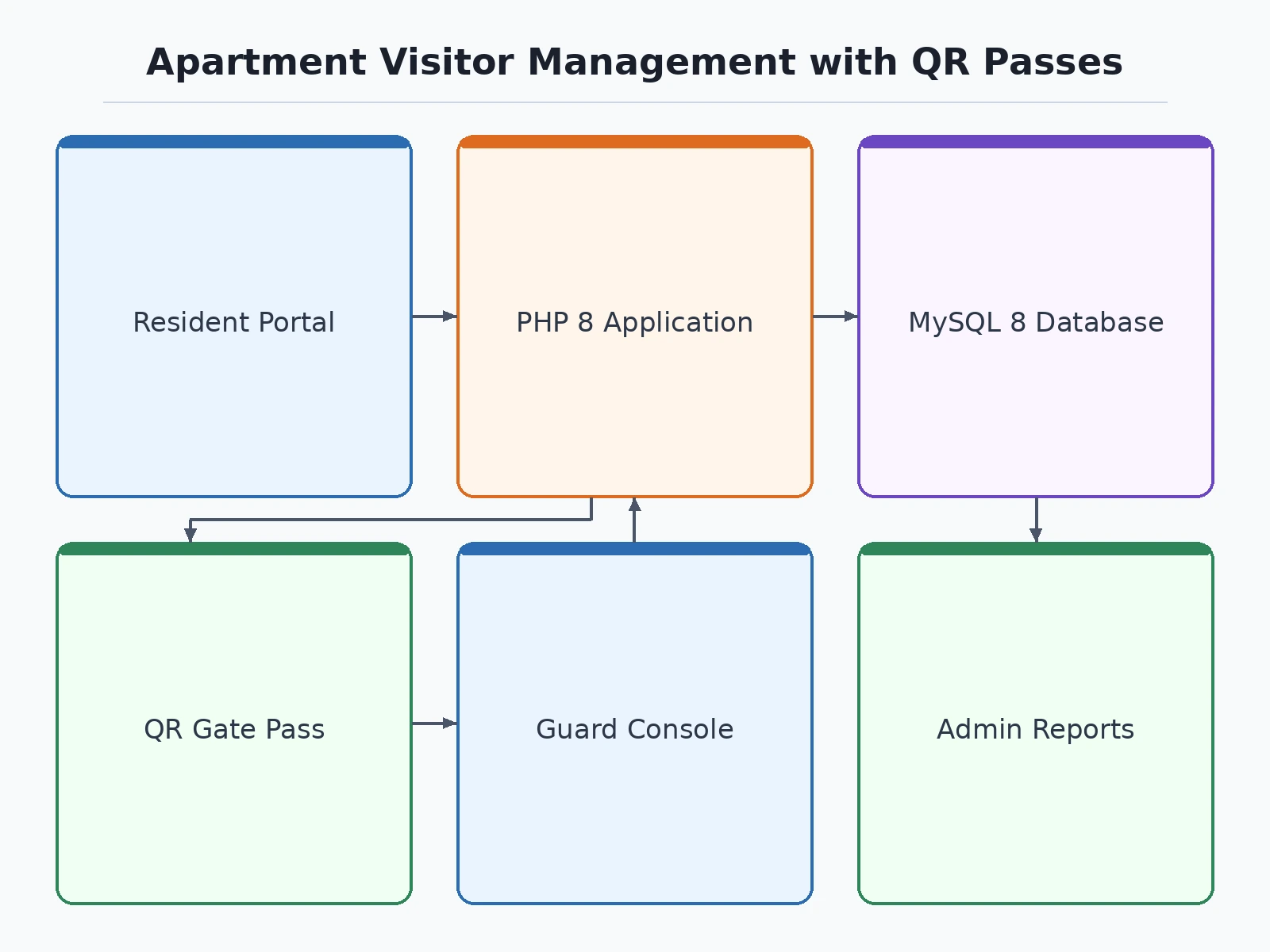
A resident opens the portal and pre-approves a visitor by entering their name, phone, purpose and optional vehicle number. The server creates a pass record in MySQL with a 9-character code — the last character is a checksum digit computed over the first five — sets expiry from the chosen window, and renders the QR payload as JSON client-side; the form-to-QR step measured 0.7 ms in the reference demo build. The resident shares the code or QR with the visitor. At the gate, the guard enters the code: the app validates the checksum first, then runs a single indexed lookup, rejects expired passes, and displays the visitor card with flat, purpose and validity. One click logs the entry event and the visitor appears on the live inside-premises list. When the visitor leaves, the guard logs the exit and the name clears from the list. The admin dashboard aggregates the append-only event log into occupancy counts, purpose-wise reports and overstay flags.
- The resident submits the visitor form; PHP creates the pass row in MySQL with the 9-character code, checksum digit and expiry timestamp.
- The QR payload (JSON with code, name, flat, purpose, expiry and checksum) is rendered client-side so the resident can share it immediately.
- At the gate, the guard types or scans the code; the checksum is validated before any database lookup, rejecting forged or mistyped codes outright.
- A single indexed query fetches the pass row; expired passes and unknown codes are rejected with an explicit reason on screen.
- The guard clicks Log Entry; the event is appended to the gate log and the visitor joins the live inside-premises list with a timestamp.
- The guard clicks Log Exit on departure; the exit event is appended and the visitor clears from the live list at once.
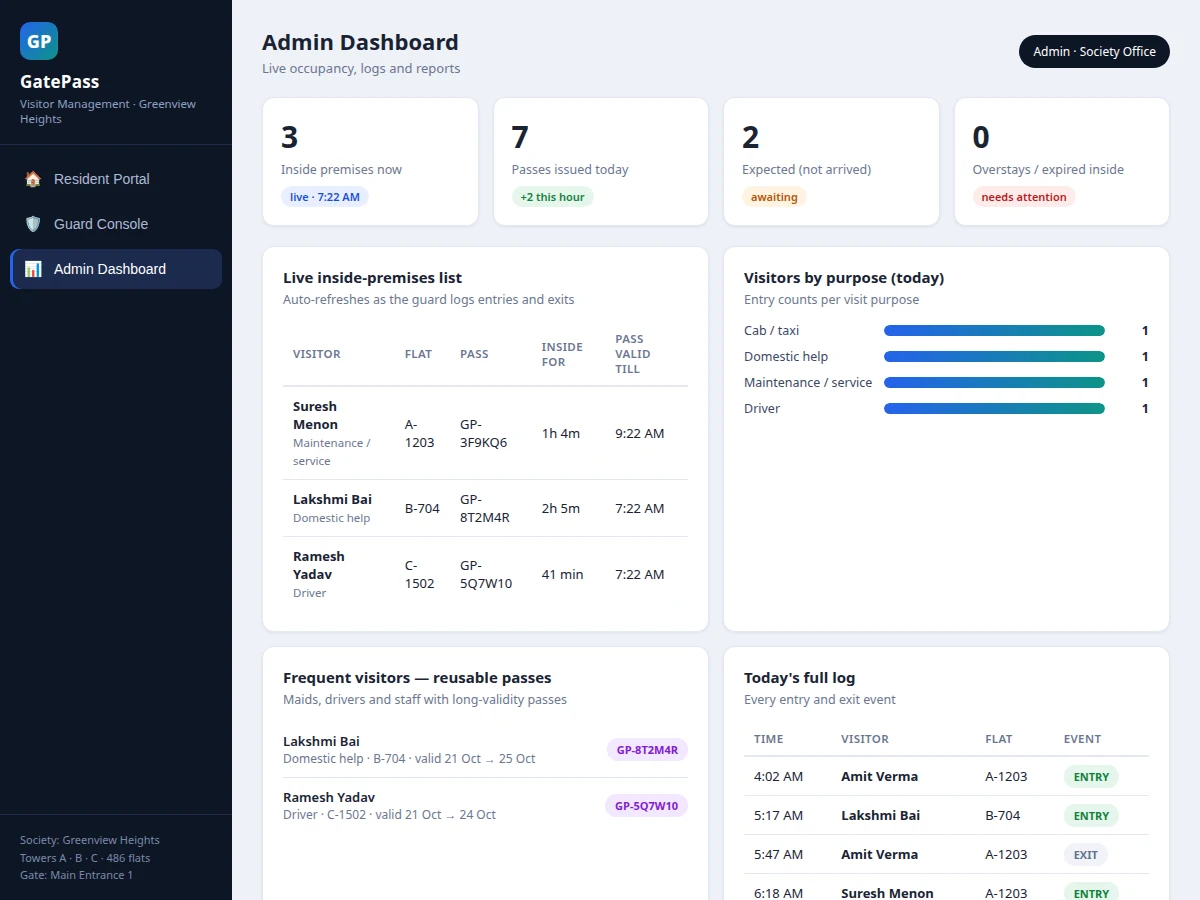
- The admin dashboard aggregates the event log into live occupancy, per-visitor elapsed times, overstay flags and visitors-by-purpose counts.
Tech stack:
- PHP 8 with PDO prepared statements
- MySQL 8 (indexed pass and event tables)
- HTML, CSS and JavaScript (responsive role views)
- Client-side QR code rendering (JSON payload)
- Apache / Nginx web server
- XAMPP local development stack
- phpMyAdmin / MySQL Workbench
- Git
| Parameter | Value |
|---|---|
| Pass code format | 9 characters: GP- prefix + 5 code characters + 1 checksum digit |
| Pass validity window | 2–12 hours, selectable at issuance (12-hour design maximum) |
| Pass creation to QR render | 0.7 ms (measured in the reference demo build, desktop browser) |
| Guard validation cost | 1 indexed MySQL query per scan (design) |
| User roles | 3 (resident, guard, admin) |
| Database tables | 5 (users, flats, passes, frequent_visitors, gate_events) |
| QR payload | JSON: code, visitor, flat, purpose, expiry, checksum |
| Hosting requirement | Ordinary shared hosting (design target; no special hardware) |
| Client requirement | Any modern browser (expected) |
Project features
Four capabilities carry this system. First, resident pass issuance: a resident fills in a visitor's name, phone, purpose and vehicle, and the system generates a 9-character pass code (GP- prefix, five code characters and a checksum digit) plus a scannable QR in under a millisecond of client-side work (0.7 ms measured in the reference demo build), valid for a chosen 2-to-12-hour window. Second, the guard console: typing or scanning the code runs checksum validation, an expiry check and a single indexed database lookup, then shows the visitor card — one click logs entry, another logs exit. Third, the live inside-premises list: every logged entry appears with elapsed time, and anyone still inside past their pass expiry is flagged as an overstay for the admin. Fourth, admin reporting: the append-only gate log feeds daily entry-exit tables, visitors-by-purpose charts and reusable passes for frequent visitors like maids and drivers.
- [Resident pass issuance with QR] The resident portal collects visitor name, phone, purpose and optional vehicle number, then generates a 9-character pass code and a scannable QR payload instantly, with expiry set from the chosen validity window.
- [Checksum-guarded pass codes] The last character of every pass code is a checksum digit over the preceding five. The guard never types a name — the QR payload is the only source of truth, which is why a forged pass fails the checksum before the name is ever read.
- [Guard validation console] Entering or scanning a code runs checksum validation, then a single indexed MySQL lookup, then an expiry check, and shows the visitor card with flat, purpose and validity. One click logs entry; another logs exit.
- [Live inside-premises list] Every logged entry appears with elapsed inside-time; logging an exit clears the visitor immediately, so the list always reflects who is actually on the premises.
- [Reusable passes for frequent visitors] Maids, drivers and staff get long-validity passes (multi-day) instead of a new code per visit, marked distinctly in the guard and admin views.
- [Admin reports and daily log] The append-only gate-events table feeds the daily entry-exit log, visitors-by-purpose counts and an overstay view that flags visitors still inside past their pass expiry.
- [Configurable validity windows] Pass lifetimes of 2, 4, 8 or 12 hours are selectable at issuance; the 12-hour cap is a design maximum to bound how long a stale pass stays usable.
- [Optional: WhatsApp/SMS pass delivery] Not in the base build — the QR link can be pushed to the visitor over WhatsApp or SMS as a separately developed customization.
What is included
- Complete PHP source code (resident portal, guard console, admin dashboard)
- MySQL schema with indexes plus seed data for a demo society
- Working single-file demo of all three role views with realistic data
- Project report PDF (background, data model, workflow, checksum design, test cases)
- PPT presentation for the final review
- Viva Q&A preparation document (RBAC, indexing, QR payload design, limitations)
- Setup guide (XAMPP local run + shared-hosting deployment steps)
Limitations & prerequisites
- The checksum guards the pass code against forgery and typos; it does not sign the QR payload itself — a production deployment should add server-side QR signing, noted as a customization.
- No OTP or SMS verification of resident or visitor identity in the base build; identity is by resident login plus the shared pass code.
- The guard console needs internet access to reach the server; offline gate operation is not supported.
- Overstay and occupancy figures depend on guards logging exits honestly — the system cannot detect tailgating through an open gate.
- The 0.7 ms QR-render figure was measured on a desktop browser; low-end phones will render more slowly (expected, not measured on devices).
- Vehicle numbers are recorded as text; automatic number-plate recognition is future scope, not included.
Frequently Asked Questions
Is this project suitable for a final-year project?
Yes — this project suits Computer Science and IT final-year programs because it is a complete three-role web application, not a toy CRUD demo. It demonstrates role-based access control, relational database design with indexing, QR-based ticketing workflows, and a checksum mechanism that gives strong viva material. The report documents the schema and design decisions in full, and the working demo lets examiners test every role live.
How does the checksum stop a forged pass?
The last character of each 9-character code is a checksum digit computed over the first five characters. When the guard enters a code, the app recomputes the digit first: a forged or mistyped code fails this check before any database lookup happens, so no visitor record is ever opened for it. Only codes the system itself issued can pass validation.
Is the database included?
Yes — the project ships with the complete MySQL schema: users, flats, passes, frequent visitors and the append-only gate-events table, with indexes on the pass code and expiry columns. Seed data for a demo society is included, so every screen — resident portal, guard console and admin dashboard — works immediately after the database import, with no manual data entry needed.
Can it be hosted online?
Yes — it is a standard PHP and MySQL application designed for ordinary shared hosting, with no VPS, Node.js runtime or special extensions required. The setup guide covers both a local XAMPP run for development and the shared-hosting deployment steps, including the database import and the configuration values that must be changed.
Does the gate need internet?
Yes — the guard console needs internet because every validation runs a live lookup against the server database, so the guard's phone or desktop must stay connected at all times for scans to validate. Resident pass issuance happens online too, and there is no offline mode in the base build. The documentation states this openly so the viva discussion stays honest.
What will I receive with the project?
You receive the complete PHP source for all three role views, the MySQL schema with seed data, and the working demo with realistic data. Also included are the project report PDF, a review PPT, a viva Q&A document and a setup guide covering local and shared-hosting deployment. Customizations such as WhatsApp pass delivery are developed separately on request.
Components & software requirements
- PHP 8 with PDO prepared statements
- MySQL 8 (indexed pass and event tables)
- HTML, CSS and JavaScript (responsive role views)
- Client-side QR code rendering (JSON payload)
- Apache / Nginx web server
- XAMPP local development stack
- phpMyAdmin / MySQL Workbench
- Git
Delivery information
Built-to-order project. Delivery timeline is shared after order confirmation based on current queue.
Support terms
Complete documentation, setup guide, and viva preparation included. Support for setup and explanation provided.
Download free synopsis (PDF)
Enter your name and WhatsApp number — the synopsis PDF downloads immediately. We may send occasional project updates on WhatsApp; no spam.