
More project photos (2)
The problem
College departments own hundreds of shared instruments — oscilloscopes, projectors, power supplies, 3D printers — yet most still track them in a spreadsheet that nobody updates, or in a register book that sits in one lab. When an instrument breaks, nobody can say when it was last serviced; when a projector goes missing before a seminar, nobody can say which room it was last seen in; and at audit time, the department reconstructs a year's history from memory. This project replaces that fragile record-keeping with a web platform: every asset gets a printed QR label, a live record showing its location and custodian, and a maintenance log that computes its next service due date automatically. Staff scan a label with any phone camera to open the asset, log a repair, or move it between rooms, and the dashboard surfaces overdue items before they fail during a practical session.
Lab staff add assets, log service and move items between rooms.
Follow the working sequence
How it works
The platform works as a loop between the physical asset and its digital record. An asset is first entered in the register with its category, purchase details, location and service interval, and a QR label is printed and fixed to it. From then on, the label is the shortcut to everything: scanning it opens the asset's live record on any phone, and any action taken there — a move, a repair, a calibration — is written back to the same record. The maintenance log watches the dates: each new service entry pushes the next due date forward by the asset's interval, and the dashboard compares due dates against today to sort items into on-schedule, due-soon and overdue. Because every change keeps a timestamp and an actor, the record doubles as an audit trail without extra paperwork.
- The administrator creates departments and locations (labs, seminar halls, workshops) and sets the default service interval for each asset category.
- Lab staff add assets to the register with category, purchase year, location, custodian and service interval, and the system assigns each a unique asset ID.
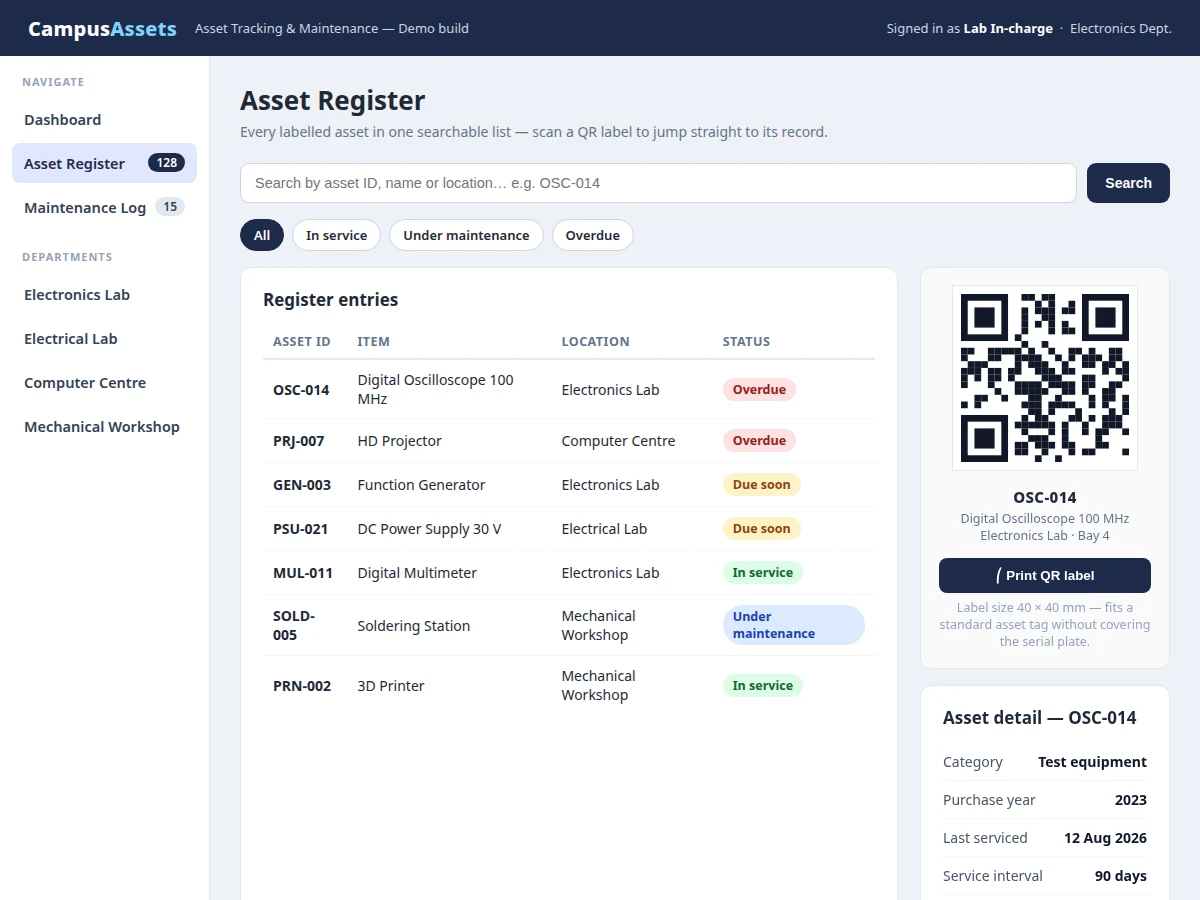
- A QR label is printed for each asset at 40 × 40 mm (design target) and fixed to the item where it does not cover the serial plate.
- Scanning a label with any phone camera opens that asset's record, showing its current location, custodian, status and full service history.
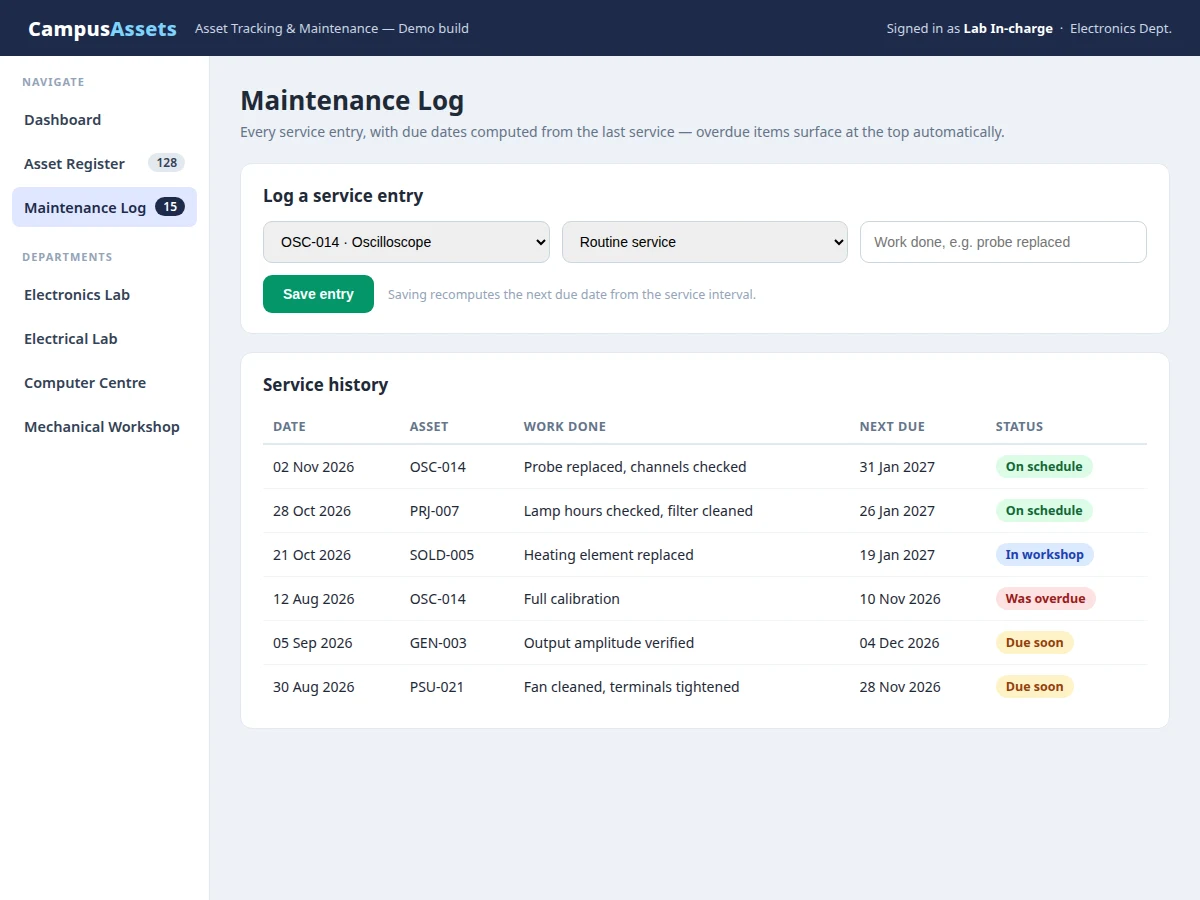
- Staff log moves, repairs, calibrations and routine services from the record; each service entry automatically recomputes the next due date from the asset's interval.
- The dashboard continuously compares due dates against the current date, sorting assets into on-schedule, due-soon and overdue, and highlights overdue items for the service team.
Tech stack:
- HTML5 · CSS3 · JavaScript (front end)
- Node.js · Express (back end)
- SQLite database
- QR code generation library
- REST API design
- Responsive web UI
- Git version control
| Parameter | Value |
|---|---|
| Platform type | Responsive web application for desktop and mobile browsers |
| QR label size | 40 × 40 mm (design target) |
| Default service interval | 90 days (design target, configurable per asset) |
| Demo sample data | 128 sample assets across 4 departments (demo data) |
| User roles | 3 roles: administrator, lab staff, viewer (design target) |
| Back end | Node.js with Express and SQLite (single-file database) |
| QR encoding | Asset ID encoded as a link to the asset record (design target) |
| Search filters | 5 filters: asset ID, name, category, location, status |
| Report types | 2 reports: printable asset list and overdue-service report |
| Hosting requirement | Any server with Node.js 18 or later (design target) |
Project features
The platform is built around three capabilities that work together: a searchable asset register, QR labels that link the physical item to its record, and a maintenance log that turns service dates into action. The register holds every asset with its category, location, custodian and status, so a department can answer where an item is within seconds. Each QR label is printed at 40 × 40 mm (design target), small enough to fit a standard asset tag without covering the serial plate — a sizing decision made while building the demo, when a larger label hid the plate on the sample oscilloscope record. The maintenance log records every service, repair and calibration, computes the next due date from the asset's service interval, and flags overdue items on the dashboard. Role-based access keeps editing with lab staff while letting students view records without changing them.
- [QR asset labels] Every asset gets a printable QR label encoding a link to its record, so scanning the item with a phone camera opens its details, location and service history instantly, with no app to install.
- [Searchable asset register] All assets live in one searchable list filterable by ID, name, category, location or status, replacing the spreadsheet that goes stale the moment two people edit it.
- [Maintenance log with automatic due dates] Each service, repair or calibration entry recomputes the asset's next due date from its service interval, so due dates are never typed by hand and never forgotten.
- [Location and custody history] Every move between rooms is recorded with a timestamp and the person responsible, giving a complete trail from purchase to present location.
- [Overdue and due-soon dashboard] Status counts and a due-soon list surface items past their service date at the top, so the service team works from a priority list instead of memory.
- [Role-based access] Three roles — administrator, lab staff and viewer — control who can add assets, log service and change locations, and who can only view records.
- [Printable audit reports] One-click asset lists and overdue-service reports give departments a clean paper trail for stock verification and internal audits.
What is included
- Complete web platform source code (front end, back end, database schema)
- Working demo with sample asset data across 4 departments
- Printable QR label set for the sample assets
- Project report PDF (background, system design, database schema, methodology, testing, plus a deployment checklist)
- PPT presentation for final review
- Viva Q&A preparation document (QR encoding, REST APIs, SQLite design, role-based access)
Limitations & prerequisites
- The demo ships with fictional sample data; a department must enter its real assets before use, and no real college inventory is included.
- QR labels identify assets but do not track them in real time — location updates only when someone scans and logs a move.
- The platform is a record-keeping tool, not a repair service: it flags overdue items but cannot service equipment itself.
- No barcode-scanner hardware is bundled; scanning assumes a phone camera and a printed label in readable condition.
- Damaged, peeled or poorly lit labels may fail to scan and must be reprinted from the register.
- The single-file SQLite database suits department-scale use; a multi-campus deployment would need a client-server database instead.
Frequently Asked Questions
How is this different from a lab-equipment booking app?
It is not a booking app at all: booking apps reserve time slots for shared equipment, while this platform tracks the whole life of each asset — its location, custodian, condition and service history. There is no slot calendar and no reservation queue; instead, every asset keeps a permanent record from purchase through every move, repair and calibration, which is what departments need at audit time and when equipment fails.
Do staff need a special app to scan the QR labels?
No special app is needed, and that is a deliberate design choice. Any phone camera that can read a QR code opens the asset's record in the browser, so a new lab assistant can start using the system with zero installation and zero training beyond the label itself. The platform is a responsive web application, so the same record works on a phone in the lab and on a desktop in the office.
What happens when an asset goes overdue for service?
It moves to the top of the dashboard automatically, under an overdue count that the service team can work through as a priority list. Overdue status is computed by comparing the asset's next due date against the current date, so nothing depends on a person remembering to check. The asset's record keeps showing its last service date and what was done, so the team knows exactly what is outstanding.
Can the platform handle multiple departments?
Yes, and the demo already models four of them: Electronics Lab, Electrical Lab, Computer Centre and Mechanical Workshop, with 128 sample assets between them. Each asset belongs to one department and one location, the dashboard breaks counts down by location, and the administrator role manages departments and locations centrally. Adding a fifth department is a data entry task, not a code change.
What does the demo show?
The demo is a working single-file web application with three views: a dashboard with status counts and assets by location, a searchable register with a QR label and detail panel for a sample oscilloscope, and a maintenance log with a working service-entry form. All data is fictional college lab equipment — oscilloscopes, projectors, power supplies — chosen so the behaviour is realistic without using any real person's or college's data.
Is this project suitable for a final-year project?
Yes — it fits Computer Science, IT and Web Development programmes, because it combines a real full-stack build with a genuinely useful problem. The student delivers a working web platform, a database schema, QR integration, role-based access and a maintenance-log workflow, and can defend each design decision — label sizing, due-date computation, role boundaries — from the built demo rather than from slides alone.
Components & software requirements
- HTML5 · CSS3 · JavaScript (front end)
- Node.js · Express (back end)
- SQLite database
- QR code generation library
- REST API design
- Responsive web UI
- Git version control
Delivery information
Built-to-order project. Delivery timeline is shared after order confirmation based on current queue.
Support terms
Complete documentation, setup guide, and viva preparation included. Support for setup and explanation provided.
Download free synopsis (PDF)
Enter your name and WhatsApp number — the synopsis PDF downloads immediately. We may send occasional project updates on WhatsApp; no spam.