
More project photos (2)
The problem
Most colleges run a fleet of buses across the city, yet students waiting at a stop have no way to know where their bus actually is. The timetable says 07:22, the bus arrives at 07:40, and nobody can say whether it left late or is stuck in traffic. Transport offices field the same phone calls every morning, and a missed bus means a missed first lecture. This project solves that with a live bus tracking portal: each bus carries a GPS tracker that reports its position every few seconds, and a web portal plots every bus on a live map over its route, alongside stop-wise timetables and per-stop ETA estimates computed from real distance and live speed. Students check the portal before leaving home; the transport office watches the whole fleet from one admin console and manages buses, routes and timetables without touching code. The build uses Leaflet for mapping, Node.js with WebSockets for the real-time feed, and a relational database for fleet data — a complete, demonstrable real-time web system.
SIM-based tracker on each bus posting lat, long and speed every few seconds.
Follow the working sequence
How it works
- Each bus carries a SIM-based GPS tracker that posts its latitude, longitude and speed to the server's ingestion API every few seconds (the demo's simulator produces the same payloads).
- The Node.js backend stores each fix in the GPS log table and broadcasts it to connected browsers over a WebSocket channel, one message per bus per update.
- The server snaps the position to the bus's route geometry, finds the next stop ahead, and computes ETA as remaining route distance divided by current speed.
- The browser's Leaflet map moves each bus marker along its route polyline, updates the legend and the per-stop ETA chips in the sidebar without a page reload.
- The timetable module serves scheduled stop times from the database; the admin console's add/toggle/remove actions write through to the same tables, so the live views reflect changes immediately.
- When a tracker stops reporting, the portal keeps showing its last-known position with a stale-data flag until the feed resumes.
Tech stack:
- Node.js · Express (backend + ingestion API)
- Leaflet.js · OpenStreetMap (live map)
- Socket.io WebSockets (real-time position broadcast)
- MySQL (buses, routes, stops, timetables, GPS log)
- HTML5 · CSS3 · JavaScript (portal frontend)
- REST API design (tracker ingestion + admin endpoints)
- Docker Compose (app + database deployment)
- Git (version control)
| Parameter | Value |
|---|---|
| Position update interval | 1–5 seconds per bus (configurable) |
| Map library | Leaflet 1.9 with OpenStreetMap tiles |
| Reference build size | 4 routes, 27 stops, 8 buses (all configurable) |
| ETA computation | Remaining route distance ÷ live speed, refreshed per update |
| Real-time channel | WebSocket (Socket.io), ~1 message per bus per update |
| Database tables | Buses, routes, stops, timetables, GPS position log |
| Browsers supported | Latest 2 versions of Chrome, Edge, Firefox, Safari |
| Deployment | Docker Compose (app + MySQL); ~512 MB RAM minimum (expected) |
| Demo mode | Built-in GPS simulator; no hardware needed for demonstration |
| Tracker hardware (production) | SIM-based GPS tracker per bus, procured separately |
Project features
- [Live GPS map] Every active bus appears as a labeled marker moving along its route polyline on a Leaflet map, updating every few seconds with its current speed, driver and next stop on click.
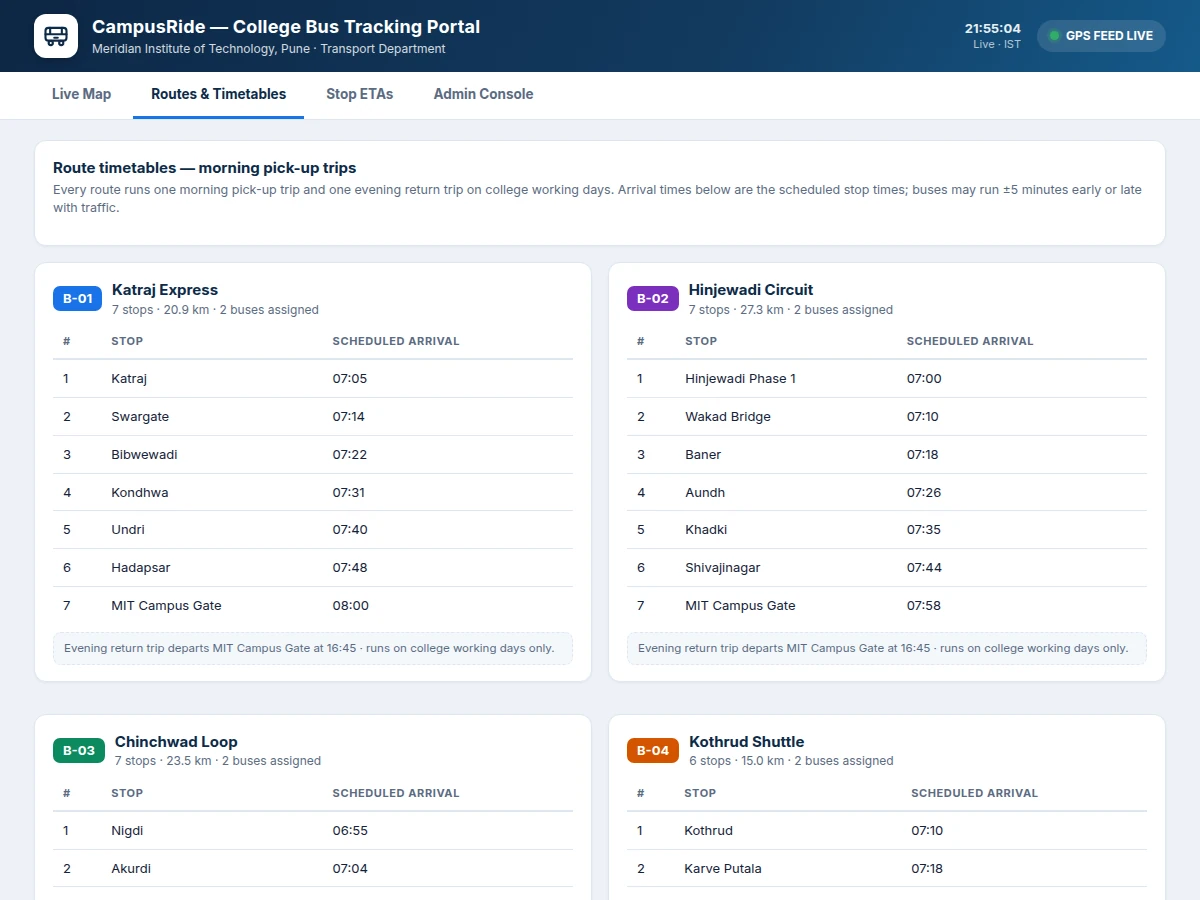
- [Stop-wise timetables] Each route carries a full scheduled timetable — every stop with its planned arrival time — viewable per route, with morning pick-up and evening return trips.
- [Live ETA estimates] Per-stop arrival countdowns computed from each bus's actual distance along the route divided by its live speed, refreshed on every position update.
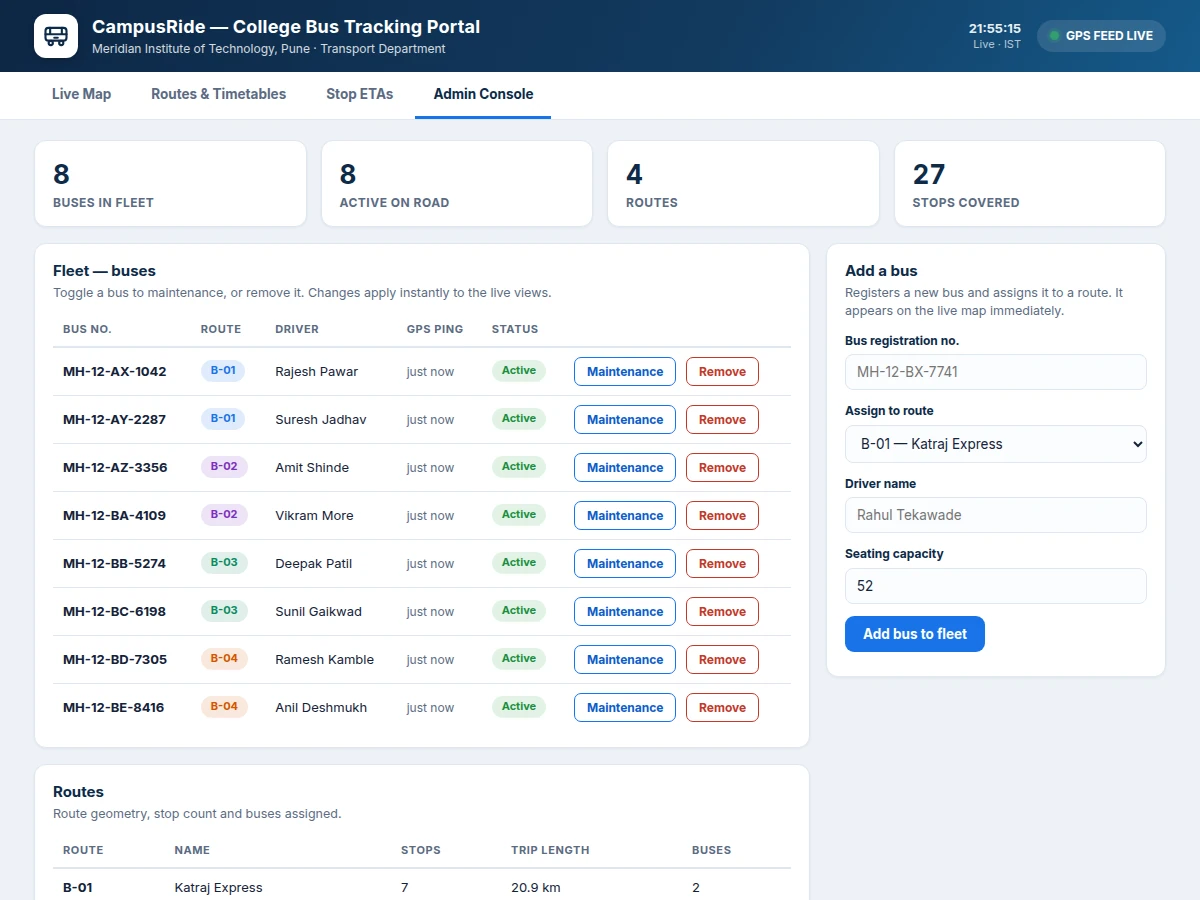
- [Admin console] Fleet table with bus registration, driver, route assignment, GPS last-ping and one-click active/maintenance toggle; routes table with stop counts and trip lengths; add-a-bus form that goes live instantly.
- [GPS feed log] A rolling log of the latest tracker position reports (bus, speed, nearest stop), giving the transport office a quick audit trail of fleet movement.
- [Simulated GPS feed] A built-in simulator moves buses along route geometry at realistic speeds, so the portal, ETAs and admin screens demonstrate fully without buying tracker hardware.
- [Responsive portal design] The map, timetable and ETA views adapt from desktop to mobile, so students check arrivals from their phones at the stop.
What is included
- Complete portal source code (Node.js backend + browser frontend)
- Leaflet live-map module with route polylines, stop markers and moving bus markers
- Route and timetable views with scheduled arrival tables
- Admin console: fleet management, route overview, add-a-bus workflow
- MySQL schema and seed data (4 routes, 27 stops, 8 buses)
- GPS ingestion API documentation (tracker payload format and endpoint spec)
- Simulated GPS feed generator for hardware-free demo and viva
- Project report PDF (architecture, ER diagram, API documentation, test procedure)
- PPT presentation for final review
- Viva Q&A preparation document (WebSockets, Leaflet, ETA logic, database design)
Limitations & prerequisites
- The shipped build demonstrates with a simulated GPS feed — real tracking needs one SIM-based GPS tracker per bus (typically ₹2,500–4,000 each, procured separately by the buyer).
- Live positions need mobile data on the tracker and internet on the viewer's device; when a tracker goes offline the portal shows its last-known position flagged as stale.
- ETA is distance-over-speed, not traffic-aware — peak-hour congestion can push arrivals 10–20 minutes past the estimate.
- Map tiles load from OpenStreetMap's public servers; heavy production use should move to a paid tile provider or self-hosted tiles.
- Designed for a single college's fleet — multi-institution or multi-campus support is future scope, not in this build.
- The portal tracks buses, not seats or fares — there is no passenger counting, ticketing or payment module.
Frequently Asked Questions
How do the buses send their location?
Each bus carries a SIM-based GPS tracker that posts latitude, longitude and speed to the server's ingestion API every few seconds. The backend stores the fix and pushes it to browsers over WebSockets. For the demo and viva, a built-in simulator generates the same payloads, so everything works with no hardware at all.
Does the portal work without the internet?
Live tracking needs connectivity on both ends — mobile data on the tracker and internet on the viewer's phone or laptop. Once the page is loaded, the scheduled timetables remain readable, but positions and ETAs freeze until the connection returns.
Can I add more routes, stops or buses?
Yes. The admin console has an add-a-bus form and the routes table is fully database-driven — new routes, stops and timetable entries are added through the database or the admin screens, and the map, ETAs and timetables pick them up immediately with no code changes.
What exactly does the admin console control?
The fleet table (bus number, driver, route assignment, capacity, GPS last-ping), one-click active/maintenance toggling, bus removal, the routes overview (stops, trip length, buses assigned), and new-bus registration. Every change writes to the database and reflects on the live map and ETA views instantly.
Is this project suitable for a final-year project?
Yes — for Computer Science, IT and Web Development programs. It demonstrates a real-time web architecture end to end: REST ingestion, WebSocket broadcast, Leaflet mapping, relational database design and an admin workflow, all on a problem every college recognizes, with a working live demo for the review. Suitable for B.E./B.Tech final-year projects in Computer Science, IT and Web Development.
Components & software requirements
- Node.js · Express (backend + ingestion API)
- Leaflet.js · OpenStreetMap (live map)
- Socket.io WebSockets (real-time position broadcast)
- MySQL (buses, routes, stops, timetables, GPS log)
- HTML5 · CSS3 · JavaScript (portal frontend)
- REST API design (tracker ingestion + admin endpoints)
- Docker Compose (app + database deployment)
- Git (version control)
Delivery information
Built-to-order project. Delivery timeline is shared after order confirmation based on current queue.
Support terms
Complete documentation, setup guide, and viva preparation included. Support for setup and explanation provided.
Download free synopsis (PDF)
Enter your name and email — the synopsis PDF downloads immediately. We may send occasional project updates; no spam, unsubscribe anytime.