
More project photos (2)

The problem
Finding a roommate is one of the highest-stakes decisions a student makes, and it currently happens through chaotic hostel-group chats: "need 1 roommate near campus, budget 6k" followed by fifty DMs and zero compatibility information. Mismatches — a night owl with an early riser, a smoker with someone asthmatic — surface only after the rent is paid. This project builds a structured alternative: profiles capture the dimensions that actually predict cohabitation success, a compatibility score ranks every candidate against the viewer, discovery is filtered by budget, locality and move-in date, and contact happens through a request workflow with accept/decline rather than cold DMs. Safety tooling — verification badges, photo control, report/block — is designed in from the start, not bolted on.
How it works
- A student creates a profile: college, budget, locality, move-in date and lifestyle answers (sleep schedule, cleanliness, smoking, guests, food).
- The matching engine computes compatibility against every other profile from weighted dimensions and budget overlap.
- Discovery shows profile cards ranked by compatibility, with filters for budget, locality and move-in date.
- Opening a card shows the full breakdown — which dimensions match and which clash — before any contact.
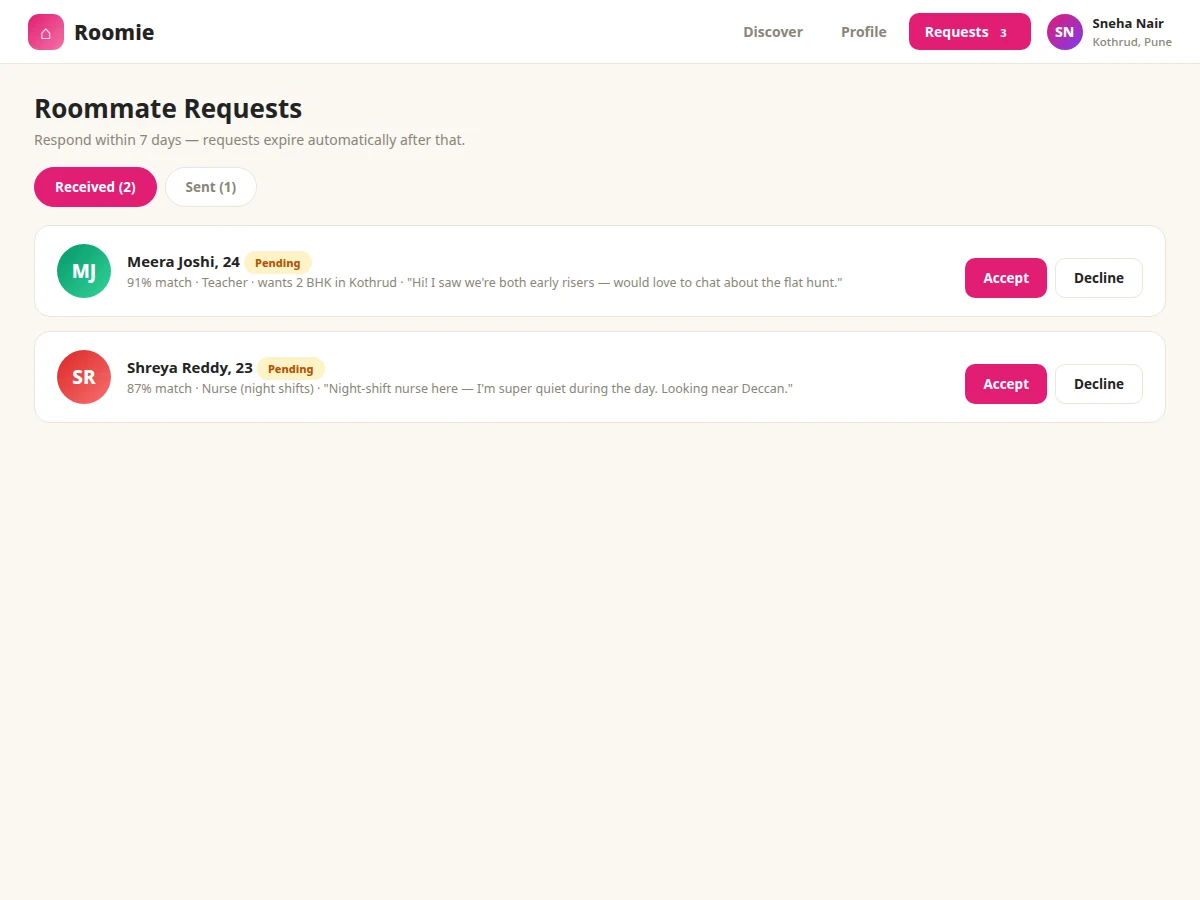
- The viewer sends a roommate request with a message; the recipient sees it under requests with accept or decline.
- On acceptance, contact details unlock and a chat thread opens; either side can form a group room from accepted matches.
Tech stack:
- HTML5, CSS3, JavaScript (frontend)
- PHP 8 / Laravel (backend)
- MySQL (profiles, preferences, requests)
- Weighted scoring algorithm (matching)
- REST endpoints for discovery and requests
| Parameter | Value |
|---|---|
| Matching dimensions | 8 lifestyle + budget overlap (design scope) |
| Score range | 0–100% compatibility (design logic) |
| Request states | 4 (pending, accepted, declined, blocked) |
| Group rooms | 2–4 members (design scope) |
| Match computation | Approximately < 200 ms per pair (expected) |
| Page load | Approximately < 2 s on broadband (expected) |
| Demo data | 24 seeded student profiles (design scope) |
| Deployment | Shared hosting compatible (PHP/MySQL) |
Project features
- [Compatibility scoring] Every profile pair gets a percentage score from weighted lifestyle dimensions — sleep, cleanliness, smoking, guests, budget overlap.
- [Structured roommate requests] Requests move through pending, accepted and declined states with accept/decline actions and a message thread per request.
- [Filtered discovery] Filter by budget range, locality, move-in window and minimum compatibility; sort by score, budget or recency.
- [Verification badges] College email, phone and ID verification tiers shown as badges on the profile card.
- [Privacy controls] Photo visibility and contact details are revealed only after request acceptance, never on the public card.
- [Roommate groups] Accepted pairs can form a group room (2–4 members) visible as a unit to landlords or other seekers.
- [Report and block] Safety tooling with report reasons and blocking that removes the profile from discovery both ways.
What is included
- Complete portal source code (frontend + backend)
- MySQL schema with migrations (profiles, preferences, requests, groups)
- Weighted compatibility scoring module with documented weights
- Discovery, request workflow and group-room modules
- Verification badge and privacy-control system
- Seeded demo profiles across budgets and localities
- Project report PDF (matching algorithm, weight design, ER diagram, test cases)
- PPT presentation for final review
- Viva Q&A preparation document (scoring weights, request state machine, safety design)
Limitations & prerequisites
- Compatibility is a weighted heuristic over self-reported answers, not a validated psychological instrument — the report states this plainly.
- Verification in the demo is badge logic on seeded data; real college-email verification needs the buyer's mail setup.
- Chat in the demo is a per-request message thread; real-time messaging is future scope.
- The portal does not list properties or handle rent payments — it matches people, not flats.
- Location matching is locality-name based, not GPS proximity.
Frequently Asked Questions
How is the compatibility score computed?
Each lifestyle dimension (sleep, cleanliness, smoking, guests, food, study noise) has a weight; matching answers score full marks, adjacent answers partial. Budget overlap adds a bonus. The weights are documented in the report and adjustable — a good viva discussion.
Why not just use a WhatsApp group?
Because groups carry no structure: no compatibility signal, no filters, no request states, no verification, no privacy. The portal's value is exactly that structure.
How does the request workflow protect privacy?
Profile cards show first name, college, budget and lifestyle — never phone or exact address. Contact details unlock only after the other side accepts the request.
What do verification badges mean?
Three tiers: phone-verified, college-email-verified and ID-verified. Badges are shown on the card so seekers can filter for verified profiles.
Can more than two people match?
Yes — accepted pairs can form group rooms of up to 4, which is how 2BHK hunting actually works.
Is this project suitable for a final-year project?
Yes — for Computer Science, IT and Web Development programs. The matching algorithm, request state machine and privacy-by-design give it strong technical and product depth. Suitable for B.E./B.Tech final-year projects in Computer Science, IT and Web Development.
Components & software requirements
- HTML5, CSS3, JavaScript (frontend)
- PHP 8 / Laravel (backend)
- MySQL (profiles, preferences, requests)
- Weighted scoring algorithm (matching)
- REST endpoints for discovery and requests
Delivery information
Built-to-order project. Delivery timeline is shared after order confirmation based on current queue.
Support terms
Complete documentation, setup guide, and viva preparation included. Support for setup and explanation provided.