
More project photos (2)
The problem
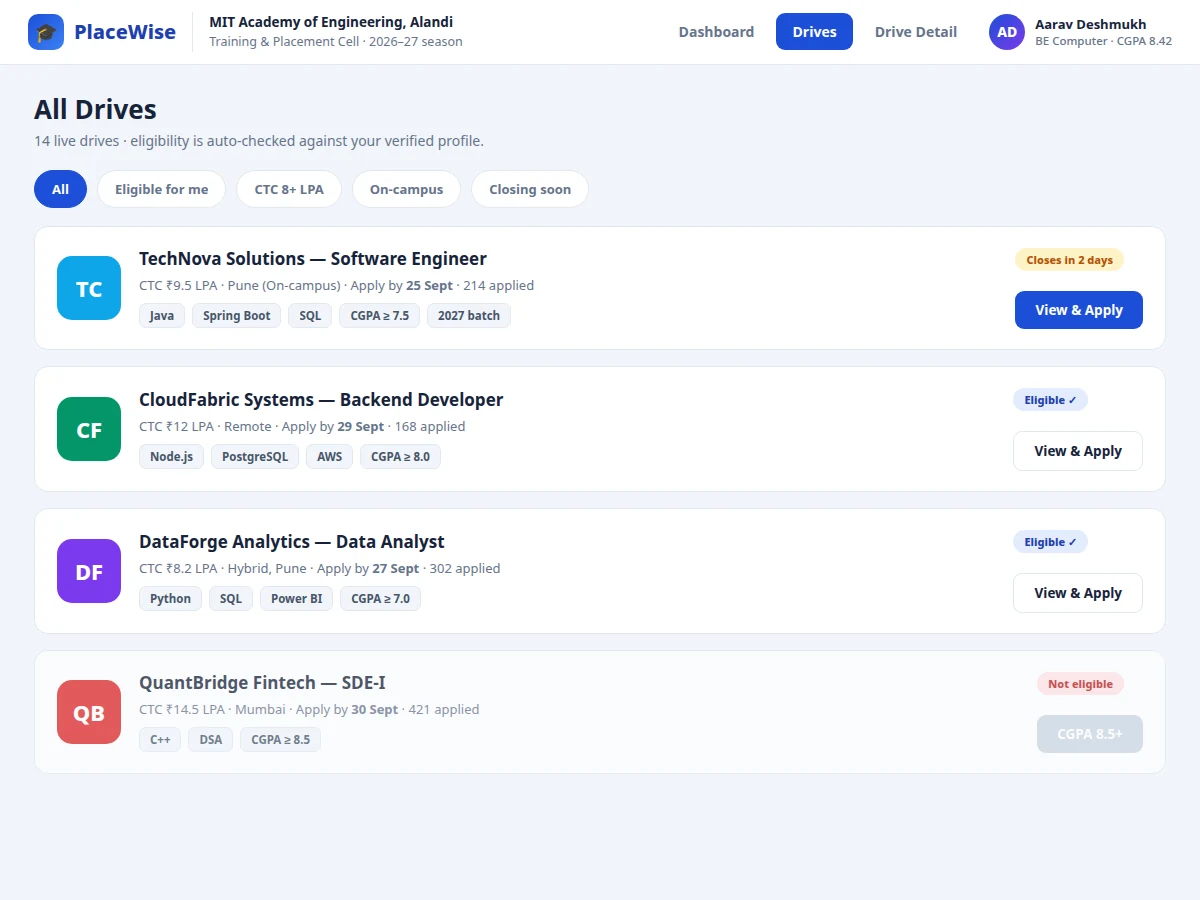
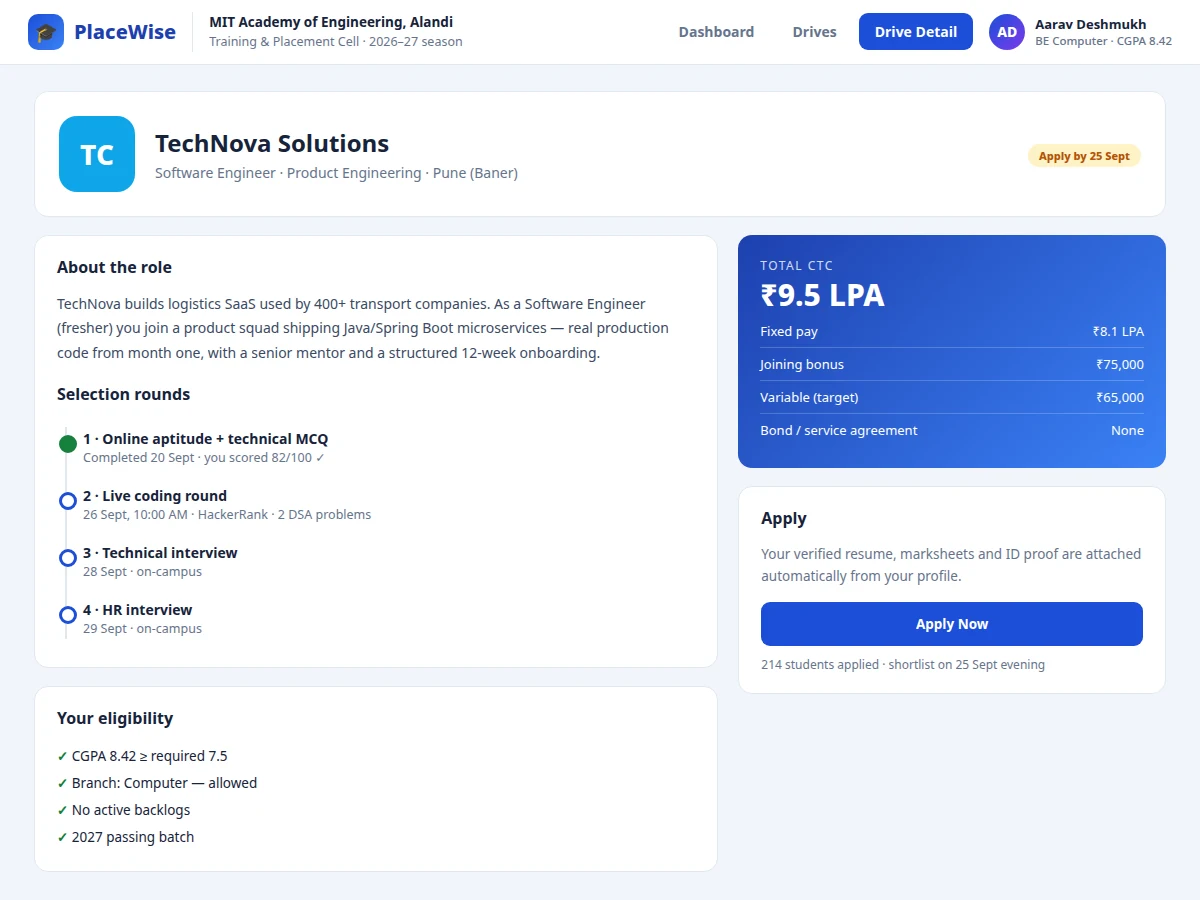
Placement season runs on notice-board PDFs, Google Forms and a flood of WhatsApp forwards: students miss deadlines, apply to drives they are not eligible for, and nobody knows which round they are stuck in. The TPO, meanwhile, cannot see at a glance how many eligible students each drive has. This project replaces that chaos with a single portal. Drives carry structured data — role, CTC breakup, eligibility rules, rounds, deadline — instead of a PDF. Applying is one tap, but the tap is gated: the portal checks the student's verified profile (CGPA, branch, backlogs, batch) against the drive's criteria before accepting. Each application then travels a round pipeline — aptitude, coding, technical, HR — with the student's position visible throughout. A dashboard surfaces deadlines this week and offer decisions pending. The eligibility engine and the round state machine are the project's technical core.
How it works
- The TPO publishes a drive: company, role, CTC breakup, eligibility rules (CGPA, branches, backlogs), rounds and deadline.
- Students browse drives; each card shows eligibility status computed live from their verified profile.
- An eligible student applies with one tap; resume and marksheets attach automatically and the application enters round 1.
- Round results are recorded per application; clearing a round advances it, with the student's pipeline position always visible.
- Offers appear on the dashboard with CTC and an acceptance deadline; accepting or declining is recorded.
- Deadline badges escalate as closing nears, and closed drives stop accepting applications automatically.
Tech stack:
- HTML5, CSS3, JavaScript (frontend)
- PHP 8 / Laravel (backend)
- MySQL (drives, students, applications, rounds)
- Role-based access (student, TPO admin)
- REST endpoints for drives and applications
| Parameter | Value |
|---|---|
| User roles | 2 (student, TPO admin) + profile verification (design scope) |
| Eligibility dimensions | CGPA, branch, backlogs, batch (design scope) |
| Round pipeline | Up to 5 configurable rounds per drive |
| Demo data | 14 drives, 40+ applications (seeded) |
| Page load | Approximately < 2 s on broadband (expected) |
| Deadline handling | Automatic closure at deadline (design logic) |
| Deployment | Shared hosting compatible (PHP/MySQL) |
Project features
- [Drive publishing] TPO creates drives with role, CTC breakup, eligibility criteria, selection rounds and application deadline.
- [Auto eligibility check] Applications are validated against CGPA, branch, backlog and batch rules from the student's verified profile before acceptance.
- [One-tap apply] Eligible students apply with verified resume and marksheets attached automatically from their profile.
- [Round pipeline tracking] Applications move through aptitude, coding, technical and HR rounds with per-round status visible to the student.
- [Student dashboard] Applications, shortlists, offers and this week's deadlines in one view, with an offer-acceptance countdown.
- [CTC breakup display] Fixed pay, joining bonus and variable components shown transparently per drive.
- [Deadline management] Closing-soon badges and deadline sorting so no student misses a drive.
What is included
- Complete portal source code (frontend + backend)
- MySQL schema with migrations (drives, students, applications, rounds, offers)
- Eligibility rule engine and round-pipeline state machine
- Student dashboard and TPO drive-management views
- Seeded demo data: drives, companies, applications, offers
- Project report PDF (eligibility design, state machine, ER diagram, test cases)
- PPT presentation for final review
- Viva Q&A preparation document (eligibility rules, round transitions, role-based access)
Limitations & prerequisites
- Student profiles are marked verified by the TPO in the demo; real document verification workflow is future scope.
- Communication (emails, SMS about shortlists) is shown as in-portal notifications; real delivery needs provider accounts.
- The demo covers one college; multi-college or pool-campus drives are future scope.
- Offer analytics for the TPO (branch-wise placement stats) are a reporting extension, not in the demo.
- Resume parsing is out of scope — resumes attach as uploaded files.
Frequently Asked Questions
How does the eligibility check work?
Each drive stores rules (minimum CGPA, allowed branches, backlog policy, batch). On apply, the engine compares the student's verified profile against every rule; any failure blocks the application with the specific reason shown.
What are the selection rounds?
Configurable per drive — the demo uses aptitude MCQ, live coding, technical interview and HR interview. Each application carries its current round, and results advance it forward.
Can a student hold multiple offers?
Yes, and the dashboard tracks each offer's acceptance deadline separately, with the TPO counsellor note for advice — mirroring how colleges actually handle it.
What happens after the deadline?
The drive flips to closed automatically and the apply action is disabled; the rule is enforced server-side, not just hidden in the UI.
Who verifies student profiles?
The TPO admin marks profiles verified after checking documents offline. Only verified profiles can apply — this is the trust anchor of the whole system.
Is this project suitable for a final-year project?
Yes — for Computer Science, IT and Web Development programs. The eligibility rule engine, round state machine and deadline logic give it solid backend depth. Suitable for B.E./B.Tech final-year projects in Computer Science, IT and Web Development.
Components & software requirements
- HTML5, CSS3, JavaScript (frontend)
- PHP 8 / Laravel (backend)
- MySQL (drives, students, applications, rounds)
- Role-based access (student, TPO admin)
- REST endpoints for drives and applications
Delivery information
Built-to-order project. Delivery timeline is shared after order confirmation based on current queue.
Support terms
Complete documentation, setup guide, and viva preparation included. Support for setup and explanation provided.