
More project photos (2)
The problem
Learning to drive in India runs on paper registers and phone calls: students call the school to book a slot, instructors keep lesson progress in notebooks, and nobody can see at a glance who is ready for the RTO test. Slots get double-booked, lessons are forgotten, and test-day failures come as a surprise. A driving school is really a scheduling business with a training pipeline underneath, which makes it an excellent web project — it needs real booking logic (day, time, instructor, car), a structured curriculum with graded milestones, and two very different user views. This project builds that as a working portal: a student dashboard with the next lesson, a slot-booking flow with instructor choice, and a 12-lesson tracker where each lesson carries the instructor's grade and remarks. A test-readiness meter aggregates the grades into the RTO skills that matter — parking, hill starts, lane discipline — so the student knows precisely what to practise before the test.
How it works
- The school admin configures instructors, dual-control cars, working days and slot capacity in the backend.
- A student signs up with their learner's licence number and enrols in the 21-day LMV course.
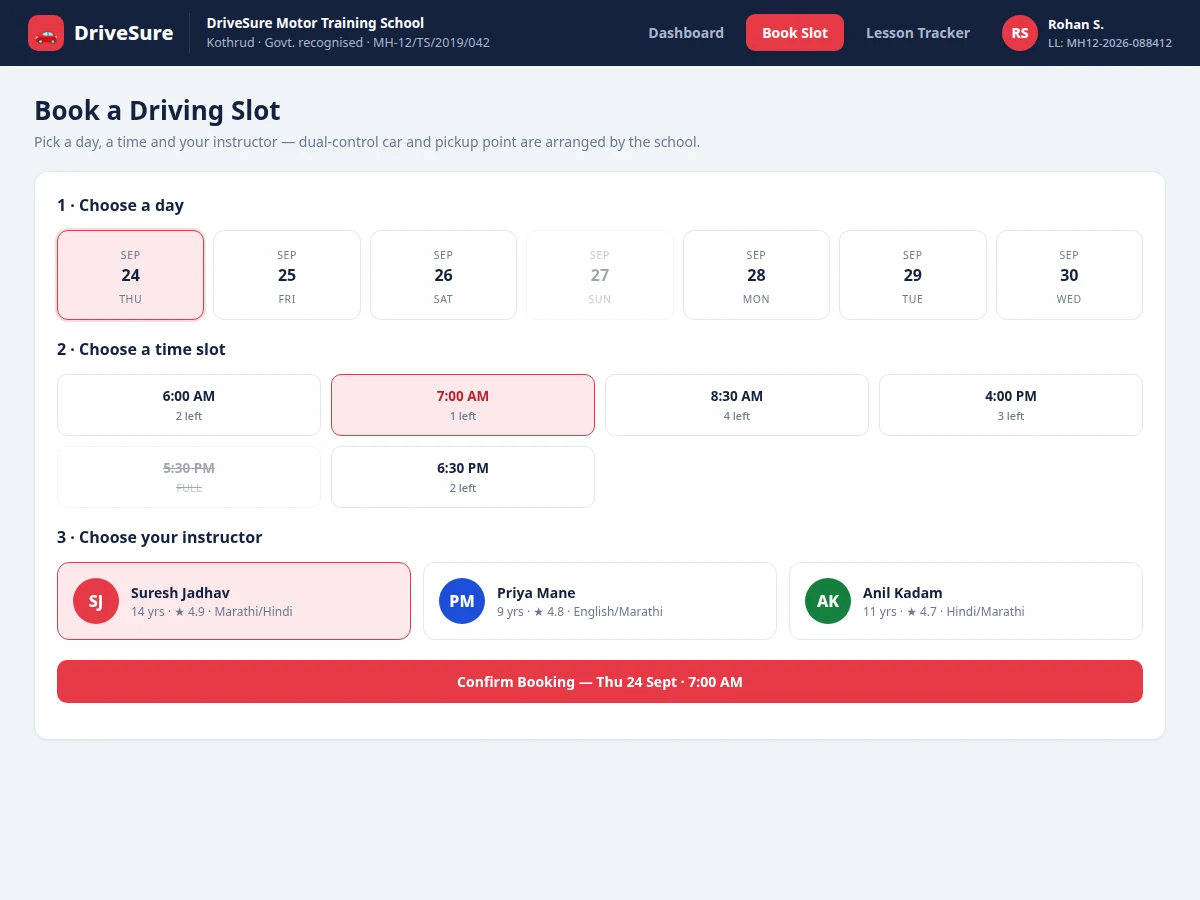
- On the booking page the student selects a day from the week strip; the app shows that day's time slots with remaining capacity, disabling full ones.
- The student picks an instructor and confirms; the booking is written with a unique ID and appears on the dashboard and weekly schedule.
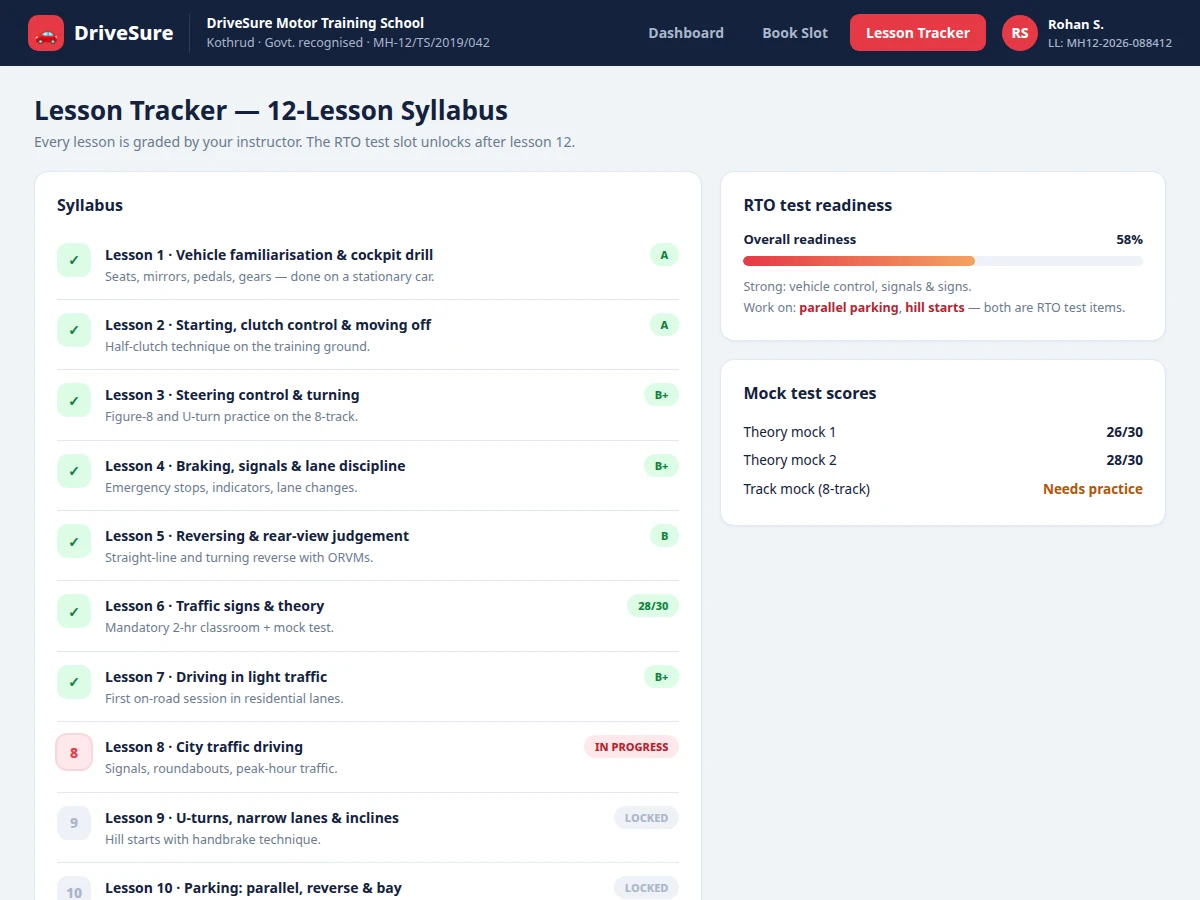
- After each lesson the instructor records a grade (A–D) and a short remark against that lesson number; the next lesson unlocks.
- The readiness engine maps lesson grades to RTO test skills and renders the test-readiness meter with specific weak areas.
- When all 12 lessons are graded, the portal flags the student as test-ready and the school can assign an RTO test date.
Tech stack:
- HTML5, CSS3, JavaScript (frontend)
- PHP 8 / Laravel (backend API)
- MySQL (bookings, lessons, grades)
- Blade templates + REST endpoints
- Canvas/SVG progress visuals
| Parameter | Value |
|---|---|
| User roles | 3 (student, instructor, admin) — design scope |
| Syllabus | 12 graded lessons in 3 phases (design scope) |
| Booking granularity | Day × time slot × instructor (design scope) |
| Page load | Approximately < 2 s on broadband (expected) |
| Concurrent bookings | Design target ~200/day per school branch |
| Data model | Approximately 12 tables (expected) |
| Deployment | Shared hosting compatible (PHP/MySQL) |
| Demo data | 1 school, 3 instructors, 40+ demo bookings (seeded) |
Project features
- [Slot booking engine] Students pick a day, time slot and instructor from live availability; booked-out slots are disabled automatically and double-booking is prevented at the data layer.
- [Instructor profiles] Each instructor card shows experience, rating, languages and assigned car, so students can choose who teaches them.
- [12-lesson graded syllabus] A structured curriculum from cockpit drill to mock RTO test; every lesson unlocks in sequence and carries the instructor's grade and written remark.
- [RTO test-readiness meter] Lesson grades aggregate into the skills examiners actually test — parking, hill starts, lane discipline — shown as a readiness percentage with weak areas highlighted.
- [Student dashboard] Next lesson card with pickup point and car details, weekly schedule timeline, course progress ring and instructor remarks in one view.
- [Rescheduling flow] Booked lessons can be rescheduled to another open slot with one action, and the change reflects everywhere instantly.
- [Mock test records] Theory mock scores and 8-track practical results are stored per student, feeding the readiness calculation.
What is included
- Complete portal source code (frontend + backend)
- MySQL database schema with migration scripts
- Seeded demo data: school, instructors, cars, bookings, graded lessons
- Booking engine with double-booking prevention logic
- Lesson tracker and RTO test-readiness scoring module
- Project report PDF (system design, ER diagram, booking logic, test cases)
- PPT presentation for final review
- Viva Q&A preparation document (scheduling conflicts, role-based access, readiness algorithm)
Limitations & prerequisites
- The demo runs on seeded data for one school branch; multi-branch management is future scope.
- Payments for course fees are out of scope — the portal tracks bookings and lessons, not billing.
- SMS reminders are shown as a notification log in the demo; a real SMS gateway needs the buyer's own provider account.
- Instructor grading is manual input in the demo; no automated driving assessment is claimed.
- The readiness meter is a weighted aggregation of instructor grades (design logic), not a certified predictor of RTO results.
Frequently Asked Questions
How does the booking system prevent double-booking?
Each slot has a fixed capacity per instructor. The booking write checks remaining capacity inside a database transaction, so two students confirming the same last seat cannot both succeed — one gets the slot, the other sees it as full.
What does the 12-lesson syllabus cover?
Three phases: basics (cockpit drill, clutch control, steering, braking, reversing, theory), city driving (traffic, U-turns, inclines), and test prep (parking, highway, night driving, mock RTO test). Each lesson unlocks only after the previous one is graded.
How is RTO test-readiness calculated?
Instructor grades per lesson are mapped to the skills examiners test — parallel parking, hill starts, lane discipline, signals. The meter is a weighted average with weak areas flagged; the weighting logic is documented in the report.
Can a student reschedule a lesson?
Yes. Any booked lesson can be moved to another open slot, subject to the school's notice policy (configurable, 12 hours by default in the demo).
Does it handle payments?
No — deliberately out of scope. The portal is a scheduling and training tracker; fee collection stays with the school's existing process.
Is this project suitable for a final-year project?
Yes — for Computer Science, IT and Web Development programs. It demonstrates real booking logic, role-based access, curriculum state machines and a scoring algorithm, all in a domain every examiner understands. Suitable for B.E./B.Tech final-year projects in Computer Science, IT and Web Development.
Components & software requirements
- HTML5, CSS3, JavaScript (frontend)
- PHP 8 / Laravel (backend API)
- MySQL (bookings, lessons, grades)
- Blade templates + REST endpoints
- Canvas/SVG progress visuals
Delivery information
Built-to-order project. Delivery timeline is shared after order confirmation based on current queue.
Support terms
Complete documentation, setup guide, and viva preparation included. Support for setup and explanation provided.