
More project photos (2)
The problem
Student elections and opinion polls on most campuses still run on paper ballots or ad-hoc form tools. Paper voting needs booths, volunteers and manual counting; generic form tools cannot enforce one-student-one-vote, keep ballots secret while publishing turnout, or block duplicate votes. Turnout suffers because voting means queueing between lectures, and organizers face recount disputes with no audit trail. This project builds a purpose-made online voting platform: a verified voter roll, anonymous ballot casting with single-use vote tokens, and a live results dashboard that shows turnout and vote shares without revealing individual votes. The ballot store is deliberately separated from voter identity, so the system can prove that you voted without knowing whom you voted for.
How it works
- The election officer creates an election with candidates, schedule and eligibility rules, then imports the voter roll (name, college email, PRN) via CSV.
- The system issues a single-use vote token per voter per election and delivers it with a secure voting link.
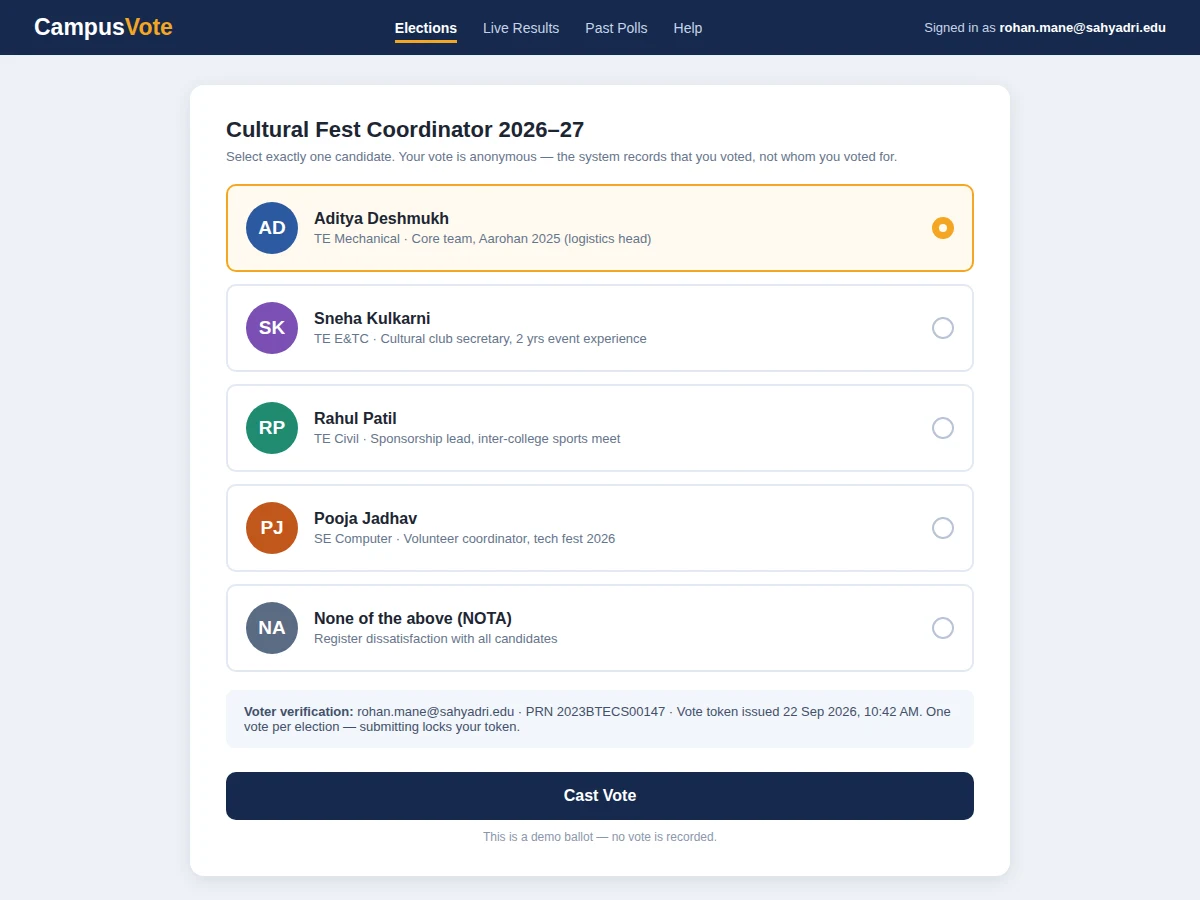
- The voter authenticates, views the ballot, selects a candidate (or NOTA) and submits; the token is consumed atomically with the vote.
- The vote is stored with no link back to the voter; only the voter's "has voted" flag is updated.
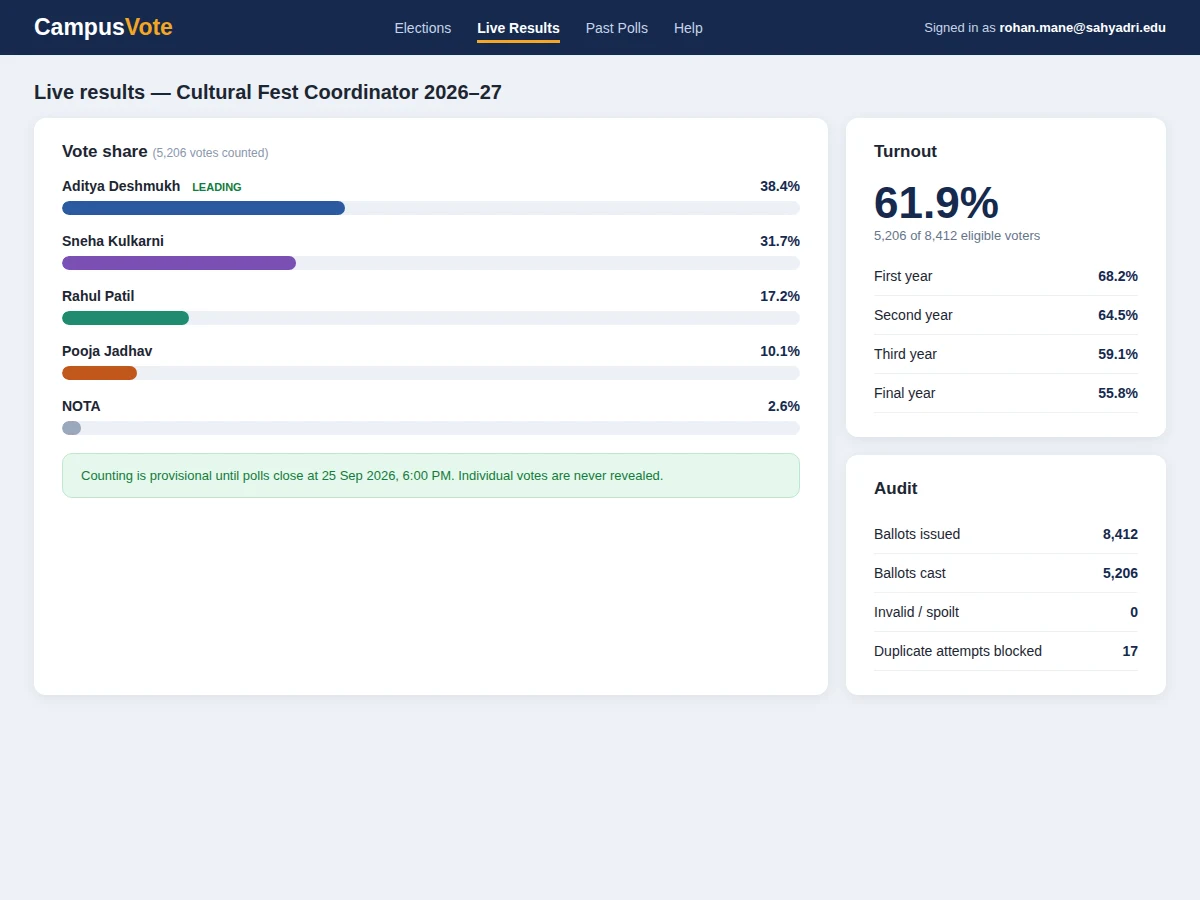
- The results engine aggregates anonymized votes into vote shares and turnout statistics served on the public dashboard.
- After polls close, results are finalized and the audit page reconciles ballots issued against ballots cast for the organizers' record.
Tech stack:
- Python (Django/Flask) or Node.js backend
- PostgreSQL/MySQL relational database
- HTML5, CSS3, JavaScript (responsive frontend)
- REST APIs for voter auth, ballot casting and results
- CSV voter-roll import
- Email service for token delivery and reminders
- HTTPS deployment
- Charting library for result dashboards
| Parameter | Value |
|---|---|
| Application type | Web application (voter + admin interfaces) |
| Voter capacity | Approximately 10,000 voters per election (design target) |
| Ballot secrecy | Votes stored with no voter linkage (by design) |
| Token model | Single-use, per-election, consumed atomically |
| Results latency | Dashboard updates within seconds of vote submission (expected) |
| Concurrent elections | Multiple, each with independent roll and schedule |
| Deployment | Any VPS/shared hosting with HTTPS (2 vCPU, 2 GB RAM adequate) |
| Deliverables | Source code, DB schema, setup guide, report, PPT, viva Q&A |
Project features
- [One-student-one-vote tokens] Each eligible voter gets a single-use token per election; the token is consumed on submission and reused or forged tokens are rejected before any vote is recorded.
- [Anonymous ballot storage] Cast/not-cast status is stored separately from vote content, so turnout is public and auditable while individual votes stay secret.
- [Live results dashboard] Vote shares, turnout percentages and year-wise turnout breakdowns update as votes arrive, with provisional status until polls close.
- [Multiple concurrent elections] Run council elections, department rep polls and mess-menu opinion polls side by side, each with its own voter roll, candidates and schedule.
- [Audit log] Ballots issued, ballots cast, invalid attempts and blocked duplicates are reconciled on an organizer-only audit page.
- [Scheduled polls and reminders] Elections open and close automatically on schedule; voters get reminders before the deadline.
- [Role-based admin panel] Separate access for voters, election officers (create elections, manage rolls) and read-only result viewers.
What is included
- Complete voting web application source code (voter + admin interfaces)
- Database schema and migration scripts
- Voter-roll CSV import templates and token system
- Results dashboard with turnout analytics
- Setup and deployment guide (VPS/shared hosting)
- Load-test script for the buyer to verify capacity claims
- Project report PDF (background, architecture, ballot-secrecy design, methodology)
- PPT presentation for final review
- Viva Q&A preparation document (authentication, anonymity design, concurrency, audit)
Limitations & prerequisites
- Voter identity relies on the accuracy of the imported roll — the system cannot fix a bad roll.
- Ballot secrecy assumes the deployment uses HTTPS and the server itself is trusted by the institution.
- One vote per election is enforced by token, not by biometric identity — token sharing is a policy matter.
- Capacity figures are design targets; the buyer runs the included load-test script to verify on their hosting.
- The system counts votes; it does not verify candidate eligibility — that stays with the election officer.
- No end-to-end cryptographic verifiability (individual receipts) in the base build — listed as future scope.
Frequently Asked Questions
How is one-student-one-vote enforced?
Each voter gets a single-use token per election. The token is consumed atomically when the vote is submitted, and any reused or forged token is rejected before a vote can be recorded. The voter's "has voted" flag prevents re-issue.
Are votes really anonymous?
Yes, by design. The database stores cast/not-cast status separately from vote content — there is no column linking a vote to a voter. Turnout is public; individual choices are not.
Can the admin see who voted for whom?
No. The admin panel shows turnout, audit counts and aggregate results only. There is no interface or query in the application that joins a vote to a voter.
What stops someone voting twice with two emails?
The voter roll is the source of truth — duplicates in the roll (same PRN) are flagged at import. Token-level enforcement then guarantees one ballot per roll entry.
What happens if the server goes down mid-election?
Votes are committed transactionally, so a crash cannot half-record a ballot. The schedule (open/close times) is server-side, and results remain provisional until the officer finalizes them.
Is this project suitable for a final-year project?
Yes — for Computer Science, IT and Web Development programs. It demonstrates authentication, data-modeling for secrecy, concurrency control and dashboard engineering around a real campus problem. Suitable for B.E./B.Tech final-year projects in Computer Science, IT and Web Development.
Components & software requirements
- Python (Django/Flask) or Node.js backend
- PostgreSQL/MySQL relational database
- HTML5, CSS3, JavaScript (responsive frontend)
- REST APIs for voter auth, ballot casting and results
- CSV voter-roll import
- Email service for token delivery and reminders
- HTTPS deployment
- Charting library for result dashboards
Delivery information
Built-to-order project. Delivery timeline is shared after order confirmation based on current queue.
Support terms
Complete documentation, setup guide, and viva preparation included. Support for setup and explanation provided.