
More project photos (2)
The problem
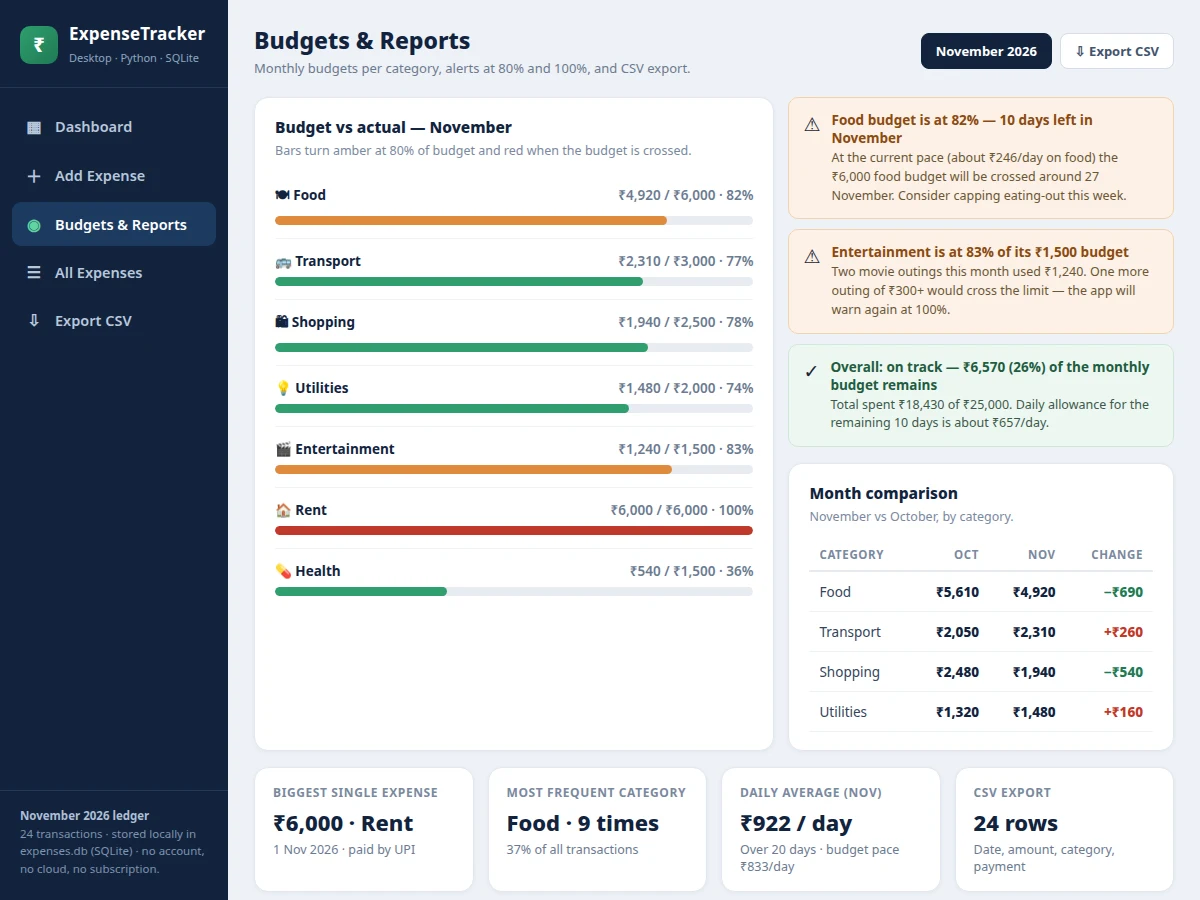
A Desktop Expense Tracker using Python Tkinter and SQLite is a standalone offline application that records daily spending in a local database and turns it into totals, category charts, monthly budgets and CSV reports with no account, server or internet connection. The student builds it in Python: Tkinter draws the dashboard, forms and charts, while SQLite stores every expense as a row in one local file, so the ledger survives restarts and can be copied or backed up as one file. Students and hostel residents usually track money in scattered notes, chat messages or memory, and only discover they overspent after the month ends. This tracker fixes that: each expense is a one-minute entry with a category and payment method, and the app shows at once how much of each category budget is used. Builder note from the demo build: the seeded November ledger holds 24 transactions totalling ₹18,430 against a ₹25,000 budget, Food at 82% of its ₹6,000 budget — the figures the demo's charts and alerts are drawn from.
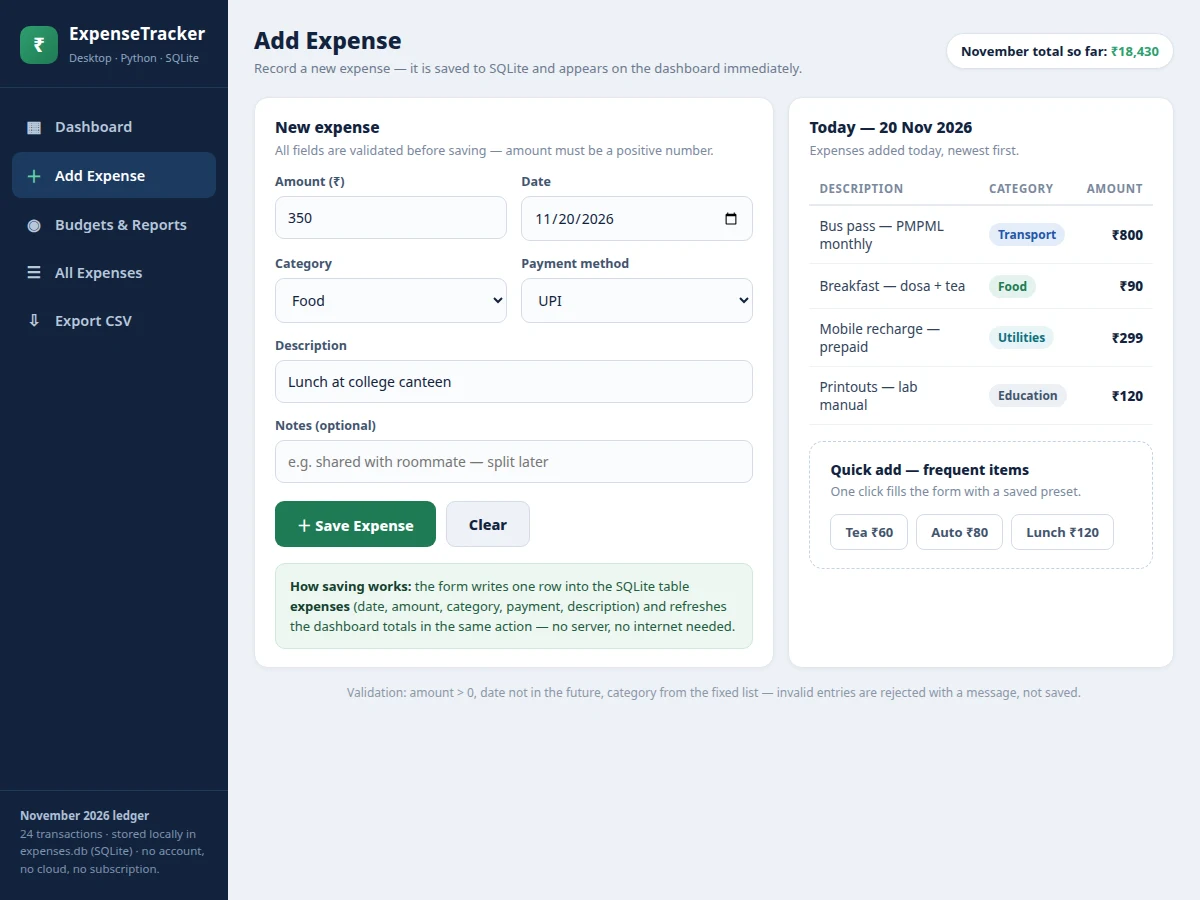
Amount, date, category, payment method, description.
Follow the working sequence
How it works
An expense enters through the Add Expense form, is validated, and is written as one row in the SQLite expenses table with date, amount, category, payment method and description; the dashboard then re-reads the table and refreshes every total, chart and budget bar, so the screen always matches the database. Tkinter is the interface layer: dashboard, form and reports are separate screens, each running SQL queries against the local database file when it opens. Budgets live in a table keyed by category and month, so the alert check is one comparison — spent so far against that category's budget — run on every load or save. Charts are drawn from query results, not stored images: the bar chart aggregates by month, the donut by category, and the month comparison runs the same query for two months side by side. Export runs a CSV writer over the same query, one row per expense, giving a spreadsheet-ready copy of the ledger.
- The user opens the app; Tkinter builds the main window and SQLite opens expenses.db, creating it on first run with expenses and budgets tables.
- The user adds an expense through the form; inputs are validated (positive amount, description present, category from the fixed list) and one row is inserted into the expenses table.
- The dashboard re-queries the database and refreshes the totals, the six-month bar chart, the category donut and the recent-transactions table.
- The user sets a monthly budget per category; the app compares spent against budget on every save and warns at 80% and again at 100%.
- Reports aggregate the same data by month and category, producing the month-on-month comparison table and the budget progress bars.
- CSV export writes the ledger — one row per expense — to a .csv file that opens in any spreadsheet application.
Tech stack:
- Python 3 (standard library)
- Tkinter · ttk widgets (desktop GUI)
- SQLite 3 (local database)
- Matplotlib · charts in the desktop build
- CSV module (ledger export)
- Parameterised SQL queries
- PyInstaller · standalone executable packaging
| Parameter | Value |
|---|---|
| Platform | Windows / Linux / macOS desktop (Python 3) |
| Interface | Tkinter desktop GUI · 3 screens (dashboard, add expense, budgets & reports) |
| Database | SQLite 3 · single local file (expenses.db) |
| Storage per expense | 1 row: date, amount (₹), category, payment method, description, notes |
| Categories | 8 fixed categories (Food, Transport, Rent, Utilities, Entertainment, Shopping, Health, Education) |
| Demo ledger | 24 transactions totalling ₹18,430 (measured from the demo build) |
| Monthly budget | ₹25,000 in the demo (configurable per month) |
| Budget alerts | At 80% and 100% of a category budget (design behaviour) |
| Export | CSV · 1 row per expense (design behaviour) |
| Startup time | Approximately under 2 seconds on a typical laptop (expected) |
| Database size | Approximately under 1 MB for a year of daily entries (expected) |
Project features
The tracker's strongest capabilities are its complete expense workflow, its per-category monthly budgets with alerts, its visual reporting, and its portable SQLite storage. Adding an expense takes one form — amount, date, category, payment method and description — and the entry appears in the transaction list and dashboard totals at once; editing and deleting work from the same list, so correcting a wrong entry is a single click. Budgets are set per category per month, and the app warns at 80% of a budget and again at 100%, turning the budget from a number on paper into a live guardrail. The dashboard pairs a six-month bar chart with a category donut and a month-on-month comparison table, so a student can see both the trend and the detail. Because SQLite keeps the entire ledger in one local file, the app runs offline, starts instantly, and the data can be exported to CSV for a spreadsheet or a report appendix.
- [Add, edit and delete expenses] One form captures amount, date, category, payment method, description and optional notes; entries appear in the transaction list immediately and can be corrected or removed with a single click.
- [Monthly budgets with alerts] A budget is set per category per month, and the app warns when spending reaches 80% of a budget and again at 100%, with the progress shown as a colour-coded bar.
- [Dashboard with totals and charts] The dashboard shows total spent, budget remaining, transaction count and average expense, plus a six-month bar chart and a category donut drawn from the live database.
- [Month-on-month comparison] A report table compares spending by category between the current month and the previous month, showing the rupee change per category.
- [CSV export] The whole ledger, or a filtered view of it, exports to a .csv file that opens directly in Excel or Google Sheets for further analysis or a report appendix.
- [Quick-add presets] Frequently repeated expenses such as tea, an auto ride or a lunch thali can be saved as one-click presets that fill the form instantly.
- [Input validation before saving] Every entry is checked before it is stored — the amount must be a positive number and a description is required — so invalid rows never reach the database.
What is included
- Complete Python source code (Tkinter GUI + SQLite data layer)
- SQLite schema and seeded demo ledger (24 November transactions totalling ₹18,430)
- Working demo of the app screens (dashboard, add expense, budgets & reports)
- CSV export module with a sample exported ledger
- Project report PDF (background, design, database schema, methodology, results)
- PPT presentation for final review
- Viva Q&A preparation document (Tkinter, SQLite, SQL queries, GUI event handling)
- Setup instructions (Python 3; no extra installs beyond the standard library plus Matplotlib)
Limitations & prerequisites
- Desktop-only: no mobile app and no web version in the base build; a companion mobile app is an optional extension.
- Single user, single machine: no login, no multi-user sync and no cloud backup — the database file must be copied manually to move it to another computer.
- Charts are drawn from stored data only; there is no bank or UPI integration, so every expense must be entered by hand.
- Budgets are monthly and per category; weekly budgets or shared-household expense splitting are not in the base build.
- The demo ledger is illustrative seed data; real insight depends on the student entering their own expenses consistently.
- Export is CSV only; the app itself does not generate PDF reports — the report PDF is a separate deliverable.
Frequently Asked Questions
Is this project suitable for a final-year project?
Yes — for Computer Science and Information Technology programs, this project is a strong fit because it demonstrates GUI programming with Tkinter, relational database design with SQLite, SQL querying, data visualisation and file export in one complete, working application that a student can demonstrate live. The report explains the schema, the event-driven GUI structure and the reporting queries, so the student can answer viva questions from the code rather than from memorised theory.
Does the app need the internet?
No — the app works fully offline because SQLite stores the entire ledger in one local file on the student's own computer, with no account, no server and no cloud service involved, so it runs anywhere Python runs, including a college lab machine with no internet. This also means the data is private by design, and the only way to move it to another machine is to copy the database file; there is no sync or backup unless the student adds it as an extension.
How is the data stored?
Every expense is stored as one row in a SQLite database file (expenses.db) with columns for date, amount, category, payment method, description and notes, plus a second table holding one budget per category per month, and the whole database is that single file. Because the whole database is a single file, it can be copied, backed up or opened with any SQLite browser, and the student can inspect or query it directly to verify what the app shows.
Can budgets and categories be changed?
Yes — budgets are set per category per month from the budgets screen and can be raised, lowered or removed at any time, with the alerts recalculated on the next save, so a student can tighten a food budget mid-month and see the warning threshold move at once. The base build ships with 8 fixed categories (Food, Transport, Rent, Utilities, Entertainment, Shopping, Health, Education); adding or renaming categories is a small code change that can be requested as a customisation.
Can this project be customised?
Yes — realistic customisations include recurring monthly expenses, a PDF report generator, weekly budgets, shared-household expense splitting, a search and filter panel, and a companion mobile app or cloud sync as a larger extension, all buildable on the same SQLite schema without redesigning the app. Additional features and modifications can be developed based on project requirements, technical feasibility and timeline.
What will I receive with the project?
The complete Python source code with the Tkinter interface and SQLite data layer, the database schema with the seeded demo ledger, the working demo of all three screens, the CSV export module, the project report PDF, the PPT presentation, the viva Q&A document and setup instructions. The build is prepared fresh for the order, and the quotation is confirmed on WhatsApp before work starts.
Components & software requirements
- Python 3 (standard library)
- Tkinter · ttk widgets (desktop GUI)
- SQLite 3 (local database)
- Matplotlib · charts in the desktop build
- CSV module (ledger export)
- Parameterised SQL queries
- PyInstaller · standalone executable packaging
Delivery information
Built-to-order project. Delivery timeline is shared after order confirmation based on current queue.
Support terms
Complete documentation, setup guide, and viva preparation included. Support for setup and explanation provided.
Download free synopsis (PDF)
Enter your name and WhatsApp number — the synopsis PDF downloads immediately. We may send occasional project updates on WhatsApp; no spam.