
More project photos (2)
The problem
Desktop App for Duplicate File Finder with Smart Cleanup (Python) is a Windows desktop application that finds byte-identical duplicate files and removes the extra copies safely, without ever deleting a file directly. It targets the everyday mess students accumulate: the same assignment PDF downloaded three times, installers left in Downloads after use, phone backups copied into two folders, and WhatsApp forwards saved next to camera originals. Windows search cannot surface byte-identical files scattered across folders, and manual cleanup is slow and risky, because deleting the wrong copy can lose a submission or a photo. Most duplicate finders stop at listing matches and leave the dangerous part — deciding what to delete — to the user. This project makes the cleanup itself the product: every candidate passes a three-stage verification, one original per group is locked as kept, the rest are staged in a 30-day quarantine, and a dry-run report shows exactly how much space will be reclaimed before anything moves.
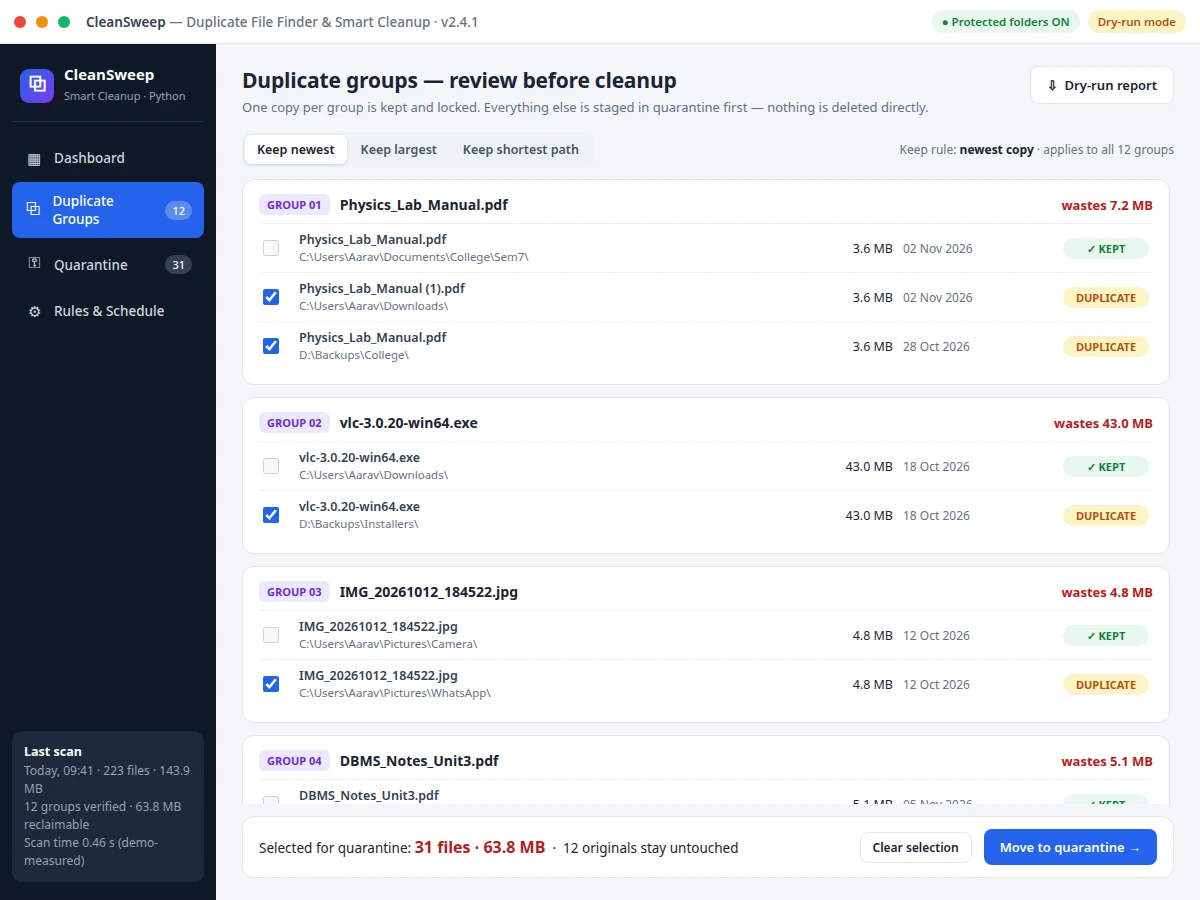
Selects root folders and reviews duplicate groups before confirming cleanup.
Follow the working sequence
How it works
The user selects one or more root folders, and the app enumerates every file recursively, skipping hidden and system folders. Files are grouped by exact byte size first, because files of different sizes can never be identical, so the 180 unique-sized files in the demo scan skipped hashing entirely. Each remaining candidate is read in 64 KiB chunks and hashed with SHA-256 over its first and last chunk; files sharing a size and a chunk hash move to a full byte-by-byte compare, and only files that match on every byte are grouped as duplicates. The app then applies the chosen keep-rule, locks one original per group, and totals the reclaimable space in a dry-run report. After the user confirms, selected copies move into a 30-day quarantine folder instead of being deleted, and only files that sit untouched in quarantine for the full retention period are permanently removed.
- The user selects one or more root folders; the app enumerates all files recursively, skipping system, hidden and user-excluded folders.
- Files are grouped by exact byte size. Any size that occurs only once cannot be a duplicate, so those files are never hashed — the fast pre-filter.
- Each remaining candidate is hashed with SHA-256 over its first and last 64 KiB chunk; files sharing a size and a chunk hash become verification candidates.
- Candidates are confirmed with a full byte-by-byte compare, reading both files in 1 MB blocks. Only files identical on every byte are grouped as duplicates.
- The chosen keep-rule (newest, largest, or shortest path) marks one original per group as kept and locked; the rest are pre-selected for staging.
- A dry-run reclaim report shows every group, the files to be staged and the total reclaimable space, and the user confirms before anything moves.
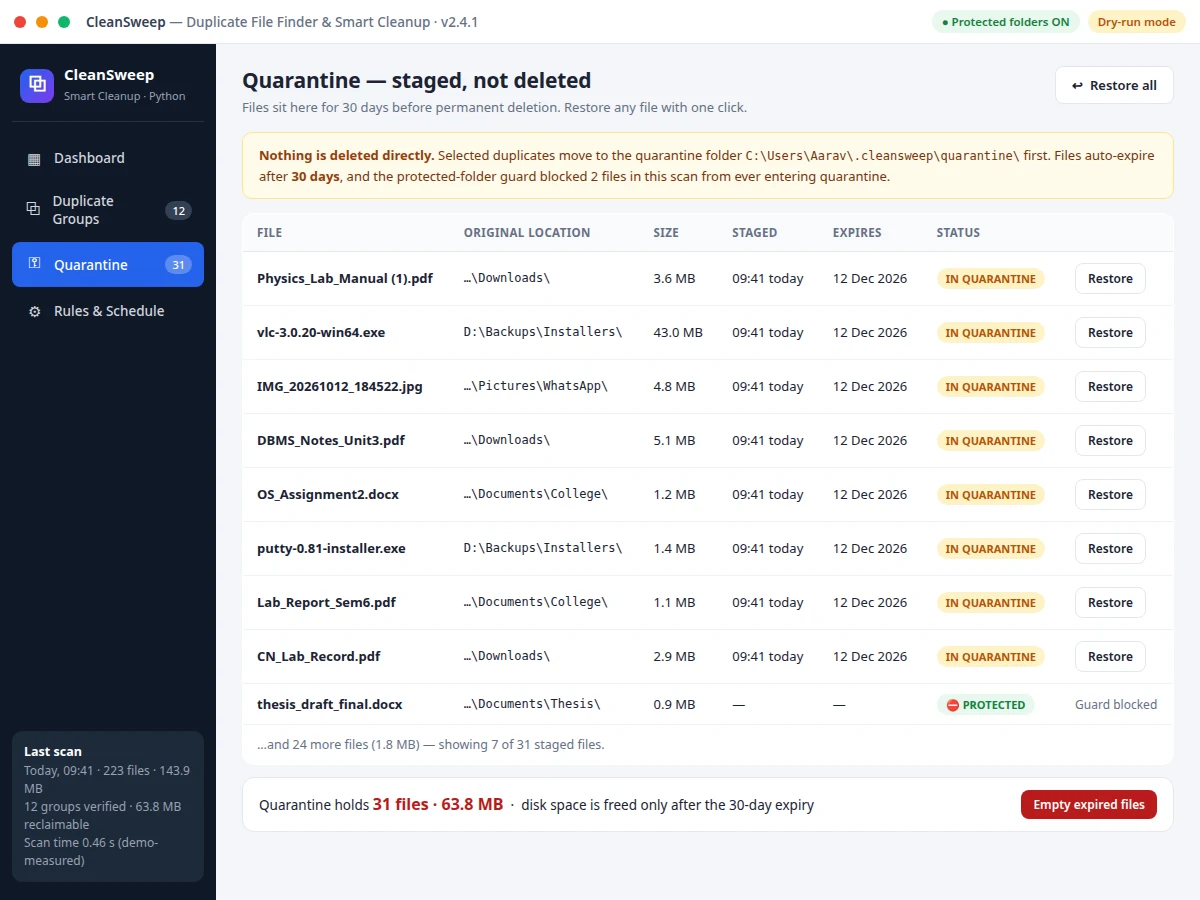
- Confirmed copies move to the quarantine folder, where they sit for 30 days with one-click restore; files untouched for the full period are then permanently deleted.
- The SQLite cache records each scanned file's path, size, mtime and chunk hash, so the next scheduled scan re-hashes only changed files.
Tech stack:
- Python 3
- PySide6 · Qt
- SQLite scan cache
- hashlib · SHA-256
- reportlab PDF reports
- PyInstaller packaging
- CSV export
- Git
| Parameter | Value |
|---|---|
| Platform | Windows 10/11 desktop (design target) |
| Detection pipeline | Size grouping → 64 KiB first/last-chunk SHA-256 → full byte-compare (design target) |
| Hash digest | SHA-256, 256-bit digest (hashlib, verified against Python docs) |
| Chunk size | 64 KiB (65,536 bytes) first and last chunk |
| Demo-measured scan | 223 files · 143.9 MB · 12 verified groups · 0.46 s (demo-measured on this VM) |
| Demo-measured reclaim | 63.8 MB across 31 duplicate copies (demo-measured on the same test set) |
| Quarantine retention | 30 days (design target) |
| Scan scale | Design target: 100,000+ files per scan |
| Memory use | Chunked streaming; design target under 200 MB during scans |
| Scan cache | SQLite store of path, size, mtime and chunk hash — unchanged files skip re-hashing |
| Reports | CSV and PDF export |
| Packaging | Single-file executable via PyInstaller (design target) |
Project features
The app's core capabilities are its three-stage byte-exact detection, its quarantine-first cleanup, and its keep-rules with a protected-folder guard. Detection groups files by exact byte size, hashes the first and last 64 KiB chunk of each candidate with SHA-256, and confirms survivors with a full byte-by-byte compare, so only genuinely identical files are ever grouped. Cleanup never deletes directly: selected copies move to a quarantine folder for 30 days, where any file can be restored with one click, and one original per group stays locked as kept. Keep-rules let the user choose which copy survives — newest, largest, or shortest path — while the protected-folder guard blocks thesis folders, family photos and system directories from ever being staged. A dry-run reclaim report, a reclaimable-space dashboard and scheduled scans round out a tool that treats safe deletion as a feature, not an afterthought.
- [Three-stage byte-exact detection] Files are grouped by exact byte size, then the first and last 64 KiB chunk of each candidate is hashed with SHA-256 (256-bit digest), and survivors are confirmed with a full byte-by-byte compare. Only files that match on every byte are grouped — no content-based image matching is used.
- [Quarantine staging with one-click restore] Selected duplicates move to a quarantine folder instead of being deleted, and sit there for 30 days before permanent removal. Any staged file can be restored to its original location with one click.
- [Keep-rules for the surviving copy] The user chooses which copy survives in each group — newest, largest, or shortest path — and the rule applies across all groups at once. The kept original is locked and can never be selected for removal.
- [Dry-run reclaim report] Before anything moves, a report lists every group, the files that would be staged, and the exact space that would be reclaimed, so the user approves a concrete plan rather than a vague promise.
- [Protected-folder guard] Folders the user marks as protected — thesis work, family photos, system directories — are excluded from staging entirely, and the guard blocked 2 files in the demo scan.
- [Reclaimable-space dashboard] A dashboard totals reclaimable space overall and by file type, so the user sees where the wasted space actually sits before deciding what to clean.
- [Scheduled scans and hash cache] Weekly or monthly scans run automatically, and a SQLite cache stores path, size, mtime and chunk hash so unchanged files skip re-hashing on the next scan. Schedules scan only — cleanup always waits for review.
What is included
- Complete Python source code for the desktop application (scan engine, GUI, quarantine workflow, reports)
- Working single-file HTML demo of the app (dashboard, duplicate groups, quarantine views)
- SQLite scan-cache schema and setup notes
- Sample scan dataset description and demo walkthrough script
- Setup instructions (dependencies, virtual environment, running from source)
- PyInstaller packaging script for the single-file executable
- Project report PDF (background, hashing theory, methodology, design, testing procedure)
- PPT presentation for final review
- Viva Q&A preparation document (hashing, chunking, file systems, Qt, safe deletion UX)
Limitations & prerequisites
- Finds byte-identical files only. A resized, recompressed or edited copy of a photo is a different file and is not flagged — no image matching is used, by design.
- The 0.46 s scan time is demo-measured on a 223-file, 143.9 MB test set on this VM; larger drives take proportionally longer, and the figure is not a benchmark for other machines.
- First/last-chunk hashing is a filter, not a verdict: only the full byte-compare confirms a duplicate, so the chunk-hash pass alone never stages a file.
- Quarantine lives on the same drive, so disk space is freed only after the 30-day expiry, not at staging time.
- Encrypted containers, password-protected archives and cloud-only files that are not synced locally are not scanned.
- Deletion after the quarantine expiry is permanent — restore before expiry if there is any doubt about a file.
Frequently Asked Questions
How is this different from a SHA-256 duplicate finder?
It is built around smart cleanup, not just detection. A plain SHA-256 finder hashes every file fully and lists matches; this app verifies with size grouping plus first/last-chunk hashing and a byte-compare, then adds the cleanup workflow — keep-rules, a 30-day quarantine, a dry-run reclaim report and a protected-folder guard — so deletion is safe by design rather than left to the user.
How does the detection actually work?
Files are grouped by exact byte size first, so unique sizes skip hashing entirely. Remaining candidates get a SHA-256 hash of their first and last 64 KiB chunk, and files sharing a size and chunk hash are confirmed with a full byte-by-byte compare. Only files identical on every byte are grouped as duplicates.
Is it safe? Can I lose an important file?
Yes, it is designed to be safe. One original per group is locked as kept, protected folders can never be staged, and selected copies move to a 30-day quarantine instead of being deleted — any staged file restores to its original location with one click, and permanent deletion happens only after the full retention period.
Does it need the internet, and which systems does it run on?
No internet is needed at any stage — scanning, hashing and quarantine are all local operations. No file content ever leaves the machine, so the app works fully offline on computers with no network connection at all, and scheduled scans with the SQLite hash cache run offline too. The packaged build targets Windows 10/11; the Python source runs anywhere PySide6 installs.
Can it find duplicates across different drives or folders?
Yes. You select any number of root folders — different drives, an external disk, a phone-backup folder — and grouping is global across all of them, so a copy on C: and a copy on D: land in the same group and the keep-rule picks the survivor.
Is this project suitable for a final-year project?
Yes — for Computer Science, IT and Software Engineering programs. It demonstrates file-system traversal, cryptographic hashing, chunked I/O, desktop GUI development with Qt, and safe destructive-operation UX, all in one coherent build that treats safe deletion as a design problem, not an afterthought. The three-stage verification pipeline and the quarantine workflow give the viva discussion concrete design decisions to explain, beyond a simple file listing.
Components & software requirements
- Python 3
- PySide6 · Qt
- SQLite scan cache
- hashlib · SHA-256
- reportlab PDF reports
- PyInstaller packaging
- CSV export
- Git
Delivery information
Built-to-order project. Delivery timeline is shared after order confirmation based on current queue.
Support terms
Complete documentation, setup guide, and viva preparation included. Support for setup and explanation provided.
Download free synopsis (PDF)
Enter your name and WhatsApp number — the synopsis PDF downloads immediately. We may send occasional project updates on WhatsApp; no spam.