
More project photos (2)
The problem
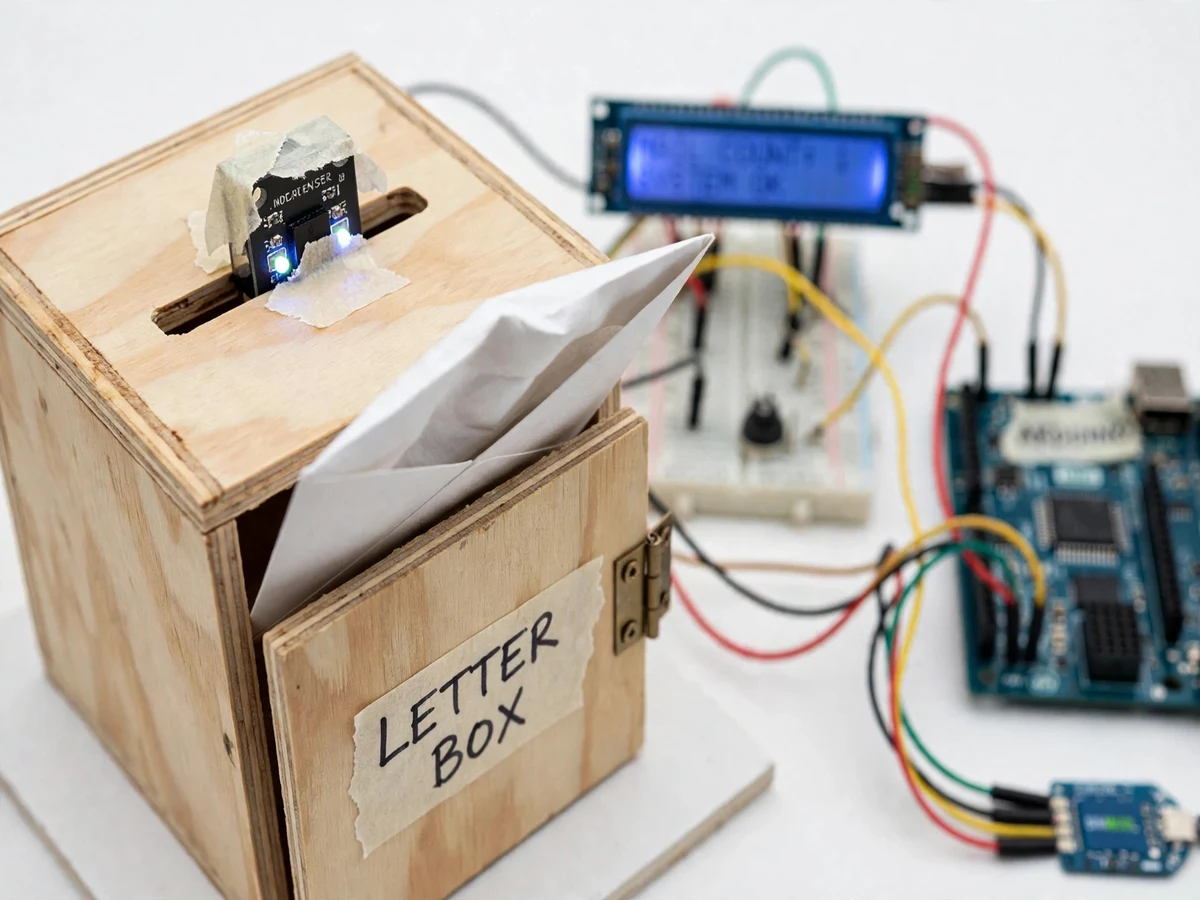
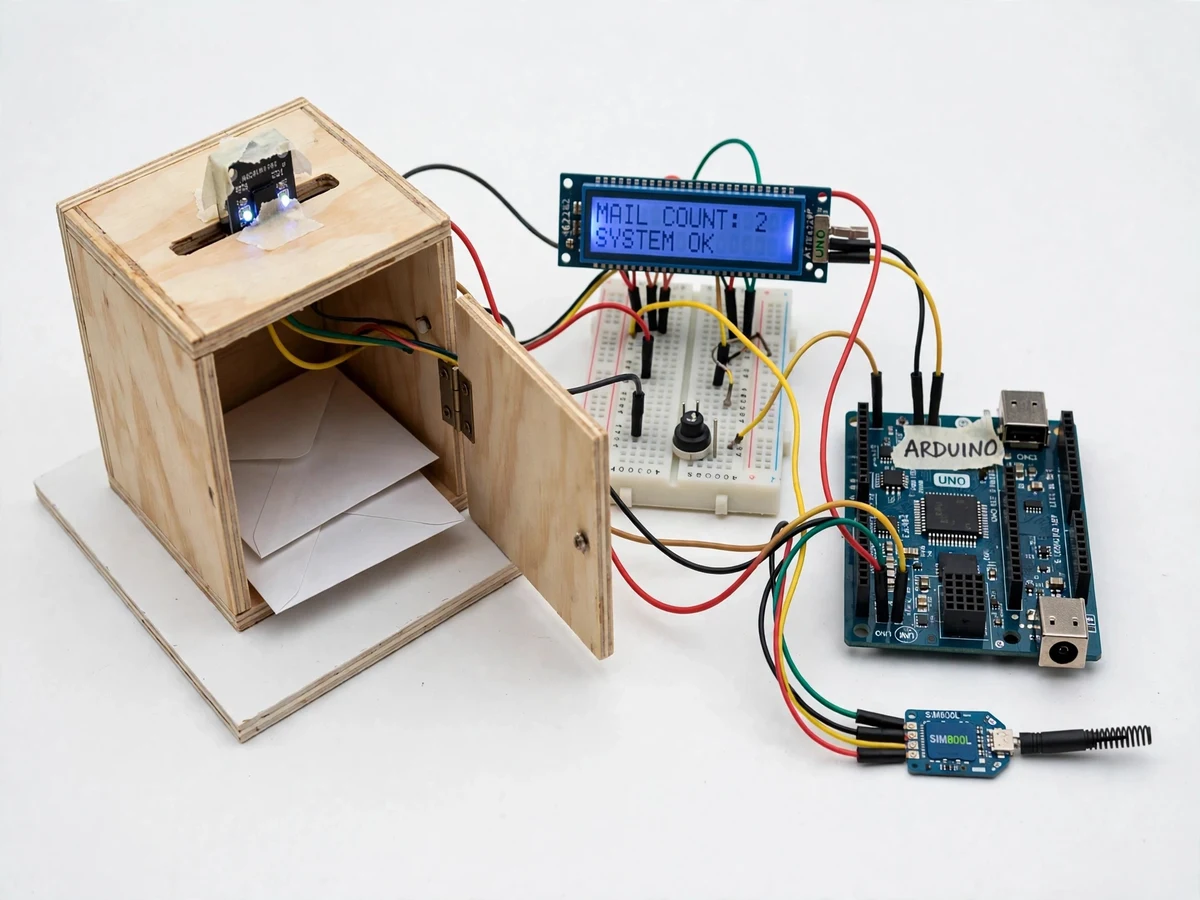
A letter box only works if someone walks to it and looks inside, and in hostels, flats and offices that check happens once a day, so letters, admit cards and bank documents sit unseen for hours or days while the owner assumes nothing arrived. Missed delivery windows, late fee notices and expired documents all trace back to the same gap: the box cannot tell anyone that mail has arrived. The Electronic Letter Box with SMS Notification using GSM and IR Sensor closes that gap with a sensing chain: an IR obstacle sensor watches the mail slot, an Arduino Uno registers each passing letter, a 16x2 LCD shows the mail count, a buzzer sounds locally, and a SIM800L GSM module texts the owner's phone the moment a letter drops in. The owner learns about the delivery within seconds, from anywhere with mobile coverage, and the count on the display shows how many letters are waiting before they walk to the box.
| Checking method | How you learn about mail | Trips to the box | Missed-mail risk |
|---|---|---|---|
| Ordinary letter box | Only by walking over and opening it | One trip per check, often daily | High — mail sits unseen for hours or days |
| SMS-notified letter box (this project) | SMS on the owner's phone within seconds of posting | Only when the count shows mail waiting | Low — every letter triggers its own alert |
Related builds on Projectech: https://projectech.in/projects/sms-controlled-wireless-electronic-notice-board-gsm-arduino/ — https://projectech.in/projects/gsm-based-intrusion-detection-pir-sms-alert/ — https://projectech.in/projects/smart-parking-slot-monitoring-ir-sensors-esp32-dashboard/ — https://projectech.in/projects/automatic-plant-watering-system-arduino-soil-moisture-sensor/
Watches the mail slot and fires when an envelope breaks its beam.
Follow the working sequence
How it works
A letter sliding through the slot breaks the IR sensor's beam, and that single event drives the whole chain. The Arduino Uno reads the sensor output, waits for a confirmation delay of approximately 1 second (design target) so a passing hand does not count as mail, then increments the mail count, saves it to EEPROM, updates the 16x2 LCD and sounds the buzzer. Next the Arduino talks to the SIM800L GSM module over a serial link with AT commands: it switches the module to text mode, addresses the SMS to the stored phone number, and sends a message stating that a new letter has arrived and giving the updated mail count. The module transmits the message over the 2G network, the LCD keeps showing the new count, and the system goes back to watching the slot until the next letter arrives or the owner presses the reset button after collecting the mail.
- The IR obstacle sensor watches the mail slot continuously; an envelope sliding through interrupts its reflected beam and pulls the sensor output low.
- The Arduino Uno reads the sensor output and applies a confirmation delay of approximately 1 second (design target), rejecting brief triggers from a hand brushing past the slot.
- On a confirmed detection, the Arduino increments the mail count, writes it to EEPROM, updates the 16x2 LCD and sounds the buzzer for approximately 1 second (design target).
- The Arduino sends AT commands to the SIM800L over a software serial link, switching it to text mode and addressing the SMS to the stored phone number.
- The SIM800L transmits the SMS over the 2G GSM network; the message states that a new letter has arrived and gives the updated mail count.
- The LCD keeps showing the new count, the system returns to watching the slot, and the owner presses the reset push-button to clear the count after collecting the mail.
Tech stack:
- Arduino Uno (ATmega328P)
- SIM800L GSM module
- IR obstacle sensor module
- 16x2 character LCD
- Arduino IDE (C/C++)
- AT commands · SMS
- LM2596 buck converter
- Buzzer · EEPROM · push-button
| Parameter | Value |
|---|---|
| Controller | Arduino Uno (ATmega328P, 14 digital I/O, 6 analog inputs) |
| GSM module | SIM800L, quad-band 850/900/1800/1900 MHz (datasheet value) |
| GSM supply | 3.4–4.4 V, 4.0 V recommended (datasheet value) |
| GSM peak current | Up to 2 A during transmission bursts (datasheet value) |
| IR sensor | Obstacle-avoidance module, detection range 2–30 cm adjustable (datasheet value) |
| Display | 16x2 character LCD |
| Buzzer | Active buzzer, beep of approximately 1 s per letter (design target) |
| Detection confirmation | Approximately 1 s sustained trigger (design target) |
| SMS | Text-mode SMS via AT commands, 1 message per letter (design target) |
| Count storage | Arduino EEPROM, survives power loss |
| Power | 12 V DC adapter; LM2596 buck converter set to 4.0 V for the GSM module |
| Network requirement | Active 2G GSM network and a SIM with SMS balance |
Project features
The letter box does four things well, and each one is visible in the demo. First, it detects every letter: an IR obstacle sensor mounted across the mail slot fires each time an envelope interrupts its beam, and a short confirmation delay in firmware ignores a hand brushing past the slot, so the count only moves when mail actually drops in. Second, it notifies instantly: the SIM800L GSM module sends a text message to the owner's phone on every detection, using standard AT commands over a 2G connection, so the alert arrives even where there is no Wi-Fi. Third, it keeps a visible record: the 16x2 LCD shows the running mail count with a system status line, and a buzzer sounds a short beep for anyone nearby. Fourth, it remembers: the count is stored in the Arduino's EEPROM, so a power cut does not reset the tally, and a push-button clears the count only after the mail has been collected.
- [IR letter detection] An IR obstacle sensor mounted across the mail slot detects each envelope as it interrupts the sensor beam, with a detection range of 2–30 cm adjustable on the module's onboard potentiometer (datasheet value). A confirmation delay in firmware rejects brief triggers from a hand passing the slot.
- [Instant SMS notification] The SIM800L GSM module sends a text message to the owner's stored phone number on every confirmed letter, using standard AT commands (AT+CMGF=1, AT+CMGS) over a 2G GSM connection. No Wi-Fi or internet connection is needed.
- [Mail count on 16x2 LCD] The display shows the running mail count and a system status line, so anyone near the box can see how many letters are waiting without opening it.
- [Local buzzer alert] A buzzer sounds a short beep of approximately 1 second (design target) each time a letter is detected, giving an audible cue in the room or corridor.
- [EEPROM count memory] The mail count is stored in the Arduino Uno's onboard EEPROM, so the tally survives a power cut and is still correct when power returns.
- [Manual count reset] A push-button clears the mail count to zero after the owner collects the letters, readying the box for the next delivery.
- [Correct GSM power design] The SIM800L is fed from an LM2596 buck converter set to 4.0 V with a 1000 µF low-ESR capacitor across its supply pins, because the module draws up to 2 A in short transmission bursts (datasheet value) and resets on a weak supply.
What is included
- Working prototype: plywood letter box with mail slot and hinged door, Arduino Uno, SIM800L GSM module, IR sensor, 16x2 LCD, buzzer and push-button
- Complete Arduino firmware with configurable phone number and confirmation delay
- Circuit and wiring documentation with the GSM power-supply notes
- Component list with part numbers
- Setup and calibration guide, including IR sensor threshold tuning
- Project abstract PDF
- Project report with methodology, results and limitations
- PPT presentation for final review
- Viva Q&A preparation document (IR sensing, GSM AT commands, SIM800L power design)
Limitations & prerequisites
- The SIM800L is a 2G-only module, so the SMS alert works only where a 2G GSM network is still active; it will not work in areas where 2G has been switched off.
- Strong direct sunlight falling into the mail slot can disturb the IR sensor, so the slot must be shaded or the sensor mounted inside the box, away from direct sun.
- SMS delivery time depends on the mobile network and is not guaranteed; delivery is typically within seconds but can be delayed by network congestion.
- The base build sends the SMS to 1 stored phone number; additional numbers need a small firmware change.
- The message carries no timestamp, because the base build has no real-time clock; an RTC module can be added as a customization.
- The prototype is a demonstration model for indoor use and is not weatherproof for outdoor mounting without a proper enclosure.
- The SIM needs an active plan with SMS balance; message charges are the owner's.
Frequently Asked Questions
Is this project suitable for a final-year project?
Yes — for Electronics and Telecommunication, Electrical and Computer Engineering students. It demonstrates embedded sensing with an IR module, serial communication with a GSM modem, AT-command SMS control, display and buzzer interfacing, EEPROM storage and the power-supply design that a 2G module demands, all in one compact, demonstrable build.
Which controller is used and why?
The Arduino Uno (ATmega328P) is used because the build needs only one digital sensor input, a software serial link to the GSM module, an LCD and a buzzer — all comfortably inside its 14 digital I/O pins. Its 5 V logic, large community support and simple IDE make it the practical choice for a student build.
Does this project need Wi-Fi or internet?
No. The SMS alert travels over the 2G GSM network through the SIM800L module, so the box works anywhere with mobile coverage and no Wi-Fi at all. The only connectivity requirement is an active 2G signal and a SIM with SMS balance; the LCD and buzzer work even without a signal.
What power supply is needed?
A 12 V DC adapter powers the build, with an LM2596 buck converter set to 4.0 V feeding the SIM800L. The GSM module must never be powered from the Arduino's 5 V pin: its supply range is 3.4–4.4 V (datasheet value) and it draws up to 2 A in transmission bursts, which resets the module on a weak supply.
Can the SMS go to more than one phone number?
The base build texts 1 stored phone number, which is set in the firmware before delivery. Sending to additional numbers is a small firmware change — the code loops the same AT command sequence over a list of numbers — and can be added on request at quotation stage.
What will I receive with the project?
You receive the working prototype (letter box with Arduino Uno, SIM800L GSM module, IR sensor, 16x2 LCD, buzzer and push-button), the complete firmware, wiring documentation, component list, setup and calibration guide, abstract PDF, project report, PPT and a viva Q&A document.
Get this project Need this project for your final year? Projectech builds it to order: working prototype with Arduino Uno, SIM800L GSM module and IR sensor, firmware, wiring documentation, report, PPT and viva kit, with the phone number configured for your SIM. Request a quotation on WhatsApp with your branch, college and deadline, and you will get the scope, price and delivery timeline for your order.
Components & software requirements
- Arduino Uno (ATmega328P)
- SIM800L GSM module
- IR obstacle sensor module
- 16x2 character LCD
- Arduino IDE (C/C++)
- AT commands · SMS
- LM2596 buck converter
- Buzzer · EEPROM · push-button
Delivery information
Built-to-order project. Delivery timeline is shared after order confirmation based on current queue.
Support terms
Complete documentation, setup guide, and viva preparation included. Support for setup and explanation provided.
Download free synopsis (PDF)
Enter your name and WhatsApp number — the synopsis PDF downloads immediately. We may send occasional project updates on WhatsApp; no spam.