
More project photos (3)

The problem
Checking an empty mailbox every day is a small annoyance, and an overflowing one signals to the street that nobody is home. A mailbox that notices its own deliveries solves both: it can raise a flag the moment a letter lands and tell the owner's phone immediately. The engineering work is in reliable mail detection inside a dark metal box, the flag mechanism and the Wi-Fi alert path. This project builds a student-scale smart mailbox on an ESP32: an IR proximity sensor inside the slot detects an arriving letter, a servo raises the red flag, the OLED flips to MAIL RECEIVED, and the ESP32 pushes a notification to a Blynk-style dashboard. A reset button clears the flag when the mail is collected.
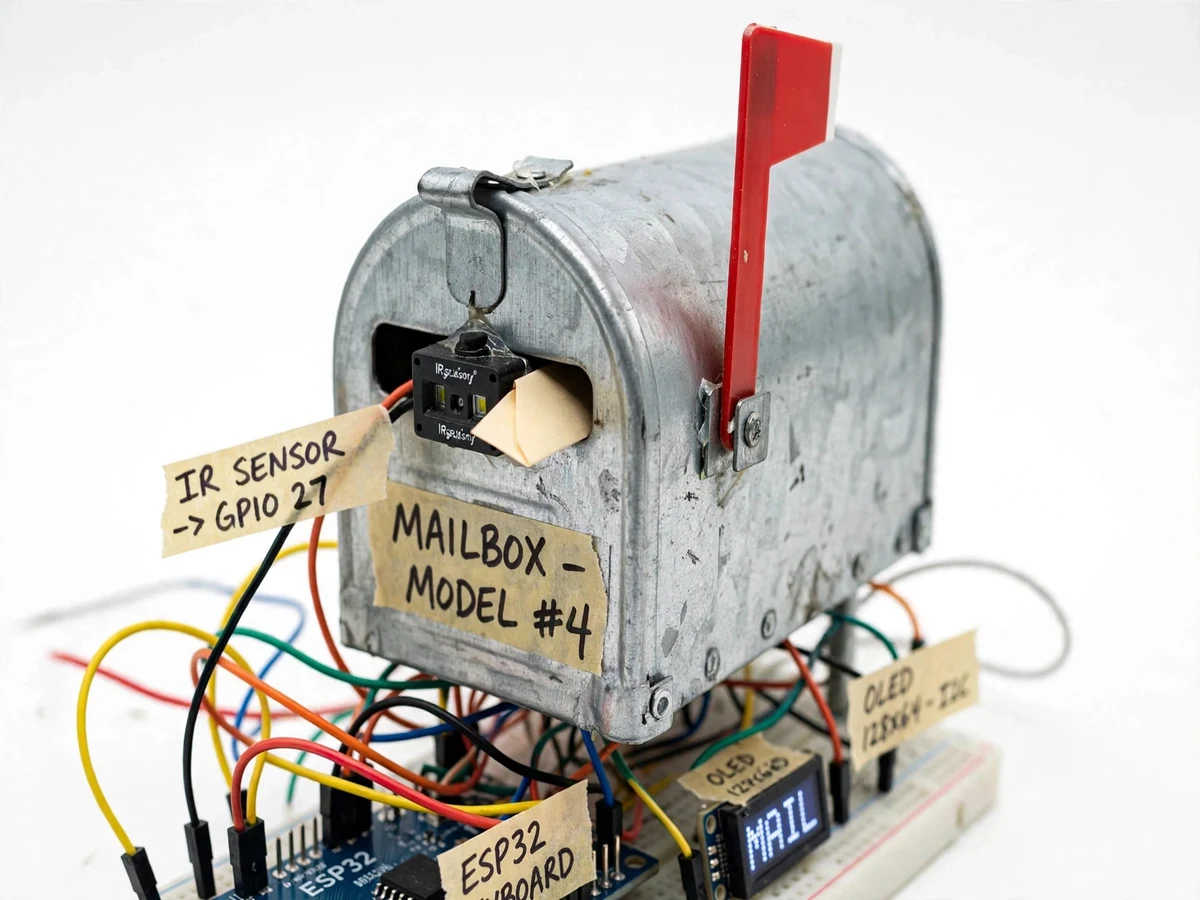
Proximity sensor inside the mail slot watching for an arriving letter.
Follow the working sequence
How it works
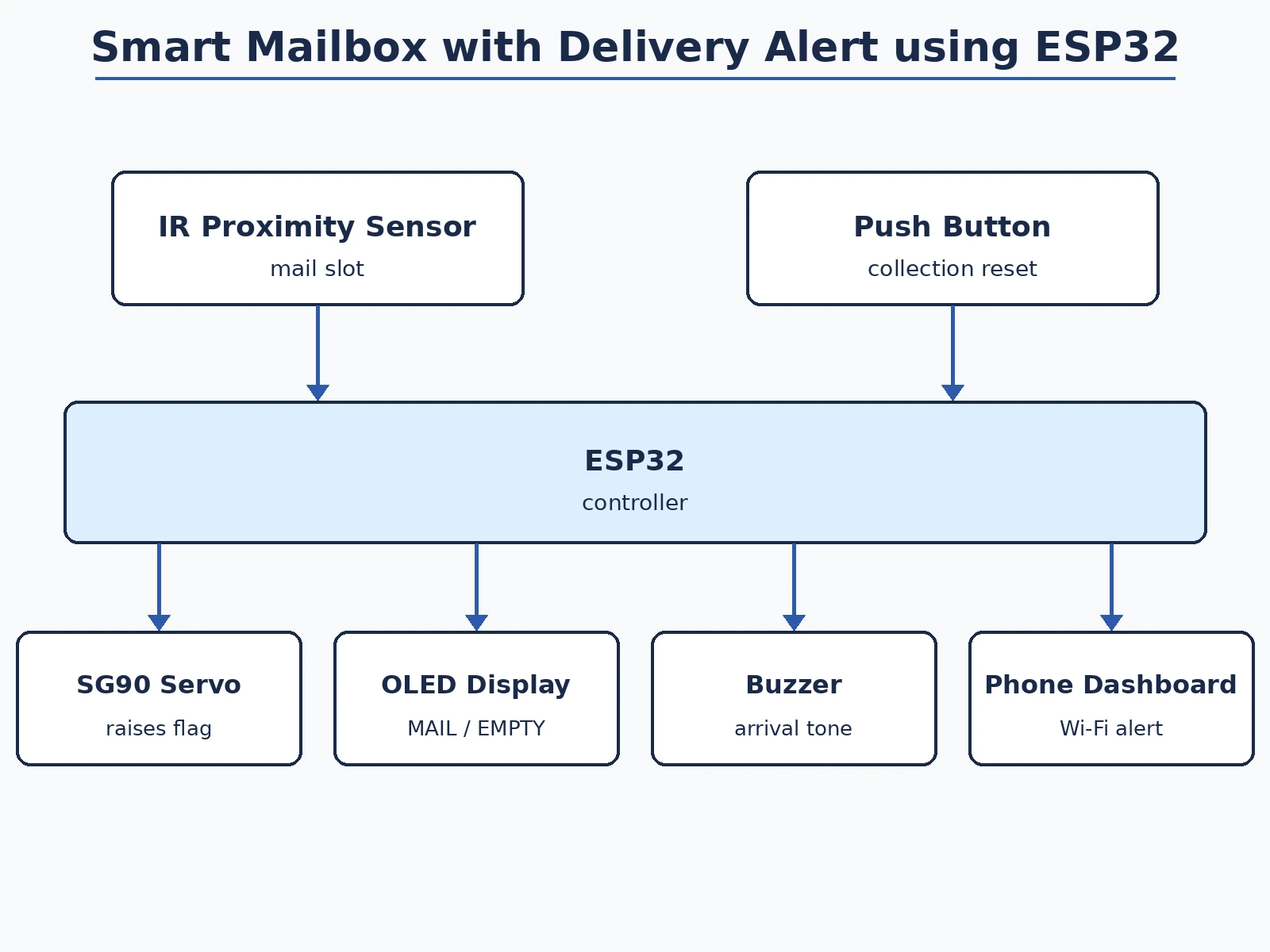
- The IR sensor inside the mail slot continuously monitors for an object entering the box.
- When a letter breaks the beam, the ESP32 registers a delivery event, raises the red flag with the servo and sounds the buzzer chime.
- The OLED switches from EMPTY to MAIL RECEIVED with the delivery time, and the ESP32 publishes the event to the phone dashboard over Wi-Fi.
- The flag stays raised and the alert stays latched until the owner collects the mail.
- Pressing the reset button lowers the flag, clears the dashboard alert state and returns the OLED to EMPTY.
- Firmware debouncing prevents a single letter from triggering multiple alerts, and the Wi-Fi reconnects automatically after outages.
Tech stack:
- ESP32 development board
- IR proximity sensor module
- SG90 servo motor (flag)
- 0.96-inch OLED display
- Buzzer and push buttons
- Blynk-style IoT dashboard (phone alerts)
- Arduino IDE (C/C++ firmware)
| Parameter | Value |
|---|---|
| Controller | ESP32 development board |
| Mail sensing | IR proximity sensor in mail slot |
| Flag actuation | SG90 servo, approximately 180° travel (design) |
| Display | 0.96-inch OLED |
| Alerts | Wi-Fi dashboard push + local buzzer |
| Detection debounce | Firmware, approximately 2 s (design) |
| Power | 5 V regulated supply (design) |
| Mailbox | Demonstration model mailbox |
Project features
- [IR mail detection] An IR proximity sensor inside the mail slot detects an arriving letter or parcel slip and triggers the alert sequence.
- [Servo-driven flag] A servo motor raises the mailbox's red flag on delivery and lowers it when the reset button is pressed after collection.
- [Wi-Fi delivery alerts] The ESP32 pushes a delivery notification to a phone dashboard over Wi-Fi on every detected arrival.
- [OLED status display] A small OLED shows EMPTY, MAIL RECEIVED and Wi-Fi connection status at a glance.
- [Buzzer arrival tone] A short chime sounds when mail is detected, giving local feedback alongside the remote alert.
- [Collection reset] A push button marks the mail as collected, lowers the flag and returns the display to EMPTY.
- [Dashboard setup guide] Step-by-step instructions connect the ESP32 to the notification dashboard on the student's own phone.
What is included
- Working smart mailbox prototype with IR sensor, servo flag, ESP32, OLED and buzzer
- Complete firmware with commented detection, servo and Wi-Fi alert logic
- Phone dashboard setup guide with screenshots
- Wiring diagram and connection table
- Project report PDF (background, system design, firmware logic, IoT architecture)
- PPT presentation for final review
- Viva Q&A preparation document (IR sensing, servos, ESP32 Wi-Fi, IoT dashboards)
Limitations & prerequisites
- Detection is demonstrated with letters and slips fitting the model mailbox; large parcels that don't pass the slot are outside the demo's scope.
- The IR sensor needs a dark interior and correct mounting angle — placement is tuned by the buyer with the included procedure.
- Wi-Fi alerts depend on the buyer's own home network and the third-party dashboard service; no uptime is guaranteed for external services.
- No camera or letter-content reading is included — the system reports arrival only, not what arrived.
- The model mailbox is a demonstration prop, not a weatherproof outdoor unit.
- Battery operation is not included; the unit runs on a 5 V adapter.
Frequently Asked Questions
How does it know mail arrived?
An IR proximity sensor sits inside the mail slot. When a letter passes through and breaks the beam, the ESP32 registers the delivery and runs the flag, display and alert sequence.
How do the phone alerts work?
The ESP32 connects to the buyer's Wi-Fi and publishes a delivery event to a Blynk-style dashboard app on the phone. The setup guide walks through the whole configuration.
What if the Wi-Fi drops?
The local flag, OLED and buzzer keep working without Wi-Fi, and the firmware reconnects automatically when the network returns.
Can it tell letters from parcels?
No — it detects that something entered the slot. Distinguishing item types is listed as future scope.
Does the flag reset itself?
No, it stays raised until the reset button is pressed when the mail is collected — that way the flag is a genuine "mail waiting" indicator.
Is this project suitable for a final-year project?
Yes — for Electronics and IoT & Embedded programs. It covers IR sensing, servo actuation, ESP32 Wi-Fi programming and a complete device-to-phone IoT loop. Suitable for B.E./B.Tech final-year projects in Electronics and IoT & Embedded.
Components & software requirements
- ESP32 development board
- IR proximity sensor module
- SG90 servo motor (flag)
- 0.96-inch OLED display
- Buzzer and push buttons
- Blynk-style IoT dashboard (phone alerts)
- Arduino IDE (C/C++ firmware)
Delivery information
Built-to-order project. Delivery timeline is shared after order confirmation based on current queue.
Support terms
Complete documentation, setup guide, and viva preparation included. Support for setup and explanation provided.
Download free synopsis (PDF)
Enter your name and WhatsApp number — the synopsis PDF downloads immediately. We may send occasional project updates on WhatsApp; no spam.