
More project photos (3)


The problem
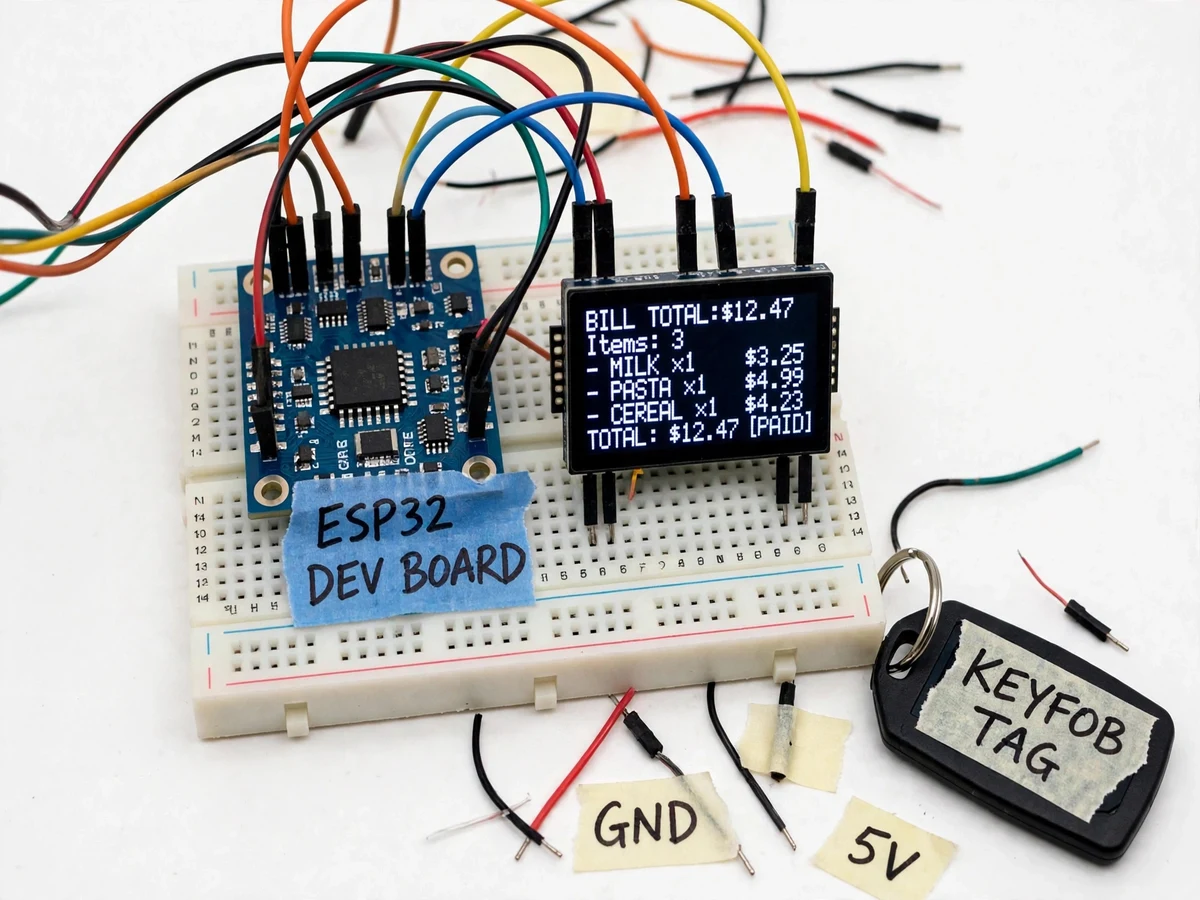
Checkout queues are retail's oldest bottleneck, and self-checkout kiosks just move the scanning work to the customer at the end. Billing items at the moment they enter the cart removes the queue entirely — the engineering work is in reliable RFID reads in a metal cart, the item database and the add/remove billing logic. This project builds a student-scale smart shopping cart on an ESP32: an RC522 reader mounted on the cart handle scans RFID cards and keyfobs standing in for tagged products, the firmware looks up each UID in its item table, the OLED shows the item name and running total, and the buzzer confirms every scan.
Card or keyfob on each demo product carrying a registered UID.
Follow the working sequence
How it works
- Each demo product carries an RFID card or keyfob whose UID is registered in the firmware's item table with a name and price.
- When an item is dropped into the cart past the reader, the RC522 reads the tag UID and the ESP32 looks it up.
- On a match, the firmware adds the price to the running total, shows the item name and new total on the OLED, and beeps.
- An unknown UID triggers an error tone and an UNKNOWN TAG message instead of billing anything.
- Pressing the remove button subtracts the last added item and updates the total; a long-press resets the whole bill.
- The duplicate-scan guard ignores repeated reads of the same UID within a short window to prevent double billing.
Tech stack:
- ESP32 development board
- RC522 RFID reader module
- RFID cards and keyfob tags (demo catalogue)
- 0.96-inch OLED display
- Buzzer and push buttons
- Arduino IDE (C/C++ firmware)
- 5 V regulated power supply
| Parameter | Value |
|---|---|
| Controller | ESP32 development board |
| RFID | RC522, 13.56 MHz (datasheet) |
| Read range | A few centimetres, tag-dependent (design) |
| Display | 0.96-inch OLED (item + running total) |
| Item database | Firmware UID table, buyer-editable |
| Power | 5 V regulated supply (design) |
Project features
- [RFID item scanning] An RC522 reader on the cart handle reads RFID cards and keyfobs representing tagged products as they are added.
- [Running bill on OLED] Every scan adds the item's price to a running total shown with the item name on a 0.96-inch OLED.
- [Item database in firmware] A UID-to-item table (name and price) lives in the ESP32 firmware and is easy to edit for the demo catalogue.
- [Scan confirmation beep] The buzzer sounds a distinct tone on each successful read so the shopper knows the item was billed.
- [Remove-item button] A push button voids the most recently added item, demonstrating the correction path in billing logic.
- [Duplicate-scan guard] Firmware rejects immediate re-reads of the same tag so one item can't be billed twice by accident.
- [Bill reset] A long-press clears the bill for the next customer, completing the checkout loop.
What is included
- Working model shopping cart with RFID reader, ESP32, OLED, buzzer and tagged demo items
- Complete firmware with commented RFID, billing and duplicate-guard logic
- Item-table editing guide for the demo catalogue
- Wiring diagram and connection table
- Project report PDF (background, system design, firmware logic, retail-automation analysis)
- PPT presentation for final review
- Viva Q&A preparation document (RFID, SPI interfacing, ESP32, billing logic)
Limitations & prerequisites
- The demo reads one tag at a time within a few centimetres — real retail needs anti-collision multi-tag reads and longer range, which is beyond this student build.
- Read reliability depends on tag orientation and the metal cart body; placement is tuned by the buyer with the included procedure.
- The item database lives in firmware, so catalogue changes need a re-flash — no cloud product database is included.
- No payment processing is implemented; the project demonstrates billing, not checkout payment.
- Demo UIDs are illustrative; real product tagging standards (EPC) are discussed in the report as future scope.
- Battery operation is not included; the unit runs on a 5 V adapter.
Frequently Asked Questions
How does the cart know each item's price?
Every RFID tag's UID is registered in a table in the ESP32 firmware with an item name and price. Scanning looks up the UID and adds the price to the running total.
What if I scan the same item twice by accident?
The duplicate-scan guard ignores repeated reads of the same tag within a short window, so one pass bills the item exactly once.
Can I remove an item from the bill?
Yes — the remove button voids the most recently added item, and a long-press resets the whole bill for the next customer.
What happens with an unknown tag?
The reader reports UNKNOWN TAG with an error tone and bills nothing, so unregistered items can't slip through silently.
Can this replace real checkout counters?
The demo proves the concept at student scale. Real deployment needs multi-tag anti-collision reads, payment integration and hardened hardware — listed honestly as future scope.
Is this project suitable for a final-year project?
Yes — for Electronics and IoT & Embedded programs. It covers RFID interfacing over SPI, lookup-table billing logic and a complete retail-automation demo. Suitable for B.E./B.Tech final-year projects in Electronics and IoT & Embedded.
Components & software requirements
- ESP32 development board
- RC522 RFID reader module
- RFID cards and keyfob tags (demo catalogue)
- 0.96-inch OLED display
- Buzzer and push buttons
- Arduino IDE (C/C++ firmware)
- 5 V regulated power supply
Delivery information
Built-to-order project. Delivery timeline is shared after order confirmation based on current queue.
Support terms
Complete documentation, setup guide, and viva preparation included. Support for setup and explanation provided.
Download free synopsis (PDF)
Enter your name and WhatsApp number — the synopsis PDF downloads immediately. We may send occasional project updates on WhatsApp; no spam.