
More project photos (2)
The problem
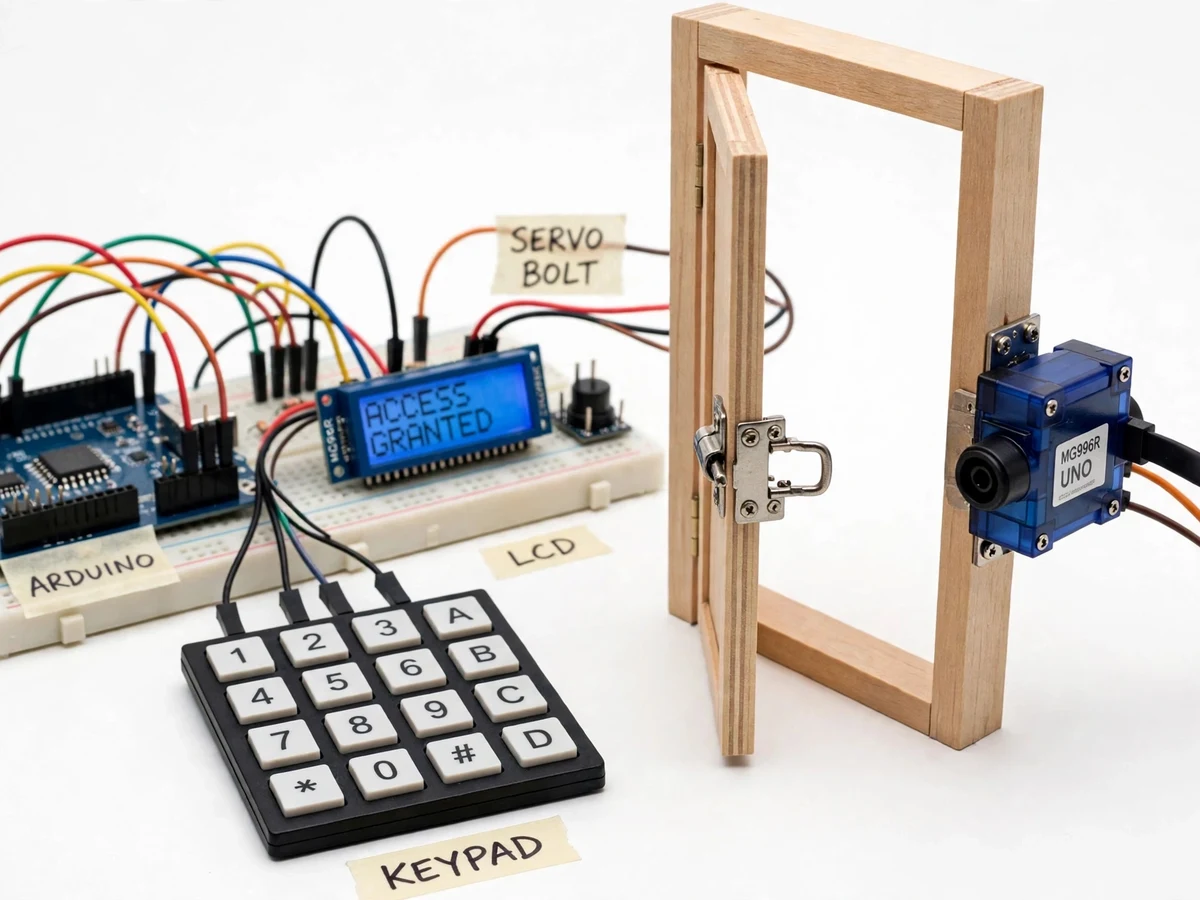
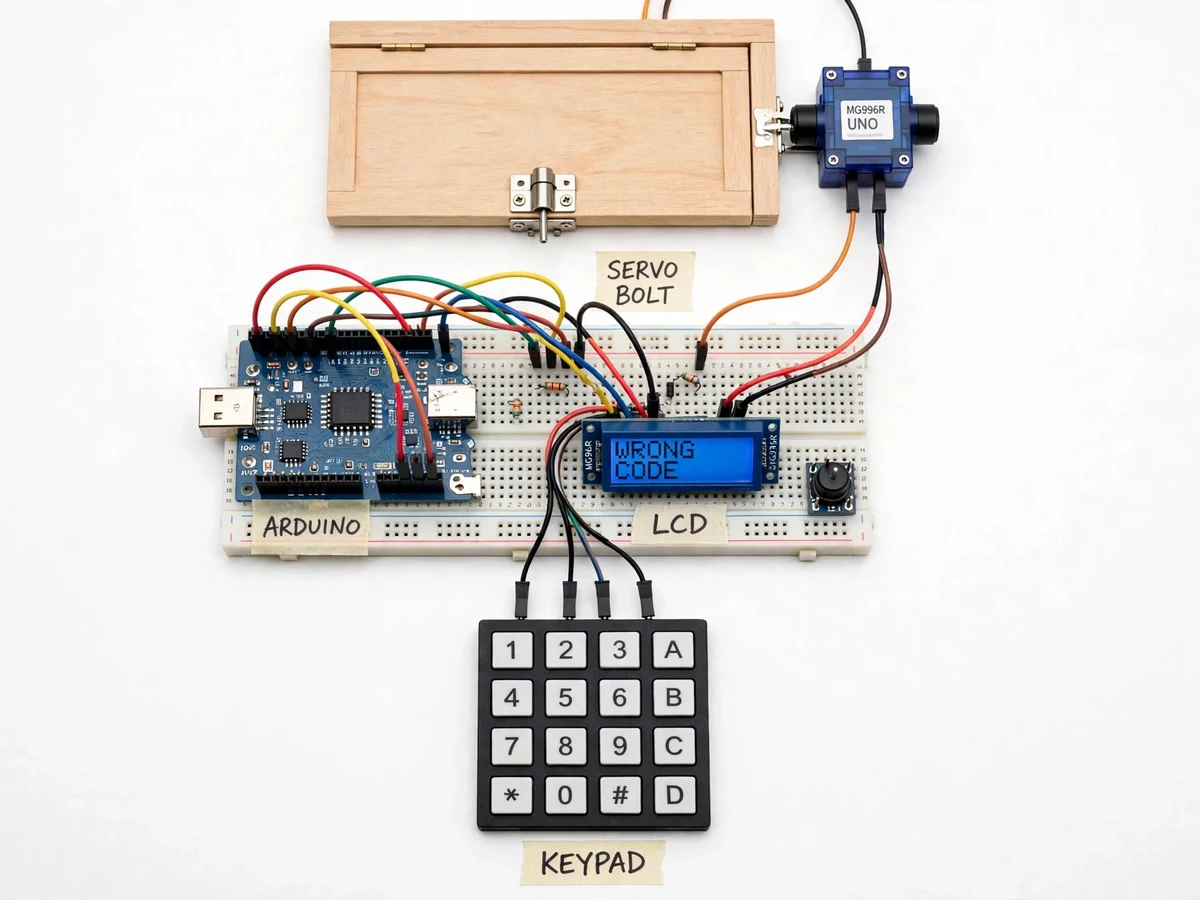
A password based door lock project using Arduino and keypad replaces the metal key with a 4-digit code typed on a 4x4 membrane keypad. An Arduino Uno reads each key press, compares the entered code with the code stored in its firmware, and, only on an exact match, drives an MG996R servo that slides a metal bolt out of the door frame so the door can open. A 16x2 LCD shows ENTER CODE, ACCESS GRANTED or WRONG CODE at each step, and a buzzer sounds after wrong entries, locking the keypad for a short period after three consecutive failures. The lock is standalone: it has no Wi-Fi, no phone app and no cloud account, so it keeps working when the internet is down and nothing about the household leaves the device. This build is for a door, not a safe box, and it is a keypad-only lock, not a Wi-Fi lock that opens from a phone.
| Lock type | What unlocks it | Needs a network? | Main weak point |
|---|---|---|---|
| Keypad lock (this project) | 4-digit code on a keypad | No | The code can be watched or shared |
| Fingerprint lock | A registered finger | No | The sensor fails with wet or dirty fingers |
| RFID lock | A registered card or tag | No | A lost card opens the door until it is blocked |
| Wi-Fi / app lock | A phone app or voice command | Yes | Dead when the router or cloud is down |
Related built-to-order projects on this site: the Wi-Fi door lock with web control (https://projectech.in/projects/wifi-door-lock-web-control-esp8266-arduino/), the digital safe lock with keypad and servo (https://projectech.in/projects/digital-safe-lock-keypad-arduino-servo-motor/) and the IoT smart door lock with fingerprint, RFID and OTP access (https://projectech.in/projects/iot-smart-door-lock-fingerprint-rfid-otp-access/).
Keys are lost, copied and lent, and a lost key means changing the lock or accepting that someone unknown may hold a copy. A keypad code can be changed in minutes without touching the hardware, and a lockout after wrong attempts slows down anyone guessing codes. This project demonstrates that idea as a working door lock: the keypad, the comparison logic, the LCD feedback and the servo-driven bolt are all built and wired together, so the demonstration is a door that opens for the right code and stays shut for the wrong one. It is deliberately different from the two related listings on this site: the Wi-Fi door lock opens from a phone over an ESP8266, and the digital safe lock guards a safe box; this project guards a door, opens only from its own keypad, and has no wireless link at all.
How it works
Pressing a key closes one row-column crossing of the 4x4 keypad, and the Arduino scans the matrix row by row to identify exactly which key was pressed. Each digit is stored in a buffer and shown as an asterisk on the 16x2 LCD, so the code stays hidden while the user can see how many digits have been entered. When # is pressed, the Arduino compares the buffer with the code stored in firmware; a match rotates the MG996R servo horn by approximately 90 degrees, and the horn pulls the metal slide bolt out of the door frame, while the LCD shows ACCESS GRANTED and the buzzer gives one short beep. A wrong code shows WRONG CODE, sounds the buzzer and counts the failure; after three consecutive failures the keypad is ignored for approximately 30 seconds. Afterwards the servo returns the bolt to the locked position, so the door locks itself again.
- The user presses keys on the 4x4 membrane keypad; the Arduino scans the 4 rows and 4 columns to detect each press and debounces it in firmware.
- Each digit is added to a 4-digit buffer and shown as an asterisk on the 16x2 LCD; * clears the buffer and # submits the code.
- On # the Arduino compares the entered code with the code stored in its firmware.
- On a match, the LCD shows ACCESS GRANTED, the buzzer beeps once, and the MG996R servo rotates by approximately 90 degrees to retract the slide bolt from the door frame.
- On a mismatch, the LCD shows WRONG CODE, the buzzer sounds, the buffer is cleared and the failure counter increases; after 3 consecutive failures the keypad is ignored for approximately 30 seconds (design target).
- After a delay of approximately 5 seconds (design target) the servo drives the bolt back into the locked position, so the door re-locks automatically.
Tech stack:
- Arduino Uno (ATmega328P)
- 4x4 membrane keypad
- MG996R metal-gear servo
- 16x2 LCD with I2C backpack
- Arduino IDE (C++)
- Keypad library
- LiquidCrystal_I2C library
- Active buzzer module
| Parameter | Value |
|---|---|
| Controller | Arduino Uno, ATmega328P, 16 MHz clock (datasheet value) |
| Keypad | 4x4 membrane keypad, 16 keys (datasheet value) |
| Display | 16x2 LCD, 32 characters, I2C backpack (datasheet value) |
| Servo | MG996R metal-gear servo, stall torque 9.4 kg·cm at 4.8 V and 11 kg·cm at 6 V (TowerPro datasheet value) |
| Servo speed | 0.17 s per 60 degrees at 4.8 V (datasheet value) |
| Servo stall current | Up to 2.5 A at 6 V (datasheet value) |
| Password | 4-digit code, stored as one constant in firmware (design value) |
| Lockout | Keypad ignored for approximately 30 seconds after 3 consecutive wrong attempts (design target) |
| Bolt travel | Approximately 20 mm slide-bolt travel (design target) |
| Unlock response | Bolt retracts within approximately 1 second of a correct code (design target) |
| Auto re-lock | Bolt returns after approximately 5 seconds (design target) |
| Connectivity | None — no Wi-Fi, no Bluetooth, no cloud (offline by design) |
| Power | 5 V regulated supply; servo on a separate 5–6 V rail |
Project features
The lock's strongest capabilities are its offline keypad entry, its visible LCD feedback, its wrong-code lockout and its servo-driven bolt. The 4x4 membrane keypad gives 16 keys, and the keypad is scanned by the Arduino in rows and columns, so only 8 digital pins serve all 16 keys. The 16x2 LCD tells the user exactly where they are in the process instead of leaving them to guess from a beep, and the buzzer turns three wrong attempts into a timed lockout that slows guessing. The MG996R servo, rated at 9.4 kg·cm stall torque at 4.8 V in the TowerPro datasheet, has the strength to slide a real metal bolt, which is why a standard-size metal-gear servo was chosen over a 9 g micro servo. Together these four capabilities make the difference between a keypad wired to a blinking LED and a lock that actually secures a door.
- [4x4 membrane keypad entry] Sixteen keys are scanned as a 4-row by 4-column matrix using only 8 Arduino digital pins. Digits build the code, * clears the entry, and # submits it for checking.
- [Servo-driven door bolt] The MG996R servo rotates its horn to slide a metal bolt out of the door frame on a correct code, and returns the bolt to the locked position after a delay of approximately 5 seconds (design target).
- [16x2 LCD status display] The display shows ENTER CODE while waiting, an asterisk for each digit typed, and ACCESS GRANTED or WRONG CODE after every attempt, so the user always knows the lock's state.
- [Wrong-code buzzer lockout] The buzzer sounds on every wrong entry, and after 3 consecutive wrong attempts the keypad ignores input for approximately 30 seconds (design target), which slows code guessing.
- [Fully offline operation] There is no Wi-Fi, Bluetooth or cloud service in this build, and the code is stored in the Arduino firmware, so the lock works during internet outages and power cuts to the router.
- [Changeable password in firmware] The 4-digit code is a single constant in the Arduino sketch, so it can be replaced with a new code and re-uploaded without changing any wiring.
- [Breadboard-friendly low-cost build] The prototype uses an Arduino Uno, keypad, LCD with I2C backpack, servo, buzzer and breadboard, all standard parts available from regular electronics suppliers.
What is included
- Working door-lock prototype (Arduino Uno, 4x4 keypad, 16x2 LCD, MG996R servo, slide bolt, buzzer, breadboard)
- Complete Arduino firmware with comments
- Circuit and wiring diagram
- Component list with supplier-ready part names
- Project report and abstract PDF
- PPT presentation for final review
- Viva Q&A preparation document
- Setup and demonstration guide
- To get this password door lock built for you with your college's requirements and delivery timeline, message Projectech on WhatsApp for a quotation — the build covers the full door-lock prototype (Arduino, keypad, LCD, servo bolt and buzzer lockout) as a built-to-order project.
Limitations & prerequisites
- A 4-digit code has 10,000 combinations, and anyone who watches the code being typed can reuse it, so this lock guards against strangers, not against a known code being shared.
- The code is stored in plain form in the Arduino firmware, so anyone with the sketch and a USB cable can read it; the prototype is an academic build, not a certified security product.
- The MG996R draws up to 2.5 A at stall (datasheet value at 6 V), so it needs its own 5–6 V supply; the Arduino 5 V pin cannot drive it.
- The bolt is a model-scale slide bolt on a demonstration door; fitting it to a real household door needs a carpenter and a stronger mounting bracket.
- Power loss leaves the bolt in its last position, because there is no battery backup in the base build; a battery backup is listed as an optional customisation.
- The membrane keypad is rated for indoor use, and rain or dust on the keys can cause missed presses.
Frequently Asked Questions
Is this project suitable for a final-year project?
Yes, this is a strong final-year project for Electronics & Telecommunication and Electrical Engineering students, because it combines embedded C++ firmware, keypad matrix scanning, LCD interfacing, servo actuation and a clear security mechanism in one working prototype. It demonstrates digital input handling, actuator control and state-machine logic, and the test is simple: the right code opens the door, and three wrong codes start the lockout.
How is this different from the Wi-Fi door lock on this site?
The Wi-Fi door lock on this site opens from a phone over an ESP8266, so it needs a router, a phone and a working network before the door will open. This project has no Wi-Fi, no phone app and no cloud account at all: the only way in is the code typed on its own keypad. That makes it simpler to build, cheaper to run and still working during an internet outage, at the cost of no remote unlocking.
Does it work without internet or Wi-Fi?
Yes, the lock is fully offline by design and needs no internet, Wi-Fi, Bluetooth or phone to work. The code is stored in the Arduino firmware, the keypad is wired directly to the controller, and the servo is driven locally, so the door opens and locks exactly the same way whether the router is on, off or missing entirely.
What happens after three wrong passwords?
After three consecutive wrong entries the buzzer sounds and the keypad is ignored for approximately 30 seconds, during which no key press is accepted and the LCD shows the lockout state. The failure counter resets after a correct code or after the lockout period ends, so a genuine user who mistyped can try again, while rapid guessing is slowed to a crawl.
Can the password be changed?
Yes, the password is a single 4-digit constant in the Arduino sketch, so changing it means editing that one value and uploading the sketch again over USB, with no wiring change. The default code is documented in the setup guide, and the team is expected to change it before the demonstration so the reviewer cannot guess it from the report.
What will I receive with the project?
The order includes the working prototype with the Arduino Uno, 4x4 keypad, 16x2 LCD, MG996R servo, slide bolt, buzzer and breadboard, plus the complete commented firmware, circuit and wiring diagram, component list, project report, abstract PDF, PPT and viva Q&A document. The price is confirmed by quotation, and the prototype is built to order rather than shipped from stock.
Components & software requirements
- Arduino Uno (ATmega328P)
- 4x4 membrane keypad
- MG996R metal-gear servo
- 16x2 LCD with I2C backpack
- Arduino IDE (C++)
- Keypad library
- LiquidCrystal_I2C library
- Active buzzer module
Delivery information
Built-to-order project. Delivery timeline is shared after order confirmation based on current queue.
Support terms
Complete documentation, setup guide, and viva preparation included. Support for setup and explanation provided.
Download free synopsis (PDF)
Enter your name and WhatsApp number — the synopsis PDF downloads immediately. We may send occasional project updates on WhatsApp; no spam.