
More project photos (2)
The problem
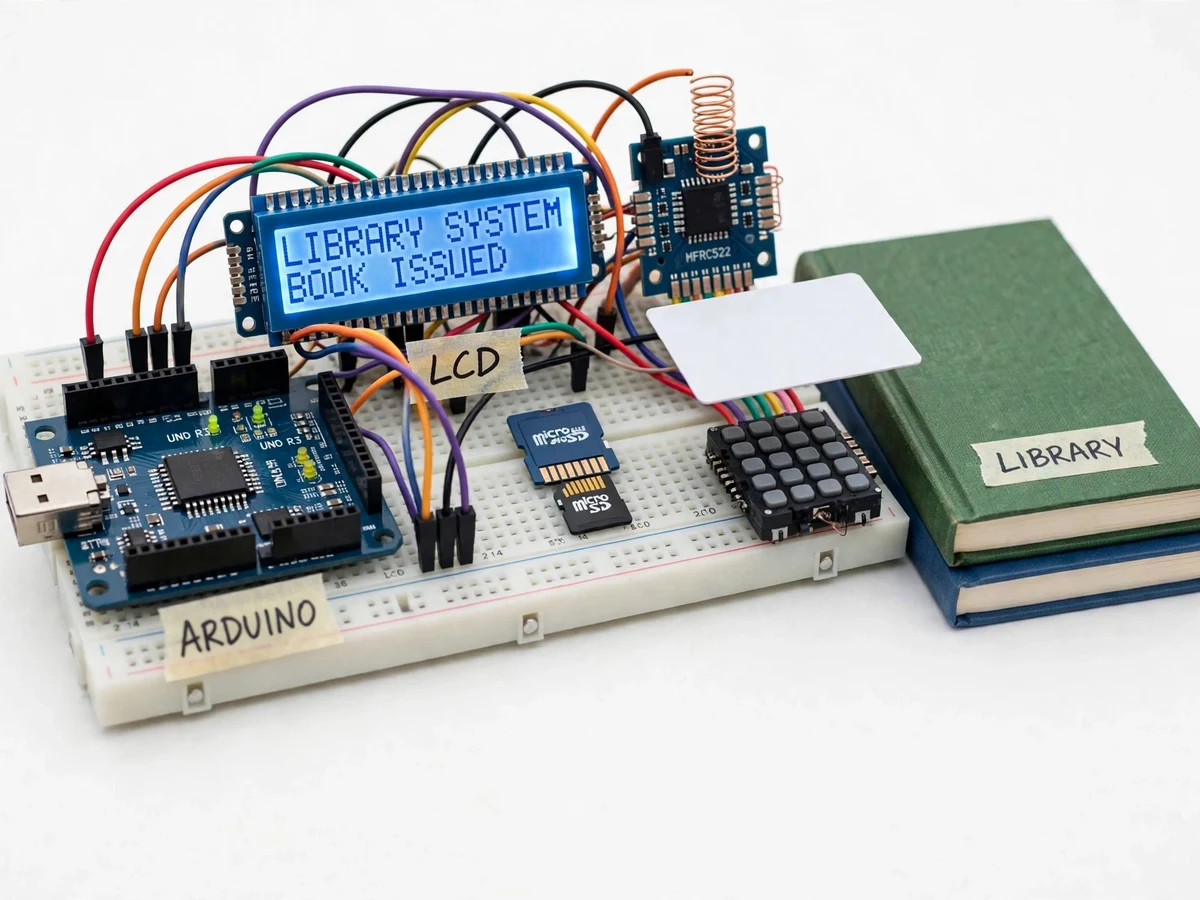
An RFID-based library management system using Arduino replaces the handwritten issue register that small college and school libraries still rely on, where a librarian writes member name, book number and date by hand for every transaction. That manual record is slow at busy hours, easy to misread or lose, and gives no quick way to tell which books are overdue, who holds them, or what fine is due. Books go missing without a traceable record, and a return means searching pages of entries to strike out the right line. It solves this by giving every member a card and every book a tag: one tap identifies the member, a second identifies the book, and the Arduino records the transaction, computes the due date, and flags overdue returns with a fine. The result is a faster counter, a searchable transaction log on a micro SD card, and a working demonstration of embedded identification, record-keeping and display logic.
Member card and book tag carry unique IDs.
Follow the working sequence
How it works
Using the RFID-based library management system is a short counter routine: the librarian taps the member card on the MFRC522 reader, the Arduino reads its UID over SPI, looks up the member record, and the LCD shows the member name and books already issued. The librarian then taps the book tag; the Arduino checks whether that book is on the shelf or already issued. For an issue it writes the member UID, book UID and issue date into the log and shows the due date; for a return it closes the open record, compares the return date with the due date, and computes the overdue fine from the configured per-day rate. The keypad selects issue or return before the book tap, and a buzzer confirms a good scan or warns on an unknown card. Every step is appended to the CSV log on the micro SD card, so the full history survives power-off.
- The librarian selects issue or return on the 4x4 keypad, and the LCD prompts for the member card.
- The member card is tapped on the MFRC522 reader; the reader's 13.56 MHz field energises the passive tag, which returns its UID to the Arduino over the SPI bus.
- The Arduino looks up the UID in its member table and shows the member name and the count of books already issued on the 16x2 LCD.
- The book tag is tapped on the reader; the Arduino reads the book UID and checks the log to see whether that book is currently on the shelf or already issued.
- For an issue, the Arduino records the member UID, book UID and issue date, sets the due date 14 days ahead (design target), and shows "Book issued" with the due date.
- For a return, the Arduino closes the open record, compares the return date with the due date, computes the overdue fine from the configured per-day rate, and shows the fine on the LCD.
- Every transaction is appended as one CSV line to the micro SD card log, and the buzzer sounds once for a successful transaction or twice for an unknown card.
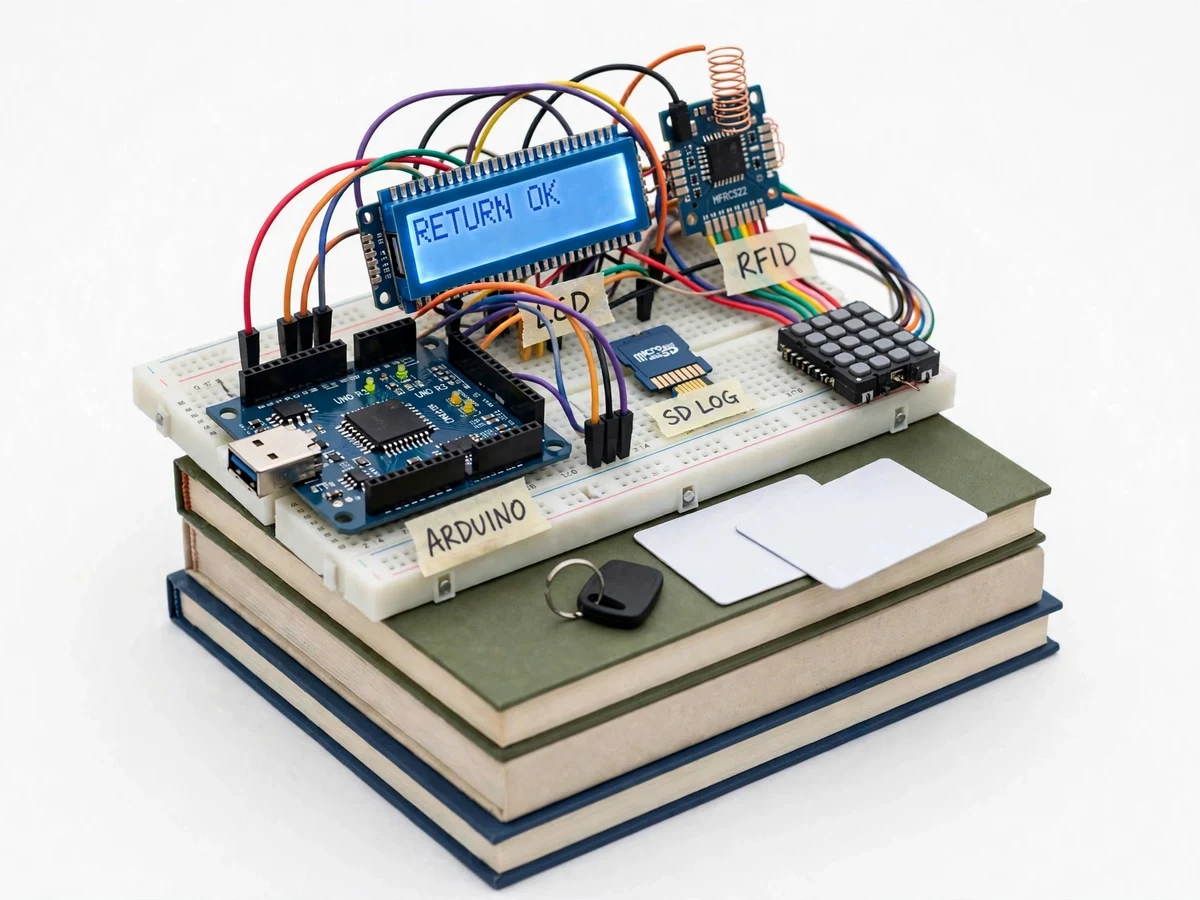
Builder note from the demo build: when two RFID cards are stacked together, the reader usually reads only the top card, so the demo procedure scans one card at a time; the SD log stores one CSV line per transaction in the form date, time, member UID, book UID, action, due date, fine.
Tech stack:
- Arduino Uno (ATmega328P)
- MFRC522 RFID reader · 13.56 MHz
- Arduino IDE · C/C++ firmware
- 16x2 LCD · I2C adapter
- 4x4 membrane keypad
- Micro SD card module · SPI
- MFRC522 library
- CSV transaction log
| Parameter | Value |
|---|---|
| Controller | Arduino Uno · ATmega328P · 16 MHz clock (datasheet value) |
| RFID reader | MFRC522 · 13.56 MHz · SPI interface (datasheet value) |
| Read range | 3–5 cm typical (datasheet value; depends on tag type and placement) |
| Display | 16x2 character LCD with I2C adapter |
| Input | 4x4 membrane keypad · 16 keys |
| Storage | Micro SD card · CSV log · 1 record per line (design) |
| Loan period | 14 days (design target · configurable in firmware) |
| Fine rate | ₹5 per day (design target · configurable in firmware) |
| Demo data set | 10 member cards and 10 book tags (design) |
| Power | 5 V DC via USB or 7–12 V DC barrel jack (datasheet range for Uno) |
| Connectivity | Offline only · no internet connection required |
Project features
The RFID-based library management system using Arduino is built around four capabilities that matter most at a library counter: fast member identification, one-tap book issue and return, automatic due-date and fine computation, and a durable transaction log. A member taps a card and the Arduino looks up the member record; a book-tag tap then completes the issue or return in seconds, with the 16x2 LCD confirming each step so the librarian never guesses the system state. The firmware adds 14 days (design target) to the issue date to set the due date, and on return it compares the dates and computes the overdue fine from a configurable per-day rate. Every transaction is appended to a CSV log on the micro SD card, so the issue history survives power-off and can be read on any computer. The remaining features below cover the keypad workflow, unknown-card handling and the demo data set.
- [Member card identification] Each member carries an RFID card whose UID is stored in the Arduino firmware; tapping the card on the MFRC522 reader identifies the member and shows the name and books already issued on the LCD.
- [One-tap book issue and return] Tapping a book tag completes the issue or the return in a single step, with the LCD confirming the book title code and the new status immediately.
- [Automatic due date and fine computation] The firmware sets the due date 14 days after issue (design target, configurable) and, on return, compares the dates and computes the overdue fine from the configured per-day rate.
- [Micro SD card transaction log] Every issue and return is appended as one CSV line (date, time, member UID, book UID, action, due date, fine) on the micro SD card, so the full history is preserved across power cycles.
- [LCD-guided counter workflow] The 16x2 LCD shows prompts at each step — scan member card, scan book, issue or return confirmed — so the counter needs no computer screen.
- [Keypad mode selection] The 4x4 membrane keypad selects issue mode, return mode and member registration, keeping the two opposite operations clearly separated.
- [Unknown-card and duplicate-scan handling] An unregistered card triggers a buzzer warning and an "Unknown card" LCD message, and scanning the same book twice in one session does not create a duplicate issue record.
What is included
- Working RFID library management prototype (Arduino Uno, MFRC522 reader, LCD, keypad, SD module)
- 10 member RFID cards and 10 book RFID tags for the demo
- Complete Arduino firmware source code with comments
- Circuit and wiring documentation with pin-connection table
- Micro SD card with sample CSV transaction log
- Project report PDF (background, RFID theory, methodology, results)
- PPT presentation for final review
- Viva Q&A preparation document (RFID, SPI, UID handling, due-date and fine logic)
Limitations & prerequisites
- Read range is 3–5 cm typical (datasheet value), so cards must be tapped close to the reader; it cannot read a whole shelf of books at once.
- When two cards are stacked, the reader usually reads only the top card, so cards must be scanned one at a time.
- Member and book records are stored in the Arduino firmware and on the SD log; there is no cloud database or multi-counter sync in the base build.
- The loan period of 14 days and the fine rate of ₹5 per day are design targets set in firmware, not library policy; the buying library sets its own values.
- The prototype handles the demo set of 10 members and 10 books; a full college library would need the record tables expanded.
- The system identifies cards and tags only; it cannot detect a book that leaves the library without being scanned.
- The prototype is an academic build, not a certified library automation product.
Frequently Asked Questions
Is this project suitable for a final-year project?
Yes — for Electronics & Telecommunication, Electronics, Computer Engineering and IT programmes, it demonstrates embedded interfacing, SPI communication, RFID identification, record-keeping logic and display handling in one working prototype. The build gives the student a real counter workflow to demonstrate: member identification, book issue and return, due-date and fine computation, and a readable transaction log, all of which map cleanly onto viva questions about embedded systems and identification technology.
Which controller and RFID reader are used?
The Arduino Uno (ATmega328P, 16 MHz clock, datasheet value) is the controller, and the MFRC522 reader module (13.56 MHz, SPI interface, datasheet values) reads the cards and tags. The reader energises each passive tag with its 13.56 MHz field and returns the tag UID to the Arduino over SPI. A 16x2 LCD, a 4x4 keypad, a buzzer and a micro SD card module complete the counter hardware.
How does the system tell an issue from a return?
The librarian selects issue or return on the keypad before scanning the book, and the Arduino also checks the book's current state in the log. In issue mode a book that is on the shelf is issued and logged with a due date; in return mode the open record for that book is closed and any overdue fine is computed. Scanning a book that is already issued while in issue mode produces a warning instead of a duplicate record.
How are due dates and fines calculated?
The due date is set 14 days after the issue date (design target, configurable in firmware), and on return the firmware compares the return date with the due date. Each overdue day adds the configured per-day fine, ₹5 per day as the design-target default, and the total is shown on the LCD. Both values are single constants in the firmware, so the student can change them to match any library policy.
Does it need internet or a computer?
No — the system works fully offline, with no Wi-Fi, cloud service or computer needed at the counter. The Arduino, reader, LCD, keypad and SD module run on their own, and the transaction log is a plain CSV file on the micro SD card. A computer is only needed afterwards to read the log file or to upload firmware changes in the Arduino IDE.
Can this project be customized?
Yes — realistic extensions include more member cards and book tags, a barcode scanner as a second input, a real-time clock module so dates survive power-off, and an ESP32 variant with Wi-Fi for a web dashboard. The loan period, fine rate and LCD messages are all configurable in firmware. Cloud sync and multi-counter operation are optional extensions, not part of the base build.
Components & software requirements
- Arduino Uno (ATmega328P)
- MFRC522 RFID reader · 13.56 MHz
- Arduino IDE · C/C++ firmware
- 16x2 LCD · I2C adapter
- 4x4 membrane keypad
- Micro SD card module · SPI
- MFRC522 library
- CSV transaction log
Delivery information
Built-to-order project. Delivery timeline is shared after order confirmation based on current queue.
Support terms
Complete documentation, setup guide, and viva preparation included. Support for setup and explanation provided.
Download free synopsis (PDF)
Enter your name and WhatsApp number — the synopsis PDF downloads immediately. We may send occasional project updates on WhatsApp; no spam.