
More project photos (3)
The problem
Factories sort small parts by eye and by hand thousands of times every day, and that work is slow, repetitive and easy to get wrong even when the parts look alike. Modern collaborative robots answer it with a camera above the workcell, a vision system that identifies each part, and an arm that shares the workspace with people instead of hiding behind a cage. Universal Robots' Gen 7 platform, set for its European debut at electronica 2026 in Munich (10 to 13 November 2026) in the Teradyne Robotics booth as reported on 4 November 2026, pushes that idea further with AI-ready arms, a new controller and teach pendant, and a tool flange that delivers data, power and safety at the wrist, demonstrated with AI-based bin picking and AI PCB inspection.
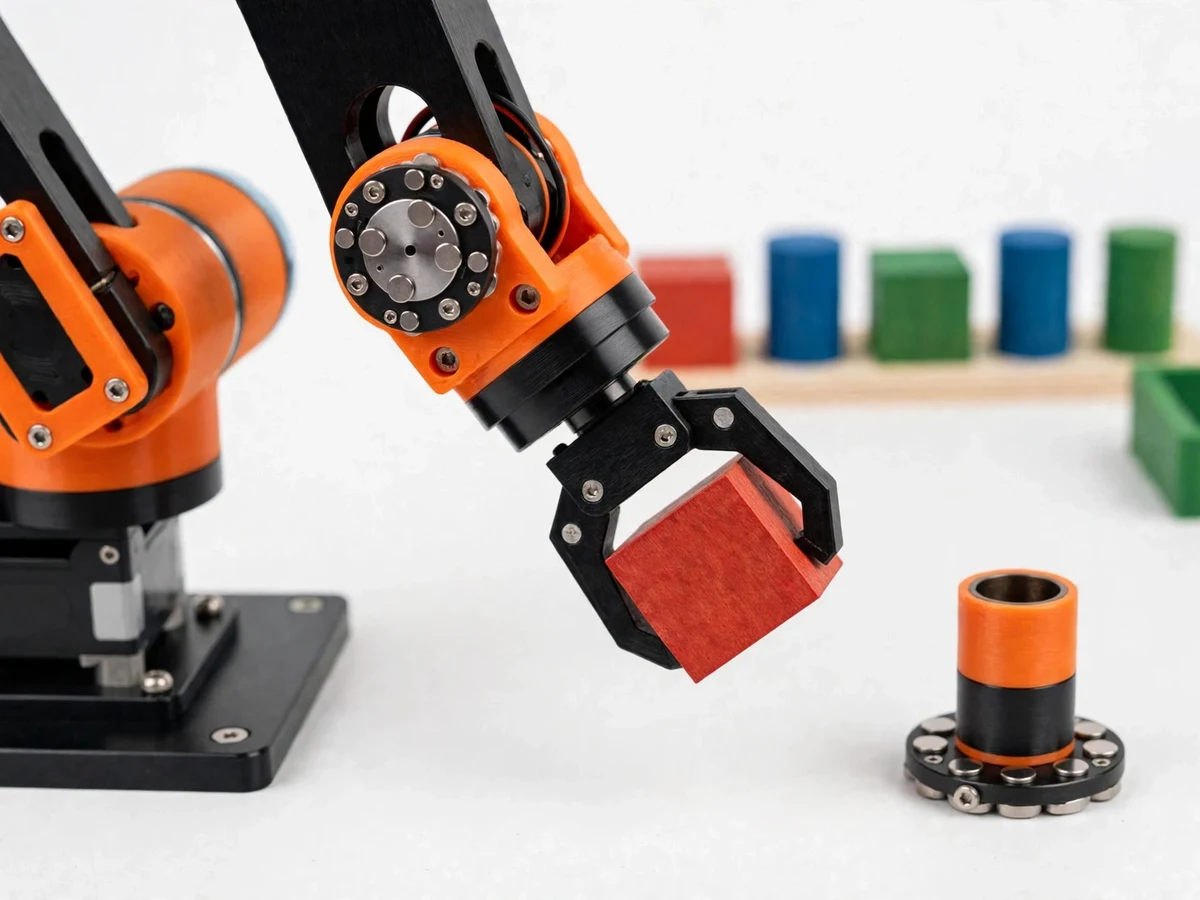
This student project translates that headline honestly to lab scale: a desktop servo arm, an overhead USB camera, an OpenCV colour and shape classifier as the explicit stand-in for neural bin picking, a magnetic tool mount as the stand-in for the Gen 7 tool flange, and a presence-sensor zone that pauses the arm when a hand enters, sorting coloured blocks and cylinders into bins.
How it works
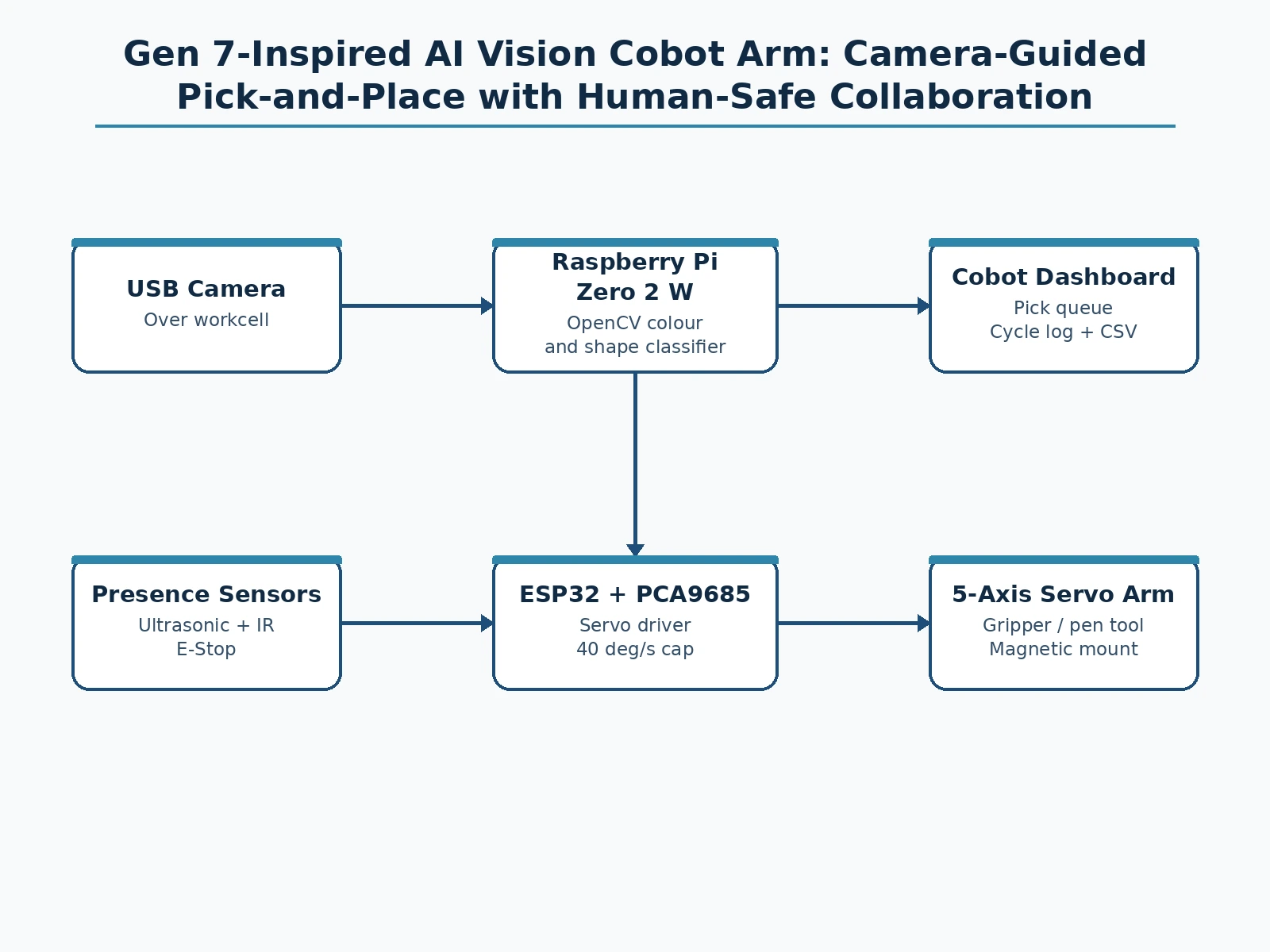
The end-to-end mechanism runs from camera frame to sorted bin in five stages a student can trace and an examiner can test. The USB camera captures the workcell from above, and the Raspberry Pi Zero 2 W runs the OpenCV classifier, which thresholds each frame by colour in HSV space and reads each contour's shape, so every object becomes one row: colour, shape, position and target bin. The Pi sends the pick queue to the ESP32 over serial, and the ESP32 turns each target into joint angles and drives the five servos through the PCA9685 driver at the capped joint speed. A servo holds position because its internal potentiometer feeds the shaft angle back to a comparator that drives the motor until the error reaches zero, which is why a taught pose replays repeatably. While the arm moves, the presence sensor watches the safety zone, pausing motion the moment a hand enters, and the e-stop overrides everything until manually reset.
- The builder assembles the arm: MG996R servos at the base, shoulder and elbow, SG90 servos at the wrist and gripper, all driven by the PCA9685 from the ESP32, with the Pi Zero 2 W, USB camera and presence sensor mounted over a fixed workcell tray.
- The builder calibrates the vision: coloured blocks and cylinders are placed in the tray under normal room light, the HSV thresholds are tuned until each colour separates cleanly, and the shape rule is checked by showing one block and one cylinder and confirming the classifier names both correctly.
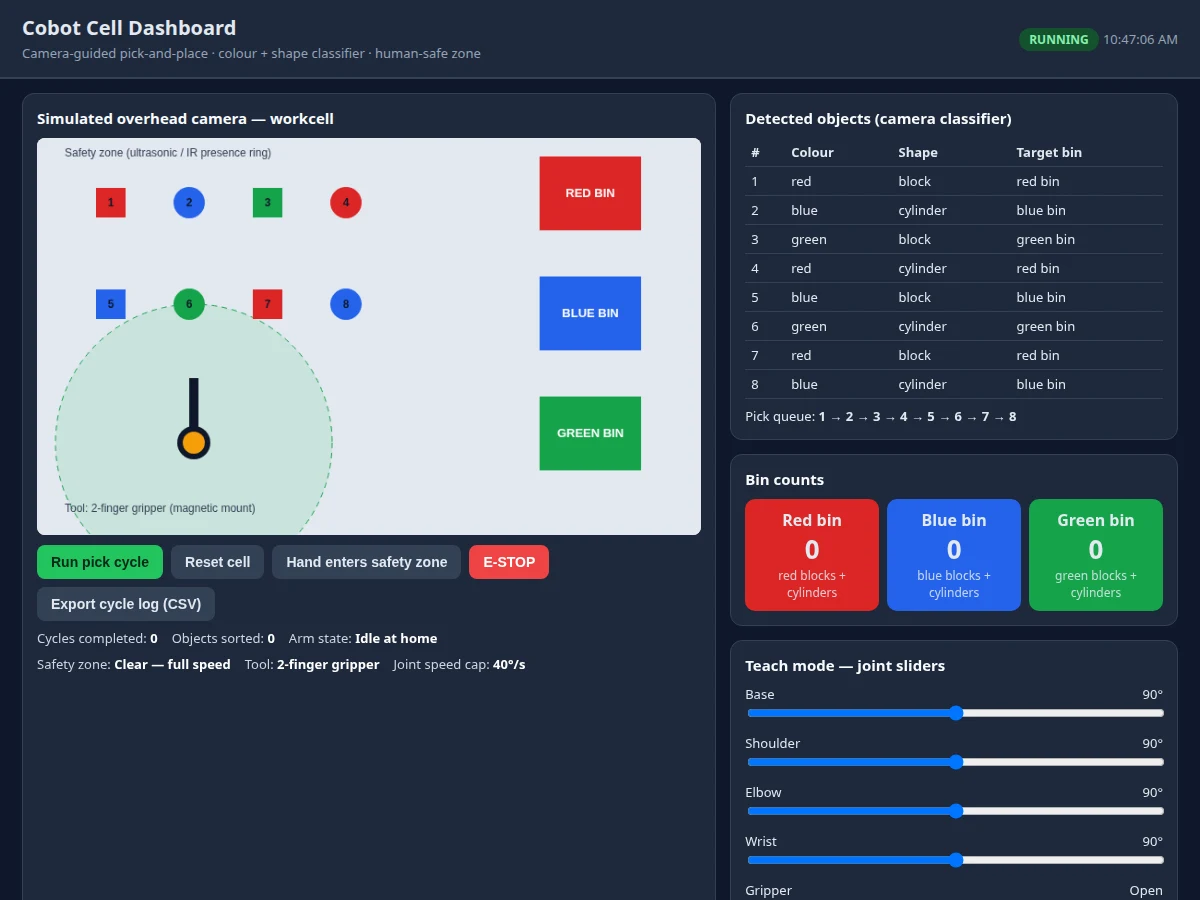
- The builder teaches the arm: using the dashboard joint sliders, the arm is moved to the pick position over the tray and to each bin, the poses are saved, and a replay confirms the gripper returns to the same positions.
- For the sorting demonstration, the builder loads eight mixed blocks and cylinders into the tray, starts the pick cycle, and watches the dashboard queue drain as each object lands in its matching colour bin.
- For the safety demonstration, the builder moves a hand into the marked zone mid-cycle and shows the arm pausing, then withdraws the hand and shows motion resuming, and finally presses the e-stop and shows that motion stays halted until the button is manually reset.
- For the tool-swap demonstration, the builder pulls the gripper off its magnetic mount, fits the pen-holder tool, and runs a taught drawing pose, showing that the wrist accepts more than one tool without rewiring.
- The builder exports the cycle log as CSV, points to the pick order, the bin counts, the pause events and the e-stop event, and reports honestly in the report which sorts succeeded, which objects were misread, and under what lighting the demo ran.
Tech stack:
- ESP32 · motion controller and servo command host
- PCA9685 servo driver · 16-channel 12-bit PWM servo control over I2C
- MG996R servos · metal-gear servos for base shoulder and elbow
- SG90 micro servos · wrist rotation and gripper actuation
- Raspberry Pi Zero 2 W · vision computer running the classifier
- OpenCV colour and shape classifier · HSV thresholds plus contour shape
- USB camera · overhead workcell view for object detection
- Cobot cell dashboard · pick queue and bin counts and safety status
| Parameter | Value |
|---|---|
| Build type | Hybrid desktop arm plus dashboard software · arm plus vision and web dashboard (design target) |
| Arm axes | 5 servo-driven axes · base · shoulder · elbow · wrist rotation · gripper (design target) |
| Base shoulder elbow servos | MG996R · stall torque 9.4 kg·cm at 4.8 V · 11 kg·cm at 6 V · stall current 2.5 A at 6 V (Datasheet value) |
| Wrist gripper servos | SG90 · stall torque 1.8 kg·cm at 4.8 V · 9 g weight · 0.12 s per 60 degrees at 4.8 V (Datasheet value) |
| Servo driver | PCA9685 · 16-channel 12-bit PWM · I2C interface · 50 Hz servo frame rate (Datasheet value) |
| Motion controller | ESP32 · Xtensa dual-core 32-bit LX6 up to 240 MHz · 520 KB SRAM · Wi-Fi 802.11b/g/n (Datasheet value) |
| Vision computer | Raspberry Pi Zero 2 W · quad-core Cortex-A53 at 1 GHz · 512 MB RAM · 65 mm by 30 mm board (Datasheet value) |
| Camera | USB camera · overhead view of the fixed workcell tray (design target) |
| Classifier | OpenCV HSV colour thresholds plus contour shape · block vs cylinder · no neural model (design target) |
| Demo objects | Coloured wooden blocks and cylinders up to ~50 g each (design target) |
| Workcell reach | ~30 cm horizontal reach from base centre (design target) |
| Joint speed cap | 40 degrees per second maximum joint speed (design target) |
| Safety zone | Ultrasonic and IR presence sensing · arm pauses when a hand enters the marked zone (design target) |
| E-stop | Physical latching e-stop button · motion resumes only after manual reset (design target) |
| Gripper timeout | 3 s maximum continuous grip drive before release (design target) |
| Servo power | 6 V 5 A servo supply · separate 5 V logic supply · joint moves staggered so simultaneous stall cannot brown out the logic rail (design target) |
| Dashboard | Web dashboard · detected objects · pick queue · bin counts · safety status · teach sliders · cycle log · CSV export (design target) |
| Trend reference | Universal Robots Gen 7 platform · European debut announced for electronica 2026 Munich 10 to 13 November 2026 · Teradyne Robotics booth · AI-ready g-Series arms · CB7 Core controller · TP7 teach pendant · PolyScope X · tool flange with data power and safety · Inbolt AI bin picking and Cognex AI PCB inspection demos · reported 4 November 2026 · reported figures only · never claimed for this build |
| Builder note | Dashboard simulation measurement: a headless test of the dashboard demo sorted 5 of 8 objects within 9 seconds of simulated cycle time at the capped joint speed, with the safety pause and teach sliders verified working in the same test · hardware cycle time will differ and is not claimed |
Project features
This cobot cell combines vision, motion and human-safety behaviour into one demonstrable loop, so the review story is a complete chain rather than one reading. The camera sees the workcell, the classifier names each object by colour and shape, the arm picks it and places it in the matching bin, and the safety zone watches for a hand and pauses the motion. The dashboard makes the whole loop visible: detected objects, the pick queue, bin counts, safety status, teach-mode joint sliders, a cycle log and a CSV export. The magnetic tool mount lets the same wrist carry a gripper or a pen holder, and the teach mode lets a student record and replay joint poses without writing new motion code. Every behaviour below is demonstrated in the same run, so the examiner never has to take a claim on trust.
- [Camera-guided pick-and-place] A USB camera mounted over the workcell feeds each frame to the classifier, which returns the colour, shape and position of every block and cylinder, and the arm picks objects in queue order and places each one in its matching colour bin — implemented in the base build.
- [OpenCV colour and shape classifier] The classifier uses HSV colour thresholds plus contour shape, counting four-vertex contours as blocks and near-circular contours as cylinders, and it is stated plainly as a colour and shape classifier, never as a neural network or a learned model — implemented in the base build.
- [Magnetic quick-swap tool mount] A magnetic plate at the wrist lets the operator swap the 2-finger gripper for a pen-holder tool by hand in seconds, echoing the Gen 7 idea of data, power and safety at the flange at student scale, with no electrical tool interface claimed — implemented in the base build.
- [Human-safe presence zone] An ultrasonic and IR presence sensor watches a marked zone around the arm, and the arm pauses mid-motion the moment a hand enters the zone and resumes only after the zone clears, so collaboration behaviour is demonstrable rather than asserted — implemented in the base build.
- [Physical e-stop and capped joint speed] A latching e-stop button halts all motion until it is manually reset, and joint speed is capped at 40 degrees per second in firmware, so the arm never moves at full servo speed near a person — implemented in the base build.
- [Teach-mode joint sliders] The dashboard exposes one slider per joint plus gripper open and close, and a taught pose can be saved and replayed, so a student can demonstrate teach-and-replay control without reprogramming the motion sequence — implemented in the base build.
- [Cobot cell dashboard with cycle log] The web dashboard shows the simulated camera view, the detected-object list, the pick queue, live bin counts, safety-zone status, joint sliders, a cycle log and a CSV export of every pick and place for the report — implemented in the base build.
- [Conveyor-fed sorting line] Future scope only, not implemented: feeding objects on a small conveyor instead of a fixed tray, listed as an extension rather than a claimed feature, since the base build sorts from one fixed workcell.
What is included
- Complete fabricated desktop arm (5 servo axes, aluminium brackets, 3D-printed joints, 2-finger gripper, pen-holder tool, magnetic tool mount, workcell tray, colour bins, coloured blocks and cylinders)
- Electronics set (ESP32 board, PCA9685 servo driver, MG996R and SG90 servos, Raspberry Pi Zero 2 W, USB camera, ultrasonic and IR presence sensors, latching e-stop button, 6 V servo supply)
- Vision and dashboard software (OpenCV colour and shape classifier, pick queue, cobot cell dashboard, teach mode, cycle log, CSV export)
- Setup and calibration guide (servo wiring, HSV threshold tuning, teach-pose procedure, safety-zone marking, e-stop test, CSV reading worksheet)
- Project report PDF (collaborative robotics background, Gen 7 comparison limits, vision pipeline design, safety design, demonstration results, honest measurement limits)
- PPT presentation for final review
- Viva Q&A preparation document (servo torque and payload limits, classifier vs neural model, safety-zone design, Gen 7 comparison limits, lighting dependence, single-workcell limits)
Limitations & prerequisites
- Not a Universal Robots product: this is a student-scale servo arm inspired by the Gen 7 announcement, it shares no parts, software or performance with any UR arm, and it must never be presented as industrial equipment.
- Not certified collaborative-safe: the presence pause, speed cap and e-stop are demonstration safety behaviours, not ISO/TS 15066 compliance, there is no force or torque sensing, no safety-rated controller and no risk assessment, so the arm must never work beside a person unsupervised or with anything heavier than the demo objects.
- Classifier is colour and shape only: it is not a neural network, it cannot recognise unseen objects, and it fails on colours outside its tuned thresholds, on touching or stacked objects, and on strong shadows or coloured room light.
- Lighting dependence: the demo needs stable, even room light, and the report must state the lighting the demonstration ran under, because a change of light can change the sort result.
- One fixed workcell only: objects must be placed in the tray inside the camera view, the arm cannot fetch objects from outside the tray, and the pen tool draws only within its taught poses.
- Lightweight objects only: demo objects are capped at about 50 g, servo torque falls with reach, and the wrist SG90 is the weakest link, so heavier or larger objects will stall the gripper or miss the bin.
- Servo limits: hobby servos have backlash and limited repeatability, taught poses drift with load and temperature, and simultaneous stall of all servos can exceed the servo supply, which is why joint moves are staggered and the gripper drive times out after 3 seconds.
- Needs supervision around power: the 6 V servo supply and the logic supply are separate rails, polarity and current ratings must be checked before first power-up, and the arm must be powered down before any tool swap or wiring change.
Frequently Asked Questions
Is this a good choice for a B.E./B.Tech project?
Yes, for Electronics, Electrical and IoT programs, because it combines servo mechanics, embedded control, computer vision and a web dashboard into one testable loop with a clear review thread around vision-guided motion, teach-and-replay control and honest safety design. The review story is: how a camera frame becomes a pick queue, how joint angles become a sorted bin, and where a demonstration safety pause stops and certified collaborative safety would begin.
Is this a real Universal Robots cobot?
No, and the report says so plainly: this is a desktop servo arm built from MG996R and SG90 servos, an ESP32 and a Raspberry Pi, inspired by the Gen 7 platform announced for electronica 2026, and it shares no parts, software or performance figures with any UR arm. Its value is demonstrating the same ideas at student scale: camera-guided picking, a quick-swap tool mount and human-aware pausing.
Does it use real AI or a neural network?
No: the vision is an OpenCV colour and shape classifier using HSV thresholds and contour shape, and the listing never calls it a neural model. That honesty is deliberate, because the Gen 7 demos use neural bin picking and PCB inspection, and a student build that relabelled colour thresholds as AI would mislead an examiner. A neural classifier is a realistic extension, but it is not in the base build.
How does the human-safe pause actually work?
An ultrasonic and IR presence sensor watches a marked zone around the arm, and the ESP32 pauses motion the moment a hand enters the zone, resuming only after the zone clears. A latching e-stop button overrides everything until manually reset, and joint speed is capped at 40 degrees per second in firmware. These are demonstration safety behaviours, not certified collaborative safety: there is no force sensing, no safety-rated controller and no compliance claim.
Can the project be customised?
Yes, within its honest limits: new object colours can be added by tuning HSV thresholds, bin layouts and tray sizes can change, the pen-holder tool can run taught drawing poses, and a conveyor feed or a neural classifier can be added as extensions. What cannot change without a redesign is the core honesty: it stays a colour and shape sorter for light objects in one fixed workcell, not a general-purpose industrial picker.
What will I receive with the project?
The fabricated desktop arm with all five servos, the gripper and pen-holder tools on the magnetic mount, the workcell tray with bins and demo objects, the full electronics set including the ESP32, PCA9685 driver, Pi Zero 2 W, camera, presence sensors and e-stop, the vision and dashboard software with CSV export, the setup and calibration guide, the project report, the presentation and the viva Q&A document. Power needs a 6 V 5 A servo supply plus a separate 5 V logic supply, both covered in the setup guide.
Components & software requirements
- ESP32 · motion controller and servo command host
- PCA9685 servo driver · 16-channel 12-bit PWM servo control over I2C
- MG996R servos · metal-gear servos for base shoulder and elbow
- SG90 micro servos · wrist rotation and gripper actuation
- Raspberry Pi Zero 2 W · vision computer running the classifier
- OpenCV colour and shape classifier · HSV thresholds plus contour shape
- USB camera · overhead workcell view for object detection
- Cobot cell dashboard · pick queue and bin counts and safety status
Delivery information
Built-to-order project. Delivery timeline is shared after order confirmation based on current queue.
Support terms
Complete documentation, setup guide, and viva preparation included. Support for setup and explanation provided.
Download free synopsis (PDF)
Enter your name and WhatsApp number — the synopsis PDF downloads immediately. We may send occasional project updates on WhatsApp; no spam.