
More project photos (2)
The problem
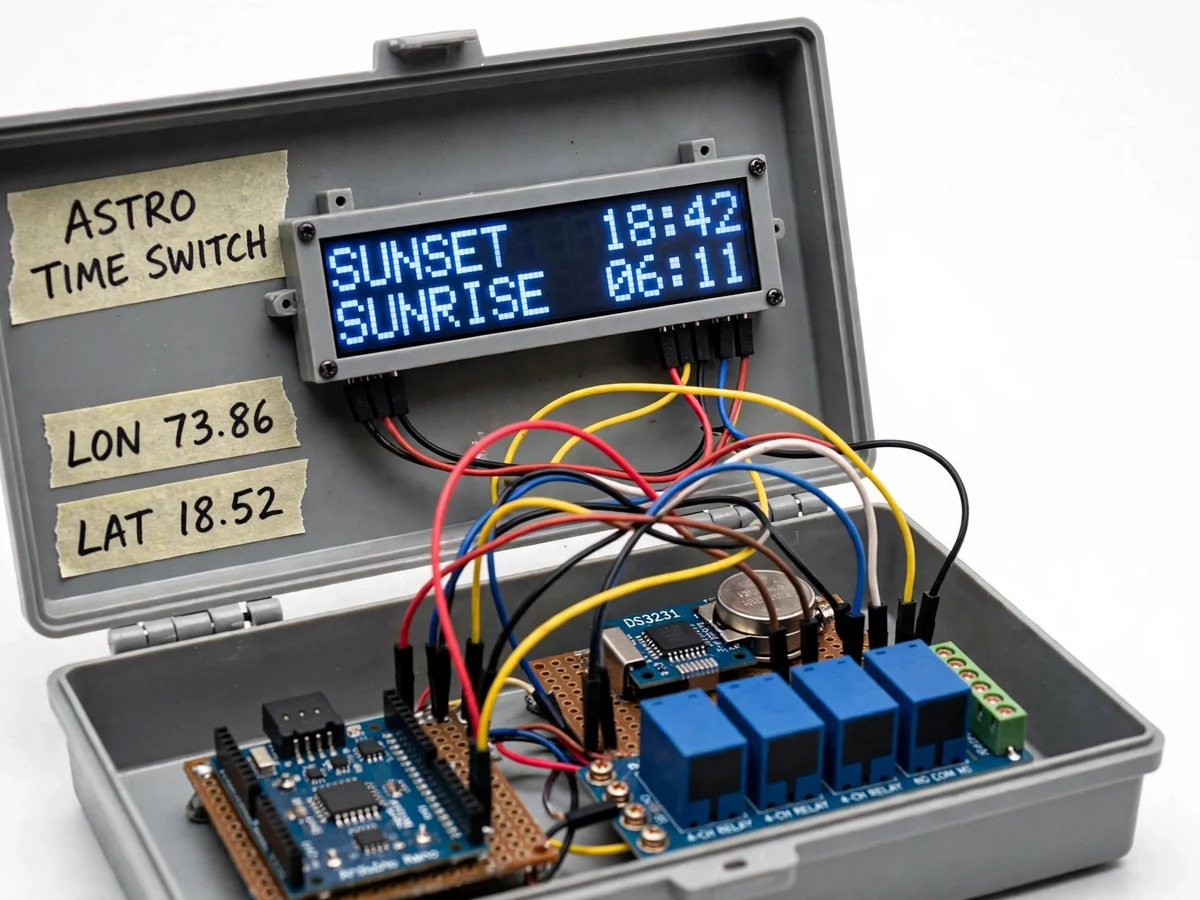
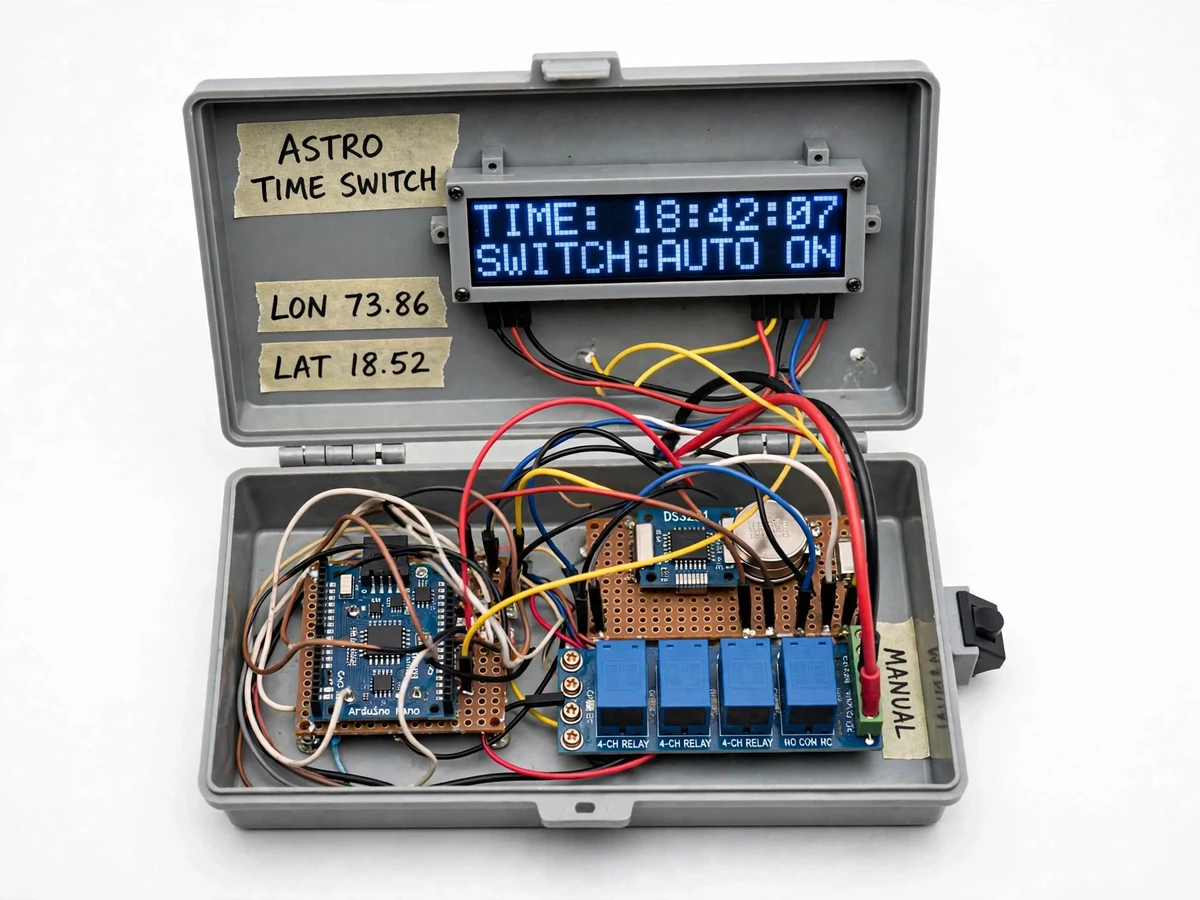
Street lights are commonly switched by fixed timers that someone must re-adjust as sunrise and sunset drift with the seasons, or by photocell sensors (LDRs) that foul with dust, rain residue and bird droppings — a dirty sensor can hold lights ON through the day or flicker them at dusk, wasting energy and maintenance visits. An astronomical time switch removes both failure modes: it computes today's sunrise and sunset from latitude, longitude and date using the standard solar-position algorithm, so the switching schedule follows the sun automatically with no sensor to clean and no seasonal re-timing. This project builds that switch as a working prototype — an Arduino Nano reads date and time from a battery-backed DS3231 RTC, runs the NOAA sunrise/sunset calculation for the configured coordinates, and switches street-light contactors through relay outputs, with configurable ON/OFF offsets and a manual-override button for maintenance. The result demonstrates how computed astronomy replaces sensing in outdoor lighting control.
Real-time clock module giving the Arduino the current date and time over I2C, kept through power cuts.
Follow the working sequence
How it works
- At power-up the Arduino Nano reads the current date and time from the DS3231 RTC over I2C; a one-time setup routine sets the RTC and walks through latitude, longitude and timezone entry on the LCD menu.
- The firmware runs the NOAA sunrise/sunset algorithm with the stored latitude, longitude, timezone offset and date (zenith 90.833°) to compute today's sunset and sunrise, then applies the configured ON/OFF offsets.
- Every second it compares the RTC time against the computed events: at the ON time it energizes the relay outputs (street-light contactor coils pull in), at the OFF time it releases them.
- At local midnight the firmware re-computes the next day's sunrise and sunset, so the schedule tracks the seasons automatically with no manual re-timing.
- The 16×2 LCD cycles through date/time, today's sunset and sunrise times, and the next switching event plus relay state.
- The manual-override button cycles AUTO → forced ON → forced OFF; returning to AUTO resumes the computed schedule without disturbing the stored coordinates or offsets.
Tech stack:
- Arduino Nano (ATmega328P, 16 MHz)
- DS3231 RTC module (I2C, CR2032 backup)
- 4-channel 5 V relay module
- 16×2 character LCD with I2C backpack
- Push buttons + EEPROM for configuration
- NOAA sunrise/sunset solar-position algorithm
- C/C++ firmware (Arduino IDE)
- Single-phase contactor for the demonstration load
| Parameter | Value |
|---|---|
| Controller | Arduino Nano (ATmega328P, 16 MHz) (datasheet) |
| Timekeeping | DS3231 RTC, ±2 ppm (0 °C to +40 °C) per Maxim datasheet; CR2032 backup (Approximately 2–3 years per cell datasheet) |
| Solar-position algorithm | NOAA sunrise/sunset calculation, zenith 90.833° (reference algorithm) |
| Switching accuracy | Approximately ±2 min of true local sunrise/sunset (design target; depends on entered coordinates and timezone) |
| Relay outputs | 4 channels; contacts rated 10 A at 250 V AC per module datasheet |
| Switched load | Single-phase contactor coils, 230 V AC (typical demo arrangement; design target) |
| Display | 16×2 character LCD via I2C backpack |
| Configuration | Latitude, longitude, timezone offset and ON/OFF offsets in minutes; stored in EEPROM |
| Manual override | Push-button cycles AUTO / forced ON / forced OFF |
| Control power | 5 V DC adapter for the control circuit (typical); contactor side per local mains practice |
Project features
- [Computed sunrise/sunset switching] The firmware implements the standard NOAA sunrise/sunset solar-position algorithm on the ATmega328P: from stored latitude, longitude, timezone offset and the RTC date it computes today's sunset and sunrise (zenith 90.833°) at power-up and re-computes at midnight. No LDR or photocell is involved — the schedule tracks the seasons by arithmetic, immune to the dust, bird droppings and stray light that false-trigger sensor-based controllers.
- [Relay outputs for contactor drive] A 4-channel relay module (contacts rated 10 A at 250 V AC per the module datasheet) drives street-light contactor coils, keeping the low-voltage control circuit electrically isolated from the mains switching side.
- [Battery-backed RTC timekeeping] A DS3231 RTC module (accuracy ±2 ppm from 0 °C to +40 °C per the Maxim datasheet) with a CR2032 backup cell keeps date and time through mains outages, so the computed schedule resumes correctly when power returns.
- [Latitude/longitude configuration] Coordinates, timezone offset and ON/OFF offsets are entered once through a push-button menu on the LCD and stored in EEPROM — moving the installation to a new city means changing settings, not reflashing firmware.
- [Configurable ON/OFF offsets] Lights can be switched ON a configurable number of minutes before computed sunset and OFF a configurable number of minutes after computed sunrise, matching common municipal switching practice.
- [Manual override] A front-panel push button cycles the controller through AUTO, forced ON and forced OFF modes for maintenance and testing; returning to AUTO resumes the computed schedule immediately.
- [Live LCD status display] A 16×2 LCD shows the current date and time, today's computed sunset and sunrise, the next switching event and the relay state, so the schedule is always visible and verifiable on the panel.
What is included
- Assembled control-box prototype: Arduino Nano, DS3231 RTC, 4-channel relay module, 16×2 LCD, manual-override push button
- Firmware source code (Arduino C/C++) with the sunrise/sunset calculation and LCD configuration menu
- Wiring diagram and connection guide for the control side, plus mains-safety notes (contactor wiring to be done by a licensed electrician)
- Latitude/longitude and timezone setup procedure
- Project report PDF covering astronomical switching theory, the algorithm and methodology
- PPT presentation for the final review
- Viva Q&A preparation document
Limitations & prerequisites
- Computed times track the sun, not actual darkness — streets that darken early under heavy storm cloud cover will not switch on early; reacting to actual light would need an LDR hybrid, listed as future scope.
- Switching accuracy (design target ≈ ±2 min of true local sunrise/sunset) depends entirely on the buyer entering correct latitude, longitude and timezone — wrong coordinates shift every switching event by the same error.
- The prototype switches relay outputs and a demonstration contactor/indicator load; it is not certified for direct connection to street-light feeders, and all mains wiring must be done by a licensed electrician.
- The enclosure is a prototype-grade plastic box with no IP weatherproof rating — outdoor pole mounting needs a weatherproof housing.
- The DS3231 keeps time to about ±2 ppm (roughly 1 minute of drift per year); the RTC is set once at installation and the base build has no automatic network time sync.
- Regions where the sun does not rise or set daily (polar day/night) are out of scope — the algorithm assumes one sunrise and one sunset per day.
Frequently Asked Questions
How is this different from an LDR-based street light controller?
An LDR controller switches on what it sees — dust, rain residue and bird droppings on the sensor make it hold lights ON in daylight or flicker at dusk, and each pole needs its sensor cleaned. The astronomical switch computes sunrise and sunset from latitude, longitude and date, so there is no sensor to foul: the schedule is arithmetic, season-tracking and identical across every pole in the same city.
Does it need the internet, GPS or any sensor?
No. The site latitude and longitude are entered once through the LCD menu and stored in EEPROM, and date/time come from the battery-backed DS3231 RTC. The algorithm needs nothing else — it runs entirely on the ATmega328P with no connectivity, which is exactly why the unit keeps working through network outages and costs nothing to run.
What happens during a power cut?
The DS3231's CR2032 cell keeps the RTC counting while mains power is gone, and the coordinates, timezone and offsets are held in the Arduino's EEPROM, which does not forget. When power returns, the firmware re-reads the correct date and time, re-computes today's events, and resumes the schedule — no reconfiguration after an outage.
Can the lights come on a few minutes before sunset rather than exactly at sunset?
Yes. ON and OFF offsets in minutes are configurable through the LCD menu — for example, switch ON 15 minutes before computed sunset and OFF 15 minutes after computed sunrise, which matches common municipal practice of lighting streets slightly ahead of full darkness. The offsets are stored in EEPROM and apply to every computed event automatically.
How is the switch configured for a new city?
On first power-up, the LCD walks through a setup menu: enter latitude and longitude (decimal degrees, from any map app), the timezone offset (e.g. +5:30), and the ON/OFF offsets. The DS3231 clock is set at the same time. The whole procedure takes a few minutes with push buttons — relocating the unit to another city only repeats the menu, never a firmware reflash.
Is this project suitable for a final-year project?
Yes — for Electrical, Electronics and Instrumentation programs. It combines embedded C firmware, RTC and I2C interfacing, relay/contactor power switching with electrical isolation, and a real astronomical algorithm, plus a clear energy-saving and maintenance narrative for the viva. The computed-vs-sensed distinction gives strong discussion material.
Components & software requirements
- Arduino Nano (ATmega328P, 16 MHz)
- DS3231 RTC module (I2C, CR2032 backup)
- 4-channel 5 V relay module
- 16×2 character LCD with I2C backpack
- Push buttons + EEPROM for configuration
- NOAA sunrise/sunset solar-position algorithm
- C/C++ firmware (Arduino IDE)
- Single-phase contactor for the demonstration load
Delivery information
Built-to-order project. Delivery timeline is shared after order confirmation based on current queue.
Support terms
Complete documentation, setup guide, and viva preparation included. Support for setup and explanation provided.
Download free synopsis (PDF)
Enter your name and email — the synopsis PDF downloads immediately. We may send occasional project updates; no spam, unsubscribe anytime.