
More project photos (3)


Watch it work
The problem
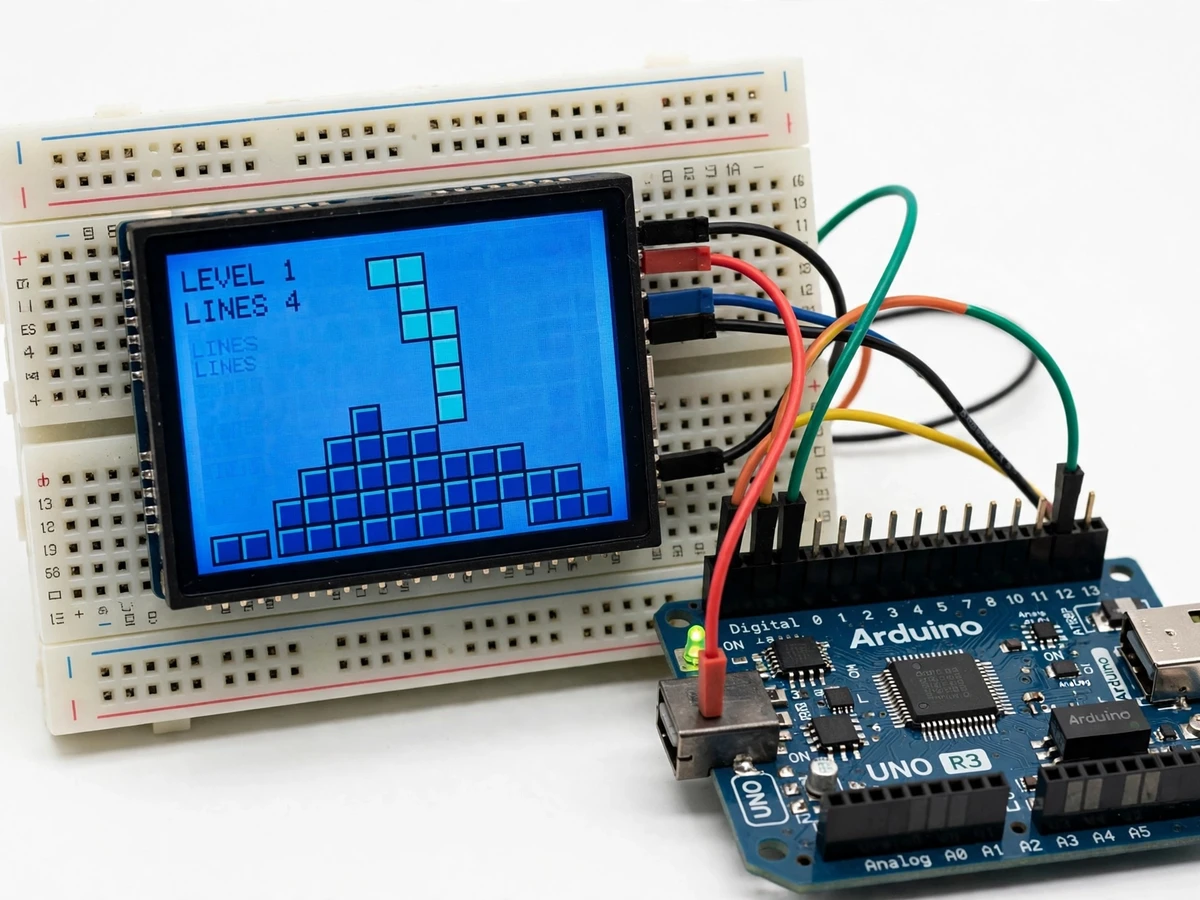
This Arduino Tetris game console is a tabletop student build that turns a classic game into an embedded-systems project: an Arduino Uno runs the whole game, a 128 by 64 monochrome LCD shows the playfield, and a two-axis joystick is the only control. There is no computer attached while it plays — the game logic, the display driving and the input handling all run on the microcontroller. The console starts at a game-select menu listing five games, and the demonstration picks Tetris and plays it from the menu to five cleared lines at level 1, with the level, the lines cleared and the next piece visible beside the playfield throughout.
How it works
From switch-on to five cleared lines takes five stages a student can trace and test. The Arduino starts at the game-select menu and waits for the joystick; pushing the joystick down the list and pressing its button selects Tetris. The game then drops pieces one at a time from the top of the well, and the joystick moves each piece left or right while its button rotates it. When a piece lands it locks into the stack, and the firmware scans the well for any row that is completely filled. A full row clears, the rows above it drop down, and the line counter rises — five times in the demonstration run.
- The builder assembles the console: Arduino Uno, 128 by 64 LCD and two-axis joystick module wired on a breadboard, powered from a 5 V USB supply.
- The builder checks the display alone: the menu, the playfield, the level and lines readouts and the next-piece preview are confirmed on screen before any game is played.
- The builder checks the joystick alone: left, right and push-button actions are verified against the display, so a missed input is caught before the game logic is blamed.
- The builder plays Tetris from the menu: pieces are steered into place, rows are completed and cleared, and the line counter is checked after each clear.
- The builder records the demonstration run: five lines cleared at level 1, with the menu, the falling pieces and the cleared lines all visible on the LCD.
Tech stack:
- Arduino Uno · ATmega328P microcontroller
- 128x64 LCD · monochrome graphics display
- Joystick module · two-axis analog control with push-button
- Breadboard prototype · solderless build
- Embedded C · Arduino IDE firmware
- 5V USB power · bench supply
| Parameter | Value |
|---|---|
| Controller | Arduino Uno · ATmega328P · 16 MHz · 2 KB SRAM (Datasheet value) |
| Display | 128x64 monochrome LCD · serial interface |
| Input | Two-axis analog joystick module with push-button |
| Menu | Five games: Bubble Attack · Snake · 2048 · Tetris · Defense |
| Demonstrated game | Tetris · level 1 · five lines cleared in the demo run |
| Gameplay | Falling pieces · joystick move and rotate · full-row clear · level and lines readouts · next-piece preview |
| Power | 5 V USB · bench supply |
| Build style | Solderless breadboard prototype |
| Sound | None fitted in the demo build · buzzer not connected |
Project features
The console works because every part of the game is visible on one small screen. The Arduino reads the joystick, updates the falling piece, checks for completed rows and redraws the LCD, so a player can watch the whole loop — input, logic and display — happen in real time. The menu, the playfield, the score readouts and the next-piece preview are all drawn by the same firmware, which makes the build easy to explain piece by piece in a review.
- [Five-game menu] The console starts at a menu listing five games — Bubble Attack, Snake, 2048, Tetris and Defense — selected with the joystick, so the build is a multi-game console rather than a single-game demo — implemented in the base build.
- [Tetris gameplay with line clears] Pieces fall one at a time, stack at the bottom of the well, and a row that fills completely clears and raises the line count; the demonstration run clears five lines at level 1 — implemented in the base build.
- [Joystick control] A two-axis analog joystick module moves the falling piece left and right, and its push-button rotates the piece, so the whole game is played with one hand on one control — implemented in the base build.
- [Next-piece preview] The next piece is shown beside the playfield, so the player can plan where the current piece should land before the next one arrives — implemented in the base build.
- [Level and lines readouts] The LCD shows the current level and the lines cleared alongside the playfield, so the state of the game is readable at a glance without a second display — implemented in the base build.
- [Breadboard prototype] The whole console is a solderless breadboard build — Arduino Uno, LCD and joystick module wired with jumper leads — so every connection can be traced and re-wired on the bench — implemented in the base build.
What is included
- Working breadboard console (Arduino Uno, 128x64 LCD, joystick module, jumper wiring)
- Arduino firmware with the five-game menu and the Tetris game (menu navigation, piece movement and rotation, row clearing, level and lines readouts, next-piece preview)
- Wiring diagram and breadboard layout documentation
- Component list with part references
- Test and demonstration procedure (display check, joystick check, full game run to five cleared lines)
- Project report PDF (game logic, display driving, joystick interfacing, demonstration results, honest measurement limits)
- PPT presentation for final review
- Viva Q&A preparation document (how the game loop runs on the microcontroller, why the LCD ghosts on fast graphics, how the joystick is read, what the menu games share)
Limitations & prerequisites
- Monochrome LCD ghosting: the display shows visible smearing on fast-moving graphics, noted by the original demonstrator, so fast falls blur slightly and the console suits turn-based play, not fast action.
- No sound: the demonstration build has no buzzer fitted and plays silently; a buzzer can be added as a customization, not in the base build.
- Breadboard prototype, not a handheld: the console is an open breadboard build for the bench, not an enclosed handheld device, and it must be handled carefully and kept on a table while playing.
- Single player only: there is no two-player mode and no high-score saving demonstrated in the build.
- Only Tetris is demonstrated: the menu lists five games and Tetris is the game shown working in the demo video; the other four menu games are selectable but their gameplay is not shown in the demo.
- Level 1 in the demonstration: the demo run plays at level 1 with five lines cleared; faster levels are not demonstrated.
- Tabletop model, not certified: this is a student prototype for learning and demonstration, not a commercial game device, and it is not tested or certified for sale as a consumer product.
Frequently Asked Questions
Is this project suitable for a final-year project?
Yes, for Computer Science, Electronics and IoT programmes, because it combines game logic, display driving and joystick input on a single microcontroller into one testable loop, with a clear review thread around fitting a game into 2 KB of SRAM and driving a slow LCD.
Which games are included?
The menu lists five games — Bubble Attack, Snake, 2048, Tetris and Defense — selected with the joystick. Tetris is the game demonstrated working in the video.
Can I play the other four games?
They are selectable from the menu, but their gameplay is not shown in the demo video; the demonstration plays Tetris only, from the menu to five cleared lines.
Does the console have sound?
No — the demonstration build has no buzzer fitted and plays silently. A buzzer for move, clear and game-over sounds can be added as a customization.
What will I receive with the project?
The working breadboard console with Arduino Uno, LCD and joystick module, the firmware with the five-game menu and the Tetris game, the wiring diagram and component list, the test and demonstration procedure, the project report, the presentation and the viva Q&A document. A 5 V USB supply and a laptop for uploading the firmware are needed, both covered in the setup guide.
Components & software requirements
- Arduino Uno · ATmega328P microcontroller
- 128x64 LCD · monochrome graphics display
- Joystick module · two-axis analog control with push-button
- Breadboard prototype · solderless build
- Embedded C · Arduino IDE firmware
- 5V USB power · bench supply
Delivery information
Built-to-order project. Delivery timeline is shared after order confirmation based on current queue.
Support terms
Complete documentation, setup guide, and viva preparation included. Support for setup and explanation provided.
Download free synopsis (PDF)
Enter your name and WhatsApp number — the synopsis PDF downloads immediately. We may send occasional project updates on WhatsApp; no spam.