
More project photos (2)
The problem
In an emergency, a person in distress often cannot unlock the phone, find an app and type a message. Most safety apps still demand exactly that: open the app, tap through screens, confirm dialogs. This project starts from the opposite assumption — the alert must fire with the smallest possible interaction. A 1.5-second press-and-hold on a large SOS button, or a hard shake of the phone detected by the accelerometer, is enough. The app then sends an SMS carrying a help message and a live-location link to emergency contacts in priority order, with a 5-second cancel window to absorb accidental triggers.
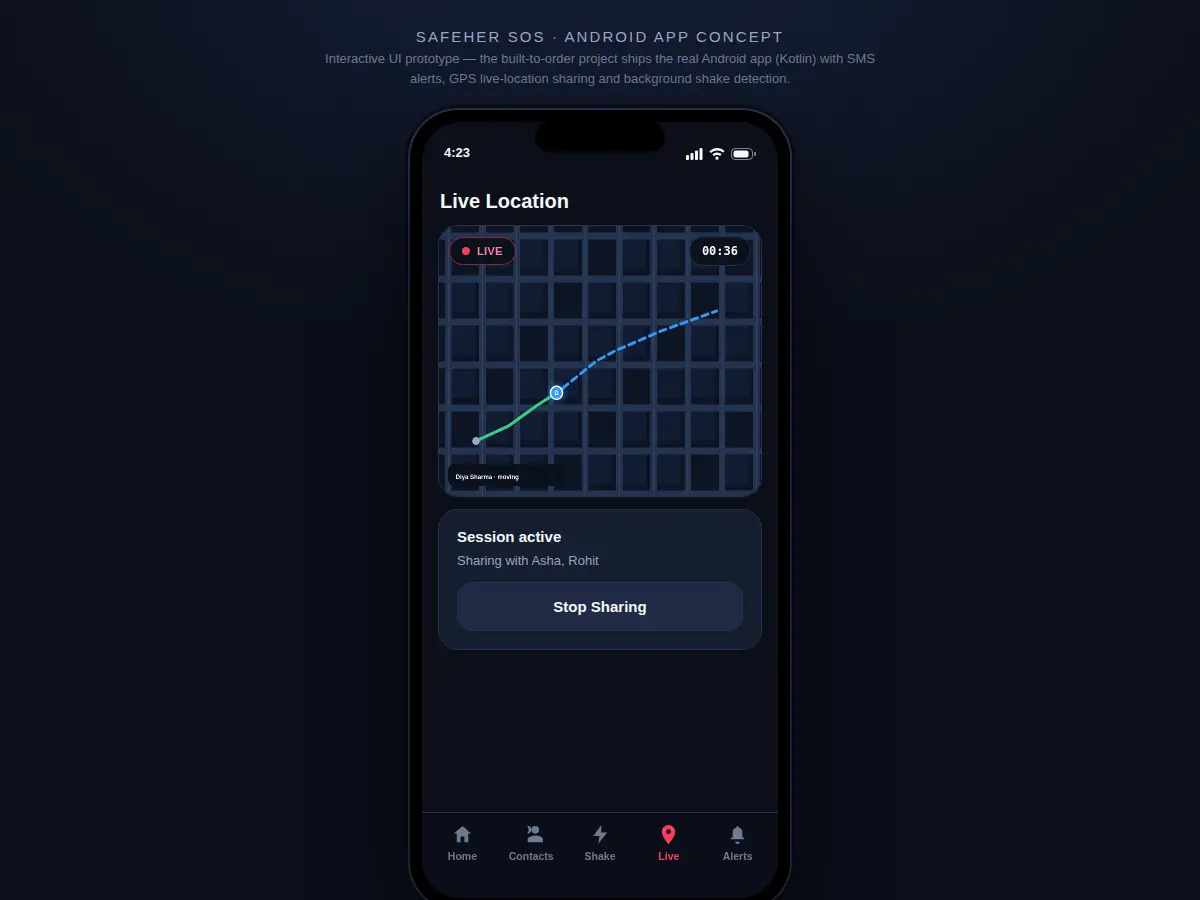
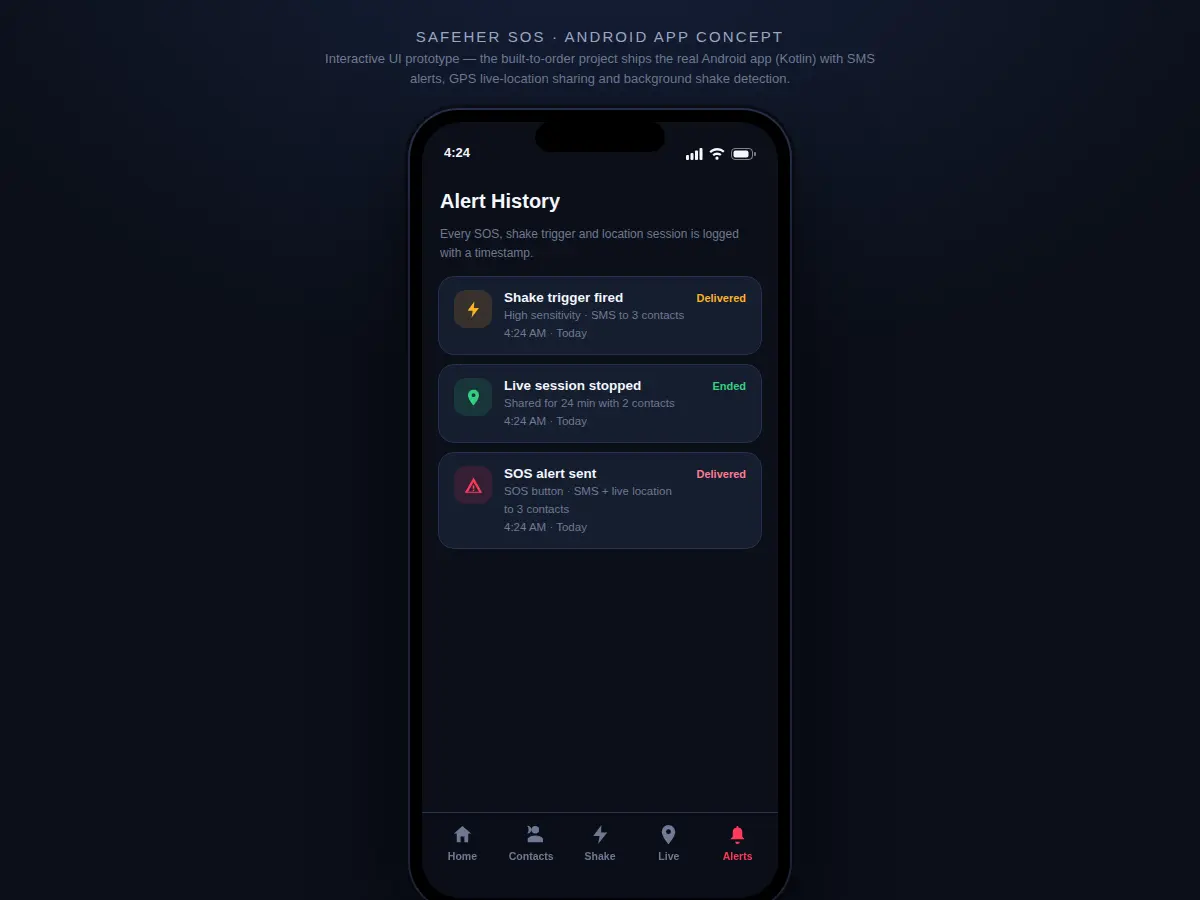
Beyond the alert itself, the app keeps trusted contacts informed for the whole incident through live location-sharing sessions: the user's GPS position streams to a map view until sharing is stopped. Around this core sit quieter tools for situations where drawing attention is unsafe — a loud siren, a fake incoming-call screen that provides an excuse to leave, and a discreet mode that hides the app behind a working calculator. An alert history log records every SOS, shake event, siren use and sharing session with timestamps.
Configures emergency contacts and triggers SOS by shake or button press.
Follow the working sequence
How it works
- The user configures emergency contacts once, ordering them by priority; contacts and the alert log are stored in a local on-device database.
- Pressing and holding the SOS button for 1.5 seconds — or a hard shake crossing the chosen sensitivity threshold — triggers the alert pipeline and opens a 5-second cancel window.
- If not cancelled, the app grabs the latest GPS fix and composes an SMS with a help message and a live-location link, sending it through the device's SMS manager to contacts in priority order.
- Optionally, the user starts a live location-sharing session; GPS positions stream through Firebase so trusted contacts watch a moving marker on a map until sharing stops.
- The siren, fake-call screen and discreet calculator mode operate independently of the alert pipeline for situations where a loud alarm is unsafe.
- Every event — SOS sent, SOS cancelled, shake fired, siren played, session started and stopped — is written to the alert history with a timestamp for later review.
Tech stack:
- Kotlin, Android SDK (minimum API 26)
- Android foreground service (shake detection) · Fused Location Provider (GPS)
- SMS manager APIs · runtime permission model
- Firebase Realtime Database (live-location streaming)
- Room database (contacts and alert log)
- Material Design 3 components
- HTML5 · CSS · JavaScript (interactive UI prototype)
| Parameter | Value |
|---|---|
| SOS activation | 1.5-second press-and-hold (design target) |
| Cancel window | 5 seconds after trigger (design target) |
| Shake sensitivity | 3 levels: Low, Medium, High |
| Alert channel | SMS via the device SMS manager |
| Location source | GPS via Fused Location Provider |
| Live update interval | Approximately 10 seconds during sharing sessions (design target) |
| Minimum Android version | API 26 (Android 8.0) |
| Contacts supported | Up to 10 emergency contacts (design target) |
| Siren | Alarm tone through media volume; loudness varies by device speaker (expected) |
| Installed app size | Approximately 25 MB (expected) |
Project features
Implemented features (shipped in the built-to-order app):
- [Hold-to-activate SOS button] A large on-screen SOS button that fires only after a sustained 1.5-second press, preventing pocket-dial false alarms; a progress ring shows the hold filling in real time.
- [Emergency contacts with priority order] Add, edit and reorder trusted contacts; SOS messages go out in priority sequence, and the prototype ships with clearly-marked fictional sample entries.
- [Shake-triggered SOS] A background accelerometer service detects a hard shake pattern and fires the same SOS flow, with sensitivity adjustable across Low, Medium and High to suit different users and phones.
- [Live location-sharing sessions] Start a session and selected contacts see the user's moving position on a map, streamed over GPS and the internet until the user stops sharing.
- [5-second cancel window] Every SOS — button or shake — opens a short countdown with a cancel option, so accidental triggers never send alerts silently.
- [Loud siren deterrent] A media-volume alarm tone with a strobe visual that keeps ringing to draw attention in public situations.
- [Fake incoming-call screen] A realistic incoming-call display from a saved contact that gives the user a believable excuse to step away.
- [Discreet calculator mode] One tap hides the app behind a working calculator interface, so a casual glance at the screen reveals nothing.
Optional and future-scope features (quoted separately, not in the base build):
- [Automatic escalation] Forwarding unanswered SOS alerts to campus security desks or nearby volunteers (future scope).
- [Fall detection] Accelerometer-plus-gyroscope fusion to detect falls and accidents automatically (future scope).
What is included
- Complete Android app source code in Kotlin with the SOS, shake-service, location-sharing, siren, fake-call and discreet-mode modules
- Interactive HTML UI prototype demonstrating every screen and flow in a browser
- Test documentation covering background-service survival, SMS delivery and GPS behaviour on physical devices
- Project report PDF (background, requirement analysis, architecture, methodology, platform constraints, results)
- PPT presentation for final review
- Viva Q&A preparation document (permissions, services, sensors, location APIs, SMS, Firebase)
- User manual including the battery-optimisation whitelist steps for major phone makers
Limitations & prerequisites
- SMS alerts use the user's own mobile plan — standard carrier SMS charges apply per message, and delivery speed depends on the carrier network.
- SOS over SMS needs cellular signal; live map streaming additionally needs GPS signal and an internet connection.
- Background shake detection is subject to Android battery optimisation — aggressive OEM task killers can pause or stop the service, and the manual documents the whitelist steps.
- The siren's loudness depends entirely on the device speaker; no decibel figure is claimed.
- Discreet mode hides the app from casual observation only — it is a disguise, not a security guarantee.
- The app assists response; it never claims guaranteed rescue or guaranteed response times from contacts or authorities.
Frequently Asked Questions
How do SOS alerts actually reach people — SMS or internet?
The primary channel is SMS, sent from the user's own phone through Android's SMS manager, so alerts work even where mobile data is unavailable. Each message carries a help text plus a live-location link. Live location streaming between phones additionally needs internet, since position updates travel through Firebase. SMS delivery speed depends on the carrier network, typically seconds on a healthy signal.
Does the shake trigger work when the phone is locked or the app is in the background?
Yes, that is the point of the design. Shake detection runs in an Android foreground service, so it keeps sampling the accelerometer while the screen is off or the app is in the background. However, some phone makers apply aggressive battery optimisation that can pause or kill background services; the user manual documents the exact battery settings to whitelist the app, and the viva discussion covers this platform reality.
What does the app cost to run — are there carrier charges?
Sending SMS alerts uses the user's own mobile plan, so standard carrier SMS charges apply per message — there is no subscription fee inside the app. Live location streaming uses a small amount of mobile data through Firebase. The prototype and documentation carry no recurring cost; the only real-world running cost is whatever the user's carrier charges for SMS, which the report states explicitly.
Does SOS still work with no internet connection?
Yes. The SOS SMS path needs only cellular signal, not mobile data or Wi-Fi — the message goes out through the carrier like any text message, carrying the last known GPS coordinates. Live map streaming pauses without internet and resumes when the connection returns, and the app tells the user which mode each alert used. The limitations section documents this split behaviour so expectations stay realistic.
Is the discreet mode really hidden?
It is a practical disguise, not a security guarantee. Discreet mode replaces the app screen with a working calculator, so a casual glance reveals nothing, and the app icon and name can be customised to look unremarkable. A determined person inspecting the phone could still find it. The report frames this honestly: discreet mode buys time and privacy from casual observation, nothing more.
Is this project suitable for a final-year project?
Yes, for Computer Science, IT and mobile-application programmes. It covers the full Android stack students are examined on: runtime permissions, background and foreground services, sensor APIs, location services, SMS management, local databases and Firebase integration. The honest treatment of platform limits — battery optimisation, SMS costs, GPS dependence — gives the viva discussion real substance beyond the feature list. Suitable for B.E./B.Tech final-year projects in Computer Science, IT and Mobile Application Development. problem: In an emergency, a person in distress is often unable to unlock the phone, find an app and type a message — yet most safety apps demand exactly that sequence. Manual SOS flows take too long and draw attention, shared locations arrive as one-time static pins that go stale within minutes, and emergency contact lists are frequently outdated or contacted in no useful order. A safety app must minimise the interaction needed to raise an alert, keep location live for the whole incident, reach contacts in a defined priority order, and offer quiet deterrents for situations where a loud alarm is unsafe. concept: A native Android app (Kotlin) built around two minimal-interaction triggers: a 1.5-second press-and-hold SOS button and a background accelerometer service that fires on a hard shake. Both open a 5-second cancel window, then send an SMS with a help message and live-location link to emergency contacts in priority order. Live location-sharing sessions stream GPS positions through Firebase to trusted contacts until stopped. A siren, fake incoming-call screen and discreet calculator mode cover unsafe situations quietly; an alert log timestamps everything. Platform limits (SMS cost, GPS/internet dependence, battery optimisation) are documented as they behave on real devices. features:
- [Hold-to-activate SOS button] Large on-screen SOS button firing only after a sustained 1.5-second press, with a live progress ring — implemented.
- [Emergency contacts with priority order] Add, edit and reorder trusted contacts; SOS messages go out in priority sequence — implemented.
- [Shake-triggered SOS] Background accelerometer service with Low/Medium/High sensitivity — implemented.
- [Live location-sharing sessions] GPS position streamed to selected contacts' map view until stopped — implemented.
- [5-second cancel window] Countdown with cancel option on every trigger — implemented.
- [Loud siren deterrent] Media-volume alarm tone with strobe visual — implemented.
- [Fake incoming-call screen] Believable excuse-to-leave call display — implemented.
- [Discreet calculator mode] App hides behind a working calculator — implemented.
- [Automatic escalation to security desks] Forwarding unanswered SOS to campus security or volunteers — future scope.
- [Fall detection] Accelerometer-plus-gyroscope fusion for automatic accident detection — future scope. requirements: Development machine with 8 GB RAM (minimum) and Android Studio; Kotlin with Android SDK, minimum API 26 (Android 8.0); a physical Android test device with accelerometer, GPS and SMS capability; Fused Location Provider and Firebase Realtime Database for live-location streaming with an internet connection; runtime permissions for SMS, fine location, foreground service and notifications; any modern browser for viewing the interactive UI prototype. deliverables: Complete Android app source code in Kotlin (SOS, shake service, location sharing, siren, fake call, discreet mode); interactive HTML UI prototype of every screen and flow; test documentation for background-service survival, SMS delivery and GPS behaviour; project report PDF; PPT presentation; viva Q&A preparation document; user manual with battery-optimisation whitelist steps. limitations: SMS alerts use the user's own mobile plan and standard carrier charges apply; SOS over SMS needs cellular signal while live map streaming additionally needs GPS and internet; background shake detection is subject to Android battery optimisation and aggressive OEM task killers can stop the service; siren loudness varies by device speaker with no decibel claim; discreet mode hides the app from casual observation only; the app assists response and never guarantees rescue or response times. timeline: Built-to-order project with a typical delivery of 3–4 weeks from order confirmation: week 1 covers UI prototype sign-off and trigger/sensor design; weeks 2–3 cover the native Android build including SMS, location streaming and the shake service; week 4 covers device testing, the report, PPT and viva Q&A. Timelines shift with customisation requests; the confirmed delivery date is fixed on the quotation. support: Every order includes a code and architecture walkthrough, help installing and running the app on the student's own Android device, the complete viva Q&A set, and post-delivery support for build or run issues during the review period. Customisation requests raised after delivery are quoted separately.
Components & software requirements
- Kotlin, Android SDK (minimum API 26)
- Android foreground service (shake detection) · Fused Location Provider (GPS)
- SMS manager APIs · runtime permission model
- Firebase Realtime Database (live-location streaming)
- Room database (contacts and alert log)
- Material Design 3 components
- HTML5 · CSS · JavaScript (interactive UI prototype)
Delivery information
Built-to-order project. Delivery timeline is shared after order confirmation based on current queue.
Support terms
Complete documentation, setup guide, and viva preparation included. Support for setup and explanation provided.
Download free synopsis (PDF)
Enter your name and email — the synopsis PDF downloads immediately. We may send occasional project updates; no spam, unsubscribe anytime.