
More project photos (2)
The problem
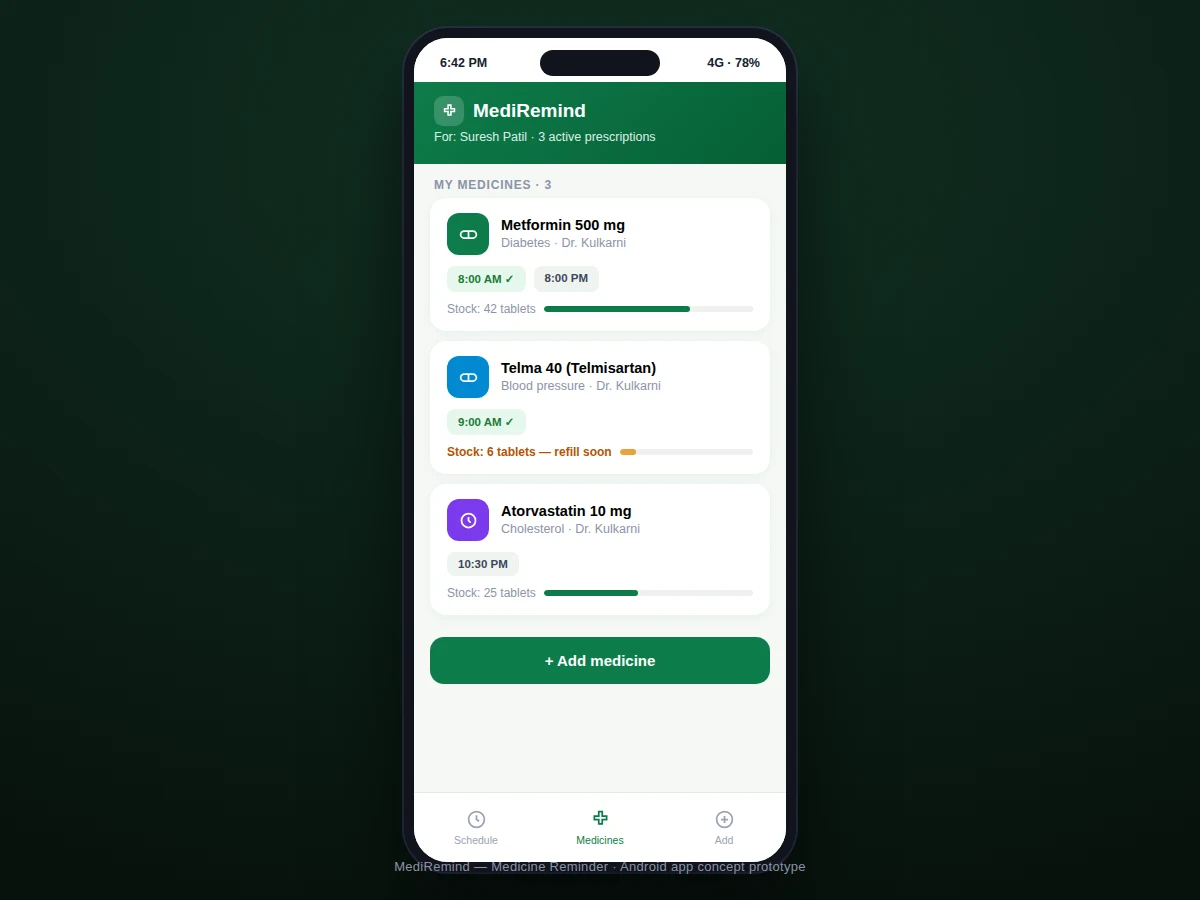
Missing doses is the most common reason prescriptions fail — especially for elderly patients managing three or four medicines with different schedules. Phone alarms help, but a generic alarm cannot say "Metformin 500 mg, 1 tablet, after dinner," cannot tell whether the dose was actually taken, and cannot warn that only six tablets remain. A dedicated medicine reminder closes all three gaps: it models each medicine with its schedule, fires precise dose alarms, records confirmations into an adherence score, and tracks stock against the dosing rate to predict refill dates. This project implements that as a native Android app with exact-alarm scheduling, a daily dose timeline, adherence analytics, refill predictions and a caregiver-friendly design.
How it works
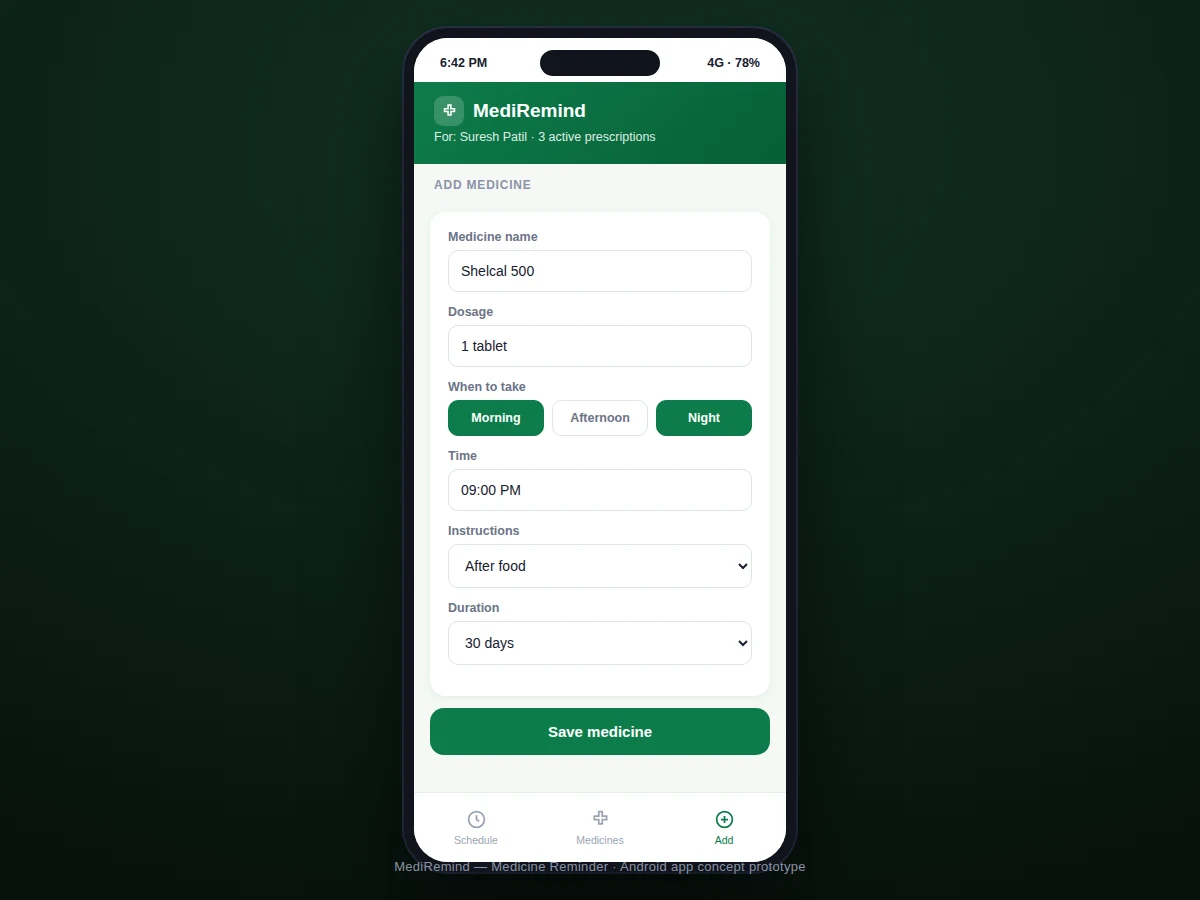
- Adding a medicine captures name, dosage, times, instructions and duration; the schedule engine expands this into concrete dose events.
- Each dose event is registered as an exact alarm with AlarmManager, with a boot receiver re-registering alarms after restarts.
- When an alarm fires, a high-priority notification shows the medicine, dose and instructions with "taken" and "snooze 10 min" actions.
- Confirmations write taken-timestamps to Room; the adherence engine compares scheduled vs taken-on-time doses for the weekly score.
- Stock decrements on each confirmation; when remaining doses fall below the warning threshold, a refill reminder is scheduled.
- A setup flow guides the user through exact-alarm permission and battery-optimization exemption so alarms survive Doze mode.
Tech stack:
- Kotlin
- Android Jetpack (MVVM)
- Room (medicines + dose events)
- AlarmManager · exact alarms
- Notifications API (actions)
- Boot receiver (alarm restore)
- Material Design 3
| Parameter | Value |
|---|---|
| Platform | Android 8.0 (API 26)+ (expected) |
| Scheduling | Exact alarms, Doze-aware |
| Dose model | Multi-dose/day + weekly supported |
| Adherence | Scheduled vs taken-on-time % |
| Refill | Stock-based prediction + warning |
| Data | Local Room DB, no account |
| Alarm restore | Boot receiver re-registers |
| Size | Approximately 10–14 MB APK (expected) |
Project features
- [Per-medicine dose schedules] Each medicine carries its own times, dosage, and instructions (before/after food); supports multiple daily doses and weekly medicines.
- [Exact dose alarms] Alarms fire at the scheduled minute via AlarmManager with Doze-mode handling, labeled with the medicine name and dose.
- [Mark-taken flow] One tap confirms a dose; late confirmations are recorded with their actual time for honest adherence math.
- [Weekly adherence score] Taken-on-time vs scheduled doses aggregate into a weekly percentage ring with the personal-best streak.
- [Refill prediction] Stock counts decrement per confirmed dose; the app warns days before the predicted run-out date.
- [Daily dose timeline] Today's schedule as a chronological list — due now, taken, upcoming — so the whole day is visible at a glance.
- [Local-first privacy] All prescription data stays in an on-device Room database; nothing is uploaded anywhere.
What is included
- Complete Android app source code (Kotlin)
- Dose-scheduling engine documentation
- Build and install instructions (APK generation)
- Project report PDF (scheduling model, Android alarm behavior, adherence math, privacy design)
- PPT presentation for final review
- Viva Q&A preparation document (AlarmManager, Doze, Room, MVVM, boot receivers)
Limitations & prerequisites
- The app is a reminder aid, not a medical device — it does not verify ingestion, and the report states this boundary explicitly.
- "Taken" confirmations are self-reported; adherence scores reflect confirmations, not observed behavior.
- Exact alarms require the SCHEDULE_EXACT_ALARM permission and battery-exemption; without them, Android may delay alarms.
- Drug-interaction checking is out of scope — the app never advises on combinations or dosages, only on timing.
- Refill predictions assume the logged stock count is accurate; unlogged extra tablets skew the prediction.
- One patient profile per install in this build; multi-profile support is designed as future scope.
Frequently Asked Questions
How is this better than a phone alarm?
Each alarm names the exact medicine, dose and instruction; confirmations feed an adherence score; and stock tracking predicts refills — a plain alarm does none of this.
Will alarms fire if the phone restarts?
Yes — a boot receiver re-registers all future dose alarms on every restart, so schedules survive reboots.
What about Doze mode delaying alarms?
The app uses exact alarms (setExactAndAllowWhileIdle) and guides the user to exempt it from battery optimization during setup.
Is prescription data private?
Completely — everything is stored in a local Room database; the app has no account system and transmits nothing.
Can it handle "take on Tuesdays only" medicines?
Yes — the schedule engine supports weekly patterns (e.g. Vitamin D3 every Tuesday) alongside multiple daily doses.
Is this project suitable for a final-year project?
Yes — for Computer Science, IT and mobile computing programs. It combines scheduling-engine design, Android background-execution depth, and a genuinely useful health aid. Suitable for B.E./B.Tech final-year projects in Computer Science, IT and mobile computing.
Components & software requirements
- Kotlin
- Android Jetpack (MVVM)
- Room (medicines + dose events)
- AlarmManager · exact alarms
- Notifications API (actions)
- Boot receiver (alarm restore)
- Material Design 3
Delivery information
Built-to-order project. Delivery timeline is shared after order confirmation based on current queue.
Support terms
Complete documentation, setup guide, and viva preparation included. Support for setup and explanation provided.