
More project photos (3)
The problem
In most colleges, attendance still runs on paper registers: faculty call out roll numbers, mark a register, and later transcribe the data to compute percentages and defaulter lists. The process eats five to ten minutes of every lecture, registers get lost, and defaulter lists arrive so late in the semester that students cannot course-correct. Biometric and RFID systems solve this with hardware that most departments cannot afford to install and maintain. This project takes the zero-hardware route instead: the faculty member's phone becomes the register. Classes, subjects, timetables and student rosters are managed in the app; the marking screen loads the roster with one-tap present/absent toggles and bulk actions; percentages recompute on every submit; and the reports module produces monthly summaries, defaulter lists and CSV exports. The design is offline-first because classrooms frequently have poor connectivity.
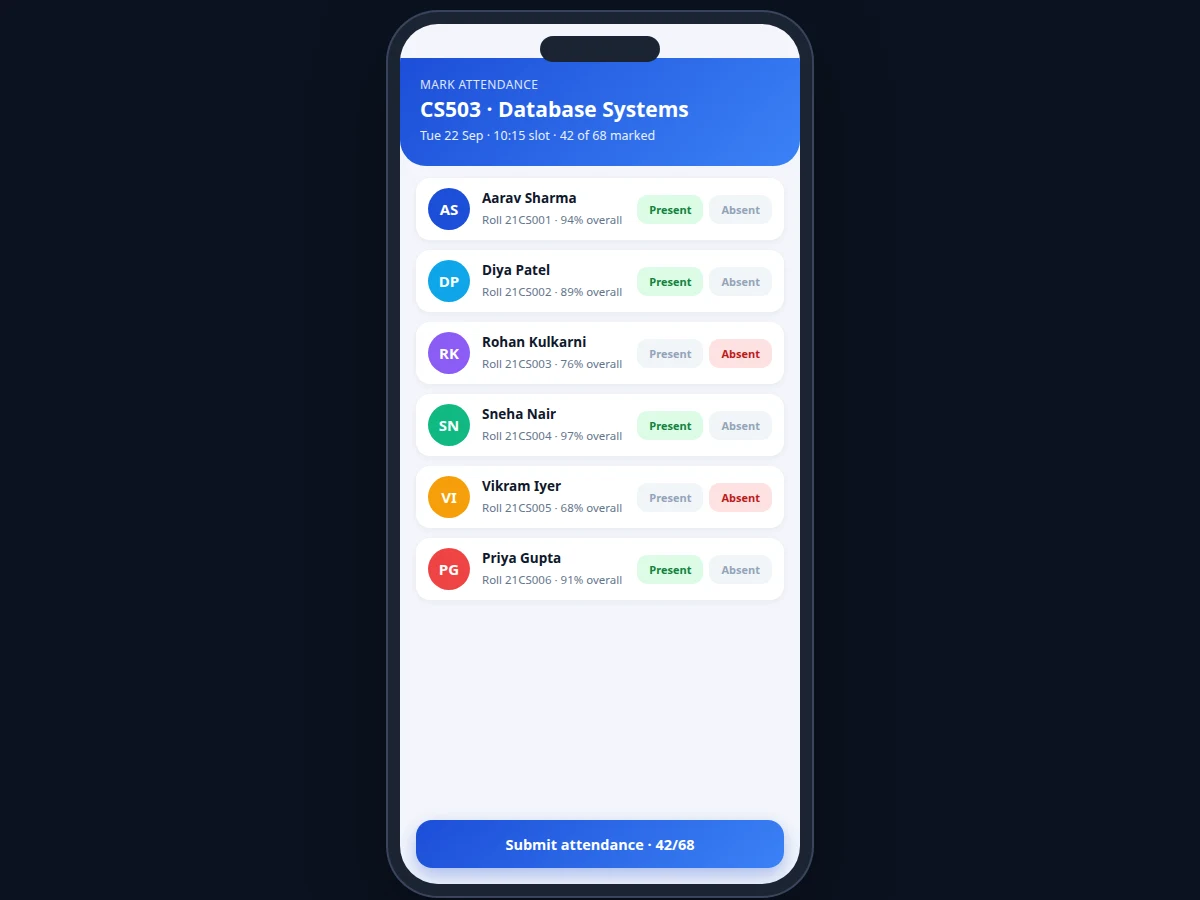
Marks present/absent with bulk actions.
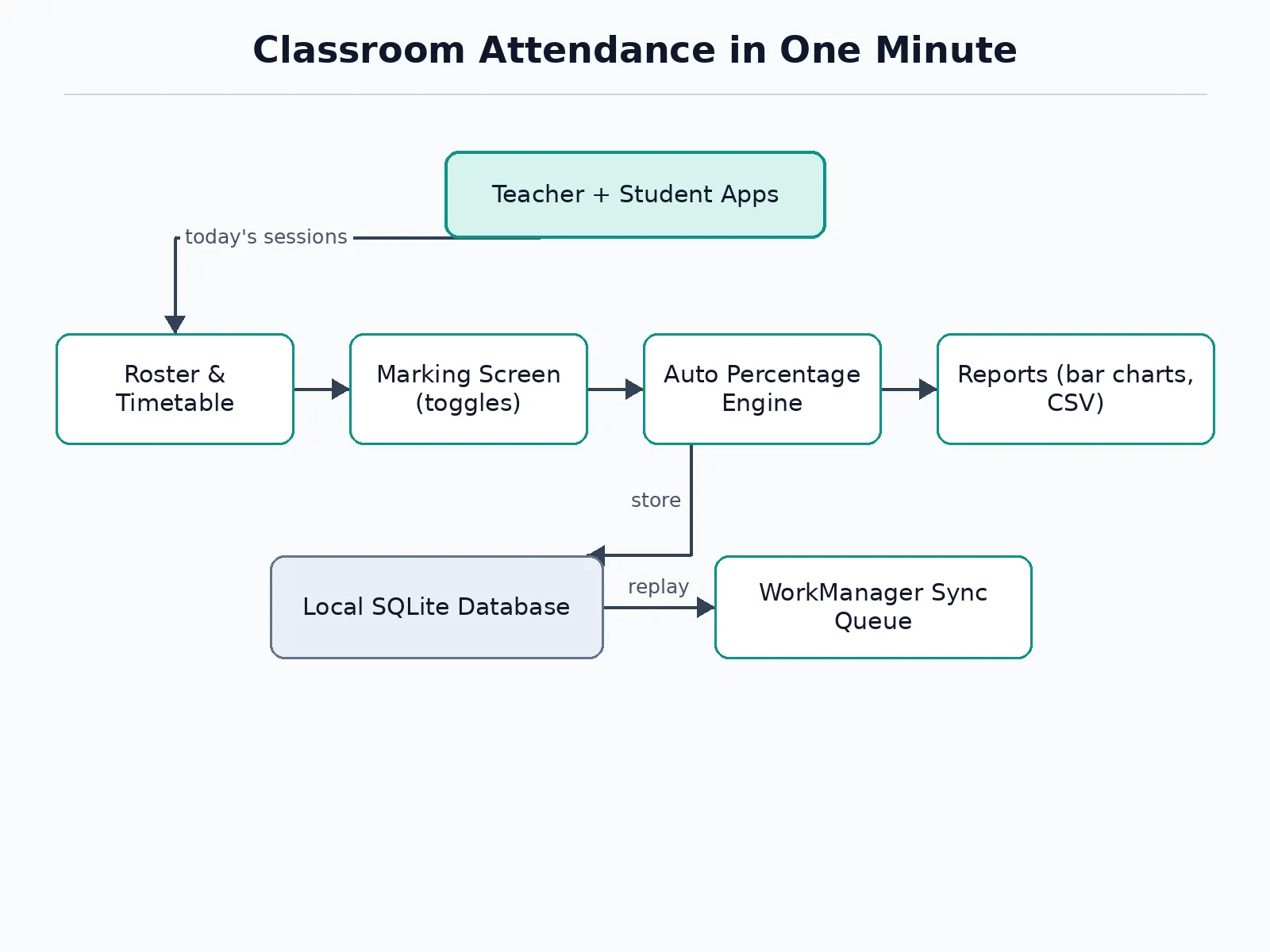
Follow the working sequence
How it works
- The faculty member sets up classes, subjects, the weekly timetable and student rosters once at the start of the semester.
- On the day, the timetable view lists today's sessions; tapping a session loads its student roster into the marking screen.
- Each row gets a present/absent toggle; bulk actions mark everyone present so only the absentees need flipping.
- On submit, the session is stored with a timestamp and per-student running percentages are recomputed automatically.
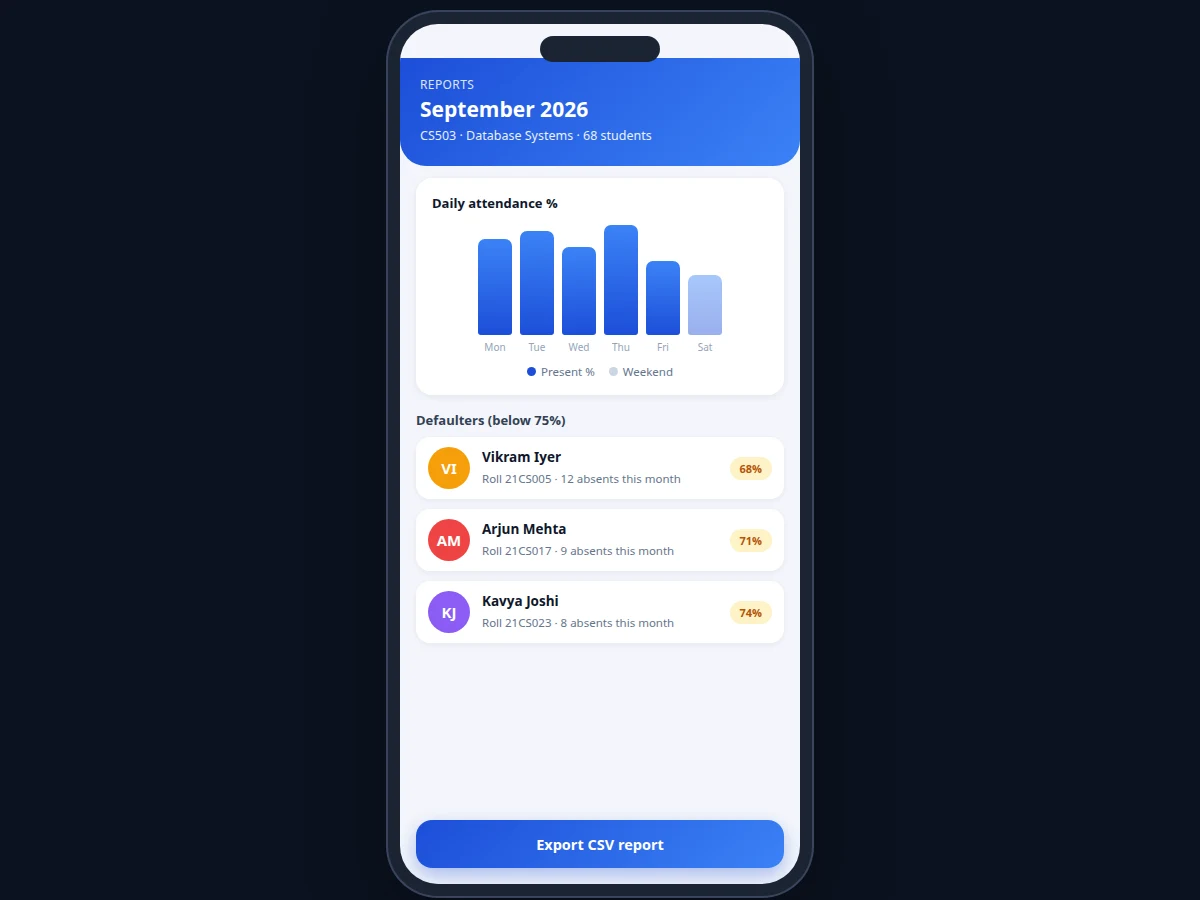
- The reports module aggregates the month: daily percentages, a bar-chart view and the defaulter list below the 75% threshold.
- Monthly or date-range reports export as CSV for department records; the sync queue replays changes to the server when online.
Tech stack:
- Android (Kotlin or Java) with Android SDK
- SQLite via Room for local storage
- Material Design components for marking and reporting UI
- Background WorkManager for the sync queue
- CSV export via standard file APIs
- Optional REST endpoint for department-server sync
| Parameter | Value |
|---|---|
| Marking model | Present/absent toggles with bulk actions; no biometric hardware |
| Class size target | 60+ students per session (design target) |
| Marking time | Under ~1 minute per full class (design target, typical device) |
| Defaulter threshold | Configurable; default 75% (matches common university rules) |
| Storage | Local SQLite; approximately a few MB per semester of records (expected) |
| Reports | Monthly and date-range views; CSV export |
| Connectivity | Fully offline for marking; optional sync when online |
| Platform | Android 8.0 and above (expected) |
Project features
- [Class, subject and roster management] Create classes, subjects and time slots, and import or enter student rosters with roll numbers; the timetable view shows today's sessions ready to mark.
- [One-minute marking screen] Every student row carries a present/absent toggle, with mark-all-present plus exception flips so a full 68-student class is marked in under a minute (design target on typical devices).
- [Automatic percentage computation] Per-student running attendance percentages recompute from the attendance table on every session submit — no manual spreadsheet work.
- [Defaulter flagging] Students below the configurable threshold (default 75%, matching common university rules) are listed for monthly review with their absence counts.
- [Monthly and date-range reports] Daily, weekly and monthly attendance views with a bar-chart summary and one-tap CSV export for department records.
- [Offline-first with sync queue] All writes hit the local SQLite database immediately; an optional background queue replays mutations to a department server when connectivity returns.
- [Bulk and exception workflows] Mark everyone present then flip the absentees, or mark individuals — the marking model supports both without extra steps.
What is included
- Complete Android app source code (marking, reports, sync queue)
- Database schema and setup documentation
- Sample class/subject/roster dataset for demonstration
- Setup guide (build, install, configure sync endpoint)
- Project report PDF (background, architecture, methodology)
- PPT presentation for final review
- Viva Q&A preparation document (Android, SQLite, offline-first design)
Limitations & prerequisites
- Marking accuracy depends on the faculty member's input — the app records what is tapped; it cannot verify physical presence without biometric hardware.
- The sync queue needs a department server endpoint to be useful; without one, data stays on the single device.
- Very large rosters (200+ students in one session) may need roster pagination on low-end devices — tested class sizes are documented in the report.
- CSV export reflects the app's local data only; discrepancies with university records must be reconciled manually.
- The app does not integrate with university ERP or biometric systems out of the box; integration is possible as custom work.
- Push notifications for defaulter alerts need a notification service configured separately.
Frequently Asked Questions
How is this different from a spreadsheet?
The roster, timetable, marking, percentage computation, defaulter flagging and CSV export live in one flow. Marking a class takes under a minute with bulk actions, percentages update on every submit, and the monthly defaulter list is one tap — none of which a spreadsheet does without manual formulas and maintenance.
Does it work without internet?
Yes. Every write goes to the local SQLite database immediately, so marking works in classrooms with no connectivity. The optional sync queue replays changes to a department server whenever the network returns.
Can the defaulter threshold be changed?
Yes. The 75% default matches common university rules, but it is a configurable setting, so departments with different cutoffs can adjust it without code changes.
How are multiple faculty handled?
Each faculty member runs the app on their own device with their own classes. The optional server sync merges records per subject; without the server, each device holds its own data.
Does it verify that students are actually present?
No — and the listing is honest about this. It records the faculty member's marking. Presence verification needs biometric or RFID hardware, which is out of scope for this software-only build.
Is this project suitable for a final-year project?
Yes — for Computer Science, Information Technology and related branches. It demonstrates Android development, SQLite database design, offline-first architecture and a genuinely useful domain workflow. Suitable for B.E./B.Tech final-year projects in Computer Science, Information Technology and related branches.
Components & software requirements
- Android (Kotlin or Java) with Android SDK
- SQLite via Room for local storage
- Material Design components for marking and reporting UI
- Background WorkManager for the sync queue
- CSV export via standard file APIs
- Optional REST endpoint for department-server sync
Delivery information
Built-to-order project. Delivery timeline is shared after order confirmation based on current queue.
Support terms
Complete documentation, setup guide, and viva preparation included. Support for setup and explanation provided.
Download free synopsis (PDF)
Enter your name and WhatsApp number — the synopsis PDF downloads immediately. We may send occasional project updates on WhatsApp; no spam.