
More project photos (2)
The problem
Beginners at the gym usually track workouts in a phone notes app or on paper, which leaves progressive overload — the actual mechanism of getting stronger — to memory: what weight did I bench last Tuesday, and for how many reps? This project closes that loop as an Android app. Routines are planned once as workout days with ordered exercises, target sets, reps and weights. During a session the app walks through one exercise at a time; each completed set is logged with a tap, the rest timer starts automatically, and finishing the workout updates session volume, personal records and progression charts. Estimated one-rep max uses the standard Epley formula so progress is comparable across rep ranges. Everything stays on the device — no account, no subscription, no cloud.
How it works
- The user builds a routine once: workout days, each with exercises in order and target sets, reps and weights.
- On training day, the app shows today's workout with each exercise's status: done, in progress or pending.
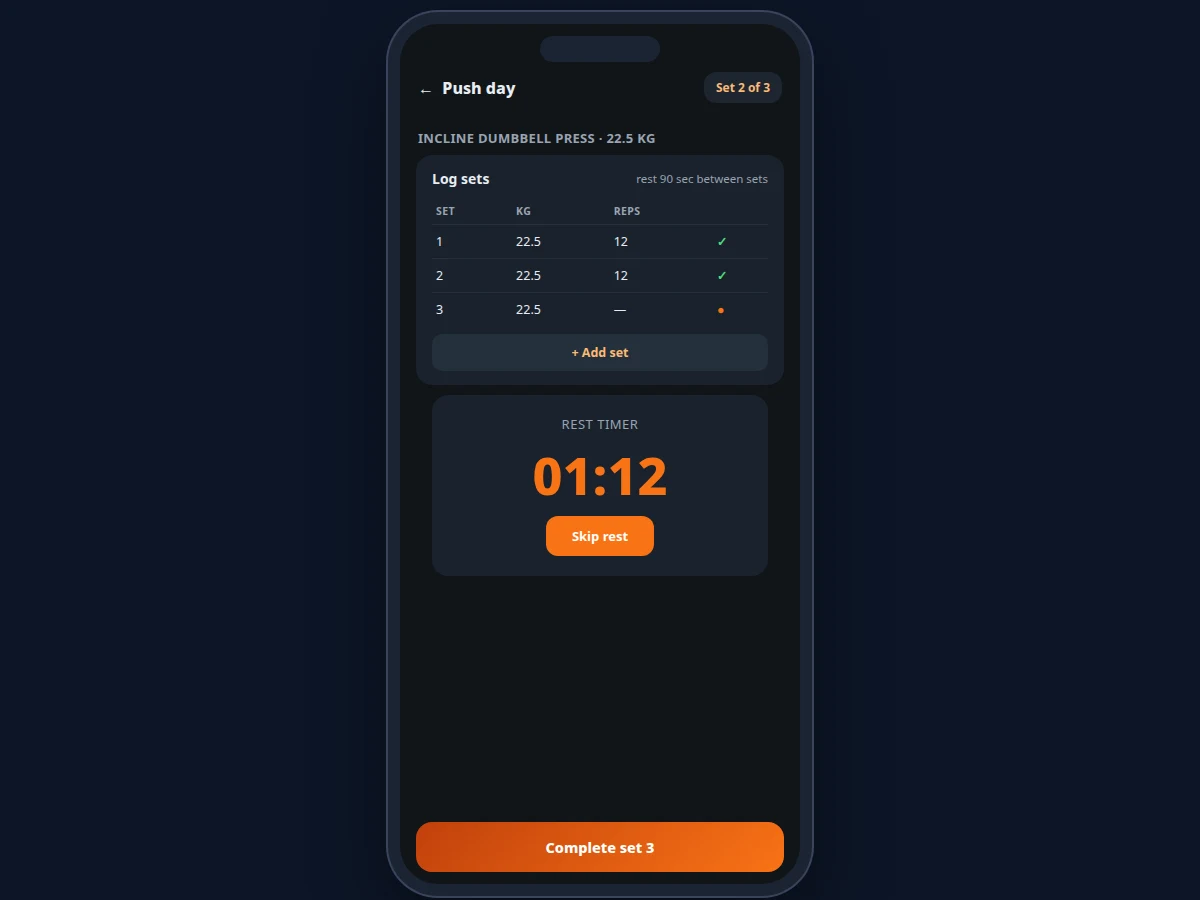
- Tapping start on an exercise opens the set logger; each completed set is logged with weight and reps.
- The rest timer counts down automatically between sets; the user can skip it or let it run.
- Finishing the session writes all sets to the log; volume, estimated 1RMs and personal records update immediately.
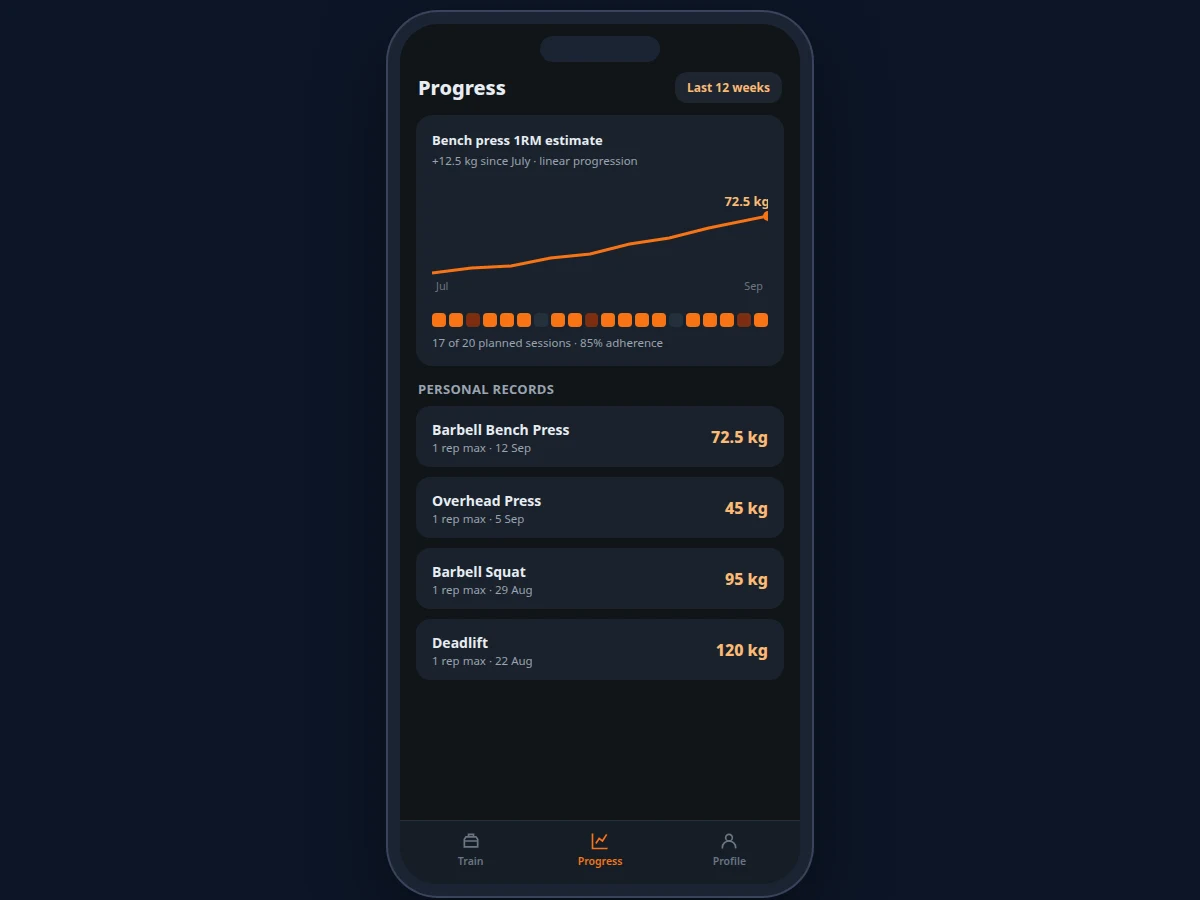
- The progress section charts estimated-1RM trends and adherence, so the user can see whether the program is working.
Tech stack:
- Android (Kotlin or Java) with Android SDK
- SQLite via Room for local storage
- Charting library for progression graphs
- Foreground service for rest timers
- Material Design components
| Parameter | Value |
|---|---|
| Logging granularity | Per set: weight, reps, timestamp |
| 1RM estimate | Epley formula: weight x (1 + reps/30) — standard approximation |
| Rest timer | Configurable duration; auto-start with skip (design target) |
| Charts | Estimated-1RM trend, session adherence strip, personal-record list |
| Routines | Custom splits; e.g. push/pull/legs over multi-week blocks |
| Storage | Local SQLite; a year of training logs is typically a few MB (expected) |
| Connectivity | Fully offline; no account needed |
| Platform | Android 8.0 and above (expected) |
Project features
- [Routine planning] Build routines as workout days (push, pull, legs or custom) with ordered exercises, target sets, reps and weights — for example week 7 of a 12-week strength block.
- [Per-set logging] Log each set's weight and reps with one tap; edit or add sets mid-session without breaking the flow.
- [Automatic rest timers] A configurable rest timer starts on every completed set with a skip option, keeping pace without watching the clock.
- [Session volume tracking] Total kilograms lifted per session is computed from the set log and shown against the day's target.
- [Personal records] The app maintains a dated 1-rep-max record per exercise, updated whenever the estimate exceeds the previous best.
- [Progression charts] Estimated-1RM trend lines and a session-adherence strip chart show progress over selectable ranges such as the last 12 weeks.
- [Streaks and adherence] Training streaks and planned-vs-completed session percentages keep consistency visible.
What is included
- Complete Android app source code (routines, session engine, charts)
- Training-data model documentation (sets, volume, 1RM computation)
- Sample routine and 12-week workout history for demonstration
- Setup guide (build, install, usage walkthrough)
- Project report PDF (background, data model, methodology)
- PPT presentation for final review
- Viva Q&A preparation document (Android, SQLite, data visualization)
Limitations & prerequisites
- Estimated 1RM is an approximation (Epley formula), not a measured lift — the report states this explicitly and it should not be treated as a true max.
- The app logs what the user enters; it cannot verify that a set was actually performed.
- There is no coaching or form guidance; programming decisions (which routine, what progression) are the user's responsibility.
- Rest-timer accuracy depends on the OS not killing the background service on aggressive battery savers.
- Data stays on one device; there is no cloud backup or multi-device sync in this build.
Frequently Asked Questions
How is the one-rep max estimated?
With the standard Epley formula: weight multiplied by (1 + reps/30). It is an approximation for tracking trends, not a measured lift — the app and the report both label it as an estimate.
Does it work without internet?
Yes. Everything — routines, logging, timers, charts — runs on the device with no account and no network.
Can I build my own routines?
Yes. Workout days, exercise order, target sets, reps and weights are all user-defined, so any split (push/pull/legs, upper/lower, 5x5) can be programmed.
How are personal records tracked?
Whenever a logged set produces an estimated 1RM above the stored best for that exercise, the record updates with the date. The progress section lists every exercise's current record.
Does it track cardio or diet?
No. This build is focused on strength-training logging; cardio and nutrition are out of scope.
Is this project suitable for a final-year project?
Yes — for Computer Science, Information Technology and related branches. It demonstrates Android development, local data modeling, background services and data visualization around a real user need. Suitable for B.E./B.Tech final-year projects in Computer Science, Information Technology and related branches.
Components & software requirements
- Android (Kotlin or Java) with Android SDK
- SQLite via Room for local storage
- Charting library for progression graphs
- Foreground service for rest timers
- Material Design components
Delivery information
Built-to-order project. Delivery timeline is shared after order confirmation based on current queue.
Support terms
Complete documentation, setup guide, and viva preparation included. Support for setup and explanation provided.