
More project photos (2)
The problem
Re-reading notes feels productive and fails reliably: memory research since Ebbinghaus shows recall decays exponentially unless reviews are spaced at increasing intervals. Spaced-repetition software exploits this — each card reappears just before it would be forgotten — and it is the standard study tool behind medical and language exams worldwide. This project implements that idea as an Android app with an original, explainable scheduler: every card carries an ease factor, an interval and a due date; grading Again resets the interval and lowers ease, Hard keeps it short, Easy multiplies the interval out. The daily queue is simply every card due today, ordered by overdue-ness. Because the interval math is implemented from first principles and documented rule by rule, the student can walk an examiner through exactly why a card is due when it is.
How it works
- The student creates decks and adds question-answer cards for the topics to revise.
- Each day the app queues every card whose due date has arrived, ordered by how overdue it is.
- The study session shows the question; the student recalls, taps to reveal the answer, and grades honestly.
- The scheduler updates the card: Again collapses the interval and lowers ease, Hard keeps it short, Easy stretches it out.
- The card's new due date is stored; mastered cards disappear for days or weeks while weak cards return tomorrow.
- Statistics aggregate the review log into recall rates, streaks and per-deck retention for the stats section.
Tech stack:
- Android (Kotlin or Java) with Android SDK
- SQLite via Room for local storage
- SM-2-family scheduling algorithm (original implementation)
- Material Design components
| Parameter | Value |
|---|---|
| Scheduler | SM-2-inspired: ease factor, interval and due date per card |
| Grading | Again (<1 day), Hard (3 days), Easy (7 days) — intervals adapt per card |
| Queue | All cards with due date on or before today, ordered by overdue-ness |
| Statistics | Recall rate, reviews/month, cards mastered, per-deck retention, streaks |
| Storage | Local SQLite; thousands of cards fit in a few MB (expected) |
| Connectivity | Fully offline |
| Platform | Android 8.0 and above (expected) |
Project features
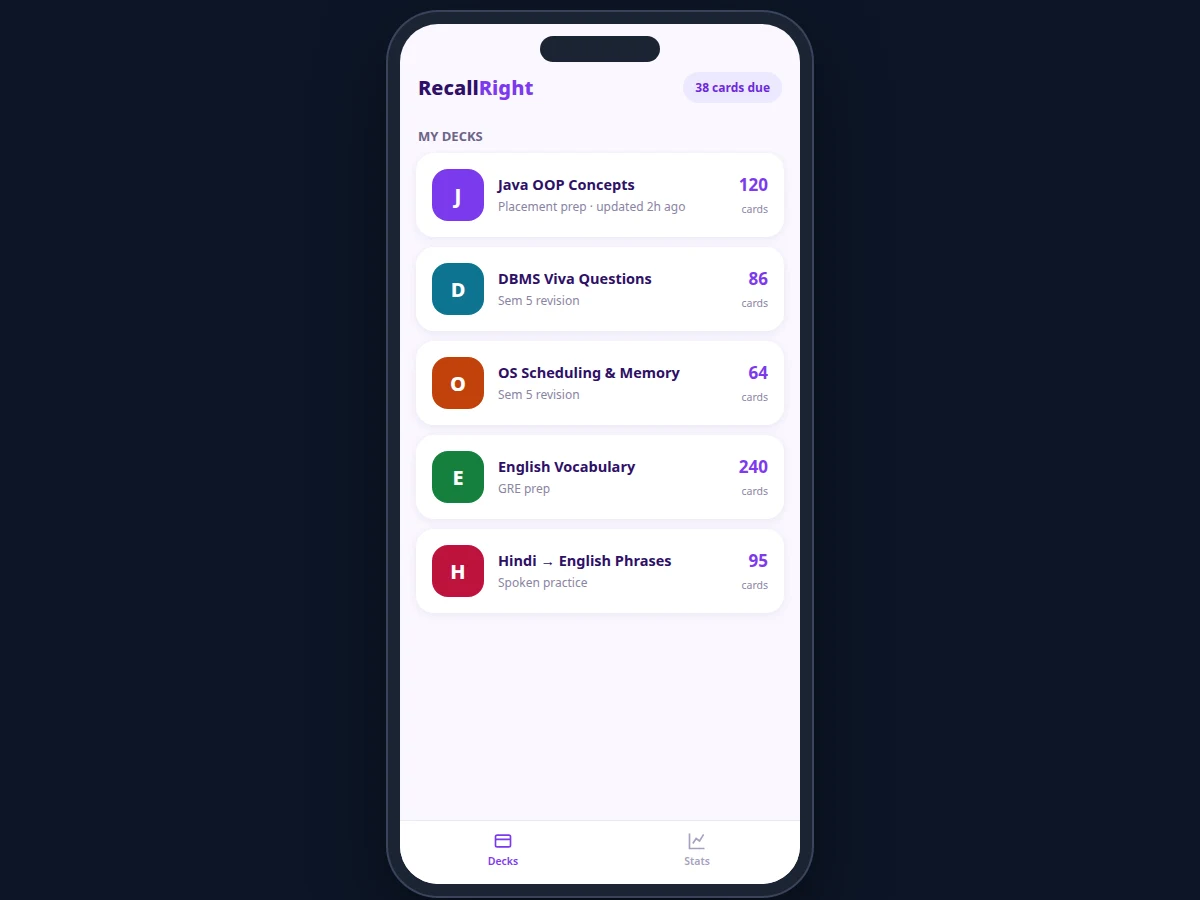
- [Deck and card management] Create, edit, delete and organize decks — Java OOP concepts, DBMS viva questions, OS scheduling, vocabulary — with per-deck card counts.
- [Study sessions with self-grading] Read the question, tap to reveal the answer, then grade recall as Again (<1 day), Hard (3 days) or Easy (7 days).
- [SM-2-inspired scheduler] Each grade updates the card's ease factor and interval deterministically; the next due date is written back to the database.
- [Due-card queues] The app shows exactly how many cards are due and queues them by overdue-ness, with session progress tracking.
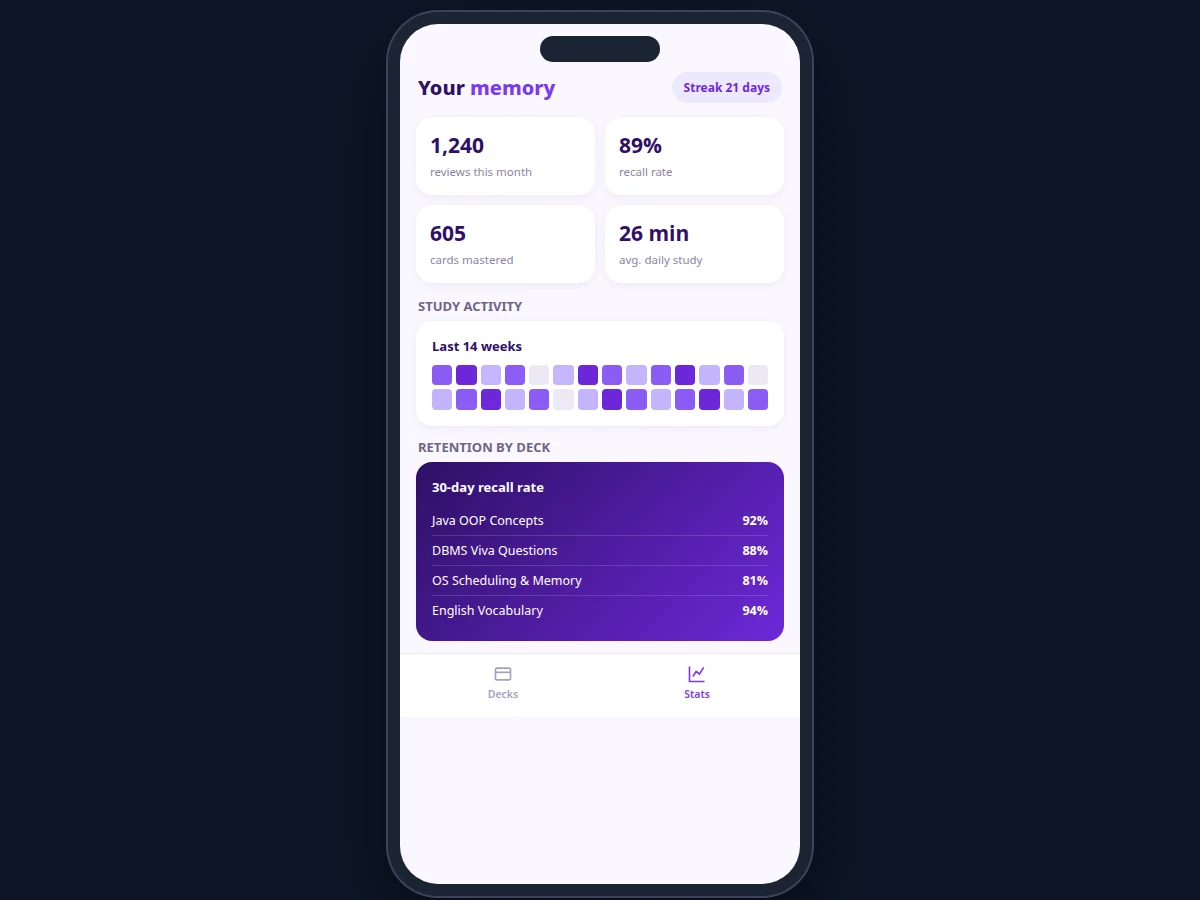
- [Retention statistics] Recall rate, reviews per month, cards mastered, average daily study time and per-deck 30-day retention.
- [Study streaks and heatmap] Consecutive study days and a weekly activity heatmap keep the habit visible.
- [Fully offline scheduling] All interval math runs on-device; studying never needs a network connection.
What is included
- Complete Android app source code (decks, study session, scheduler, stats)
- Scheduler documentation with rule-by-rule interval examples
- Sample decks (Java OOP, DBMS viva, OS scheduling, vocabulary) for demonstration
- Setup guide (build, install, usage walkthrough)
- Project report PDF (background, forgetting curve, scheduler design, methodology)
- PPT presentation for final review
- Viva Q&A preparation document (Android, SQLite, spaced-repetition theory)
Limitations & prerequisites
- Recall grading is self-reported; the scheduler is only as honest as the student's grading.
- The SM-2-family scheduler is a well-known heuristic, not a personalized memory model — intervals are approximate by design.
- Card quality determines effectiveness; poorly written cards (vague questions) produce poor retention regardless of scheduling.
- There is no cloud sync or shared-deck marketplace in this build; decks live on one device.
- Image and audio cards are not implemented; cards are text-based.
Frequently Asked Questions
How does the scheduling algorithm work?
Each card has an ease factor, an interval in days, and a due date. Grading Again resets the interval to under a day and lowers ease; Hard keeps a short interval; Easy multiplies the interval and raises ease. The report documents the exact update rules with worked examples.
Why is this better than re-reading notes?
Re-reading builds familiarity without recall. Active recall (answering before revealing) plus spacing (reviewing just before forgetting) is the evidence-backed combination; the scheduler automates the spacing part.
Does it need internet?
No. Deck management, study sessions, scheduling and statistics are all on-device and fully offline.
Can I import ready-made decks?
The build supports creating and editing decks in-app; bulk import format is documented for loading question banks quickly.
How many cards can it handle?
Thousands of cards comfortably — the database and queue queries are indexed, and storage for text cards is a few megabytes.
Is this project suitable for a final-year project?
Yes — for Computer Science, Information Technology and related branches. It demonstrates Android development, algorithm implementation from first principles and applied cognitive-science concepts. Suitable for B.E./B.Tech final-year projects in Computer Science, Information Technology and related branches.
Components & software requirements
- Android (Kotlin or Java) with Android SDK
- SQLite via Room for local storage
- SM-2-family scheduling algorithm (original implementation)
- Material Design components
Delivery information
Built-to-order project. Delivery timeline is shared after order confirmation based on current queue.
Support terms
Complete documentation, setup guide, and viva preparation included. Support for setup and explanation provided.