
More project photos (2)
The problem
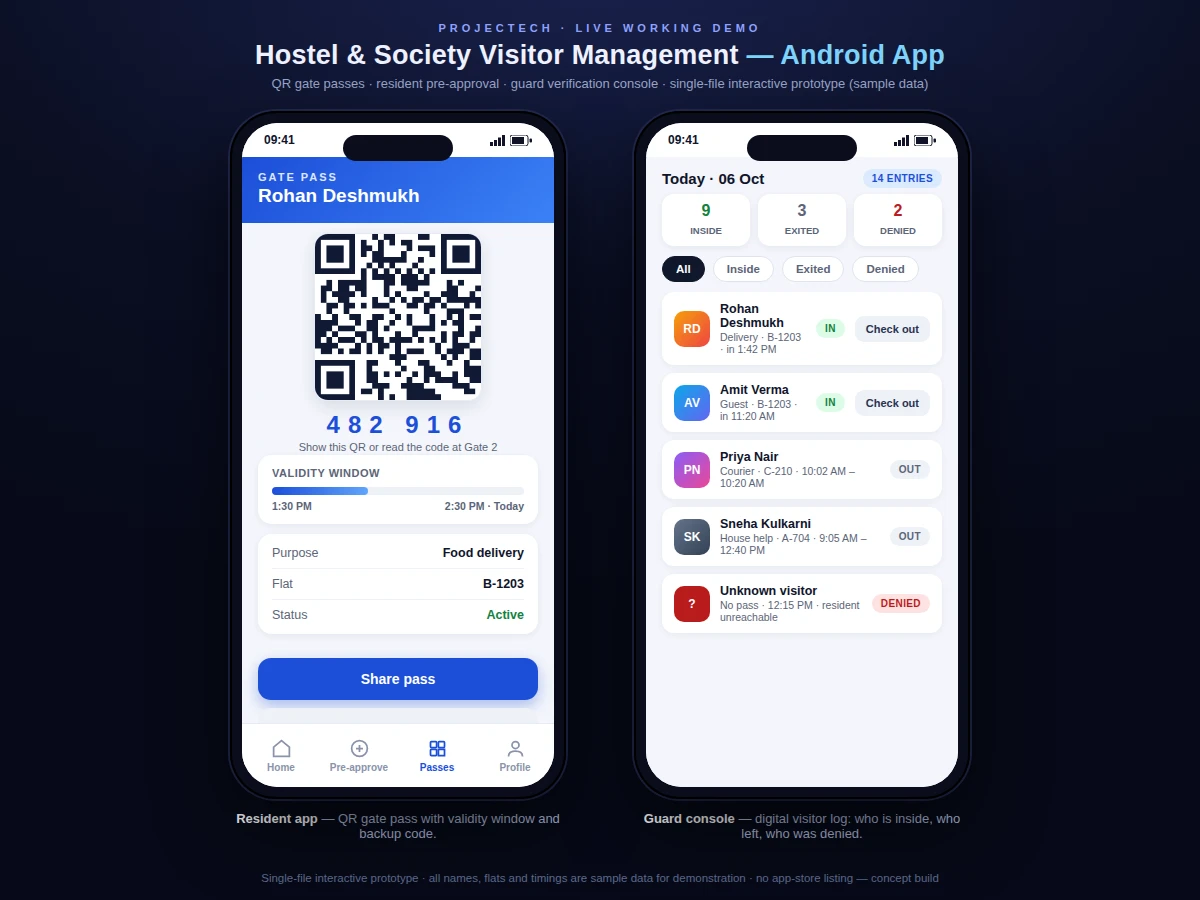
Hostel wardens and housing-society committees still manage visitor entry with a paper register at the gate. The guard scribbles a name, phones the resident on the intercom, and waves the visitor through — a process that breaks the moment the resident is unreachable, and leaves behind a register nobody can search when an incident needs tracing. Forged entries, unrecorded exits and tailgating go unnoticed because the paper trail is decorative, not functional. Residents, meanwhile, get no control over who reaches their door and no record of who came. This project replaces that register with a phone-first system: the resident pre-approves a visit from the app, the approval becomes a time-bound QR gate pass (plus a numeric backup code), and the guard verifies the pass against live data before allowing entry. Every check-in and check-out lands in a timestamped digital log that the society can filter by date, flat or purpose.
Registers with a phone number verified against the flat record, then creates pre-approvals for expected visitors.
Follow the working sequence
How it works
- The resident registers in the app with a phone number verified against their flat record in the society database.
- To authorize a visit, the resident fills the pre-approval form — visitor name, phone, purpose and time window — and the backend creates a signed pass document.
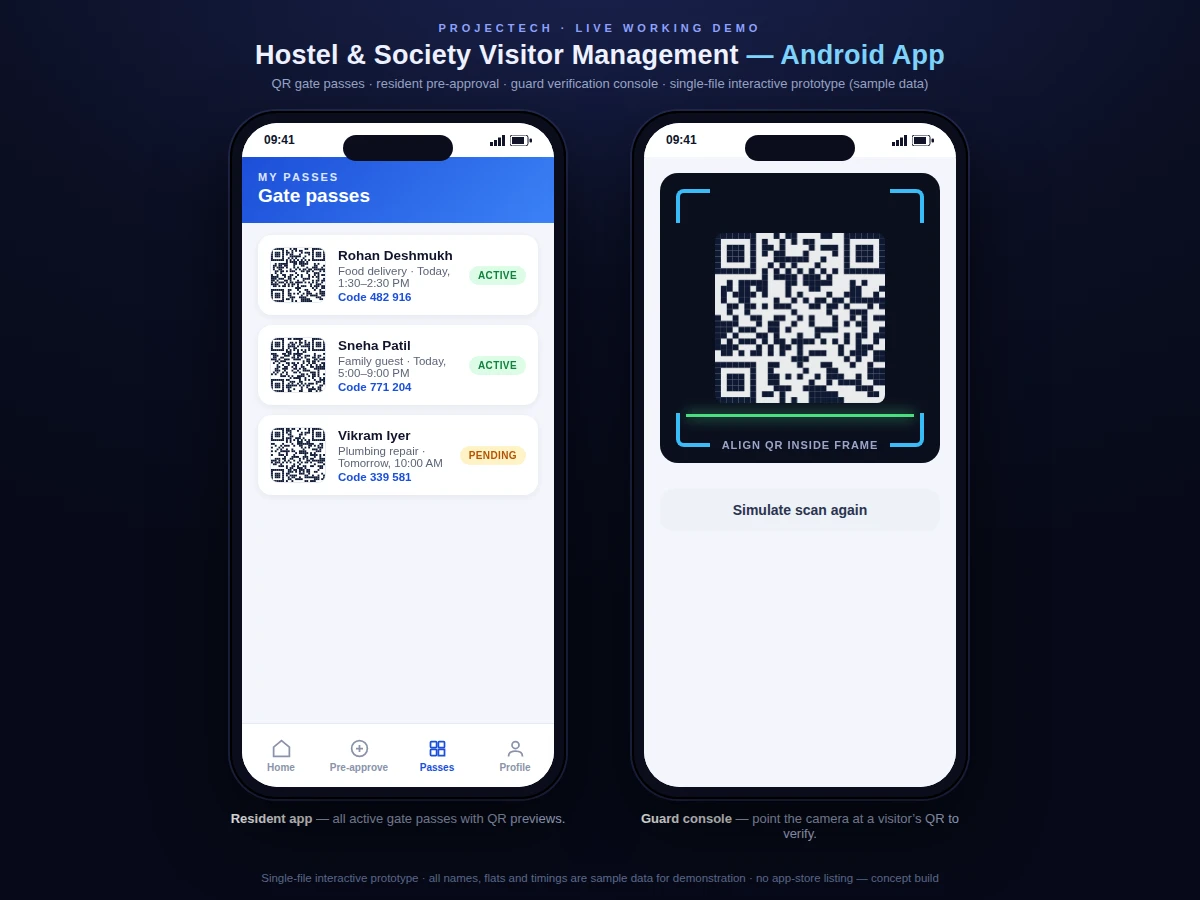
- The app renders the pass as a QR code with a 6-digit backup code; the resident shares it with the visitor over any messaging app.
- At the gate, the guard scans the QR (or enters the code); the console fetches the pass, confirms it is active and inside its validity window, and shows the visitor details.
- The guard approves or denies the entry; approval writes a check-in record with a timestamp and notifies the resident, while a denial is logged with the reason.
- On exit the guard scans again to record check-out, and the admin view shows a live list of everyone currently inside plus the full day's log.
Tech stack:
- Kotlin + Android SDK (Jetpack: ViewModel, Navigation, Room cache)
- Firebase Authentication (phone + flat verification)
- Cloud Firestore (passes, visits, entry log)
- Firebase Cloud Messaging (arrival / denial / check-out alerts)
- Cloud Functions (pass signing and validation logic)
- ZXing (QR generation and scanning)
- Material Design 3 (app UI)
| Parameter | Value |
|---|---|
| Platform | Android 8.0 (API 26) and above (design target) |
| Pass validity window | 1–12 hours, configurable per visit (design target) |
| Gate-pass code | 6-digit numeric backup code |
| QR payload | Approximately 200 bytes signed token (design target) |
| Verification response | Typically under 3 seconds on 4G (expected, network-dependent) |
| Offline behaviour | Passes cached on the guard device; check-ins sync on reconnect (design behaviour) |
| Concurrent guard logins | Up to 5 guard devices per society (design target) |
| Log retention | 12 months rolling, configurable (design target) |
| Demo dataset | 3 flats, 8 sample visitors, 14 sample log entries (demo build) |
Project features
- [Resident pre-approval] The resident raises a visit request with the visitor's name, phone, purpose and time window; the app issues the approval instantly and the visitor is expected at the gate — no intercom calls needed.
- [QR gate pass with validity window] Every approval generates a unique QR code plus a 6-digit backup code, valid only inside the chosen time window, so a pass cannot be reused the next day.
- [Guard verification console] The guard scans the QR (or types the code) and sees the visitor's name, purpose, flat and validity on one screen before tapping approve or deny.
- [Digital visitor log] All entries carry check-in and check-out timestamps and are filterable by date, flat and purpose — the searchable replacement for the paper register.
- [Entry and exit tracking] Visitors are checked out at the gate on exit, so the log always shows who is currently inside the premises.
- [Push notifications] Residents get a push alert when their visitor arrives, is denied entry, or checks out, via Firebase Cloud Messaging.
- [Recurring visitor passes] Regular visitors such as house help, drivers and tutors get weekly recurring passes instead of a fresh approval every day.
What is included
- Complete resident Android app source code (Kotlin)
- Guard verification console source (scan, verify, log, check-out)
- Firebase backend configuration template (Auth, Firestore rules, Cloud Functions)
- QR pass module (generation, signing, validity checks)
- Society admin view for flats, guard accounts and announcements
- Project report PDF (architecture, data model, security choices)
- PPT presentation for final review
- Viva Q&A preparation document (Android, Firebase, QR security)
- Setup guide: Firebase project setup, build and install steps
Limitations & prerequisites
- Real-time verification needs internet on the guard device; offline mode only caches passes and syncs check-ins later.
- Push notification delivery depends on Firebase Cloud Messaging and the resident's network — delivery timing is not guaranteed.
- The demo build uses sample flats and visitors; connecting a real society's resident records is a deployment step done with the buyer.
- QR passes are bearer tokens — anyone holding a shared QR can present it inside its validity window, which is why windows are kept short.
- No biometric or ID-document verification is included; identity trust rests on the resident's pre-approval.
- Hosting the backend on Firebase's free tier has usage limits; a busy society may need the paid plan (billed by Google, not included).
Frequently Asked Questions
Is this project suitable for a final-year project?
Yes — for Computer Science, Information Technology and Computer Engineering programs. It demonstrates native Android development, cloud backend design with Firebase, QR-based authentication tokens, role-based access (resident, guard, admin) and a complete working demo for the viva.
How does the QR gate pass actually work?
When a resident approves a visit, the backend creates a pass document with a signed token and a validity window. The app renders it as a QR code plus a 6-digit backup code. The guard's console reads the token, checks the signature and the time window against the live database, and shows the visitor's details before entry is approved.
Does the guard console work without internet?
Partially. Passes are cached on the guard device so verification of known passes continues offline, but new approvals and the live log need connectivity — queued check-ins sync automatically when the network returns.
Can this be customized for my college hostel?
Yes. Common customizations are warden approval workflows, in-time / out-time rules for hostel gates, student ID linking instead of flat numbers, and a warden dashboard — quoted separately based on scope.
What will I receive with the project?
The full Android source for both apps, the Firebase backend template with security rules, the report, PPT, viva Q&A and a setup guide — everything needed to build, demo and explain the project.
Components & software requirements
- Kotlin + Android SDK (Jetpack: ViewModel, Navigation, Room cache)
- Firebase Authentication (phone + flat verification)
- Cloud Firestore (passes, visits, entry log)
- Firebase Cloud Messaging (arrival / denial / check-out alerts)
- Cloud Functions (pass signing and validation logic)
- ZXing (QR generation and scanning)
- Material Design 3 (app UI)
Delivery information
Built-to-order project. Delivery timeline is shared after order confirmation based on current queue.
Support terms
Complete documentation, setup guide, and viva preparation included. Support for setup and explanation provided.
Download free synopsis (PDF)
Enter your name and email — the synopsis PDF downloads immediately. We may send occasional project updates; no spam, unsubscribe anytime.