
More project photos (2)
The problem
Salons still run on phone calls, walk-ins and a paper appointment diary. The receptionist answers the same pricing questions all day, customers cannot see which slots are free without calling, and double bookings happen when two people are promised the same chair at the same time. No-shows hurt because there is no reminder and no record of who booked what. This project replaces that chaos with a dedicated Android app: customers browse the full service menu with prices and durations, pick a stylist, see genuinely free slots for the day they want, and book in seconds with a confirmation they can revisit anytime. On the other side, the salon gets a staff panel to manage services and prices, maintain the stylist roster, and view the day's schedule — with each reserved slot locked so it can never be booked twice.
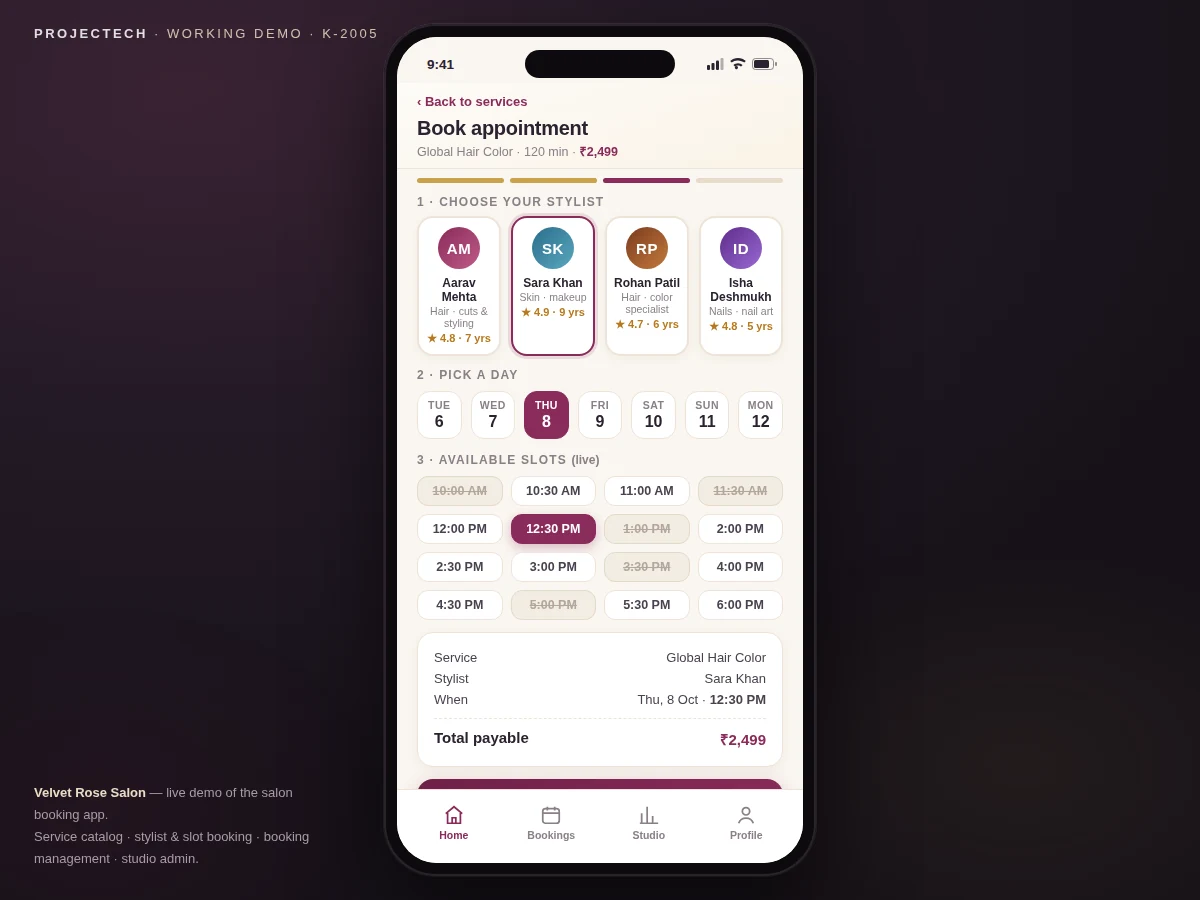
Signs in with phone OTP, picks a service, stylist, day and a free 30-minute slot.
Follow the working sequence
How it works
- The customer signs in with phone OTP through Firebase Authentication; the app then loads the salon's service catalog and stylist roster from Cloud Firestore.
- Choosing a service opens the booking flow: the customer picks a stylist, then a day from the 14-day booking window.
- The app reads that stylist's slot data for the day and renders a 30-minute slot grid; already-reserved slots appear struck through and cannot be tapped.
- Tapping a free slot starts the booking: a Firestore transaction writes the booking record and marks the slot as booked in one atomic step, so two customers can never claim the same slot.
- The customer receives an in-app confirmation with a booking ID; Firebase Cloud Messaging delivers a push confirmation, and a WorkManager job schedules a reminder about two hours before the visit.
- The booking appears under My Bookings, where it can be rescheduled to another free slot or cancelled — cancelled slots return to the live grid at once.
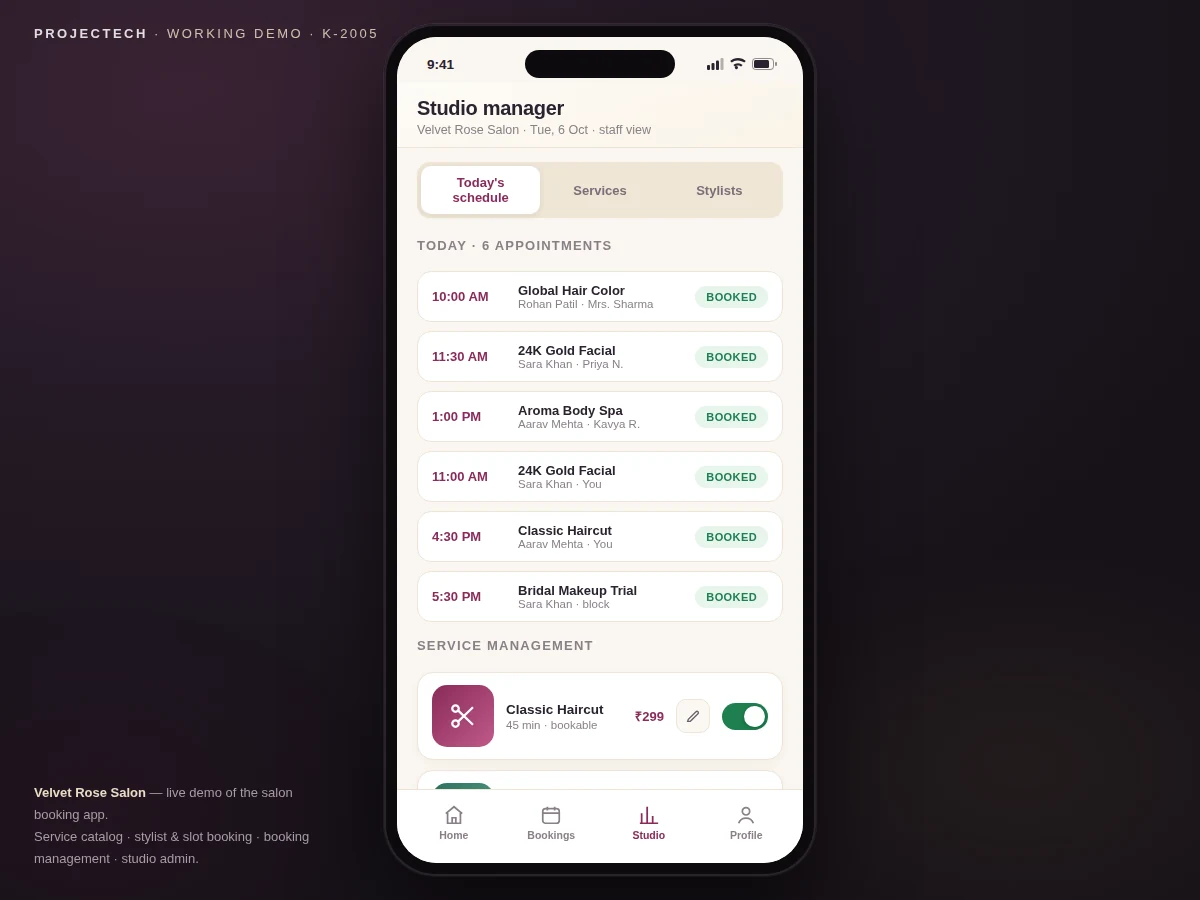
- In the staff admin panel, the salon adds or edits services and prices, toggles availability, manages stylists, and reviews each day's booked schedule with customer names.
Tech stack:
- Kotlin (Android app language)
- Android Studio (development environment)
- Firebase Authentication (phone-OTP sign-in)
- Cloud Firestore (services, stylists, slots & bookings database)
- Firebase Cloud Messaging (booking confirmations & reminders)
- WorkManager (scheduled appointment reminders)
- Material Design 3 (app UI components)
- Git (version control)
| Parameter | Value |
|---|---|
| Platform | Android (native app) |
| Language | Kotlin (datasheet) |
| Minimum Android version | API 24 — Android 7.0 (datasheet) |
| Target Android version | API 34 — Android 14 (datasheet) |
| Authentication | Phone-number OTP via Firebase Authentication |
| Database | Cloud Firestore (NoSQL, real-time sync) |
| Slot granularity | 30-minute slots (design target) |
| Booking window | Up to 14 days ahead (design target) |
| Reminder lead time | Approximately 2 hours before the appointment (configurable) |
| Notifications | Firebase Cloud Messaging push (requires internet) |
| Installed app size | Approximately 25–40 MB (expected) |
| Booking confirmation | Typically under 2 seconds on a 4G connection (expected) |
Project features
- [Service catalog with prices & durations] Customers browse the salon's full menu — hair, skin, nails, spa, makeup — each service showing its price, duration and rating, with category filters and search so finding a service takes seconds.
- [Live slot grid with double-booking guard] For the chosen stylist and day, the app renders a 30-minute slot grid from the server; already-reserved slots appear struck through and untappable, and the selected slot is locked atomically at booking time.
- [Stylist profiles & selection] Each stylist has a profile with photo, specialization, experience and rating, so customers book with the person they trust instead of whoever happens to be free.
- [Booking management: cancel & reschedule] Every booking carries an ID and lives under My Bookings, where the customer can reschedule to another free slot or cancel — cancelled slots return to the live grid immediately.
- [Admin panel: services, stylists & schedule] Staff add or edit services and prices, toggle a service's availability, manage the stylist roster, and view each day's booked schedule with customer names — the operational half of the system.
- [Push notifications for confirmations & reminders] Firebase Cloud Messaging sends a confirmation the moment a booking is made, and a scheduled reminder goes out about two hours before the appointment to cut no-shows.
- [Booking history & visit receipts] Past visits stay on record with service, stylist, date and amount paid, giving the customer a receipt trail and the salon a simple visit history per customer.
What is included
- Complete Kotlin source code for the customer app and the staff/admin panel
- Firebase project configuration guide (Authentication, Firestore setup, FCM setup)
- Firestore data model and security-rules documentation
- Working demo APK build for testing on a real device
- Setup instructions (Android Studio, Firebase console, build and run)
- Project report (background, architecture, data model, slot-locking design, testing)
- PPT presentation for the final review
- Viva Q&A preparation document (Firebase, transactions, FCM, MVVM, Android lifecycle)
- Build timeline: approximately 3–4 weeks from order confirmation (expected)
- Support: setup guidance and bug fixes during the review period; extended support available on request
Limitations & prerequisites
- Booking, slot locking and notifications need an active internet connection; only previously loaded screens are visible offline.
- Payment collection is not part of the base build — the app records "payable at salon"; UPI or card payment integration is an optional customization.
- The slot grid assumes one stylist serves one customer per slot; overlapping or multi-chair services need custom logic.
- Reminder delivery depends on Firebase Cloud Messaging and the device's notification settings; aggressive battery optimization on some phones can delay reminders.
- The demo ships with sample services, stylists and prices; the salon enters its real catalog through the admin panel.
- Firestore's free Spark-plan limits apply unless the project is upgraded; heavy production usage may need a paid plan.
- Phone-OTP sign-in needs a properly configured Firebase project; production phone-auth quotas are usage-based.
Frequently Asked Questions
How does the app stop two customers from booking the same slot?
When a customer taps a free slot, a Firestore transaction writes the booking and marks that slot as booked in a single atomic step. If two people tap the same slot at the same moment, the transaction lets only the first write succeed — the second customer sees the slot as taken and picks another one.
Which database is used, and is it included?
Cloud Firestore, Google's NoSQL real-time database. The project ships with the complete data model (services, stylists, slots and bookings collections), security rules, and a step-by-step Firebase console setup guide, so the backend is ready to use after configuration.
Does the app work without internet?
Previously loaded services remain visible from cache, but booking a slot, cancelling, and receiving notifications all need connectivity. Slot availability must be checked live against the server — that live check is exactly what makes double-booking impossible.
Can payment or more features be added?
Yes. UPI or card payment integration, a loyalty-points system, customer reviews, multi-branch support and a web dashboard for the salon are the most common customizations, and can be developed based on project requirements, technical feasibility and timeline.
Is this project suitable for a final-year project?
Yes — for Computer Science, IT and MCA programs with a mobile-application or software-engineering focus. It demonstrates Android development in Kotlin, Firebase backend design, real-time data sync, atomic transactions, push notifications, and a two-role customer-plus-admin product.
Components & software requirements
- Kotlin (Android app language)
- Android Studio (development environment)
- Firebase Authentication (phone-OTP sign-in)
- Cloud Firestore (services, stylists, slots & bookings database)
- Firebase Cloud Messaging (booking confirmations & reminders)
- WorkManager (scheduled appointment reminders)
- Material Design 3 (app UI components)
- Git (version control)
Delivery information
Built-to-order project. Delivery timeline is shared after order confirmation based on current queue.
Support terms
Complete documentation, setup guide, and viva preparation included. Support for setup and explanation provided.
Download free synopsis (PDF)
Enter your name and email — the synopsis PDF downloads immediately. We may send occasional project updates; no spam, unsubscribe anytime.