
More project photos (3)
The problem
A lab equipment booking app replaces the paper register in most college laboratories. Today, a student reaches the lab to find the oscilloscope taken, two batches dispute the function generator booking, and the in-charge cannot trace who kept a multimeter past return time. The core problem is coordination without visibility: nobody sees free capacity beforehand, and nobody stays accountable after the slot ends.
This project builds that visibility as a working Android app. Students browse a catalog of lab instruments, reserve 1-hour slots across a 7-day window, and receive a QR booking pass encoding the reservation. Check-in and return are recorded by scanning the pass, every event timestamped and synced via Firebase. Because each booking is a transaction on its slot document, two students cannot claim the same equipment for the same hour. The in-charge dashboard turns the booking stream into live answers: what is free now, what is overdue, and which instruments carry the week's heaviest load.
Browses the equipment catalog and reserves a 1-hour slot.
Follow the working sequence
How it works
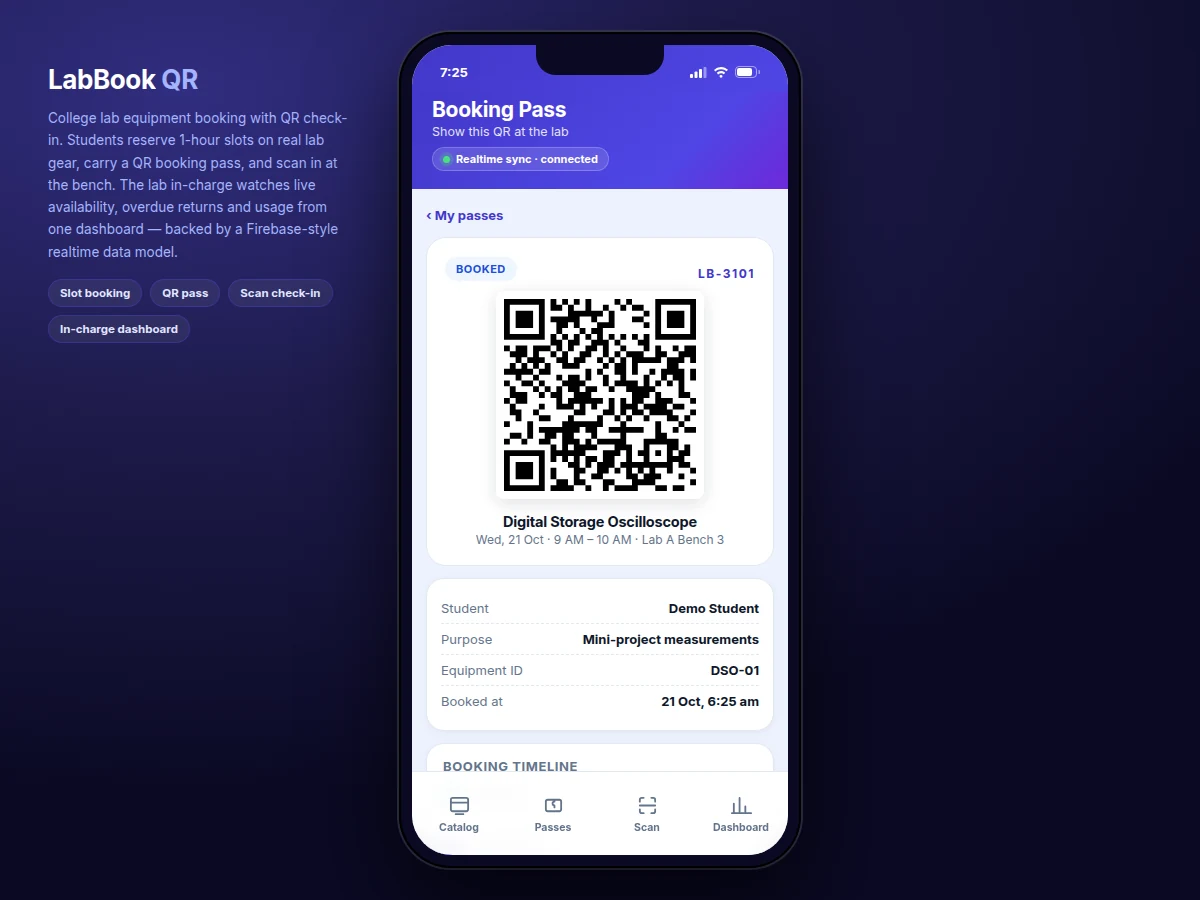
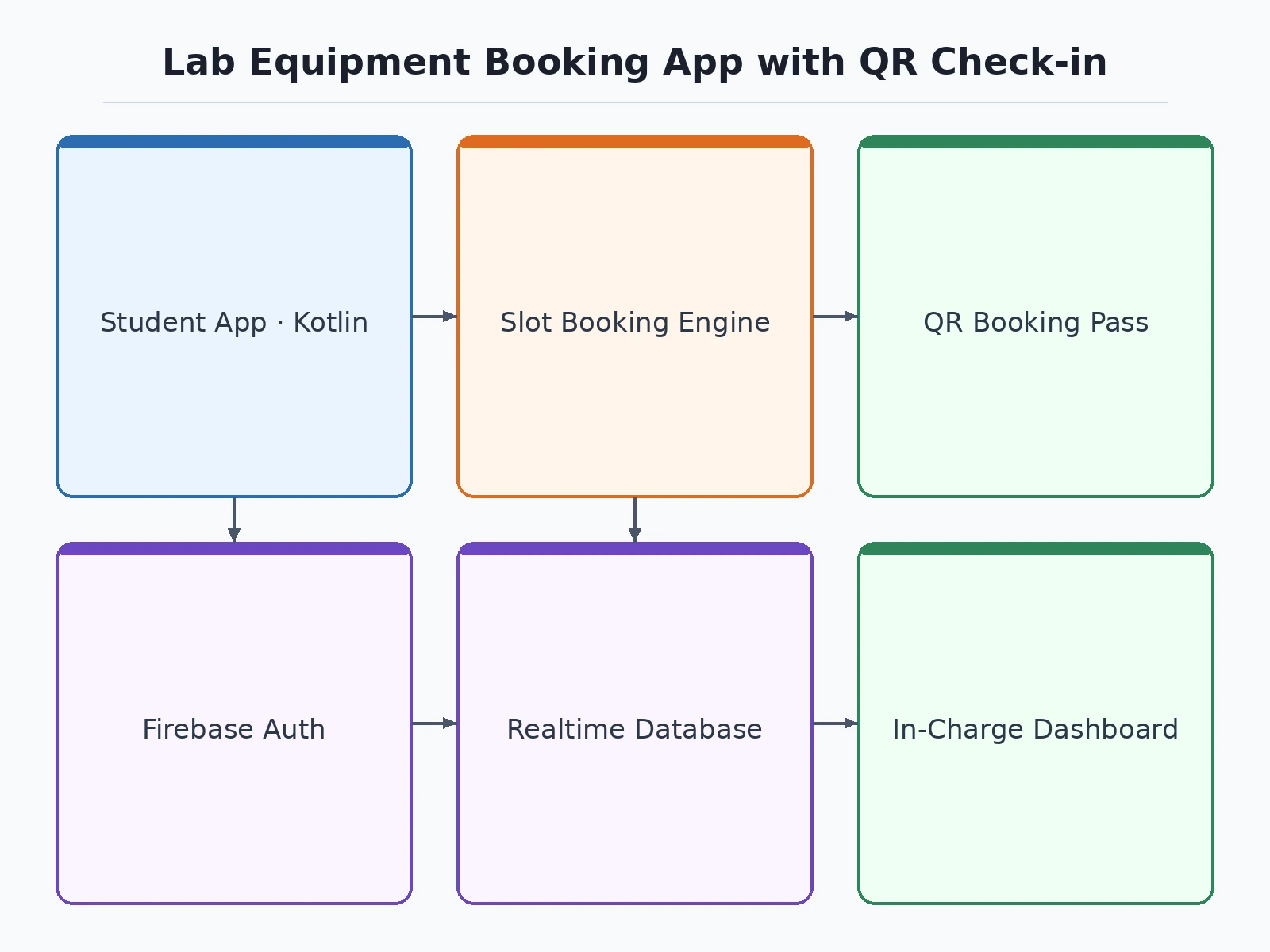
The flow runs from catalog to dashboard without leaving the app. A signed-in student opens the equipment catalog, which shows each instrument with its bench location and free unit-slots for the day. Tapping an instrument opens the booking screen: a 7-day date strip and a grid of eight 1-hour slots, each showing remaining units. Confirming a slot runs a transaction that claims the slot document — the mechanism that makes double-booking impossible — and writes the booking record. The app then renders the QR booking pass, encoding booking reference, equipment ID, date, slot and student name. At the lab, the in-charge scans the pass: the payload is verified against the booking and check-in is timestamped. A return scan closes the loop and frees the unit. Every write lands in Firebase Realtime Database, so the dashboard's availability counts, overdue list and usage chart update on every connected screen within the design-target sync window.
- The student signs in with email and password through Firebase Authentication; the UID tags every booking for accountability.
- The catalog reads the equipment collection and shows free unit-slots per instrument for the selected day.
- The booking screen offers the 7-day strip and the 1-hour slot grid; slots whose units are fully claimed render disabled.
- Confirming runs a transaction on the slot document and writes the booking; the QR pass renders from the booking fields.
- The in-charge scans the pass at the bench — the payload is verified, check-in is timestamped, and a second scan records the return.
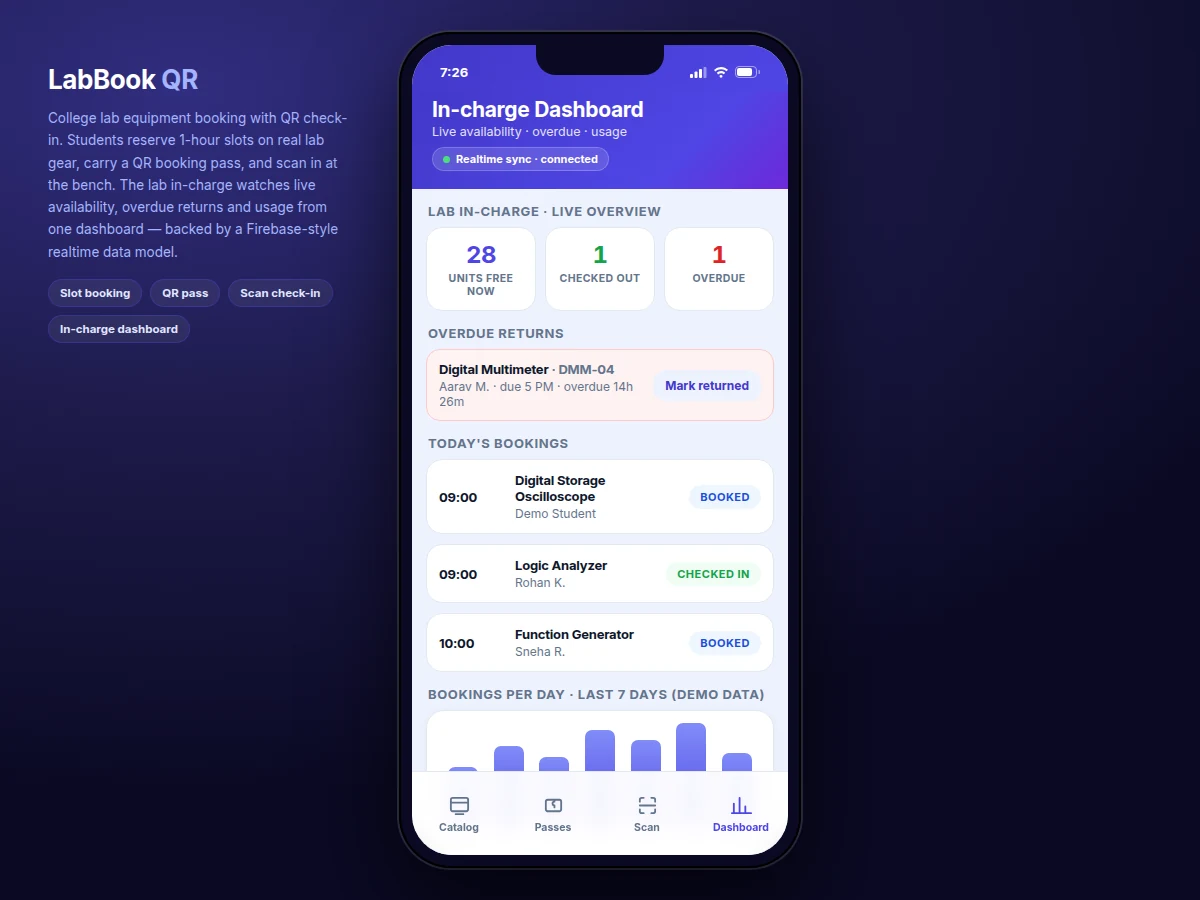
- The dashboard listens to the bookings collection and recomputes free units, overdue items and usage on every change.
Tech stack:
- Kotlin (Android)
- Firebase Authentication
- Firebase Realtime Database
- ZXing QR processing library
- Material Design 3
- Android Studio
- Gradle build system
- Git
| Parameter | Value |
|---|---|
| Platform | Android 8.0+ (API 26 and above, design target) |
| Slot granularity | 1 hour |
| Lab hours | 9:00 AM – 5:00 PM (8 slots per day) |
| Booking window | 7 days (configurable) |
| QR standard | ISO/IEC 18004 |
| Pass render time | Approximately 88 ms (measured in the demo build) |
| QR density | 33 × 33 modules, Version 4, error-correction level M (measured for a typical pass payload) |
| Backend | Firebase Realtime Database |
| Authentication | Firebase Authentication (email and password) |
| Sync | Realtime listeners; design-target sync under 2 seconds on typical campus Wi-Fi |
| Demo catalog | 8 instrument types across 2 labs (configurable per college) |
Project features
The build centers on four capabilities that work together end to end. First, a slot-booking engine: students pick an instrument, a day from a 7-day strip, and one of eight 1-hour slots between 9 AM and 5 PM, with full slots visibly disabled before confirmation. Second, a QR booking pass: every confirmed reservation renders a scannable ISO/IEC 18004 code encoding the booking reference, equipment, date, slot and student — measured at approximately 88 ms from tap to visible pass in the demo build. Third, scan-based check-in and return: a scan at the bench timestamps arrival, a second scan records return, and the timeline on the pass updates itself. Fourth, the in-charge dashboard: live free-unit counts, a checked-out list, overdue returns with elapsed time, today's schedule and a 7-day usage chart, all recomputed from the realtime booking stream.
- [Slot-based reservation engine] Seven-day date strip with eight 1-hour slots per day from 9 AM to 5 PM, per-unit capacity counts on every slot, and fully-claimed slots disabled before the student can tap them.
- [QR booking pass] Each confirmed reservation renders an ISO/IEC 18004 QR code encoding the booking reference, equipment ID, date, slot and student name — approximately 88 ms from tap to visible pass, measured in the demo build.
- [Scan check-in and return] A bench-side scan verifies the pass payload against the booking record and timestamps arrival; a second scan records the return and frees the unit.
- [Double-booking-proof data model] A booking is a transaction on its slot document, not a blind insert — a second claim on the same slot fails and the app reports the slot as full.
- [In-charge live dashboard] Free units right now, the checked-out list, overdue returns with elapsed overdue time, today's full schedule and a 7-day usage chart, recomputed on every database change.
- [Overdue detection] Any checked-in booking past its slot end is flagged overdue automatically, with the elapsed time shown next to the student's name.
- [Firebase Authentication] Email and password sign-in; every booking carries the student's UID so each reservation is attributable.
Optional on request (not in the base build): push reminders before slots, kiosk self-check-in mode, fine calculation for late returns. Future scope: multi-department roles and approval workflows.
What is included
- Complete Android source code in Kotlin
- Firebase project setup guide (Authentication + Realtime Database)
- QR booking-pass module and bench-side scan flow
- In-charge dashboard with availability, overdue and usage views
- Working demo build for evaluation
- Project report PDF (10-section abstract included)
- Presentation slides for project review
- Viva Q&A document covering the data model, booking transaction and Firebase concepts
Limitations & prerequisites
- Booking, check-in and the dashboard need internet; the QR pass itself renders on-device and stays viewable offline.
- Firebase's free Spark tier documents approximately 100 simultaneous database connections — fine for a department pilot; heavier use needs the Blaze plan.
- Check-in scanning needs a second device at the lab (or the in-charge's phone); the base build has no fixed kiosk hardware.
- The app flags overdue returns but cannot physically enforce return — slot discipline still depends on lab policy.
- The 88 ms pass-render figure was measured in desktop headless Chromium; on-device timing will differ.
- A QR pass is a bearer token: anyone holding the image can present it, so high-value equipment should use the in-charge verification mode.
- This is an academic prototype, not a certified access-control or asset-tracking system.
Frequently Asked Questions
Is this project suitable for a final-year project?
Yes. It fits Computer Science, IT and Electronics programs and demonstrates a complete mobile system: Android UI, Firebase Authentication, realtime database design, transactional booking logic and QR-based verification. The topic is easy to defend in a viva because every screen maps to a real lab workflow, and the report documents the data model, the double-booking guarantee and the measured pass-render timing.
How does the app stop two students booking the same slot?
A booking is not a blind insert — it is a transaction on the slot's own document. The slot document records how many units are claimed, and the transaction succeeds only while a unit is still free. Two students tapping the same slot at the same instant cannot both succeed, because the database serializes the transactions and the second one finds the slot full.
Does the app need internet to work?
Booking, check-in and the dashboard need connectivity because they read and write the Firebase Realtime Database — the design target is sync under 2 seconds on typical campus Wi-Fi. The QR pass itself is generated on the phone, so a confirmed pass stays viewable offline. A fully offline mode with deferred sync is future scope, not part of the base build.
Can it be adapted to our college's labs and equipment?
Yes. The equipment catalog, lab names, bench locations, unit counts, slot length and lab hours are data, not code — the in-charge can reshape them without touching app logic. College-specific needs like department-wise in-charge roles, approval before costly equipment is issued, or regional-language labels are quoted as customizations.
What will I receive with the project?
The complete Kotlin source code, the Firebase setup guide, the QR pass and dashboard modules, a working demo build, the project report PDF, presentation slides and a viva Q&A document covering the data model, the booking transaction and Firebase concepts. The 10-section abstract PDF is included, and everything is prepared built-to-order.
Components & software requirements
- Kotlin (Android)
- Firebase Authentication
- Firebase Realtime Database
- ZXing QR processing library
- Material Design 3
- Android Studio
- Gradle build system
- Git
Delivery information
Built-to-order project. Delivery timeline is shared after order confirmation based on current queue.
Support terms
Complete documentation, setup guide, and viva preparation included. Support for setup and explanation provided.
Download free synopsis (PDF)
Enter your name and WhatsApp number — the synopsis PDF downloads immediately. We may send occasional project updates on WhatsApp; no spam.