
More project photos (3)
The problem
Booking a cab by phone call leaves the rider guessing: the fare is unknown until the trip ends, the driver cannot be followed on a map, and no record of past trips. The Android Cab Booking App with Fare Estimate and Driver Tracking answers this by putting the whole trip in one app: pickup and drop entry, an upfront fare estimate before confirming, a live map of the approaching driver, and a history list of completed trips. Unlike a home-service booking app, which schedules a tradesperson for a time slot, this app books a vehicle for a journey: distance-and-time pricing from a stored rate card, and tracking as a moving position on a map rather than a status timeline. The estimate runs on the phone itself from that rate card, so the price appears instantly. This is an academic project build, not a production taxi marketplace: demo drivers, trips and fares are sample data, with no real-driver onboarding included.
Getting a cab without an app means negotiating the fare, waiting without knowing where the driver is, and having no trip record afterwards. Riders want three things before they commit: a price they can see, a driver they can follow, and a receipt of where they went. This app demonstrates all three in one Android build — booking, transparent fare estimation, live driver tracking and trip history — using a stored rate card and a simple nearest-driver assignment rule that a student team can build, test and explain end to end.
The rider opens the cab booking app to book a journey.
Follow the working sequence
How it works
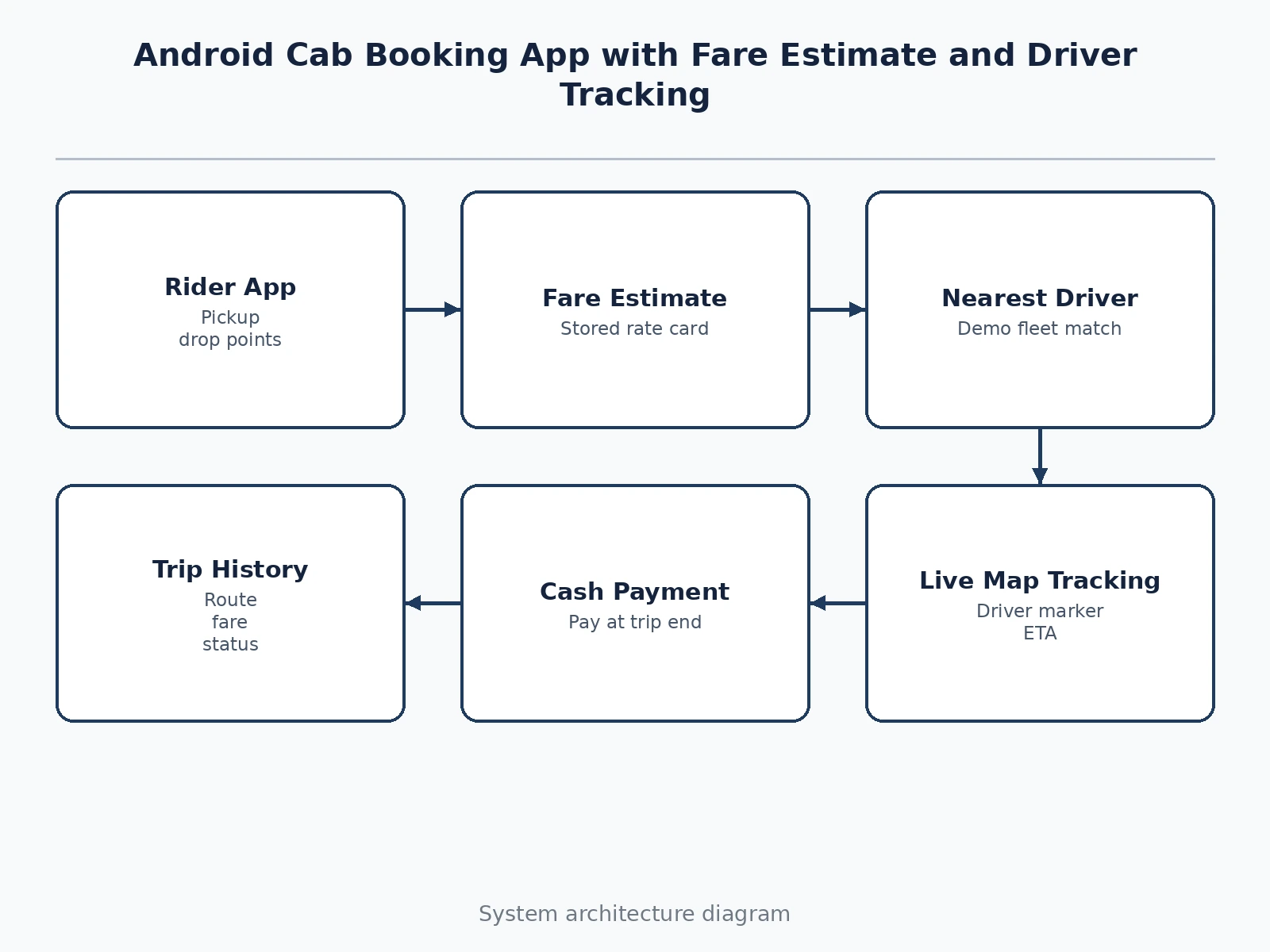
A rider's journey through the app runs end to end in five visible stages. The rider enters pickup and drop points and picks a vehicle type, and the app immediately computes an upfront fare estimate on the phone from its stored rate card — base fare plus per-kilometre and per-minute charges — so the price is known before confirmation. On confirmation, the request goes to the nearest available driver in the demo fleet; if none is available, the app says so plainly and offers a retry. Once a driver accepts, the tracking screen opens: the driver appears as a moving marker on a map with arrival time and distance remaining, and the trip status moves from Driver Assigned to In Trip at pickup. At the drop point the final fare is shown, the rider pays cash in the base build, and the completed trip is written to the history list for later review.
- The rider enters a pickup point and a drop point and selects a vehicle type (Hatchback, Sedan or SUV).
- The app computes the fare estimate on the phone from the stored rate card: base fare plus distance charge plus time charge, shown before confirmation.
- On confirmation, the booking request is matched to the nearest available driver in the demo fleet; if no driver is available, the app shows "No drivers nearby" with a retry option.
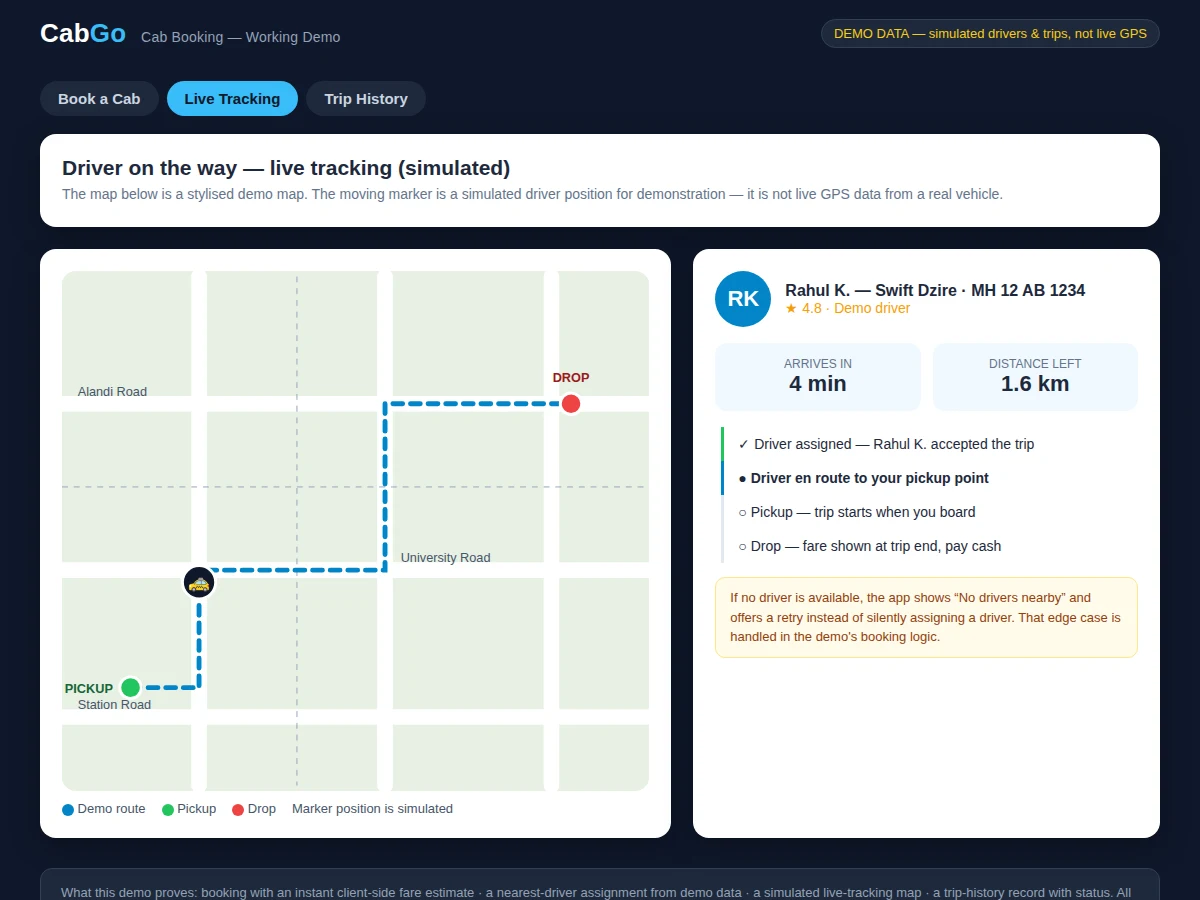
- The assigned driver's name, vehicle and rating are shown, and the tracking screen opens with the driver as a moving marker on a map.
- The rider follows arrival time in minutes and distance remaining in kilometres as the driver approaches, and the status moves to In Trip at pickup.
- At the drop point the final fare is displayed, the rider pays cash in the base build, and the trip status becomes Completed.
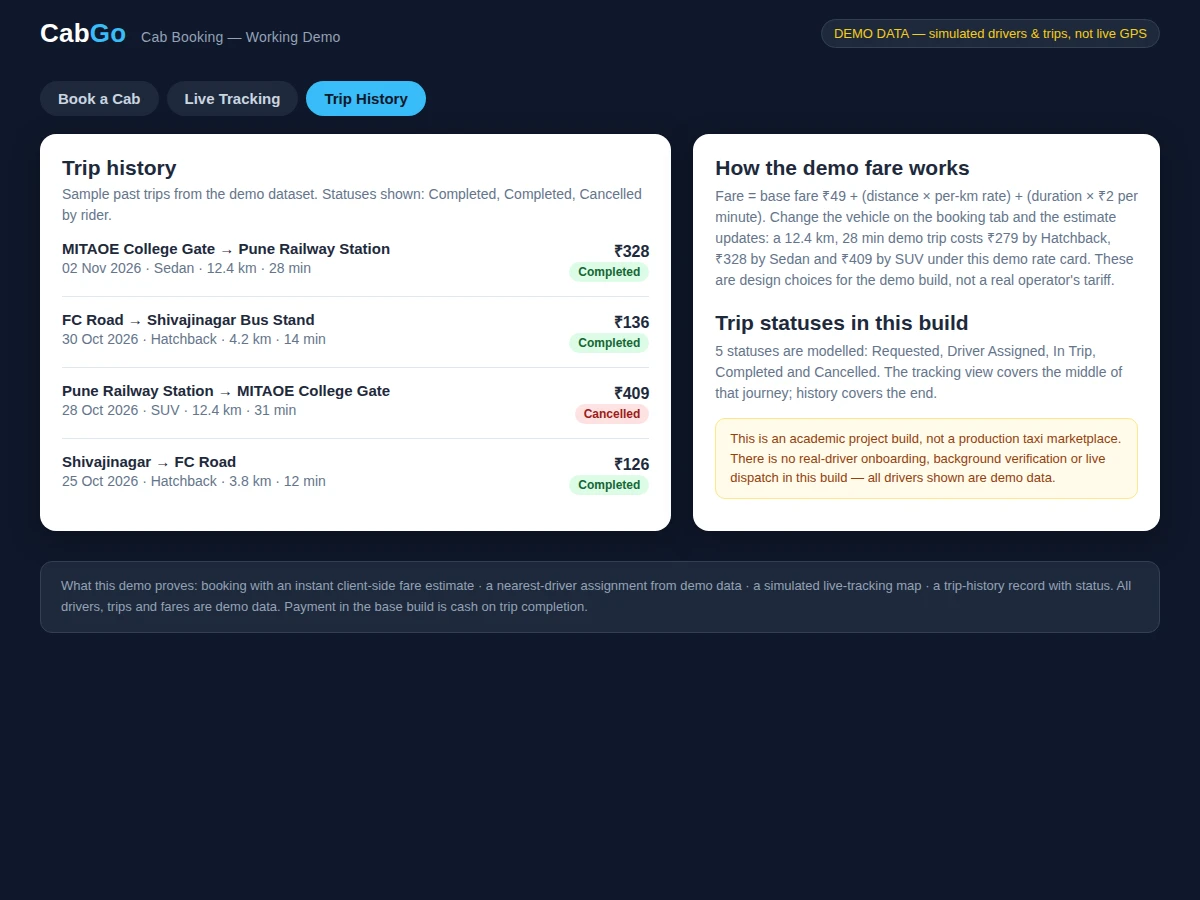
- The trip — route, vehicle type, distance, duration, fare and status — is saved to the history list, where completed and cancelled trips can be reviewed.
Tech stack:
- Kotlin for Android
- Android Studio
- Firebase Realtime Database
- Firebase Authentication
- Google Maps SDK · stylised demo map
- Material Design components
- Room Database · local trip history
- Git
| Parameter | Value |
|---|---|
| Platform | Android (design target: Android 8.0 and above) |
| App views | 3 main views: booking, live tracking, trip history |
| Vehicle categories | 3 (design choice): Hatchback, Sedan, SUV |
| Base fare | ₹49 (design choice, demo rate card) |
| Per-km rates | ₹14 · ₹18 · ₹24 for Hatchback · Sedan · SUV (design choices) |
| Per-minute charge | ₹2 per minute (design choice) |
| Sample trip fare | ₹279 for a 12.4 km, 28 min demo trip by Hatchback (demo-build calculation: ₹49 + ₹174 + ₹56) |
| Trip statuses | 5 statuses: Requested · Driver Assigned · In Trip · Completed · Cancelled (design choice) |
| Payment in base build | Cash on trip completion; in-app card or UPI payment not included |
| Driver and trip data | Demo and sample data only; no real-driver onboarding in this build |
| Fare estimation | Client-side from a stored rate card; no server round-trip needed for the estimate |
Project features
The app's strongest capabilities are its instant fare estimate, its live driver tracking, its nearest-driver assignment and its trip history. The fare estimate is computed on the phone from a stored rate card the moment pickup and drop points are entered, so the rider sees the price before confirming anything. Live tracking shows the assigned driver as a moving marker on a map with arrival time and distance remaining, turning an anxious wait into a visible approach. Driver assignment picks the nearest available driver from the demo fleet, and every finished or cancelled trip is kept in a history list with route, vehicle type, fare and status for later checking. Together, these capabilities cover the full rider journey from price check to trip record, while the no-driver-available message and the cash-payment scope keep the build honest about its limits.
- [Instant fare estimate] Entering pickup and drop points immediately shows an upfront fare from the stored rate card — base fare plus distance charge plus time charge — before the rider confirms the booking.
- [Live driver tracking on a map] After assignment, the rider follows the driver as a moving marker on a map, with arrival time in minutes and distance remaining in kilometres updating as the driver approaches.
- [Nearest-driver assignment] A booking request is matched to the nearest available driver in the demo fleet, and the rider sees that driver's name, vehicle and rating before the trip starts.
- [Trip history with status] Every trip is recorded with its route, vehicle type, distance, duration, fare and status — Requested, Driver Assigned, In Trip, Completed or Cancelled — so past travel can be reviewed.
- [Vehicle choice with per-km rates] The rider picks Hatchback, Sedan or SUV, each with its own per-km rate on the rate card, and the estimate updates instantly for the chosen vehicle.
- [No-driver-available handling] When no driver is available, the app shows a clear "No drivers nearby" message with a retry option instead of silently assigning a driver or hanging on a loading screen.
- [Cash payment on completion] The base build settles the fare in cash when the trip ends, keeping the payment flow simple and honest about what is actually implemented.
Implemented vs optional vs future scope: the 7 features above are in the base build. In-app card or UPI payment is an optional customization, not in the base build. Surge pricing during peak hours and driver-rating-based matching are future scope, not implemented.
What is included
- Complete Android app source code (Kotlin) with booking, fare estimation, tracking and history screens
- Working demo build with sample drivers, routes and trip history
- Firebase backend setup for driver availability and trip status
- Project report PDF (background, methodology, architecture, results, limitations)
- Project abstract PDF
- PPT presentation for final review
- Viva Q&A preparation document (fare logic, assignment rule, tracking flow, limitations)
- Setup and run instructions
- Request a quotation on WhatsApp: share this project name, the vehicle types and payment option you want, and your needed delivery date, and Projectech will confirm the scope, the price and the delivery timeline before the build starts.
Limitations & prerequisites
- Driver positions in the demo are simulated sample data, not live GPS from real vehicles; a real deployment would need driver devices reporting GPS.
- The fare figures come from a demo rate card chosen for this build, not from any real operator's tariff.
- Driver assignment and live tracking need internet connectivity; only the fare estimate itself works from the stored rate card without a server round-trip.
- The map in the web demo is a stylised demo map, not a licensed live map feed.
- In-app card or UPI payment is not in the base build; the base build settles fares in cash on trip completion.
- There is no real-driver onboarding, background verification or live dispatch in this build.
- This is an academic project build, not a production taxi marketplace, and it must not be presented as one.
Frequently Asked Questions
How is the fare estimate calculated?
The fare estimate is calculated on the phone from a stored rate card: a base fare of ₹49 plus a per-kilometre charge plus ₹2 per minute. The per-km rate depends on the vehicle chosen — ₹14 for Hatchback, ₹18 for Sedan and ₹24 for SUV in this demo build. For the sample 12.4 km, 28 min demo trip by Hatchback, that arithmetic gives ₹49 + ₹174 + ₹56 = ₹279. These are design choices for the demo build, not a real operator's tariff, and the estimate is shown before the rider confirms the booking.
Does the tracking show a real driver's live GPS position?
No — the tracking view in the demo shows a simulated driver position moving along a demo route, and every driver shown is sample data, not a live GPS feed from a real vehicle. It demonstrates how live tracking would look and behave, but it is not connected to any real vehicle. The screen shows a moving marker, arrival time and distance remaining. A real deployment would need driver phones reporting GPS to the backend, which is outside this academic build.
Is in-app payment included?
No, in-app card or UPI payment is not included in the base build, which settles the fare in cash when the trip ends. This keeps the payment flow simple and honest about what is actually implemented in the delivered app. Card or UPI payment can be developed as an optional customization on request, with a payment gateway account and production approval, but it must not be assumed to be present in the delivered base app.
How is this different from a home-service booking app?
This app books a vehicle for a journey, while a home-service app books a tradesperson for a time slot. The differences run through the whole design: pricing here comes from distance and time on a rate card, not from visit charges; tracking here is a moving position on a map, not a status timeline; and the trip record is a route with a fare, not an appointment with a slot. A reader comparing the two should look at what is being booked — a cab ride versus a service visit.
Does the app work without internet?
Partly — the fare estimate itself works without a server round-trip because it is computed on the phone from the stored rate card, so a rider can check a price offline. Driver assignment, live tracking and saving trips to the shared backend do need internet connectivity. They depend on driver availability and status updates from the server. Trip history already saved on the phone remains viewable offline through the local store.
Is this project suitable for a final-year project?
Yes — for Computer Engineering, Information Technology and Android application development programmes. It demonstrates Android UI design, client-side fare logic, map-based tracking, backend status updates and a complete booking flow, all of which a student team can build, test and explain in a review.
Components & software requirements
- Kotlin for Android
- Android Studio
- Firebase Realtime Database
- Firebase Authentication
- Google Maps SDK · stylised demo map
- Material Design components
- Room Database · local trip history
- Git
Delivery information
Built-to-order project. Delivery timeline is shared after order confirmation based on current queue.
Support terms
Complete documentation, setup guide, and viva preparation included. Support for setup and explanation provided.
Download free synopsis (PDF)
Enter your name and WhatsApp number — the synopsis PDF downloads immediately. We may send occasional project updates on WhatsApp; no spam.