
More project photos (2)
The problem
Family location sharing answers a simple everyday question — where is everyone right now — without a phone call to each person. Parents want to know a child reached college safely, a commuter wants to know a partner has left home, and a family wants to notice if an elderly parent living alone has not moved all day. Group chats and repeated calls give partial answers, arrive late, and interrupt the person asked. A family location sharing Android app solves this by showing each consenting member on one shared map, with a geofence around places such as home and college that raises an entry or exit alert automatically. Location is shared only inside the family circle, only with explicit consent, and any member can pause sharing, so reassurance does not become surveillance. This project builds that app in Kotlin with the Google Maps SDK, the Fused Location Provider and Firebase, demonstrating the full loop from location update to geofence alert.
A family member's Android phone shares its location with explicit consent.
Follow the working sequence
How it works
A family location sharing app with geofence alerts works as a loop: location in, sync out, geofence check, alert back. The Android app requests fine location permission and the Fused Location Provider supplies the phone's position, combining GPS, Wi-Fi and mobile-network signals. Each update is written to Firebase Realtime Database under the member's record in the family circle, and every other member's app listens to the same circle, so the shared map refreshes without anyone pressing refresh. Separately, the app registers circular geofences — a latitude, longitude and radius for home and for college — with the Android Geofencing API, which watches for enter, exit and dwell transitions even when the app is in the background. When a transition fires, the app writes the event to the alert feed and sends a notification to the circle, for example "Kabir entered College at 8:55 am". Pausing sharing stops the app's own location writes while leaving other members visible.
- A family member installs the app, signs in, and joins or creates an invite-only family circle with explicit consent to share location.
- The app requests fine location permission, and background location permission where geofence alerts must work while the app is closed.
- The Fused Location Provider supplies the phone's position, and the app writes it to Firebase Realtime Database under that member's circle record.
- Every circle member's app listens to the same Firebase node, so the shared map and member list refresh as new locations arrive.
- The app registers circular geofences for home and college with the Geofencing API, each defined by latitude, longitude and radius in metres.
- The Geofencing API fires an enter, exit or dwell transition when a member crosses a boundary, and the app writes the event to the alert feed.
- The circle receives a notification for the transition, for example "Kabir entered College at 8:55 am", with the time and place recorded.
- Any member can pause sharing from the app; the pause stops that member's own location writes and is shown to the circle.
Tech stack:
- Kotlin (Android)
- Google Maps SDK for Android
- Fused Location Provider (Google Play services)
- Geofencing API (Google Play services)
- Firebase Realtime Database
- Firebase Authentication
- Android Studio
- Material Design components
| Parameter | Value |
|---|---|
| Platform | Android 8.0 (API level 26) or higher (design target) |
| Language | Kotlin (Android) |
| Map | Google Maps SDK for Android |
| Location source | Fused Location Provider (Google Play services) |
| Geofence shape | Circular area defined by latitude, longitude and radius |
| Geofence transitions | 3 types: enter, exit and dwell |
| Geofences per app | 100 per app per device user (Android limit, datasheet value) |
| Demo geofence radii | Home 200 m, College 150 m (demo configuration) |
| Location accuracy | Typically 5–10 m outdoors (Approximate, device-dependent) |
| Location update interval | Approximately 30 s while moving (design target) |
| Background geofence events | Every couple of minutes on Android 8.0 or higher (Android behaviour) |
| Members per circle | Up to 10 members (design target) |
| Location history | Past 24 hours (design target) |
| Sync | Firebase Realtime Database, real-time listeners |
| Demo build | Single-file HTML demo with 4 members and 2 geofences |
Project features
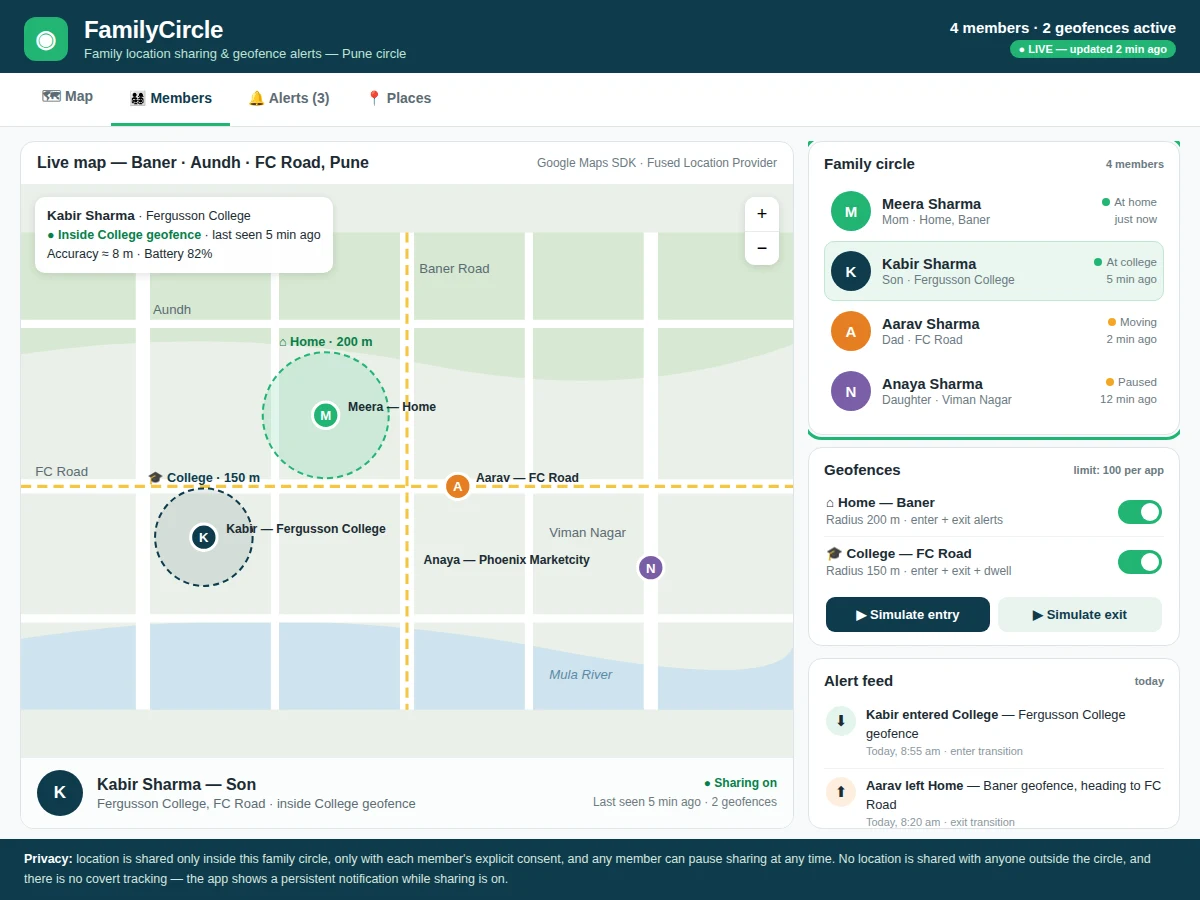
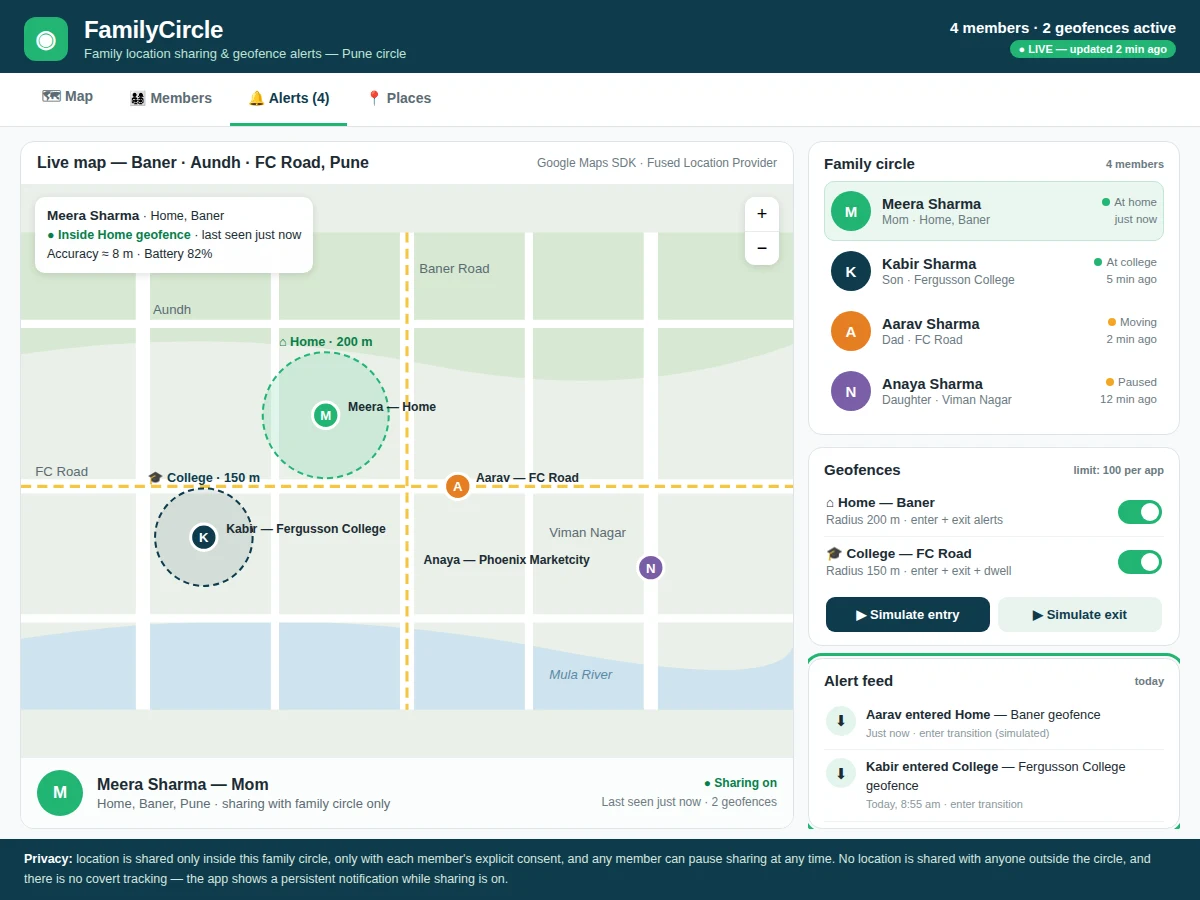
A family location sharing app is judged on four capabilities: a live map readable at a glance, geofence alerts without anyone checking the phone, a consent model that every member understands, and location data that stays fresh without draining the battery. It delivers all four: the live map shows every consenting member with a last-seen time and a place name, not just a dot. Geofences around home and college fire enter, exit and dwell alerts through the Android Geofencing API. The family circle is invite-only, each member can pause sharing, and a persistent notification shows while sharing is on. Location updates use the Fused Location Provider in balanced mode, combining GPS, Wi-Fi and network signals instead of running GPS continuously. Builder note: the working demo built for this project renders 4 family members and 2 geofence circles from one HTML file, with the alert feed, member list and map updating together on every simulated entry or exit.
- [Live family map] Every consenting member appears on one shared map with a name, place label and last-seen time, so the family's positions are readable in a glance without opening separate chats or calling anyone.
- [Geofence entry, exit and dwell alerts] A circular geofence around home or college fires an alert when a member enters, leaves, or stays inside for a set dwell time, and each alert is logged in the feed with its transition type and timestamp.
- [Consent-based family circle] Membership is invite-only and location is shared only inside the circle; any member can pause sharing at any time, and the app shows a persistent notification while sharing is active.
- [Member list with last-seen and battery] The circle view lists each member's place, last-seen time and battery level, so a stale location is never mistaken for a live one and a low battery explains a gap.
- [Place and geofence management] Family members can add, edit and remove places, set each geofence radius in metres, and choose which transitions (enter, exit, dwell) raise an alert for that place.
- [Location history trail] The app keeps a recent trail of each member's movements for the past 24 hours (design target), so a route home or a missed college arrival can be checked after the event.
- [Battery-aware location updates] The Fused Location Provider supplies locations in balanced mode, combining GPS, Wi-Fi and network signals, so updates stay useful without keeping GPS on continuously.
What is included
- Complete Android app source code in Kotlin (map, circle, geofences, alerts, settings)
- Firebase project configuration (Realtime Database rules and Authentication setup guide)
- Working single-file HTML demo of the app (map, member list, geofences, alert feed)
- Project report PDF (background, location and geofencing theory, methodology, limitations)
- PPT presentation for final review
- Viva Q&A preparation document (permissions, Fused Location Provider, Geofencing API, Firebase sync, privacy)
Limitations & prerequisites
- Location accuracy is typically 5–10 m outdoors (Approximate, device-dependent) and worse indoors, so a geofence must be larger than the expected error to avoid false transitions.
- Geofence alerts need Google Play services and location permission; on Android 8.0 or higher, background geofence events arrive every couple of minutes, not instantly.
- The app cannot locate a member who paused sharing, switched location off, or has no network — a stale last-seen time is shown instead of a guessed position.
- Firebase Realtime Database sync needs internet; without it, locations queue locally and sync when connectivity returns.
- The Geofencing API allows 100 geofences per app per device user (Android limit), so very large place lists need pruning.
- Battery use rises with frequent updates; balanced mode trades some freshness for battery life, and aggressive battery optimisation on some phones can delay updates.
- This is an academic prototype, not a safety-critical tracking system — it must not be presented as a substitute for emergency services or supervision.
Frequently Asked Questions
Is this project suitable for a final-year project?
Yes, for Computer Science, IT and Android Development programs. It demonstrates Android development in Kotlin, the Google Maps SDK, the Fused Location Provider, the Geofencing API and Firebase real-time sync, plus a privacy design that makes a strong viva discussion. The working demo, report, PPT and Q&A document cover the full submission.
How does a geofence alert actually work?
A geofence is a circular area defined by a latitude, a longitude and a radius in metres, registered with the Android Geofencing API. Location Services watches the phone's position and fires an enter, exit or dwell transition when the boundary is crossed, and the app writes that event to the alert feed and notifies the circle. The demo uses a 200 m home circle and a 150 m college circle.
Does the app track family members without them knowing?
No. Location is shared only inside an invite-only family circle, only after each member gives explicit consent, and the app shows a persistent notification while sharing is on. Any member can pause sharing at any time, and the pause is visible to the circle, so nobody is located secretly.
What happens when a phone is offline or has no internet?
The member's last known location stays on the map with its last-seen time, clearly marked as stale, and no position is guessed. Location updates queue on the phone and sync to Firebase when connectivity returns, and geofence transitions are delivered once the device can report them again.
Can the app be customised for a college's requirements?
Yes, the app can be customised: places and geofence radii can be changed, new alert transitions and sounds added, the circle size adjusted, and an optional SMS fallback or a location-history export added on request. Customisation is quoted separately and depends on feasibility and timeline.
What will I receive with the project?
The complete Kotlin source code, Firebase configuration and setup guide, the working HTML demo, the project report PDF, a PPT for final review, and a viva Q&A document. The app is built to order, so the code, demo data and documentation are prepared fresh for the order.
Components & software requirements
- Kotlin (Android)
- Google Maps SDK for Android
- Fused Location Provider (Google Play services)
- Geofencing API (Google Play services)
- Firebase Realtime Database
- Firebase Authentication
- Android Studio
- Material Design components
Delivery information
Built-to-order project. Delivery timeline is shared after order confirmation based on current queue.
Support terms
Complete documentation, setup guide, and viva preparation included. Support for setup and explanation provided.
Download free synopsis (PDF)
Enter your name and WhatsApp number — the synopsis PDF downloads immediately. We may send occasional project updates on WhatsApp; no spam.